Your guide to browser security vendors in 2026. Understand the different approaches to browser security and the vendors that are leading the respective categories, and how to know which one meets your requirements.
Your guide to browser security vendors in 2026. Understand the different approaches to browser security and the vendors that are leading the respective categories, and how to know which one meets your requirements.
Ask a security team where most of their tools are and it's the endpoint, network, or cloud. But ask where their users spend most of their time and it's the browser.
So we got a category: browser security. And when it comes to the best browser security tools, there's a problem. Browser security means three different things depending on who's talking: enterprise browser extensions, enterprise browsers, and remote browser isolation (RBI).
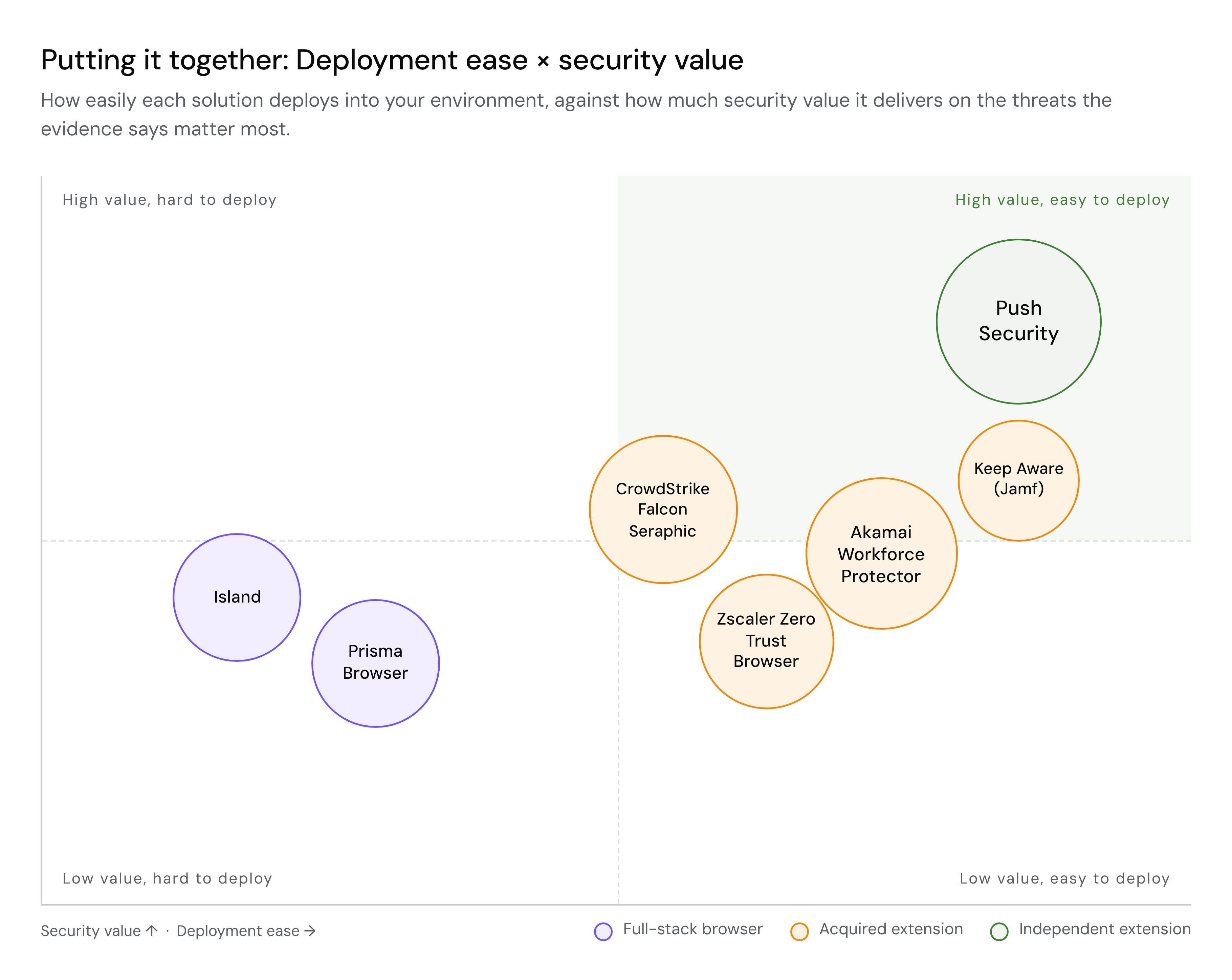
The market reflects that confusion, but the momentum is real. According to Omdia's 2026 research, browser security is already a top-five priority for 88% of organizations and the top priority for 26%, with 86% having meaningfully increased their browser security spending in response to emerging threats. Four browser security startups were acquired by major platform vendors in 2026 alone — CrowdStrike bought Seraphic, Zscaler absorbed SquareX, Akamai completed its acquisition of LayerX in July, and Jamf acquired Keep Aware in September.
Here's what the browser security market looks like in 2026.
The top browser security solutions in 2026 include Push Security, Island, and LayerX.
Enterprise browsers are also known as secure enterprise browsers (SEBs), and we rank them separately in our guide to the best secure enterprise browsers. These are functionally the same thing, but buyers looking specifically for Secure Enterprise Browsers tend to be focused more on security use-cases (protecting users, and by extension business, from external threats). But all enterprise browsers tend to cover security use cases to a lesser or greater degree.
This list covers enterprise browsers alongside browser extensions and isolation tools. For enterprise browsers only, see the 8 best secure enterprise browsers in 2026.
1. Push Security – Enterprise browser extension
Push is a browser extension, not a browser, that turns whatever browser your people already use into a detection and response platform for the security team. With no migration, no user disruption, no new browser to manage. It covers four use cases from a single deployment: detecting and stopping sophisticated browser-based attacks, AI visibility and control, identity and shadow IT security, and DLP and insider investigations. Detections are built on in-house threat research and operationalized by autonomous agents, so what Push catches is based on attacker techniques and behaviors rather than a blocklist. It deploys in minutes across managed and unmanaged devices.
Push detects AiTM and device code phishing kits (75+ across Tycoon 2FA, Sneaky 2FA, Evilginx, and many others) behaviorally by analyzing page structure and script execution — so detection survives infrastructure rotation. It catches ClickFix-style clipboard injection before the payload executes, detects stolen session tokens via marker injection when they appear in uninstrumented browsers, and monitors OAuth consent flows across 20+ authorization servers. Push is deployed across 3 million browsers worldwide and has been rolled out to 100,000 users in under one hour during normal office hours.
In a 30-day proof-of-value deployment at a ~4,500-employee financial services organization with a mature existing security stack, Push detected and blocked 6 ClickFix attacks and 10 AiTM phishing attempts — none of which were visible to any other tool in place. You can read more customer stories here.
2. Island – Enterprise browser
Island was one of the first to market in the enterprise browser category and still defines it. It replaces current browsers with a managed Chromium fork that gives IT granular control over copy-paste, screenshots, downloads, session recording, and application access — all enforced at the browser level without routing traffic through a proxy. For highly regulated environments where that degree of governance is a requirement, it's a capable platform with real enterprise traction. In October 2026, Island extended its browser to AI agents, applying the same policies to agents working in web and SaaS apps
Island is a full browser replacement, with primary use cases around VDI replacement, contractor access, BYOD governance, and zero-trust network access. Most organizations plan for a phased rollout.
3. Prisma Browser – Enterprise browser
Formerly Talon, now Palo Alto Networks' enterprise browser and the last-mile enforcement layer of its SASE platform. Prisma Browser is a managed Chromium browser with DLP that inspects the rendered page and zero-trust access controls, designed primarily for contractor, BYOD, and remote worker populations accessing corporate apps from unmanaged devices.
Like Island, it's a browser replacement. It integrates natively with the broader Prisma Access and Cortex stack, feeding browser telemetry into Palo Alto Networks' existing correlation and response workflows.
4. CrowdStrike Falcon Seraphic Enterprise Browser (formerly Seraphic Security)
Seraphic works across any browser through an endpoint agent that adds enterprise security without replacing what's deployed. CrowdStrike acquired Seraphic in early 2026 and now sells it as Falcon Seraphic Enterprise Browser.
For existing CrowdStrike customers, the extension into the browser is a natural addition to the Falcon ecosystem. Cross-browser coverage remains a differentiator for mixed environments.
5. Akamai Workforce Protector (formerly LayerX) – Enterprise browser extension
LayerX is extension-based, focused on real-time DLP and AI governance which captures what happens inside AI tools, flagging sensitive data submissions, and enforcing policy, all without requiring a new browser. Low deployment friction and a growing AI visibility capability are the draw.
Akamai completed its acquisition of LayerX in July 2026 and now sells it as Akamai Workforce Protector, part of its Zero Trust portfolio. For buyers evaluating LayerX as a long-term platform bet, the question is what the roadmap looks like 18 months post-close, given Akamai's track record of absorbing acquisitions (Guardicore, Neosec, Inverse) into its broader platform.
6. SquareX (Zscaler) – Enterprise browser extension
SquareX takes a detection-minded posture, inspecting files and links while browsing, neutralizing malicious content before it reaches the endpoint, and offering disposable browser environments for high-risk activity. It was clearly built by people who think in attacker terms.
Zscaler acquired SquareX in early 2026, integrating it into the Zero Trust Exchange alongside its existing SSE capabilities.
7. Keep Aware (Jamf) – Enterprise browser extension
Keep Aware is an agentless extension built with security operations in mind. It's quick to deploy through MDM or group policy, and focused on surfacing browser threats, extension risk, and AI usage into existing SOC workflows. Detection and response is the throughline, with SIEM integration as a core part of the offering.
Founded in 2022, Keep Aware was acquired by Jamf in September 2026, which plans to pair it with its Apple device management and AI governance work.
8. Menlo Security – Remote browser isolation
Menlo pioneered remote browser isolation: web content renders in a disposable cloud container and the user receives a clean visual stream, so nothing malicious ever touches the endpoint. For zero-tolerance environments and third-party or contractor access where you don't fully trust the device, the approach has a solid track record. Cloud rendering introduces latency and the occasional site-compatibility issue, though Menlo has invested in reducing both over the years. Menlo now positions its isolation technology as a wider browser security platform, including controls for AI agents.
9. Chrome Enterprise / Edge for Business – Enterprise browser
The security controls are already built into the browsers most of your people use. Chrome Enterprise offers centralized management, Safe Browsing, and identity tool integration across the fleet; Edge for Business adds work-and-personal separation, phishing protection, and tight integration with Microsoft 365 and Defender.
These are baseline controls, and for many organizations they're effectively free with what's already deployed. Most organizations treat them as the foundation that the rest of the tools on this list build on.
According to Omdia, 86% of organizations have meaningfully increased browser security investment in response to emerging threats — 85% expect to spend more over the next 12–24 months. The built-in controls in Chrome and Edge are a foundation, but they're insufficient against the current threat landscape on their own.
10. SURF Security – Enterprise browser
SURF is a Chromium-based enterprise browser built zero-trust-first, with identity-based access controls, DLP, and session security inside a fully managed environment. Centralized, policy-driven control by default is the pitch, aimed at security-first organizations that want a locked-down browser from day one.
Like Island and Prisma, it's a browser replacement, so it follows the same deployment model — plan for a migration alongside the capabilities.
Learn more about Push Security
Push Security is the most powerful AI-native security tool in the browser. Think EDR, but for the browser — high-fidelity telemetry and real-time control across every session, on every device, with no browser migration required.
Push is the best choice for organizations looking to solve the most impactful security problems in the browser, with use cases including detecting and stopping advanced attacks, data loss and insider investigations, identity and shadow IT security, and AI visibility and control.
Security teams use Push to detect and stop advanced browser-based attacks like AiTM phishing, ClickFix, and session hijacking; gain visibility and control over AI tool usage across their workforce; harden identities by surfacing credential reuse, SSO gaps, and shadow IT; and support data loss and insider investigations with browser-layer telemetry that other tools can't see.
Book a live demo to learn more.
Frequently asked questions
What is browser security?
Browser security refers to the tools and practices that protect users, data, and organizations from threats that originate inside the web browser. The browser is where modern work happens: employees access SaaS applications, interact with AI tools, and handle sensitive data — which makes it the most targeted attack surface in the enterprise. When people discuss browser security solutions, they usually mean secure enterprise browser (SEB) extensions or full-stack enterprise browsers. Remote browser isolation (RBI) is a third category that is not really comparable to the other two, but comes up through virtue of sounding similar.
What is the difference between an enterprise browser extension and an enterprise browser?
An enterprise browser extension deploys into the browsers your users already have, so it rolls out quickly with no browser migration. An enterprise browser replaces the existing browser entirely, which adds deeper workspace controls but means moving users onto it. For a side-by-side of the leading options, see our ranking of the best secure enterprise browsers.
Do I need to replace my browser to get browser security?
No. Browser extensions like Push Security, Seraphic (CrowdStrike), LayerX (Akamai), SquareX (Zscaler), and Keep Aware deploy into existing browsers without requiring users to switch. Enterprise browsers like Island, Prisma Browser, and SURF do require browser replacement. According to Omdia's 2026 research, 48% of organizations cite the ability to use their existing browsers as an important attribute in a secure browsing solution, and 80% expect to use browser security alongside existing tools rather than as a replacement.
What do browser security vendor acquisitions mean for buyers?
CrowdStrike, Zscaler, Akamai, and Jamf all acquired browser security startups in 2026. This is significant validation of the browser security market that the browser is a gap that network and endpoint security vendors have acknowledged and are attempting to close.
But whether acquired products retain their innovation velocity as they're absorbed into larger platforms is a legitimate concern for buyers evaluating long-term roadmaps.
Can browser security be deployed to unmanaged or BYOD devices?
Yes, but it depends on the approach and vendor. According to Omdia, 32% of users access corporate applications from an unmanaged device at least occasionally. Enterprise browsers can be installed on unmanaged devices, but require the user to download and switch to a new browser application. Enterprise browser extensions like Push can be deployed to contractor and BYOD machines without MDM — via email or landing page self-enrollment — providing threat detection and policy enforcement without browser replacement or device management overhead.
What are the most common browser-based attacks in 2026?
The most common attacks include AiTM phishing, ClickFix-style social engineering, malicious browser extensions, and malicious OAuth consent grants. In 2026, device code phishing has become a core part of the attacker’s arsenal too, with 30+ unique attacker kits now offering the technique.
Among browser-based attack victims surveyed by Omdia, phishing was the most common attack type (40%), followed by data loss or leakage (38%), malicious browser extensions (34%), and credential theft (28%).
It's worth noting the distinction between attacks on the browser and attacks inside the browser. A number of the solutions in this list were designed to stop browser exploitation and prevent sandbox escapes. But the vast majority of the attacks in the wild are identity based — they happen in the browser, not on it.
Do I need browser security if I already have EDR?
EDR monitors the operating system layer — processes, file system activity, registry changes, memory behavior. Browser security operates inside the browser session — observing the rendered page, credential entry, session tokens, and user interaction.
The two are complementary: EDR catches malware execution and endpoint-level attacks, while browser security catches credential phishing, session hijacking, OAuth consent abuse, and browser-native social engineering like ClickFix that never touch the endpoint in ways EDR can observe. CrowdStrike's acquisition of Seraphic in 2026 reflects the industry recognition that endpoint and browser are separate detection layers that both need to be instrumented.
Can browser security stop phishing that bypasses MFA?
Yes, but the effectiveness depends on the tool and its detection approach. AiTM phishing kits relay credentials and MFA tokens in real time, so most forms of MFA are bypassed. Browser security tools with behavioral detection — analyzing page structure, script behavior, and credential-harvesting mechanics — can detect phishing kits regardless of which domain they're hosted on or how quickly the infrastructure rotates.
Tools that rely primarily on URL blocklists or reputation scores are less effective because 89% of phishing domains are active for fewer than two days. It's also worth noting that not all MFA-bypass phishing works the same way. Device code phishing sidesteps authentication entirely — the user authorizes a device on a legitimate identity provider page, and the attacker receives a valid token without ever touching the credential exchange.
With attacks evolving so quickly, telemetry isn't enough on its own — the vendor needs dedicated threat research expertise to turn that visibility into detections that keep pace with attacker innovation. Push detects and blocks phishing including AiTM reverse-proxy kits, human-operated relay panels, and device code phishing flows, backed by an in-house research team that discovers and publishes new attack techniques as they emerge.
What should I look for when evaluating browser security solutions?
The criteria that matter most are:
Detection model — is the vendor detecting behavioral attacker techniques or relying on URL blocklists that attackers rotate in minutes?
Deployment model — does it deploy into existing browsers or require a migration?
Coverage for unmanaged and BYOD devices — does it need MDM, an endpoint agent, or just a browser?
Integration — does it feed telemetry into your SIEM, XDR, and identity tools or create a silo?
AI visibility and governance — can it discover shadow AI apps and govern OAuth consent flows?
Research depth — is the vendor discovering novel attack techniques or covering what others already documented?
We've written a detailed guide on how to avoid the browser security buyer's trap and how to make the business case for browser security.
Can remote browser isolation (RBI) stop the same attacks as other browser security tools?
RBI was designed to prevent malicious content from reaching the endpoint by rendering web pages in a remote container. The architecture is effective for that specific threat model, but the dominant browser-based attacks in 2026 — AiTM phishing, session hijacking, ClickFix, OAuth consent abuse — don't deliver payloads to the endpoint. They manipulate what the user sees, steal session tokens, and hijack authenticated state inside the browser session. There's nothing for RBI to isolate. RBI still has value in specific zero-tolerance environments and for managing untrusted third-party access, but for organizations looking to address the threats driving most browser-based breaches today, an enterprise browser extension is more appropriate.
How does browser security help with AI governance?
AI usage is primarily browser-based — every LLM interaction, every prompt containing sensitive data, every AI agent authorization happens inside a browser session. Browser security tools can discover which AI tools are in use (including shadow AI), monitor what data users share with them, observe OAuth consent flows for AI agent permissions, and block access to unsanctioned AI applications. According to Omdia, generative AI application security was the #1 capability organizations want from a secure browsing solution at 59%, ahead of data loss prevention and general web security. Push data shows the average organization has 16 unique AI apps, 17 AI browser extensions, and 17 AI OAuth integrations in active use — most unapproved (or simply not known about).
Do I still need a secure web gateway (SWG) or CASB if I have browser security?
SWGs and CASBs operate at the network/proxy layer, inspecting traffic metadata and URLs. Browser security operates inside the browser session, observing the rendered page, script behavior, credential entry, and user interaction. The key difference: network tools can tell you where data went, but browser security sees what the user actually saw and did. SWGs block known-bad URLs via blocklists — but phishing infrastructure rotates faster than blocklists update. Browser-native detection analyzes page behavior regardless of whether the URL is known-bad. The two are complementary, though browser-layer capabilities are increasingly making network-centric tools redundant for specific use cases.
Does browser security replace security awareness training?
If you're counting on user awareness as a meaningful defense layer, yes. Security awareness training is not a technical control — it depends on every user making the right call, every time, across every delivery channel. Browser-based attacks now arrive through email, search engines, SMS, QR codes, social media, and voice calls, each with different lure formats and social engineering mechanics. The volume and variation makes it impossible for users to keep up.
Browser security detects and blocks attacks automatically at the point of risk regardless of the delivery channel, because the detection happens inside the browser session where the attack plays out — it should be the primary defense layer, not training.