Organizations spend billions annually on security awareness training, but can't keep up with attack evolution. Browser-based technical controls can make the difference where training falls short.
Organizations spend billions annually on security awareness training, but can't keep up with attack evolution. Browser-based technical controls can make the difference where training falls short.
The compliance email arrives on schedule: "All employees must complete annual security awareness training by Friday." Across the organization, hundreds of employees skim through presentations about phishing emails, answer predictable quiz questions, and return to work feeling modestly more informed about cybersecurity.
Two weeks later, an employee in the marketing department — encouraged by the company's AI adoption initiative — searches Google for "ChatGPT" to access the tool they'd been told to start using. They click the top result, a sponsored ad pointing to a chatgpt.com URL. The page displays a professional-looking ChatGPT service disruption notice: "We're experiencing high traffic right now. Download our desktop app to continue." They click the download button, which redirects to a pixel-perfect clone of ChatGPT's official download page. The file they install is an infostealer.
This scenario is fictional, but the campaign behind it isn't. Push researchers detected and blocked exactly this attack across multiple customer environments. The attackers had used ChatGPT's own code-rendering feature to build a fully designed fake service page hosted on chatgpt.com itself, then drove traffic to it through search ads targeting queries like "chatgpt," "chatgpt free," and common typos. The destination URL was genuine, and the page looked like a real system notice. Every URL reputation check in the world considers chatgpt.com safe, because it is safe — except when an attacker builds a weapon inside it.
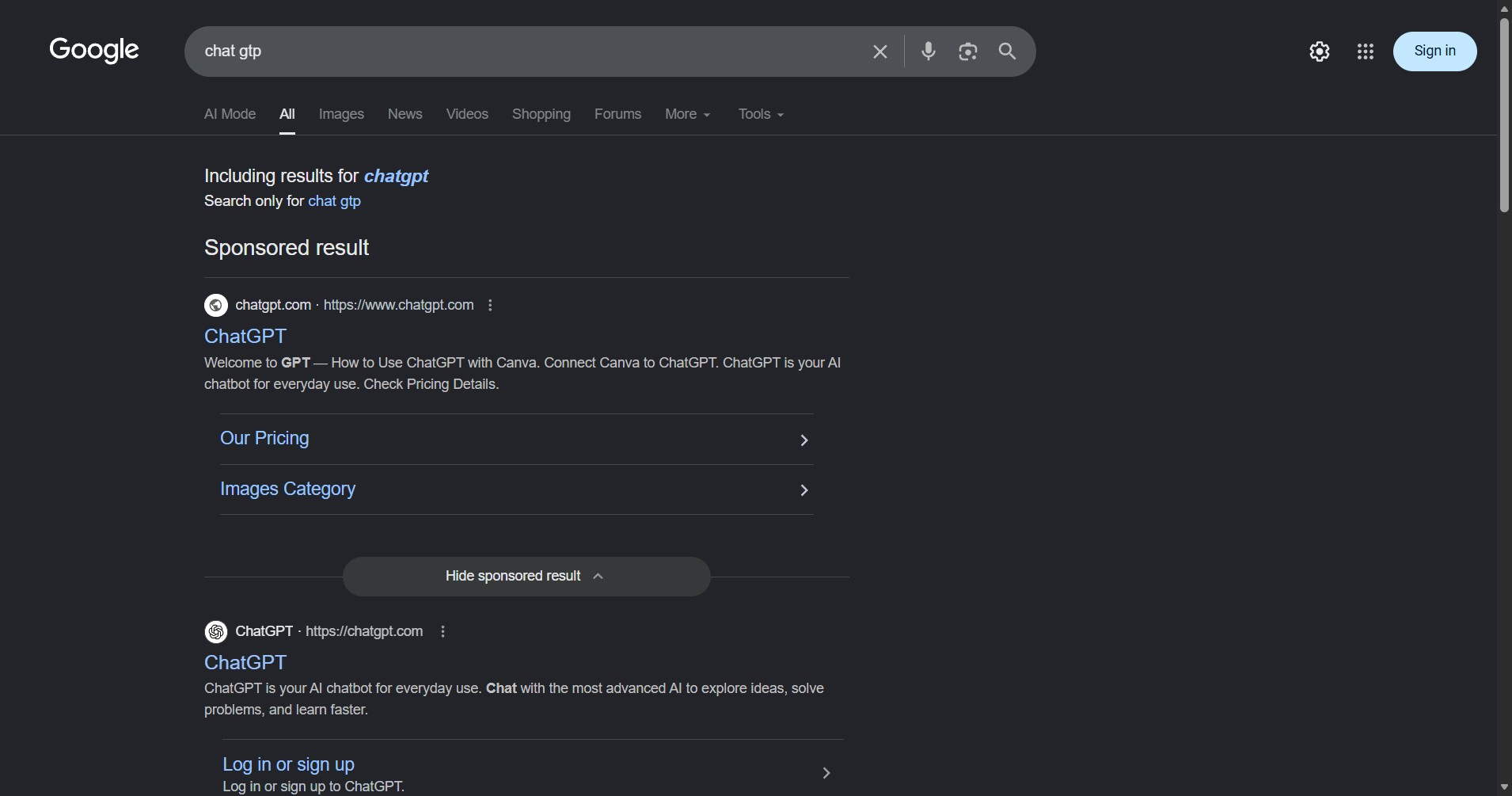
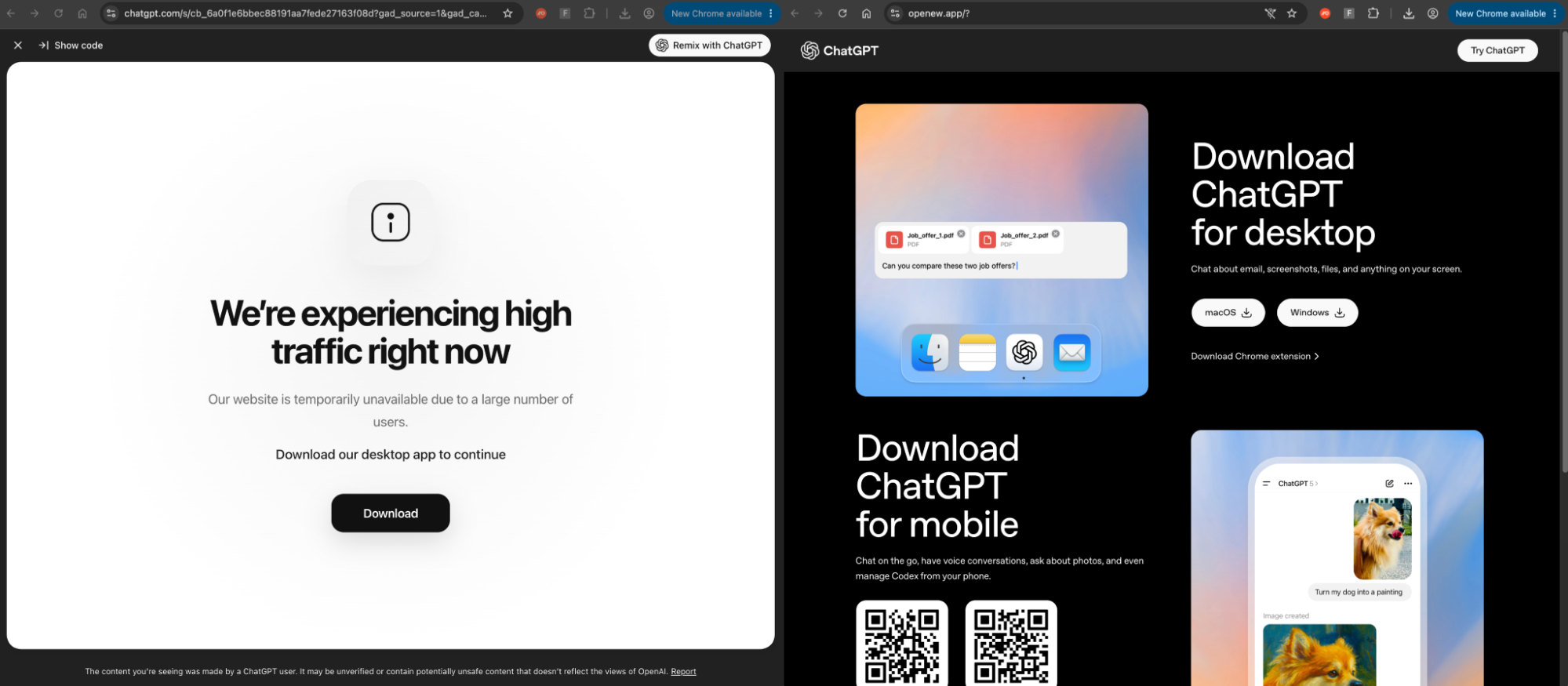
No amount of training prepares someone to suspect a legitimate-looking page on a legitimate domain for a tool they've been explicitly told to use.
These scenarios aren’t unusual. We’ve covered multiple campaigns involving LinkedIn-delivered phishing attacks, where attackers compromised LinkedIn accounts and sent phishing links via direct message to first-degree connections — routing victims through trusted sites to a session-harvesting AITM page. The targets had every reason to trust the message: it came from someone they knew, on a platform they used daily for work.
These are the kinds of attacks that organizations are dealing with every single day. And that recent awareness training checkbox makes absolutely zero difference to the outcome.
What the research actually shows
The evidence on training effectiveness is more nuanced than either side of the debate usually admits — but the conclusion for security leaders is the same regardless of where you land.
A 2025 study from Purdue University involving 12,511 employees at a US fintech firm found that anti-phishing training produced no significant effect on click rates (p=0.450) or reporting rates (p=0.417), with effect sizes below 0.01 across every training modality tested. Trained employees actually clicked phishing links at a marginally higher rate (10.5%) than the untrained control group (9.8%). A separate study of 19,789 personnel at UCSD Health, published at IEEE S&P 2025, found that annual training combined with post-click exercises reduced click likelihood by just 2% — and that employees who completed static training actually had worse phishing failure rates.
Training vendors have argued that continuous, adaptive, gamified programs produce materially better results, and a 2024 meta-analysis supports the claim that active engagement and repeated practice improve outcomes where annual programs don't. The Verizon DBIR 2025 found that employees trained within the last 30 days were 4x more likely to report phishing than those trained earlier.
But here's the problem that even the best training program can't solve: Every one of these studies — and virtually every phishing simulation platform on the market — tests email-based phishing. The attacks driving the biggest breaches in 2026 don't arrive by email. They arrive through search engine ads, social media DMs, shared AI chatbot pages on trusted domains, and legitimate OAuth consent flows. Continuous adaptive training may reduce email phishing click rates from 7% to 1.5%, but it has nothing to say about an employee who googles "ChatGPT" and lands on a malware delivery page hosted on chatgpt.com.
The deeper issue is structural. Behavioral science calls it the information deficit model: the assumption that people make risky decisions because they lack information, and that providing more information will fix the problem. This model has been debunked across multiple domains, from public health to environmental protection. People routinely engage in behaviors they know are risky — not because they lack knowledge, but because immediate pressures outweigh abstract training from months ago.
Training can build security culture, help employees understand why controls exist, and create champions who influence peers - and these are important outcomes. What training cannot reliably do is serve as a preventive control for split-second decisions made under cognitive load, time pressure, and competing priorities. To make matters worse, most organizations don't even attempt to measure whether it does.
The attacks training can't address
Even if the training debate were settled — even if continuous adaptive programs reliably reduced email phishing click rates to near zero — the attacks driving the biggest breaches in 2026 don't look like anything a simulation platform tests for.
The LLMShare campaign described above used a genuine chatgpt.com domain to serve a fake page that looked like a routine system notice — no suspicious URL, no grammatical errors, and no visual tells. ClickFix attacks present as routine CAPTCHAs. ConsentFix operates entirely on legitimate Microsoft infrastructure. Device code phishing asks users to enter a code on a real app page. None of these attacks trigger the signals users were trained to look for, and 4 in 5 ClickFix payloads arrive via search engines, not email.
There are countless scenarios where users performing seemingly benign actions on plausible (or even legitimate) sites can result in a compromise.
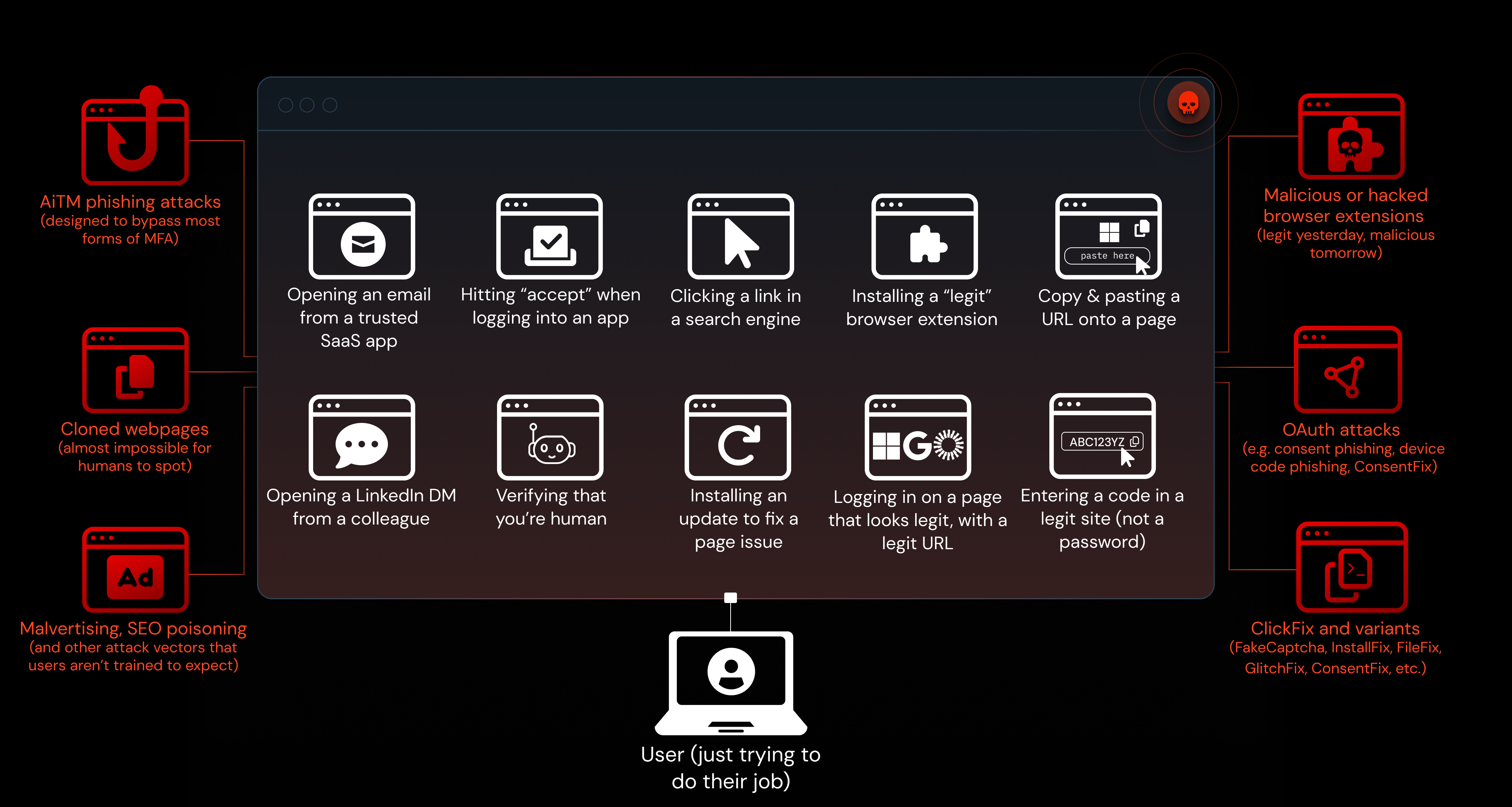
The lesson isn't that employees are incompetent. It's that the attack surface is too broad, the delivery channels are too varied, and the social engineering too convincing for training to function as a primary control — regardless of how it's designed.
Real-time intervention where attacks execute
The browser is where every phishing attack, credential-harvesting attempt, and social engineering campaign ultimately executes — and where 89% of phishing domains are active for fewer than two days, 95% of attacks use bot protection to defeat automated scanners, and traditional security architectures have a structural blind spot.
Network tools see encrypted traffic. Endpoint agents see processes and files. Email security sees messages in transit. None of them can intervene when a user is about to enter credentials into a fake login page.
Browser-based detection and response addresses both the prevention gap and the training gap simultaneously. As a technical control, Push detects and blocks phishing pages behaviorally — including AiTM kits, cloned login forms, device code phishing pages, and ClickFix malicious-copy-and-paste events — in real time, regardless of whether the domain is brand-new or the phishing page was delivered via email, social media, or a search ad.
Push stops the attack as it happens, in real time, before a compromise occurs.
As a contextual education mechanism, Push provides immediate, in-browser feedback when a user encounters a threat — explaining why access was blocked and creating teachable moments at the point of need rather than months before. Every blocked threat becomes a micro-learning opportunity, reinforcing pattern recognition through repetition in the context of the user's actual work.
Push's in-browser controls are designed to work this way — not by removing users from the security equation, but by making them informed participants. Warn screens with "proceed anyway" options, SSO login guidance, and MFA enforcement prompts respect user agency while providing real-time risk context. Our controls guide covers how security teams can configure these guardrails to match their organizational culture and risk tolerance.
Right-sizing security training
Training's role must be right-sized. It builds culture, shared vocabulary, and explains why controls exist — but it cannot reliably serve as the primary preventive control against sophisticated attacks encountered months later under pressure.
The Purdue study's authors recommend that "organizations should set realistic expectations about training outcomes and highlight the importance of technical controls rather than human-centered defenses." We agree.
Invest in technical controls where attacks execute — in the browser — to provide real-time prevention, detection, and education. Measure what matters: reduction in successful compromise, detection and response time, and employee reporting rates — not training completion. And stop expecting employees to reliably detect pixel-perfect attacks across every channel and workflow.
Overrelying on user vigilance isn't a legitimate security strategy: it's blame allocation.
Push Security is the most powerful AI-native security tool in the browser. Think EDR, but for the browser — high-fidelity telemetry and real-time control across every session, on every device, with no browser migration required.
Security teams use Push to detect and stop advanced browser-based attacks like AiTM phishing, ClickFix, and session hijacking; gain visibility and control over AI tool usage across their workforce; harden identities by surfacing credential reuse, SSO gaps, and shadow IT; and support data loss and insider investigations with browser-layer telemetry that other tools can't see.