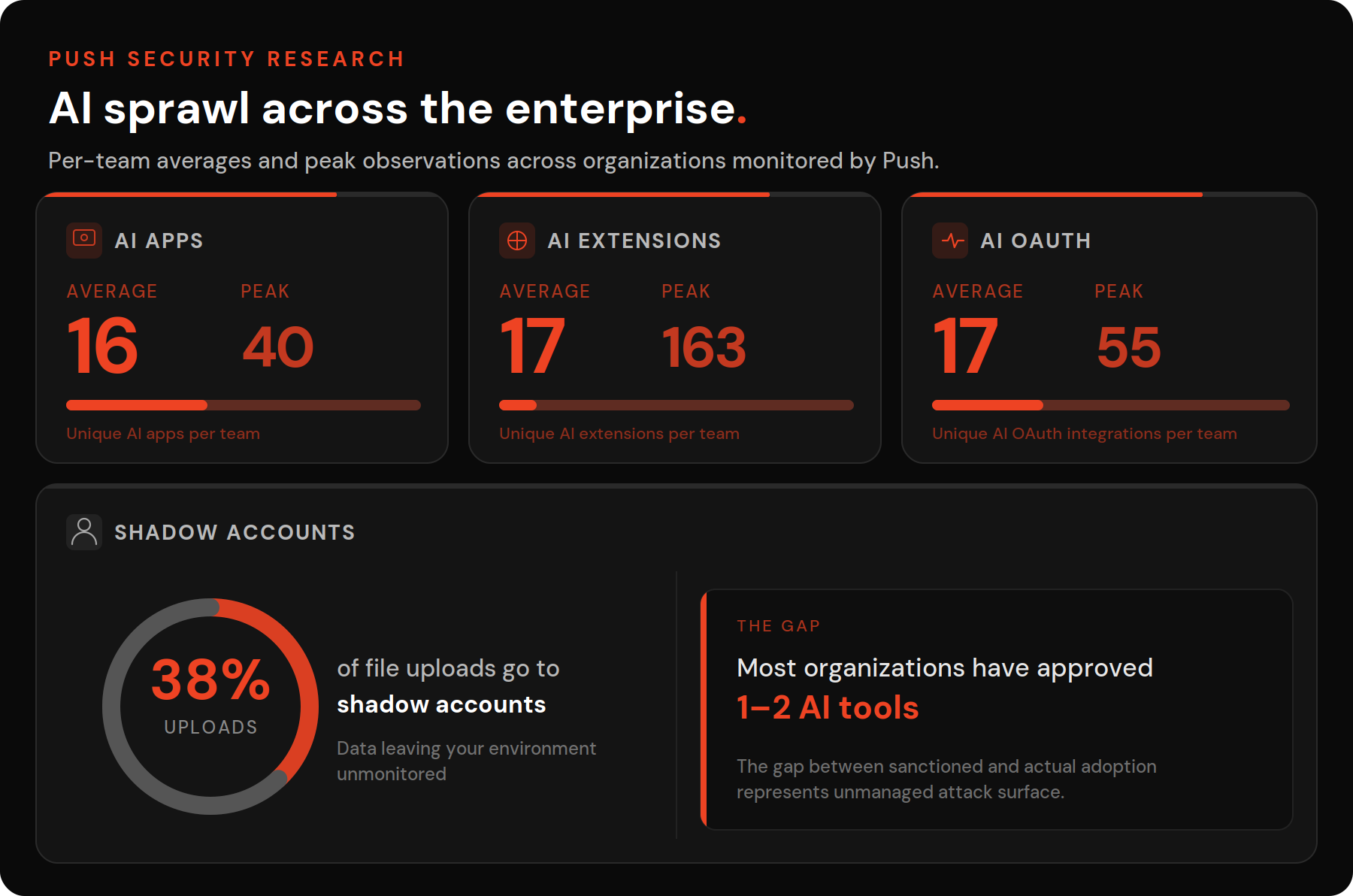
Push telemetry shows that the average organization has 16 unique AI apps, 17 AI browser extensions, and 17 AI OAuth integrations in active use — most of them unapproved. Shadow AI is arguably shadow SaaS with better marketing. But AI adoption has been a genuine force multiplier for the problem.
Push telemetry shows that the average organization has 16 unique AI apps, 17 AI browser extensions, and 17 AI OAuth integrations in active use — most of them unapproved. Shadow AI is arguably shadow SaaS with better marketing. But AI adoption has been a genuine force multiplier for the problem.
Employees have been self-adopting apps, creating unmanaged accounts, and introducing third-party software dependencies into their organizations for years, and the core problem hasn't changed: unmanaged software expanding your attack surface without your knowledge.
But the rate at which employees are signing up for AI tools is unprecedented, and the depth of interconnectivity those tools demand is fundamentally different from traditional shadow SaaS.
AI tools aren't just standalone apps that employees sign into — they're increasingly used as agents that drive other applications, pulling data from one platform, acting on another — they are becoming a core that other apps are integrating to, and that users are integrating with their wider SaaS stack. It’s becoming a focal integration point for app access and functionality in a way that's more comparable to an enterprise cloud platform than a typical SaaS tool.
The industry data backs this up. The Verizon DBIR 2026 reports that 45% of employees are now regular AI users on corporate devices, up from 15% the year before. Omdia's 2026 browser security research presents a stronger picture, finding that 92% allow employees to use public GenAI applications. However, given that the typical company policy sanctions a small number of approved tools, this means everything else employees are using is unsanctioned by default. In other words: every organization in the survey had unsanctioned AI usage.
What is shadow AI? A quick 101
Shadow AI is any use of AI tools, services, or integrations that happens outside an organization's security governance and visibility. Shadow AI risks cut in two directions:
Data exposure: source code, credentials, internal documents, and customer data routinely get pasted into AI prompts or uploaded as context, and once shared, that data is outside the organization's control.
Attack surface: Every shadow AI app is an unmanaged identity with credentials that can be phished or stuffed, OAuth grants that give persistent API access to corporate systems, and browser extensions that can be compromised in supply chain attacks.
AI tools increasingly function as hubs, connected via OAuth and MCP to email, cloud storage, code repositories, and other high-value systems. Every app connection an employee grants turns that AI tool into a node in a web of interconnected services, which means the more you hook in, the larger the attack surface across all the connected apps — and the greater the blast radius if the account used to access the AI tool is compromised.
Each integration creates a persistent trust relationship that survives password resets and MFA changes. Compromise a single AI app and an attacker inherits whatever access the employee granted it, turning one ungoverned tool into a pivot point across the SaaS estate. Attackers are already exploiting this interconnectivity — from malvertising campaigns that impersonate AI tools to steal credentials, to leveraging OAuth consent grants in supply chain attacks.
An added dimension here is the role of autonomous agents. Unsupervised agents can lead to the introduction of security vulnerabilities and data exposures, while agents themselves can be targeted through new classes of attack like prompt injection. But for the majority of organizations, where most of the workforce is simply using GenAI tools in the browser, agentic security is more of a niche concern for developers.
The state of shadow AI, using Push data
We analyzed a snapshot of AI activity across Push customers during an average week in April 2026. We wanted to make sure it captured actual activity, not just historical data on apps that were added once and no longer used.
The numbers paint a picture that most security teams will find uncomfortable.
The average organization has 16 unique AI apps in active use, 17 unique AI browser extensions, and 17 unique AI OAuth integrations connected into just Google Workspace and Microsoft 365 — with some organizations reaching as high as 40 unique AI apps, 163 AI extensions, and 55 OAuth connections to AI apps respectively. At the other end, the smallest organization with the lowest adoption level is actively using two.
These are counts of unique products observed in one week, not total installs or connections across the workforce — each unique app, extension, or integration represents a separate AI tool that at least one employee has adopted, so the actual number of individual installs and active sessions across the organization is considerably larger. When the average organization has 17 unique AI extensions deployed, for instance, and many of those are popular tools adopted independently by multiple employees, the per-user footprint adds up quickly.
If most organizations have sanctioned one or two core AI assistants/platforms for business use, the gap between what's approved and what's actually happening is significant.
Understanding the four categories of shadow AI
Shadow SaaS has always been a problem, but in the context of AI apps there are four categories of shadow IT that security teams need to understand, because each one introduces a different kind of risk and requires a different approach to tackling it.
Shadow AI apps
Shadow apps are AI tools that employees have signed up to and are using for business purposes without approval. This is the most visible dimension of the problem, and the one most people think of when they hear "shadow AI" — an employee pastes sensitive internal documents into ChatGPT, uploads confidential files to an AI assistant, or uses an unapproved coding tool to generate production code.
All of that is sensitive data leaving the organization through channels the security team can't see - and often accessible using personal accounts that can be compromised on personal devices or workstations.
The 2026 DBIR's data loss prevention analysis underscores the scale — shadow AI is now the third most common non-malicious insider action in DLP data, a 4x increase year-over-year. Across 858,000+ DLP events targeting GenAI tools, the most common data types being submitted were source code (28%), images (16%), structured data (14%), documents (13%), and PDFs (10%). That's not employees asking ChatGPT to fix their grammar — it's core intellectual property, production code, and internal documentation flowing into platforms the security team has no visibility into. But shadow apps themselves are only the most obvious part of the problem.
Shadow tenants
Even when an organization has approved an AI tool — say, an enterprise ChatGPT deployment — employees frequently access the same app with personal accounts, creating shadow tenants that sit entirely outside organizational control. The DBIR found that 67% of GenAI users on corporate devices are using non-corporate accounts, and our own data shows that 38% of file uploads to AI tools are made from shadow accounts rather than approved organizational ones.
When an organization approves Claude, ChatGPT, or another core AI platform, you typically also approve the OAuth integration and browser extension for core apps (e.g. M365, Google Workspace, and so on). When that integration is approved, it is approved for all tenants — not just your corporate tenant.
This is a perfect example of where Evil Twin opportunities are likely to be abused by attackers. If you’re not familiar, this is where an attacker can effectively hide a malicious integration where an existing connection for that app is already approved, blending in with normal activity. But while historically maybe 1 out of 100 users had an automation tool like Zapier integrated already, the modern equivalent is that a much higher proportion of users already has Claude or ChatGPT integrated.
This means that even if you've deployed enterprise controls around your sanctioned AI tools — DLP policies, retention settings, admin oversight — more than a third of the file uploads hitting AI tools are bypassing those controls entirely because they're happening through personal accounts on corporate devices.
Shadow extensions
Many AI tools come with a browser extension counterpart, and there's a large ecosystem of third-party AI extensions that offer everything from writing assistance to automated data extraction. The average organization in our dataset has 17 unique AI browser extensions deployed across its workforce, with the highest we observed reaching 163 — and since each of those average 17 different extensions may be installed by multiple employees, the actual number of individual extension installs across the organization is much higher still.
The extension dimension is particularly concerning because most extensions operate with significant privilege inside the browser — they can read and modify page content, access cookies and session tokens, and interact with virtually every web application an employee uses. As we detailed in our recent analysis of browser extension risk scoring, at least 46.76% of all extensions across Push customers have the permission combinations needed to perform account takeover with no user interaction, and the extensions involved in every major supply chain breach of the past 18 months scored as normal or low-risk beforehand.
This isn't just a Push observation — Omdia found that malicious browser extensions were cited by 34% of organizations that experienced a browser-based attack, making them the third most common attack type after phishing and data leakage. The Verizon DBIR 2026 reports that more than 15% of corporate users had unauthorized AI browser extensions installed — meaning a material share of the workforce is running AI-powered code with broad permissions that no one in security approved or is monitoring.
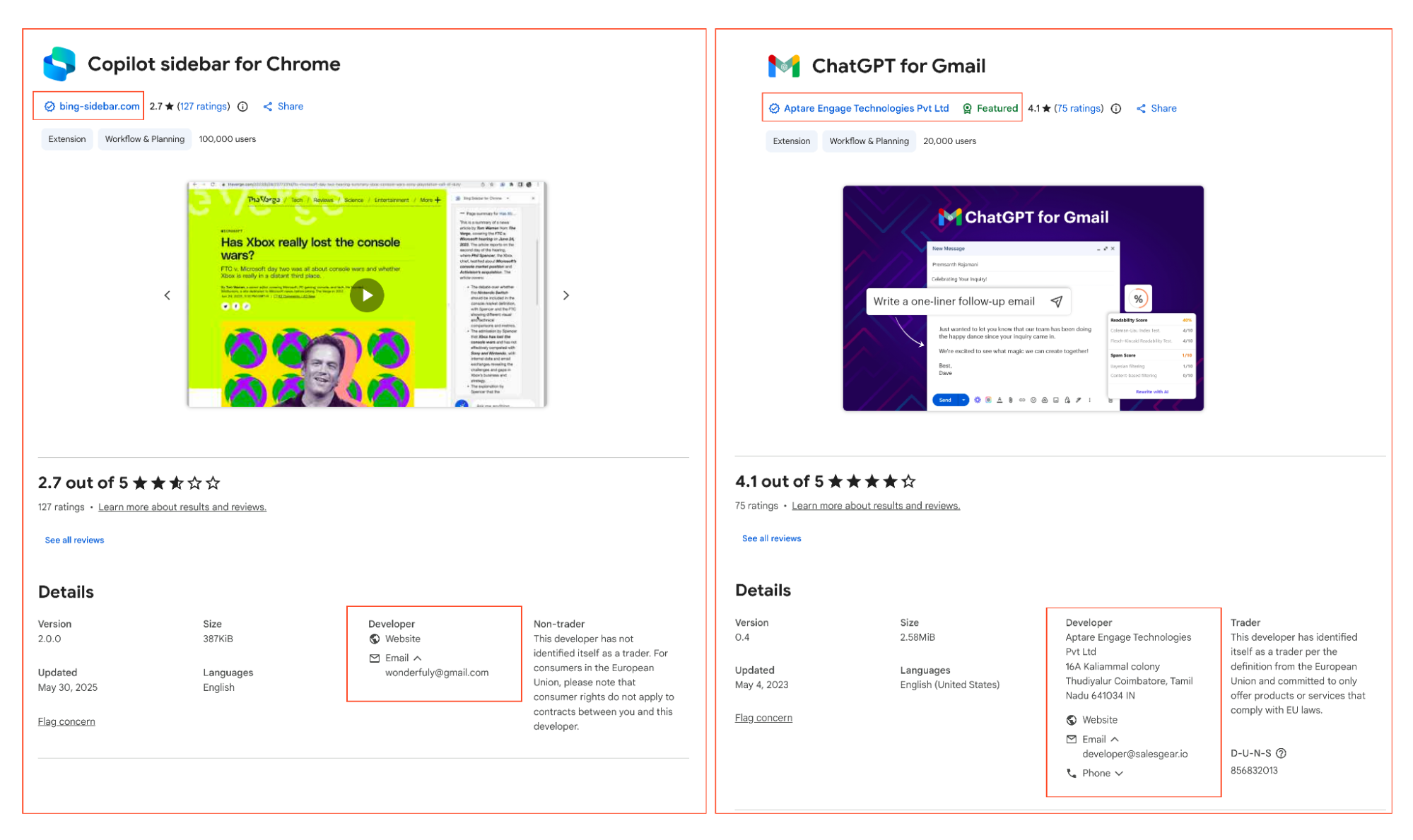
AI extensions add a specific wrinkle to this problem: many are branded to look like official companions to well-known AI tools but are actually third-party creations with no affiliation to the original vendor. They're not necessarily malicious at the point of installation, but they're exactly the kind of extension that's likely to be acquired and weaponized down the line — and in the meantime, they're collecting data that their permissions entitle them to (which, in most cases, means everything the user can see in their browser).
Shadow integrations
The fourth dimension — and arguably the most dangerous — is shadow integrations: OAuth connections between AI tools and core enterprise apps that aren't known or approved by the security team. Even if an organization has approved an AI tool for standalone use, plugging that tool directly into Google Workspace, Microsoft 365, Salesforce, or any other one of the dozen or so SaaS apps in a typical user’s work stack is a fundamentally different risk decision, because it creates a persistent, programmatic bridge between your environment and a third party.
On average, we see 17 unique AI app OAuth integrations per organization in just Google Workspace and Microsoft 365 (to be clear: this number excludes the dozens of downstream apps the AI assistants are integrated with as well), with the highest reaching 55. Each of those represents a unique AI product that has been granted OAuth access — the total number of individual consent grants across users is larger, because popular integrations get authorized by multiple employees independently.
The actual number of AI-related OAuth connections across the full SaaS estate is considerably higher again, because AI tools that automate workflows need to be connected to be useful — pulling data from one app, analyzing it in another, presenting results in a third.
MCP connections use OAuth to achieve this interconnectivity in the same way, and AI coding agents create a particularly concentrated version of the risk: a single agent configuration can hold OAuth tokens for Jira, Confluence, Salesforce, GitHub, and more, meaning that compromising one agent — whether through prompt injection, a malicious repository config, or a supply chain attack on an MCP server — yields persistent, broadly scoped tokens for every service it was connected to, tokens that survive session restarts and generate audit log entries indistinguishable from legitimate user activity.
It's also worth noting that OAuth blast radius is almost always larger than organizations expect. A single well-permissioned user can expose secrets, dashboards, and internal tooling without tenant-wide admin access. And every new AI tool an employee connects makes the web of abusable permissions a little wider.
The Vercel breach is a textbook illustration of integration risk. A Vercel employee had connected a consumer-grade AI app from Context.ai into their Google Workspace tenant — most likely a self-service trial that was lightly used and forgotten about. Vercel wasn't even a registered customer of Context.ai. When Context.ai was subsequently compromised via an infostealer infection, the attacker leveraged stored OAuth tokens to pivot into the Vercel employee's Google Workspace account, accessing internal dashboards, API keys, NPM tokens, and GitHub tokens.
Vercel is far from an isolated case. In 2025, Scattered Lapsus$ Hunters launched OAuth-driven supply chain attacks against Salesforce and Google Workspace tenants after breaching Salesloft Drift and Gainsight, impacting over 1,000 organizations and stealing over 1.5 billion records. More recently, Snowflake customers were impacted after a breach at data anomaly detection company Anodot, where attackers attempted to leverage stolen authentication tokens to access downstream environments.
Why shadow AI needs a different solution to shadow SaaS
The reason it's worth distinguishing between these four dimensions isn't academic. Each one requires a different control, and addressing one doesn't solve the others.
Blocking unsanctioned AI apps does nothing for the personal accounts accessing approved ones, and neither addresses the average 17 different AI extensions running with broad browser permissions, let alone the dozens of OAuth integrations that have already been granted persistent access to core enterprise apps — and even auditing OAuth in Google Workspace and Microsoft 365, where the controls are relatively mature, leaves the broader SaaS estate unaddressed, where admin tooling is inconsistent and visibility is limited.
The tooling gap compounds the policy gap. Omdia found that 58% of organizations rely on secure web gateways to secure GenAI usage — but an SWG can tell you that a user visited ChatGPT, not whether they pasted your source code into the prompt. That link between knowing where data went and knowing what the user actually did is the fundamental visibility gap that makes GenAI policies unenforceable without browser-layer tooling.
Advice for security teams
The principles behind managing shadow AI are the same ones that have governed shadow SaaS and software supply chain management for years: default-deny where feasible, comprehensive inventory where it isn't, and continuous monitoring for changes that signal increased risk. But it's vital that teams act fast to stop the snowball.
That starts with visibility into which AI tools employees are actually using and which accounts they're using to access them — without that baseline, every other control is built on assumptions.
Extensions need the same default-deny allowlisting approach that has been best practice for software management elsewhere: build a complete inventory, allowlist what's vetted, block everything else, and monitor the approved set for changes that precede weaponization.
OAuth demands the most urgency, because each unmanaged integration is a persistent trust relationship that survives password resets and MFA changes — adopt default-deny for consent grants in your primary enterprise apps, routinely audit what's already connected, and critically extend that visibility beyond Google and Microsoft to the broader SaaS estate where the controls are weaker and the sprawl is harder to track.
Browser visibility and control is key to de-risking AI adoption
AI usage is fundamentally browser-based activity — every LLM interaction, every prompt containing sensitive data, every AI agent authorization, every OAuth consent grant happens inside a browser session — which makes the browser the natural control point for AI governance across the workforce.
Push tracks AI app usage and login security across the workforce, inventories and controls AI browser extensions, monitors and blocks OAuth consent flows across any app (not just the primary enterprise platforms), and gives security teams a single view of the full shadow AI picture across all four dimensions.
Shadow AI isn't a problem that will age well if ignored. Every week that passes without visibility adds more apps, more extensions, more integrations, and more potential breach paths into the environment — and as the Vercel breach demonstrated, it only takes one forgotten OAuth grant to turn an employee's idle curiosity into an organization-wide incident.
Learn more about how you can tackle Shadow AI with Push.
Push Security is the most powerful AI-native security tool in the browser. Think EDR, but for the browser — high-fidelity telemetry and real-time control across every session, on every device, with no browser migration required.
Security teams use Push to detect and stop advanced browser-based attacks like AiTM phishing, ClickFix, and session hijacking; gain visibility and control over AI tool usage across their workforce; harden identities by surfacing credential reuse, SSO gaps, and shadow IT; and support data loss and insider investigations with browser-layer telemetry that other tools can't see.
Book a live demo to learn more.
Shadow AI: Frequently asked questions
How is shadow AI different from regular shadow IT or shadow SaaS?
AI doesn't just store data — it actively processes it, and employees submit qualitatively more sensitive material (source code, credentials, internal strategy) into AI prompts than they typically put into a project management tool or file-sharing app.
AI also arrives embedded inside tools you've already approved — Salesforce, Google Workspace, Notion, Slack all ship AI features that activate without a separate procurement decision, so there's no sign-up event for a CASB to catch.
And the integration surface is different too: AI tools connect to other enterprise apps through OAuth grants and MCP connections that create persistent API-level access, turning each one into a potential pivot point across your SaaS estate. This level of AI integration dwarfs typical SaaS-to-SaaS interconnectivity, and what an agent can do with the data in a given app is typically much more permissive and way less predictable.
What's the risk if employees use personal AI accounts for work?
When an employee uses a personal ChatGPT, Gemini, or Claude account to do work, everything they submit — prompts, file uploads, pasted code — goes to an environment your organization has no governance over. There are no data retention controls, no audit trail, no DLP policies, and no way to revoke access if that employee leaves. The Verizon DBIR found 67% of GenAI users on corporate devices use non-corporate accounts, and Push data shows 38% of file uploads to AI tools come from these shadow accounts rather than approved organizational ones. The risk isn't hypothetical usage of a banned tool — it's real work happening on the same tool you approved, just on an account you can't see or control.
It's even worse if that employee has been tricked into joining an external tenant (as attackers tried to trick Push employees into doing recently) where your data flows directly into the hands of a malicious outsider.
Can AI tools access my other enterprise apps?
Yes, and this is one of the less visible risks of shadow AI. Many AI tools request OAuth permissions to connect to Google Workspace, Microsoft 365, Slack, or code repositories during setup — a "Connect to Google Drive" or "Sign in with Microsoft" flow that grants persistent API-level access to data in those systems. Unlike a browser session that expires, these tokens survive password resets and MFA changes, and they often have broader scope than users realize (shared drives, shared calendars, any collaborative resource the consenting user can reach). The Vercel breach showed what happens when one of these goes wrong: a single forgotten OAuth integration from a consumer AI app gave attackers a path into internal dashboards, API keys, and source code repositories.
What's the risk if I approve an MCP connection?
MCP (Model Context Protocol) connections let AI tools interact with other applications — reading files, querying databases, triggering workflows — through a standardized interface. Approving an MCP connection grants the AI tool persistent access to whatever systems the MCP server exposes, and that access operates at the API layer rather than through the browser session you're used to controlling.
The risk is similar to OAuth but often broader in scope: a single MCP connection to a code repository or project management tool can give the AI agent read and write access across that system, and if the AI tool or MCP server is compromised, those permissions become the attacker's permissions. Unlike a browser session, MCP tokens persist until explicitly revoked, and compromising one AI agent that's connected to multiple MCP servers yields tokens for every service it was connected to.