Malicious OAuth integrations: how to detect, block, and remediate
OAuth integrations extend your security boundary to every connected vendor. Learn how attackers exploit legitimate integrations in supply chain attacks and how to secure your environment.
OAuth integrations are the hidden entry point in SaaS supply chain attacks
An OAuth integration is a connection between two applications where a user authorizes one app to access data in another — granting permissions through an OAuth consent flow rather than sharing credentials. It's how modern SaaS environments function: a CRM pulls data from email, a BI tool reads from a data warehouse, an AI assistant connects to a document store. Each grant creates a persistent token that lets the authorized application access data on the user's behalf without requiring their credentials again.
OAuth integrations are the connective tissue of SaaS, and they're proliferating. AI applications are accelerating the trend — Push data shows an average of 17 unique AI app integrations per organization in Microsoft 365 and Google Workspace alone, most of them authorized by individual employees outside any approval process. MCP connections use OAuth for app-to-app connectivity, adding another layer of interconnection.
The security problem is that every integration extends your security boundary to include the vendor's own security posture. OAuth tokens persist through password resets, MFA changes, and employee offboarding. When a vendor is compromised, the attacker inherits their authorized access — legitimate API-level reach into your email, files, CRM records, and collaboration tools. The more integrations, the larger the blast radius of a single vendor compromise.
How do attackers exploit OAuth integrations in supply chain attacks?
An attacker compromises a third-party SaaS vendor, finds stored OAuth tokens used by the vendor to connect to downstream customer environments, and uses those tokens to access customer data.
- A third-party vendor is compromised — through infostealer-harvested credentials, code repository secrets, or direct exploitation
- The attacker discovers stored OAuth tokens connecting the vendor to downstream customer environments
- Those tokens provide API-level access to the customer's data — email, files, CRM records, secrets, internal tooling
- The access is legitimate from the application's perspective — no anomalous login, no credential theft, no malicious domain
- The attacker exfiltrates data and repeats across every downstream customer with an active integration
This pattern produced some of the largest SaaS breaches of 2025–2026, including the Salesloft Drift and Gainsight breaches in 2025, and the Context.ai, Anodot, and Klue breaches in 2026, with hundreds of downstream victims.
This problem is a symptom of the SaaS-to-SaaS interconnectivity of modern business IT, but the rapid adoption of AI apps is accelerating OAuth sprawl. Push data shows an average of 17 unique AI app integrations per organization in Microsoft 365 and Google Workspace alone. MCP connections use OAuth to achieve this interconnectivity, and each connection is another node in the attack graph that an attacker traverses when any connected vendor is compromised.
This is exactly what happened in the Vercel breach in 2026. An employee trialled the Context.ai app, connected it to Google Workspace, and forgot about it. Months later, it became the access path for an attacker when Context.ai was breached.
A single well-permissioned employee — a developer with access to secrets, dashboards, and internal tooling — can expose far more through one OAuth grant than the app's stated purpose suggests. The scopes themselves are often deceptively broad: a Google Drive scope grants full read/write access to everything the user can see, not just their personal files.
Why do most security tools miss OAuth supply chain attacks?
The core challenge with OAuth supply chain attacks is that the access is legitimate. A compromised integration uses valid tokens, makes normal API requests, and connects from the vendor's expected infrastructure. There's no anomalous login, no credential theft, no malicious domain. Logs show an authorized application doing exactly what it was authorized to do — the only difference is who's driving.
Admin consent controls in Google Workspace and Microsoft 365 help govern new integrations on those two platforms, but the web of OAuth connectivity spans far beyond them. To govern consent across your full SaaS estate, you'd need to be an app admin for every application that supports OAuth, and each one would need to provide granular consent controls. Most don't. You may not even directly administer most of the apps in your environment.
Even after an attack is discovered, remediation is harder than it should be. OAuth tokens survive password resets, MFA changes, and even employee offboarding if they aren't explicitly revoked. The Vercel breach happened because a deprecated app's integration was never cleaned up. A forgotten integration with valid tokens is a standing invitation for any attacker who compromises the vendor.
How do you secure OAuth integrations?
You can't eliminate third-party integrations — they're how modern SaaS environments function — so defense has to combine default-deny consent governance with continuous monitoring of existing grants across the full SaaS estate, not just your primary enterprise apps.
Start with admin consent controls in core platforms like Microsoft 365 and Google Workspace. This doesn't cover every authorization server, but it governs the two largest. Pair admin consent controls with a policy for evaluating and approving integration requests, and communicate it so employees don't work around it.
Audit existing integrations regularly and revoke anything that's no longer needed. Regular reviews of existing OAuth grants — who authorized them, what permissions they hold, whether the connected vendor is still in use — reduce the surface area that an attacker inherits when a vendor is compromised.
For the broader SaaS estate beyond Microsoft and Google, browser-level consent monitoring covers authorization servers that admin consent controls can't reach, including the apps that you don't know your employees are using yet, and don't directly manage. This is the layer that closes the gap between what your IdP admin console shows and what's actually happening across your environment.
How Push detects, blocks, and manages OAuth integrations
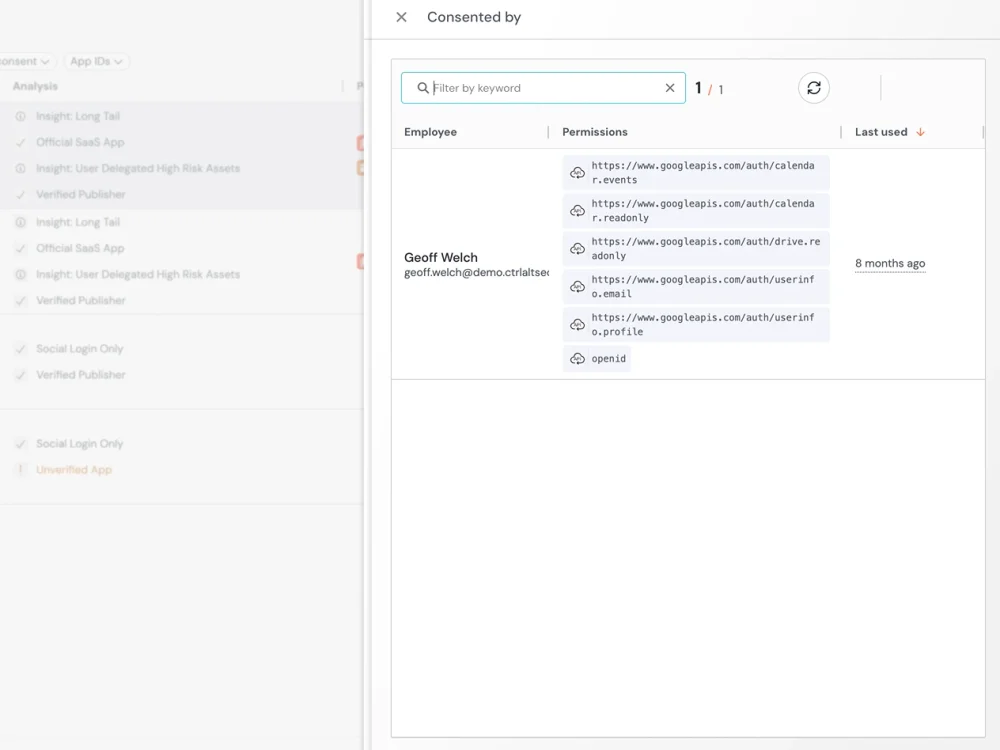
Push monitors consent events across 20+ major authorization servers — capturing the application, client ID, authorization server, scopes requested, and authorizing user for every consent flow. This includes grants that never appear in IdP admin consoles, such as user-consented apps on unmanaged and BYOD devices.
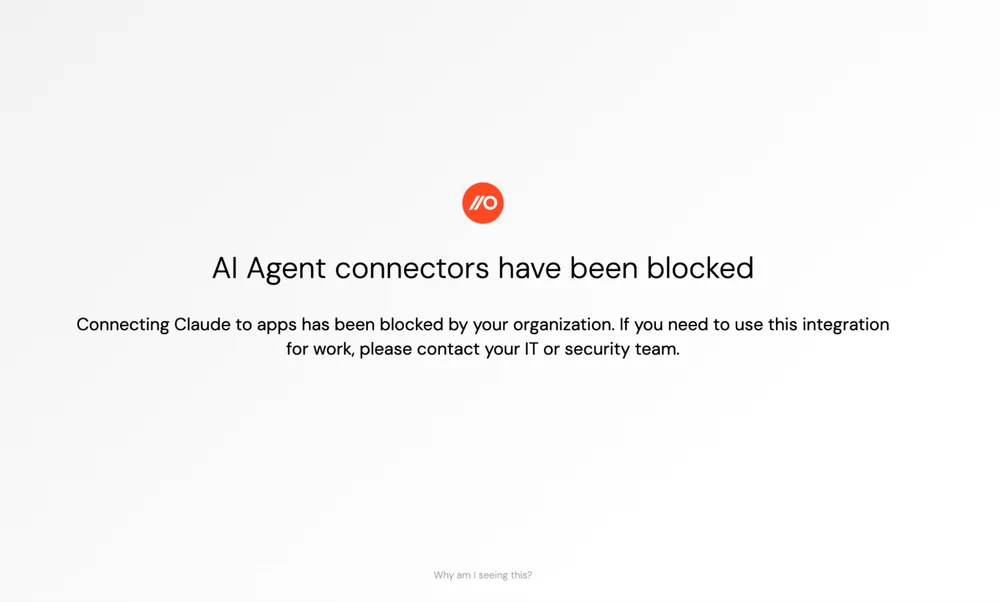
For new integrations, Push provides consent monitoring and blocking — identifying OAuth authorization requests in real time as they happen. In Warn mode, Push surfaces an in-browser warning for unrecognized applications, giving the user context before they authorize. In Block mode, unauthorized consent grants are prevented entirely — the user can't complete the authorization flow for applications that haven't been approved. This works across any authorization server, not just Microsoft and Google.
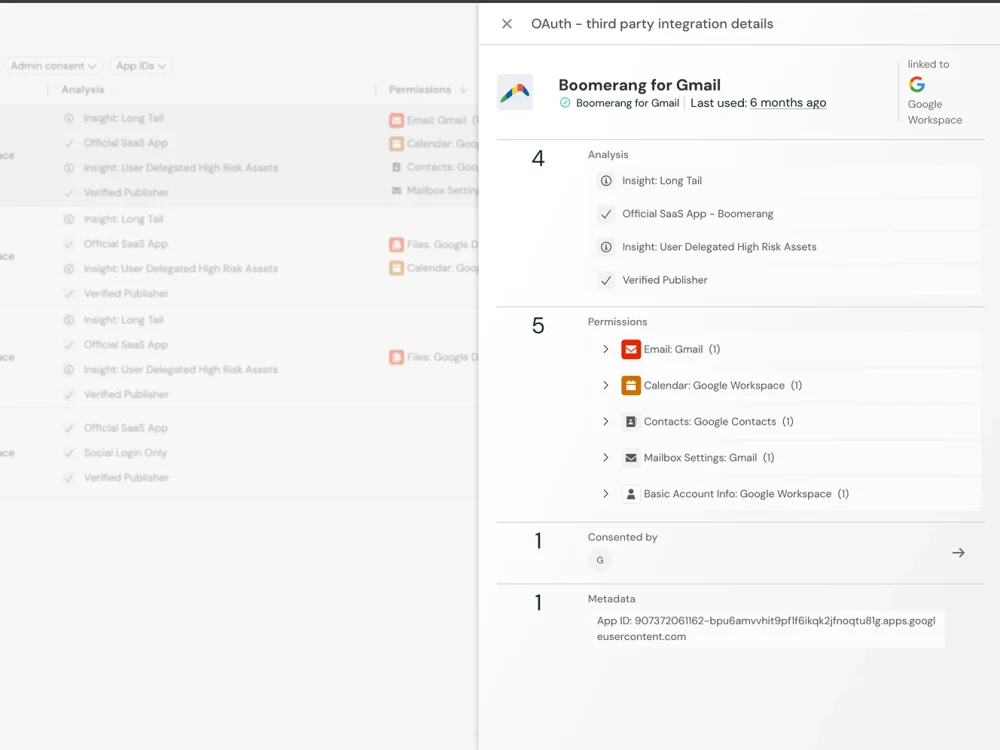
For existing integrations, Push provides app management — visibility into what applications are connected, what permissions they hold, how many users have authorized them, and when. Security teams can remove unwanted integrations directly via Push, reducing the exposure to supply chain attacks.
Frequently asked questions
An attacker compromises a third-party SaaS vendor and finds stored OAuth tokens that connect the vendor to downstream customer environments. Those tokens provide API-level access to customer data — email, files, CRM records, secrets — through legitimate authorized connections. The access is indistinguishable from normal API activity because the application was genuinely authorized.
The pattern produced major breaches in 2025–2026: ShinyHunters stole Drift OAuth tokens to access 700+ Salesforce environments, Anodot tokens were exploited to breach Snowflake environments including Rockstar Games, and a deprecated AI app's OAuth tokens exposed Vercel's Google Workspace. Each attack exploited tokens from legitimate integrations that were never revoked.
Any active OAuth integration connecting the vendor to your environment gives the attacker API-level access through the vendor's stored tokens. The access persists until the tokens are explicitly revoked — password resets, MFA changes, and IdP-based remediation don't affect OAuth grants.
The blast radius depends on what permissions the integration holds and which users authorized it. An integration authorized by a well-permissioned employee — a developer or admin with access to shared drives, internal tools, and collaborative resources — exposes far more than that employee's personal data. Push provides visibility into what integrations exist, what permissions they hold, and who authorized them, so security teams can assess and remediate exposure quickly.
OAuth sprawl describes the accumulation of third-party OAuth integrations across an organization's SaaS environment, most of them authorized by individual employees outside of any approval process.
Each integration extends your security boundary to include the vendor's own security posture. A vendor compromise gives the attacker access to every downstream customer with an active integration. The risk is amplified by shadow integrations — apps connected through self-service trials, one-off projects, or employee experimentation that were never tracked or revoked. Push monitors OAuth consent flows across 20+ authorization servers and provides shadow SaaS discovery that surfaces integrations security teams didn't know existed.
Start with admin consent controls in Microsoft 365 and Google Workspace — require approval for new integrations on the two platforms you administer directly. For the broader SaaS estate, Push provides browser-level consent blocking that works across any authorization server: in Block mode, employees can't complete an OAuth authorization flow for applications that haven't been approved. This covers platforms where you don't have admin consent controls, and catches grants from unmanaged devices where IdP-side policies don't reach.
Combine preventive controls with regular audits of existing integrations. The most dangerous OAuth supply chain attacks exploited integrations that were authorized months earlier and never revoked when they were no longer needed.
IdP admin consoles in Microsoft 365 and Google Workspace show admin-consented applications, but user-consented grants are harder to surface — especially from unmanaged devices or personal accounts. SSPM tools provide API-level auditing for connected applications but require per-app configuration and don't capture the consent event in real time.
Push provides OAuth grant visibility by monitoring consent events at the browser layer — recording the application, authorization server, requested scopes, and authorizing user for every consent flow across 20+ authorization servers. This captures grants that never appear in IdP admin logs, including user-consented apps on unmanaged devices. Push's OAuth app management also shows existing integrations with their permissions, user count, and metadata — giving security teams a complete picture of their OAuth footprint.
Configure Entra ID to require admin consent for new third-party applications — this prevents employees from authorizing integrations without approval. However, admin consent controls only cover OAuth flows to Microsoft's authorization server, and user-consented apps on unmanaged devices bypass these controls entirely.
Push provides an additional layer: browser-level monitoring of OAuth consent flows to Microsoft's authorization server, capturing every consent event including the application's client ID, requested scopes, and authorizing user. Push's OAuth app management shows existing integrations and supports direct removal of unwanted applications. For organizations using Push's Block mode, unauthorized consent grants are prevented regardless of device management status.
Configure Google Workspace admin settings to restrict third-party app access — requiring admin approval for OAuth consent. As with Microsoft 365, this only governs flows through Google's authorization server, and user-consented apps from unmanaged browsers or personal accounts bypass admin controls.
Push monitors OAuth consent flows to Google's authorization server in real time, capturing consent events that Google's admin console may not surface. Push can warn or block unauthorized consent grants at the browser layer, covering BYOD and contractor devices. Push's OAuth app management provides visibility into what applications are connected and supports direct removal of risky integrations.
Yes. OAuth tokens are independent of the user's password — they're granted through a separate authorization flow and persist until explicitly revoked. Resetting a password, rotating MFA, or even deactivating an account in the IdP doesn't invalidate existing OAuth grants. This is what makes supply chain attacks through OAuth integrations so persistent: the attacker's access survives every remediation action that security teams take through the identity provider.
Revoking the specific OAuth grant is the only effective remediation. Push's OAuth app management helps identify which applications have been granted access and supports direct removal. The same persistence mechanism affects ghost logins and hijacked sessions — different access types, but the common thread is that they all persist outside the IdP's control plane.
Most organizations have some OAuth visibility through their IdP admin consoles, but that coverage is limited to admin-consented apps on one or two platforms. Effective monitoring requires layering tools that cover different parts of the OAuth landscape — from admin-consented apps on major platforms to user-consented grants on unmanaged devices across the broader SaaS estate.
IdP admin consoles (Microsoft Entra, Google Workspace admin) show admin-consented applications on their respective platforms. They're structurally blind to user-consented grants, apps on unmanaged devices, and OAuth flows to other authorization servers.
SSPM tools provide API-level auditing for connected applications, covering more apps than the IdP admin console but requiring per-app configuration. They don't capture the consent event in real time — they tell you an integration exists, not when or how it was authorized.
Push monitors OAuth consent flows at the browser layer across 20+ authorization servers in real time — capturing the application, scopes, and authorizing user for every consent event. Consent-level blocking prevents unauthorized applications from being authorized in the first place. This is the layer that closes the gap between what your admin console shows and what employees are actually connecting.
Push provides OAuth app management that shows existing integrations with their permissions, user count, and metadata. For integrations in Microsoft 365 and Google Workspace, Push supports direct removal — security teams can delete unwanted OAuth applications from within the Push console without needing to navigate each user's app permissions individually.
For other applications, removing an OAuth integration requires admin access to the specific vendor platform. Push surfaces which integrations exist and their risk indicators — permissions scope, user count, last activity — to help security teams prioritize which integrations to investigate and remove. The priority should be integrations that are dormant (no longer actively used), overly permissioned (broad data access scopes), or connected to vendors with elevated risk.
Latest resources


