Identity security — harden unmanaged identities
Employees create accounts across hundreds of SaaS apps, many outside SSO and outside policy. Weak passwords, missing MFA, and unmonitored login paths follow. Push surfaces these gaps continuously so teams can close them before they're exploited.
- Discover every identity and login method used to access apps
- Find weak points like breached accounts, reused passwords, and MFA gaps
- Enforce secure access with in-browser guardrails








Find identity security gaps before they cause a breach
Your identity attack surface is the sum of every account, credential, and access path across your SaaS estate — including the ones you don't know about. Traditional identity security focuses on what the IdP manages: SSO-connected applications, MFA-enrolled users, provisioned accounts. But the most exploitable identity weaknesses exist outside the IdP's line of sight.
Ghost logins let users authenticate with local passwords on apps that are supposed to require SSO. Shadow accounts exist on SaaS apps the organization hasn't sanctioned. Shared accounts spread credential exposure across multiple people. Weak and reused passwords persist because the IdP can't enforce password policy on non-SSO logins. Each of these is an access path an attacker can exploit — and none of them appears in your IdP's dashboard.
Push provides identity attack surface management at the browser layer. By observing actual login behavior, Push discovers every identity and access path — managed and unmanaged — and gives security teams the data they need to harden them.
Discover every identity across your SaaS estate
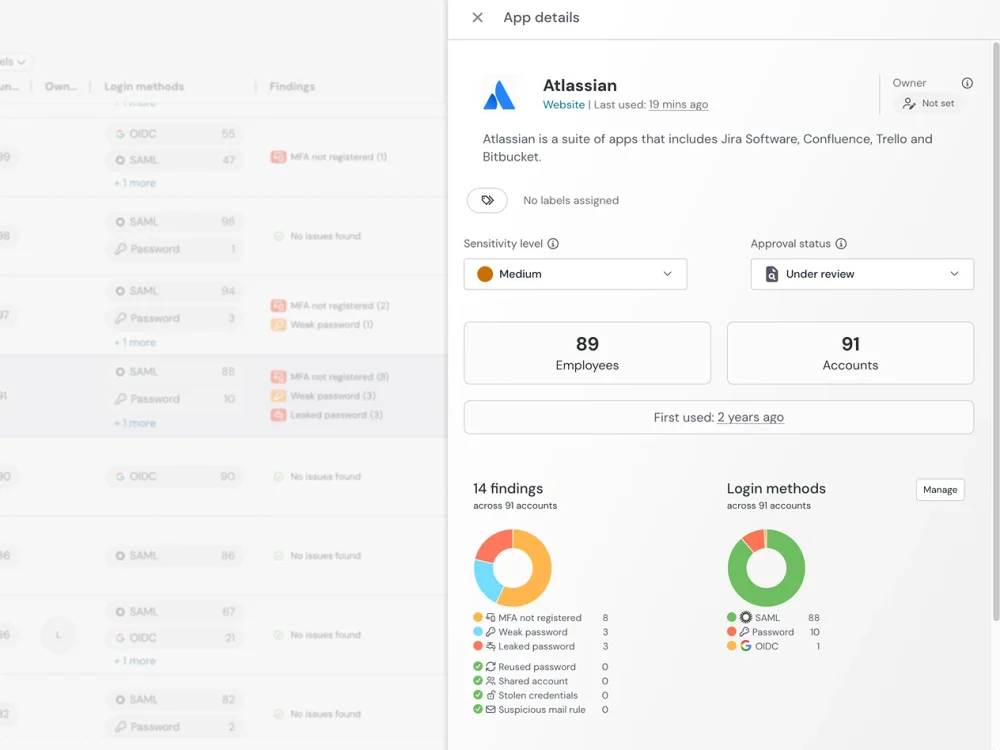
Push discovers identities from browser login events — the actual moment a user authenticates to an application. Every login Push observes includes the application, the user identity, the authentication method (password, SSO, social login, passkey), MFA status, and password strength. This builds a comprehensive inventory of every identity in your SaaS estate, including those that exist outside your IdP.
This discovery works across managed and unmanaged devices. Employees on BYOD laptops, contractors using personal machines, and remote workers on personal networks all generate the same identity telemetry in the browser. You don't need network-level visibility or device enrollment to map your identity attack surface — the browser extension is the sensor.
Find and fix identity weaknesses
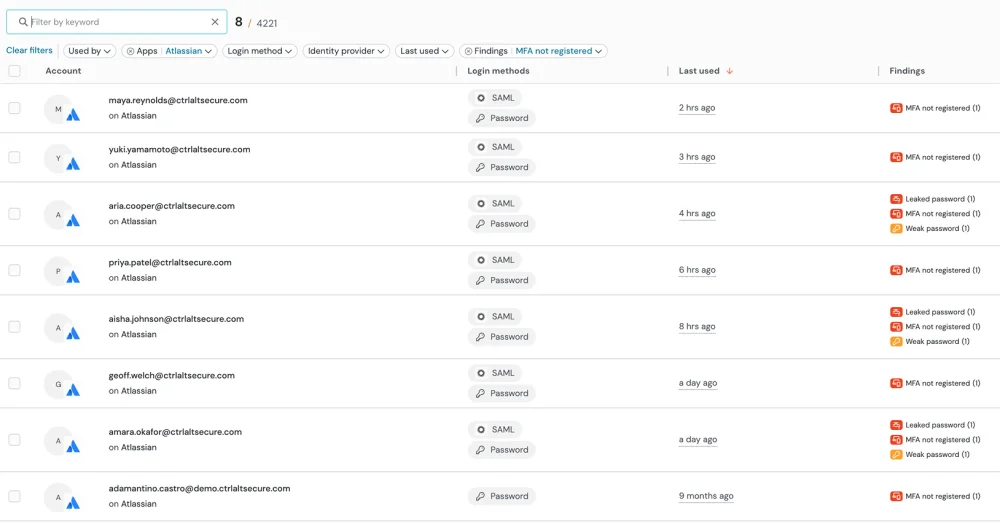
Discovery tells you what exists. What makes it actionable is seeing the specific weaknesses that make those identities exploitable. Push detects ghost logins that bypass SSO, weak and reused passwords, credentials that appear in breach datasets or infostealer logs, accounts missing MFA enrollment, and shared accounts where multiple employees authenticate with the same credentials — all observed from actual login behavior in the browser, not IdP reporting. Password analysis uses locally generated salted SHA256 partial hashes, so plaintext credentials are never transmitted or stored.
Guide users with in-browser guardrails
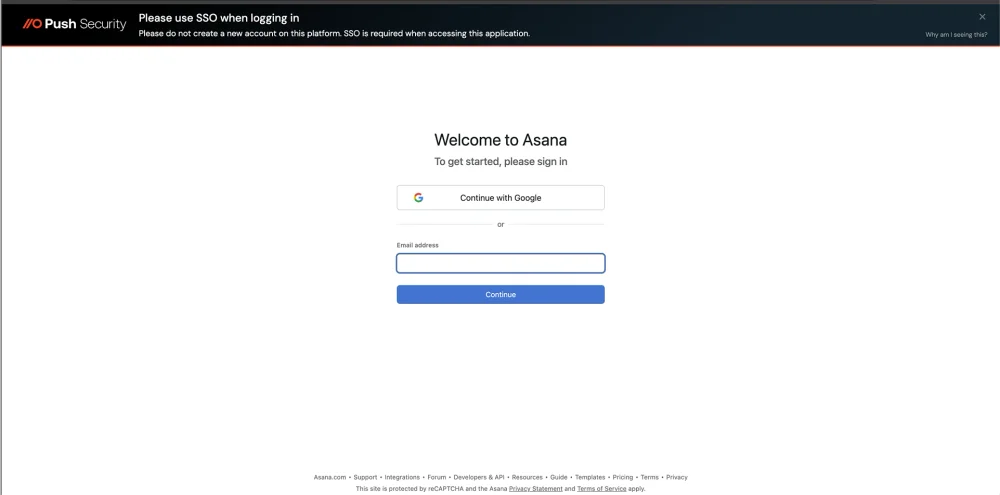
Detection alone doesn't close the gaps — remediation does. Push uses in-browser guardrails to guide users to fix identity weaknesses at the moment they're observed. When a user logs in with a weak password, Push prompts them to update it. When they authenticate to an SSO-managed app via a local login, Push prompts them to switch to SSO. When they're missing MFA, Push prompts enrollment.
This remediation model is self-service and real-time. Users fix their own identity hygiene issues without the security team needing to identify them, file tickets, and chase follow-ups. Security teams set the policies; the browser enforces them.
Identity security, beyond the IdP
Identity providers only see authentication that flows through them. Applications that support SSO but also allow local logins have a parallel authentication path the IdP can't monitor. Applications that aren't connected to SSO at all are invisible. OAuth consent grants initiated in the browser may not be visible in IdP logs depending on the authorization server.
Push complements your IdP by providing the browser-layer identity visibility that IdPs can't offer. It doesn't replace SSO, MFA, or identity governance — it extends your visibility to the identities and access paths those tools can't reach.
| Dimension | Push Security | Identity provider |
|---|---|---|
| Identity discovery scope | Yes — Discovers every account and login from browser activity — SSO, local, social, shared, personal | No — Only sees identities and logins that flow through the IdP |
| Ghost login detection | Yes — Detects local login paths that bypass SSO on managed applications | No — Cannot detect authentication that doesn't flow through it |
| Password visibility | Yes — Detects weak, reused, and compromised passwords at the point of login (securely stored, hashed and salted, never leaves the local browser) | No — Can enforce password policy on IdP-managed logins; no visibility into non-SSO app passwords |
| MFA gap detection | Yes — Surfaces MFA gaps from actual login observation — including apps not connected to the IdP | No — Reports MFA enrollment for IdP-managed apps only |
| Shared account detection | Yes — Detects accounts used by multiple employees from browser login patterns | No — Limited visibility — may see multiple sessions but can't observe the login behavior |
| Remediation | Yes — In-browser guardrails prompt users to fix issues at the moment of login — self-service, real-time | No — Policy-based enforcement on IdP-managed apps; manual remediation for everything else |
| Unmanaged device coverage | Yes — Works on any device with the browser extension. Can be deployed via MDM or to unmanaged devices | No — Device-based policies require device enrollment or compliance certificates |

Frequently asked questions
Identity security is the practice of protecting an organization's accounts, credentials, and access paths from compromise. It spans identity and access management (IAM), multi-factor authentication (MFA), privileged access management (PAM), identity governance, and identity threat detection.
Push provides the browser-layer component of identity security: discover every identity across the SaaS estate (including unmanaged ones), detect credential weaknesses, and harden access paths that traditional identity tools can't see. Push complements your IdP and IAM infrastructure — it doesn't replace them.
Identity attack surface management (IASM) is the process of discovering, assessing, and reducing the identity-related weaknesses across an organization's environment. This includes unmanaged accounts, weak credentials, missing MFA, ghost logins, shared accounts, and excessive OAuth permissions.
Push provides IASM at the browser layer by observing actual authentication behavior — discover every identity and access path, not just the ones managed by your IdP — and surface the specific weaknesses that make those identities exploitable.
Identity security posture management focuses on the ongoing assessment and improvement of an organization's identity security controls. This includes tracking MFA adoption rates, monitoring SSO coverage, identifying credential weaknesses, and reducing the identity attack surface over time.
Push provides posture telemetry from the browser: MFA enrollment status per user and app, SSO vs local login ratios, password strength distribution, ghost login prevalence, and shared account detection. This data feeds into your security posture view alongside IdP reporting — filling in the gaps your IdP can't observe.
Credential phishing (including AiTM) steals passwords and session tokens. Credential stuffing replays breach-sourced passwords at scale. Session hijacking replays stolen tokens, bypassing authentication entirely. OAuth abuse grants attackers persistent access through consent phishing. Ghost login exploitation targets local login paths that bypass SSO policy.
Each of these attacks exploits identity weaknesses that exist outside the IdP's visibility. Push detects them at the browser layer — where the authentication actually happens.
Identity providers detect anomalies in authentication that flows through them — but can't see local logins, personal accounts, or OAuth grants on non-SSO apps. SIEMs correlate identity signals from multiple sources but depend on those sources having visibility. EDR sees endpoint activity but not browser-level authentication behavior.
Push observes authentication directly in the browser, detecting identity attacks regardless of whether they flow through the IdP: compromised credential use on local logins, phishing pages targeting non-SSO apps, session token replay, and OAuth consent abuse.
IdP-based discovery only sees identities it manages. CASB-based discovery derives application usage from network traffic patterns. Neither approach captures shadow accounts created with personal emails, local login paths on SSO-managed apps, or accounts on unsanctioned applications that don't flow through managed infrastructure.
Push discovers identities from browser login events — capturing every application, every account, every authentication method across your entire user population. This includes shadow accounts, shadow SaaS, and ghost logins, with full authentication context for each discovery.
Identity governance focuses on policy and compliance: who should have access to what, how access is provisioned and deprovisioned, how access decisions are reviewed and certified. Identity attack surface management (IASM) focuses on security: what exploitable weaknesses exist across your identity infrastructure, and how to reduce them.
There's overlap, but the emphasis differs. Governance asks "is this access appropriate?" IASM asks "is this access exploitable?" Push provides the browser-layer data that feeds both — but its primary value is in IASM: discover and harden the identity weaknesses that governance processes can't see because they exist outside the IdP.
Attackers target the access paths that sit outside IAM visibility. Ghost logins on SSO-managed apps let attackers authenticate with stolen passwords, bypassing MFA and conditional access. Shadow accounts on unsanctioned apps persist after employees leave, with credentials that may appear in breach datasets. Shared accounts spread credential exposure to multiple people. Weak passwords on non-SSO apps are never flagged by IdP password policy.
Push discovers these access paths from the browser and hardens them — prompting users to switch to SSO, update weak passwords, and enroll in MFA.
Consent phishing tricks users into granting OAuth permissions to attacker-controlled applications — typically by presenting a consent prompt that impersonates a legitimate service. Once granted, these permissions provide persistent API-level access to the user's data that survives password changes and doesn't require ongoing authentication.
Push captures every OAuth consent flow in the browser, recording the client ID, authorization server, scopes requested, and who approved the grant. Security teams can monitor, warn on, or block OAuth consent grants — and manage or remove integrations that have already been authorized. See the consent phishing solution page for more detail.
OAuth grants create persistent API-level access paths that often go unreviewed after the initial consent. Most identity tools have limited visibility into which applications have been granted permissions, what scopes were approved, and whether those grants are still appropriate — particularly for apps that don't flow through the IdP.
Push captures OAuth consent flows as they happen in the browser, providing a real-time audit trail of every grant: the application, the scopes, the authorization server, and who approved it. Combined with IdP API integrations (Google Workspace, Microsoft 365, Okta), Push provides comprehensive OAuth grant visibility for governance and security review.
Latest resources


