Why the right browser security tool makes a separate AI visibility and control purchase unnecessary — and how to decide what you actually need.
Why the right browser security tool makes a separate AI visibility and control purchase unnecessary — and how to decide what you actually need.
When is a fork not a fork? When it's a browser security platform built to solve both problems of the AI era.
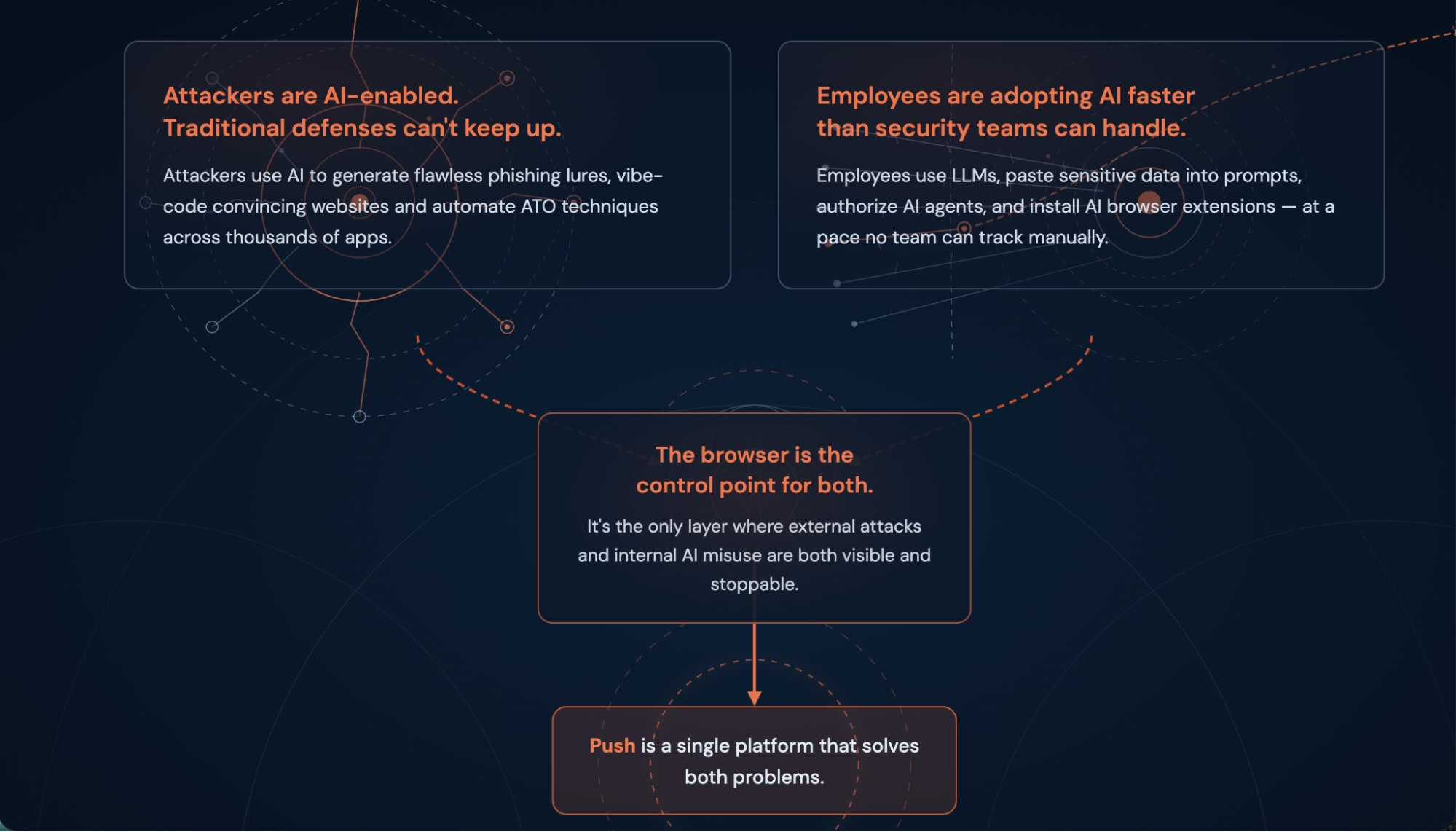
Many security leaders are rightly worried about two big problems in the age of AI: AI-enabled attacks targeting their employees via the browser; and employees introducing the risk of data loss through their use of AI tools.
For security teams researching browser-based solutions to these challenges, the decision at first looks like a fork in the road: Choose a solution that's purpose-built to detect and respond to modern browser-based attacks like AI-enabled phish kits, ClickFix and other *Fix-style attacks, malicious browser extensions, device code phishing, and others; or select an AI governance tool to enforce sensible policies for sensitive data in the browser.
Push solves both of these problems. One platform, one SKU.
In this article, we'll take a look at the two big AI security and data governance problems that security teams are facing and outline how Push solves them in a single solution. We’ll cover what questions to ask as you evaluate browser security solutions, and describe Push's focus on providing foundational telemetry, detections, and controls that allow you to answer the question “What actually happened here?” not just “What policy was violated?”
The AI risks every security team is now responsible for
AI is an amplifier, for adversaries and for your employees. Whatever they could do before, they can now do faster, more powerfully, and at scale.
The two risks that every security team now must manage:
AI is making browser-based attacks faster, cheaper, and harder to detect.
Employee AI adoption is creating data exposure faster than security teams can respond.
Both of these challenges intersect in the same place: The browser. It's the place where adversaries target employees with modern attacks designed to accomplish account takeover and data exfiltration. It's also the place where workers discover and use new AI-enabled apps and introduce risk into the business in the form of data loss, shadow apps, risky browser extensions, and shadow integrations.
To address both problems, security teams need visibility and control in the browser.
How AI is transforming attacks
On the adversary side of the equation, adversaries are using AI tooling to rapidly iterate on new attack types or new iterations of existing browser-based TTPs that target employees to achieve account or endpoint compromise — usually with the end goal of harvesting valuable corporate identities in order to exfiltrate data or hold it for ransom.
Learn how AI-enabled attacks are making infrastructure-based detection increasingly ineffective in our update on the Pyramid of Pain concept for 2026.
AI is changing attacks in three key ways.
AI has supercharged the iteration and evolution of adversary tools and techniques
Attackers are using the same AI capabilities as any other engineer who wants to multiply their output. That translates to an array of new attack techniques: multiple increasingly sophisticated variations of the ClickFix-style attacks that use social engineering techniques to get users to unknowingly install malware via malicious scripts; as well as creative exploitation of device codes, a legitimate authentication mechanism, that allows attackers to phish access post-authentication.
Device code phishing in particular demonstrates the rapid growth of new techniques, with early documented appearances of the TTP occurring in 2024, and by early the next year, the method had been packaged as a PhaaS offering with GPT-enhanced spear-phishing and customized landing pages. The campaign targeted more than 340 organizations across five countries in March 2026, using personalized AI-generated lures at a scale that would have been impractical to produce manually.
Nearly every phishing toolkit that Push encounters in the wild today displays the fingerprints of AI use. Check out our recent analysis of Doko's Panel, a real-time vishing and AiTM kit, for a under-the-hood look at this.
Infrastructure-based detections are increasingly degraded by AI-enabled approaches
AI has also collapsed the cost and time it takes to build convincing phishing infrastructure: Attackers can vibecode a convincing phishing page in minutes, burn the domain, and regenerate another one before any blocklist updates.
According to Spamhaus, 89% of phishing domains are active for fewer than two days, with just 6.5% surviving past 15 days. That means that if you're primarily looking at static indicators, you're already behind. IOC-based detections can't keep up with how quickly attackers can rotate infrastructure.
The impact on IOC-based detections that rely on infrastructure elements is severe: When elements constantly change, every phishing attack is essentially a zero-day. Complicating the picture further is the increasing use of legitimate cloud platforms like Railway, Cloudflare Workers, and Vercel, which attackers use to host and dynamically rotate attack infrastructure.
AI is making it easier to build and run omni-channel campaigns
Push researchers have written extensively over the last year about malvertising campaigns that serve malicious pages to users via search engine results, enticing them to visit sites designed to steal credentials or deliver malware.
We've tracked sustained campaigns impersonating Onfido, TradingView, Ahrefs, Semrush, and others. These campaigns are part of a self-reinforcing criminal ecosystem: Malvertising campaigns paid for by stolen ad accounts, with credential theft that funds the next round of credential theft. And the recent LLMShare campaign identified by Push shows how attackers are combining their abuse of AI tools of AI-assisted phishing page creation with malvertising, helping them to spin up lookalike pages quickly and cheaply to serve as convincing lures.
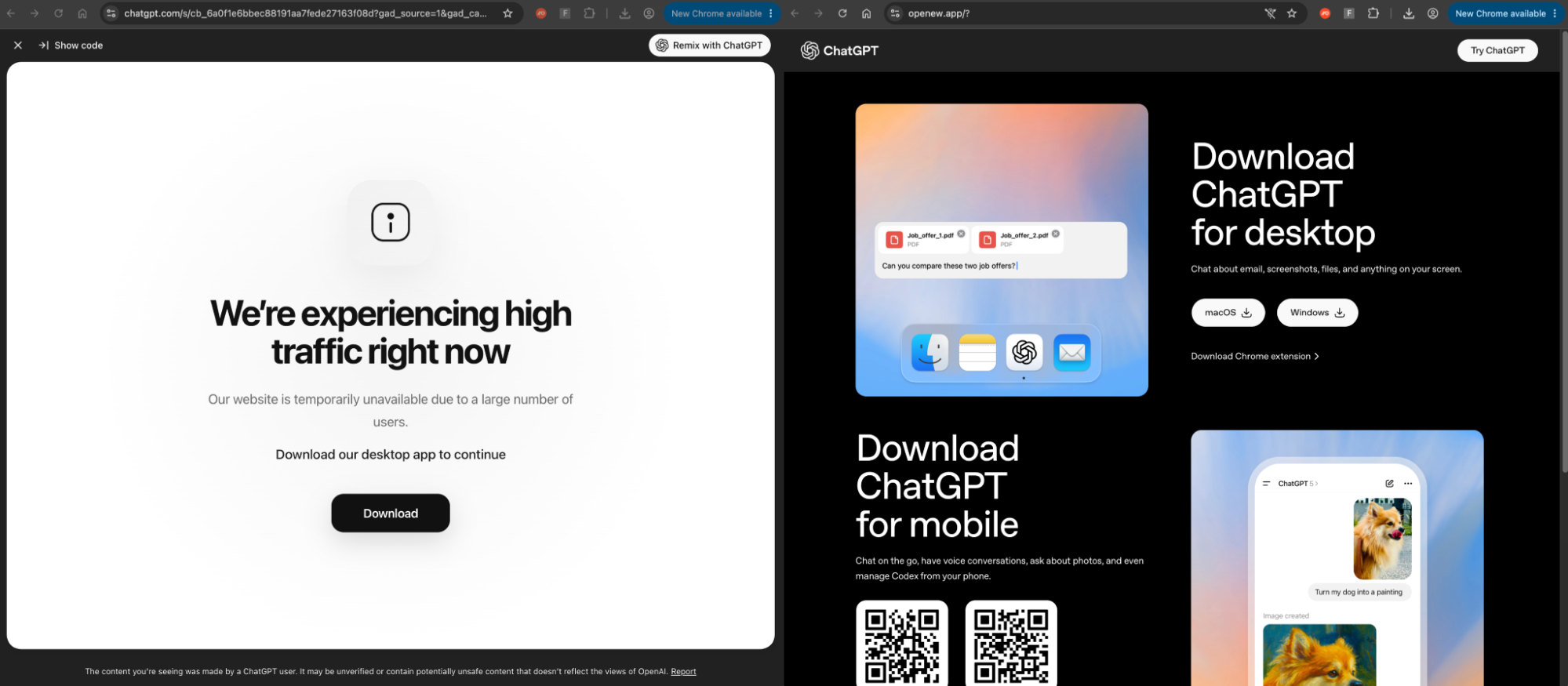
These are just a few examples of how phishing has moved beyond the inbox, targeting users through malvertising, SEO poisoning, and social media DMs. Over the last year, Push researchers found that 1 in 3 payloads intercepted by the platform were sent outside of email.
How AI is creating risky employee behaviors
Meanwhile, on the employee side of the equation, there are three other key concerns that security teams should be paying attention to when it comes to the risks associated with AI use.
Data leaving the business via shadow AI and AI extensions
Employees are signing up to AI tools directly, beyond the bounds of procurement or security review. That means security teams can't see sensitive data going into LLMs — clipboard pastes of API keys, file uploads to coding assistants, customer data in uploaded spreadsheets, etc.
Most teams also don't have visibility of AI browser extensions, another avenue for data to leave the business. Extensions are also an attack surface in their own right, as previously benign extensions can be compromised by threat actors through account takeover of the extension developer.
Employees using personal accounts on corporate AI app tenants
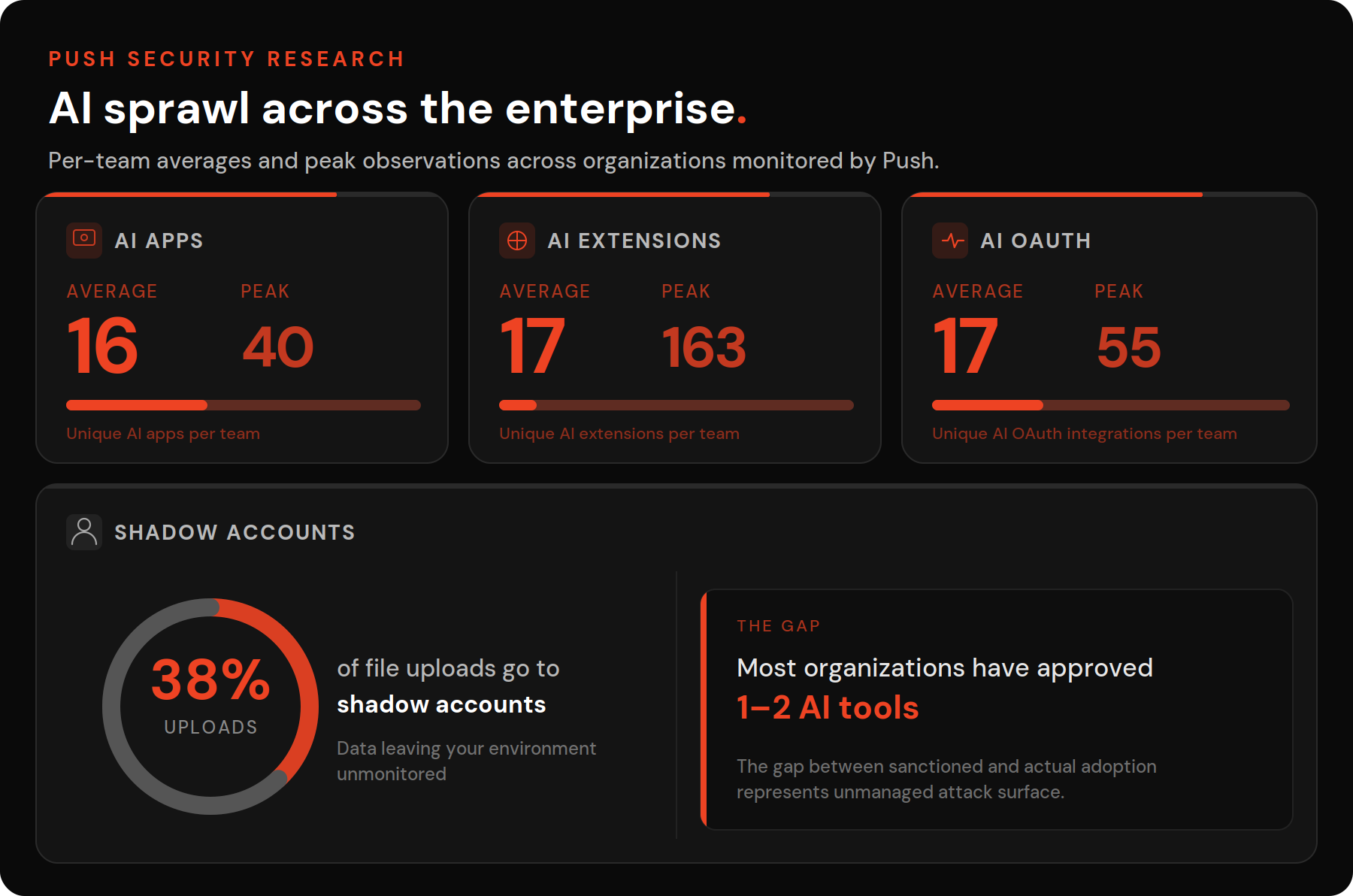
The 2026 Verizon DBIR found that 67% of GenAI users on corporate devices are using non-corporate accounts, and our own data shows that 38% of file uploads to AI tools are made from shadow accounts rather than approved organizational ones.
That means a large number of employees in most organizations are using AI apps with personal accounts, outside of organizational data governance, retention policies, access controls, or basic security oversight.
The compounding risk is that personal accounts are typically protected by weaker passwords, inconsistent MFA, and credential reuse from other personal services — meaning a compromise of the personal account could give an attacker access to corporate data and tools.
Shadow integrations between AI tools and corporate systems
App-to-app connections accomplished through OAuth are also proliferating faster than most teams can observe and review them. For the average organization, Push sees 17 unique AI app OAuth integrations connected just to Microsoft and Google corporate tenants.
The recent Vercel breach illustrates the risks of even a single OAuth connection from a compromised third-party AI SaaS provider. This isn't really a new AI threat so much as a shadow SaaS problem that's accelerating alongside AI adoption, given that AI apps are specifically designed to pull data from one system, analyze it in another, and present it in a third — with MCP connections now creating the same kind of persistent, permissioned access through an authentication protocol (OAuth) that most organizations have no process to review.
The Vercel breach isn't an isolated incident. ShinyHunters demonstrated the breadth and scale of OAuth-targeted attacks last year, impacting more than 1,000 organizations in targeted campaigns against Salesloft/Drift. Adversaries compromised Salesloft’s GitHub environment, stole Drift OAuth tokens, and used them to access downstream Salesforce environments. The same pattern was later repeated at Gainsight.
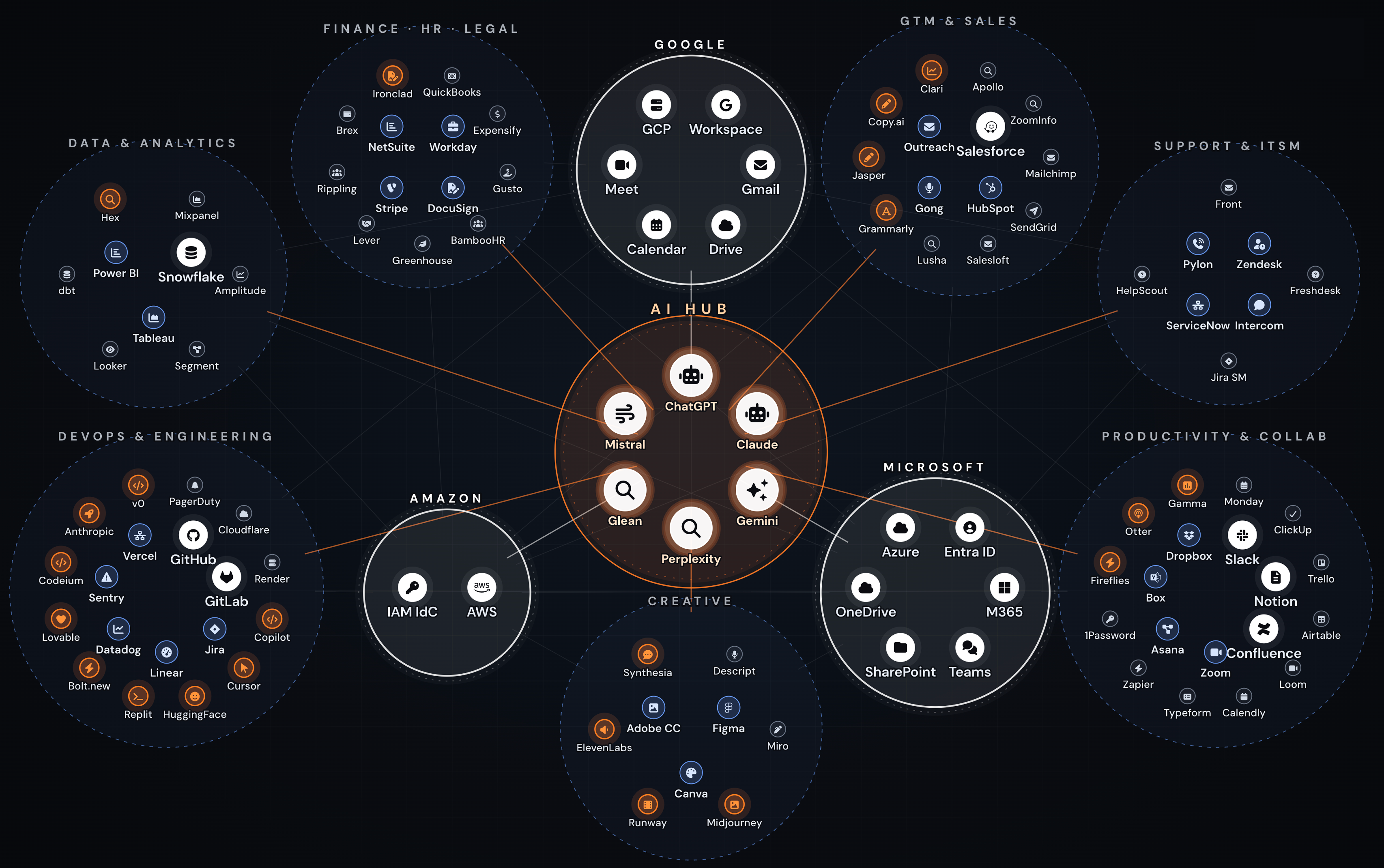
This is the same web of OAuth-connected apps that is being exposed at scale through AI tool integrations. For many organizations, AI tools are now the hub of modern activity that orchestrates and automates across the mesh of cloud apps, which adds a useful perspective on what's changed.
A word on prompt injection: Prompt injection is a serious and structurally difficult to solve problem, and one AI researchers and the security industry are still working out how to defend against.
High-impact attacks of this kind are still rare in the wild, but the building blocks are all demonstrated and the attack surface is growing as agentic browsers and in-app AI features proliferate. The threat is evolving quickly and detections are still limited, so it pays to start with the controls that hold up regardless of how attacks evolve.
This starts with knowing which AI browsers, extensions, and assistants employees are using, which SaaS apps have AI features enabled, and what OAuth scopes those AIs have been granted. The blast radius of any successful prompt injection is exactly the data and actions those grants permit, so visibility into AI tooling and AI-connected identity is the foundation that any further defense builds on.
What to ask when evaluating browser-based AI visibility and control solutions
When you're evaluating AI visibility and control platforms that operate in the browser, there are two lines of questioning that can be useful to unpack.
The first is the tactical basics: What use cases does the product cover, and how quickly will you see value? In this category, you'll likely be looking for:
Depth of visibility: Can the solution observe both corporate and personal account usage of AI apps? Does the solution work with all major browsers, including emerging AI browsers? Does the solution automatically classify AI apps and automatically discover shadow AI?
Granularity of controls: Does the solution support visibility and control over clipboard interactions, allowing you to identify sensitive data strings like personal access tokens (PATs) or API keys? Does the solution allow you to set multiple enforcement modes (monitor, warn, block) and carve out exceptions for tools, teams and individuals where necessary?
Ease of deployment: How is the solution deployed? Browser extension-based solutions like Push can be deployed at scale in an hour. Solutions that require an endpoint agent or a complete browser replacement will be a heavier lift.
Scope of coverage: Does the solution only enforce policy around AI usage, or does it also prevent AI-enabled attacks in the browser?
The second set of questions is more about the underlying architectural choices a product has made, and how those translate into actionable intelligence for security teams — or where there may be blind spots. In this category, you will want to ask:
Does the tool capture AI interactions that didn’t trigger a policy violation — or only the ones it blocked?
This is the most useful diagnostic if you're focused on understanding the wider security meaning and impact of an AI interaction, not just whether it violated a policy.
Enforcement-first tools record what they stopped: blocked uploads, attempted usage of unapproved apps, flagged file names, etc.
That's useful for compliance reporting but incomplete for security investigation, because the most significant events are often the ones that looked normal at the time: A user whose behavior shifted gradually over weeks before a resignation. An approved AI browser extension that updates its permissions, putting it in risky territory. An OAuth consent grant that was technically permitted but shouldn't have been.
Ask whether the tool can collect user behavior telemetry, file upload and download activity, and AI usage logs for permitted events — not just policy violations — and whether that telemetry can be forwarded to your SIEM.
One approach gives you an investigation tool. The other gives you compliance alerts without deeper context.
When an AI agent requests OAuth permissions to access your organization's data, does the tool capture the consent flow — what scopes were requested on which app, which user initiated the consent, and what was the outcome?
Most enforcement-first tools treat OAuth as a binary: approved app or blocked app. That was a reasonable model when OAuth grants were primarily app-to-app integrations managed by IT. It isn't sufficient for agentic AI.
AI agents request OAuth permissions to access organizational data on behalf of users. These are user-initiated consent grants that happen inside browser sessions, often with broad scopes, and frequently without security team awareness. The right tool needs to capture the consent event itself: what permissions were requested, what scopes were granted, who approved them, and what application received them.
Ask whether the tool monitors OAuth consent flows across authorization servers, whether it can warn or block consent grants in real time based on policy, and whether that coverage extends to AI-enabled apps and MCP connections.
When a new browser attack technique emerges that no tool has a signature for, how long does it take the platform to detect it — and can you show a specific example?
Attackers are rotating infrastructure in hours and using AI to generate new lures and phishing pages at scale. A detection model built on blocklists, reputation feeds, and known-bad indicators is architecturally behind any novel technique because by the time the indicator appears on a feed, the attacker has already moved on.
Ask vendors to show you a specific detection that fired on a novel technique before the infrastructure appeared on any threat feed.
What browser telemetry reaches your SIEM — just alerts, or the underlying session data that makes those alerts investigable?
Ask to see a sample SIEM event from a real detection. Many browser security tools integrate with SIEMs, but the depth of what they forward varies a lot.
Some send alert metadata that captures policy violations, timestamps, and involved users. Others forward a broader set of telemetry for deeper context — credential reuse, app logins, newly installed extensions, detected phishing kits, file uploads, clipboard activity, OAuth consent flows, file downloads, etc.
The difference determines whether your SOC team can easily correlate signals from the browser-based tool with other layers of their stack and begin an investigation from the SIEM event itself — or whether they need to pivot back into the vendor's console for the actual evidence.
AI visibility and control is a feature of the right browser security platform, not a separate purchase
Ultimately, the choice of browser platform for solving the two big problems of the AI era comes down to whether you need broader attack coverage and telemetry context in order to secure your organization, or whether a policy-based approach is enough.
Push treats the challenges of stopping AI-enabled attacks and providing visibility and control over AI usage as features that extend naturally from the platform's underlying architectural model: Rich browser-layer telemetry in a single tool that helps security teams answer the question “What actually happened here?” not just “What policy was violated?”
This unified architecture matters because the AI control problem and the browser threat detection problem share a root cause: Security-relevant activity is happening inside browser sessions that most tools can't see.
A standalone AI governance tool can tell you which AI apps are in use and whether employees violated a usage policy. It can't tell you whether the OAuth grant an AI agent just received was part of a broader pattern that includes credential entry on an unfamiliar domain, a clipboard paste from an internal document, and a login to a shadow SaaS app — all in the same session, all visible in the same telemetry stream.
Separating AI governance from browser security means maintaining two tools that each only see half the picture.
How Push can help
Block emerging browser-based attack techniques, including AI-enabled phishing and quickly evolving *Fix-style attacks.
Benefit from Push's agentic detection pipeline, which continuously hunts across customer environments to identify emerging threats and ship new detections.
Stream telemetry to your SIEM for a wide variety of events, including attack detections; newly installed browser extensions or newly adopted apps; updates to extension permissions; file uploads and downloads; clipboard pastes; app logins; credential reuse; OAuth consents; and more.
Block file uploads and downloads.
Block clipboard pastes of sensitive data, with regex-based patterns you can define.
Monitor for or block unauthorized MCP connections.
Write your own custom YAML rules targeting specific elements of the page DOM, web requests and responses, HTTP headers such as cookies, and a lot more.
If you'd like to learn more about Push, book a live demo.