Malicious browser extensions: what they are, and how to detect and block them
Malicious browser extensions steal credentials and session data from inside the browser. Learn how to detect, audit, and block risky extensions.

Malicious browser extensions turn "legitimate" tools into attack vectors
A malicious browser extension is an extension that steals data, injects content, or intercepts user activity from inside the browser session. Some are purpose-built for data theft, while others are legitimate, widely installed extensions that are acquired or hijacked and weaponized through a malicious update. Because browsers auto-update extensions without user interaction, a single compromised extension can silently infect thousands of browsers across an organization.
Once active, a malicious extension can steal data depending on the permissions granted. Common targets include session cookies, credentials, clipboard contents, and form data.
The reality is that 47% of extensions observed in Push-protected environments have the permissions required for direct session account takeover, meaning that roughly half of extensions, if compromised, would pose a significant threat.
In reality, many third-party extensions are not things you want running in employee browsers from a data security perspective, but an increasing number are flipping from dodgy and unwanted to actively malicious, and a genuine security threat to businesses.
How malicious browser extensions work
Most malicious extensions start life as legitimate ones. Attackers acquire widely installed extensions, wait for install counts to reach scale, then push a malicious update. Every browser running the extension updates automatically.
- The attacker acquires a legitimate extension through purchase, developer phishing, or supply chain compromise, or creates one and waits for it to reach a viable install base (aka. the "sleeper agent" approach)
- A malicious update is uploaded to the extension store, passing standard review checks, often using configs loaded dynamically outside of the extension code
- User browsers auto-update and are infected
- The extension begins intercepting credentials, session tokens, and sensitive data from pages the user visits
- Harvested data is exfiltrated to an attacker-controlled server
These attacks are prominent and impactful. The most notable example is the Cyberhaven breach. A developer was phished via a consent phishing lure from a legitimate Google domain, giving the attacker access to the Chrome Web Store. A malicious update was uploaded, and 2.6 million users were infected across a month-long campaign, with credentials, session tokens, and payment details harvested from visited pages.
Why most security tools miss malicious browser extensions
Malicious extensions are designed to evade static and dynamic analysis. Attackers use dynamically loaded configs to introduce malicious functionality, meaning code reviews (such as those conducted by extension stores themselves) often fail to spot malicious functionality. Similarly, since malicious modules are loaded dynamically, and often won't trigger in certain conditions, this can leave significant gaps when trying to proactively find and block bad extensions the moment they exhibit malicious behavior.
In one major example, the GhostPoster campaign, with 890,000 installs across 34 extensions, evaded detection by waiting 48 hours between check-ins and loading a payload only 10% of the time.
Extension risk scoring — rating extensions by permissions, developer reputation, and install count — also fails when extensions are effectively "legitimate" before being weaponized. The vast majority of large-scale campaigns in the wild involve extensions that fall under risk-based thresholds before they are weaponized.
By the time malicious behavior is observed, the extension is already running in production browsers across the environment.
How AI is accelerating the problem with imitation AI assistants
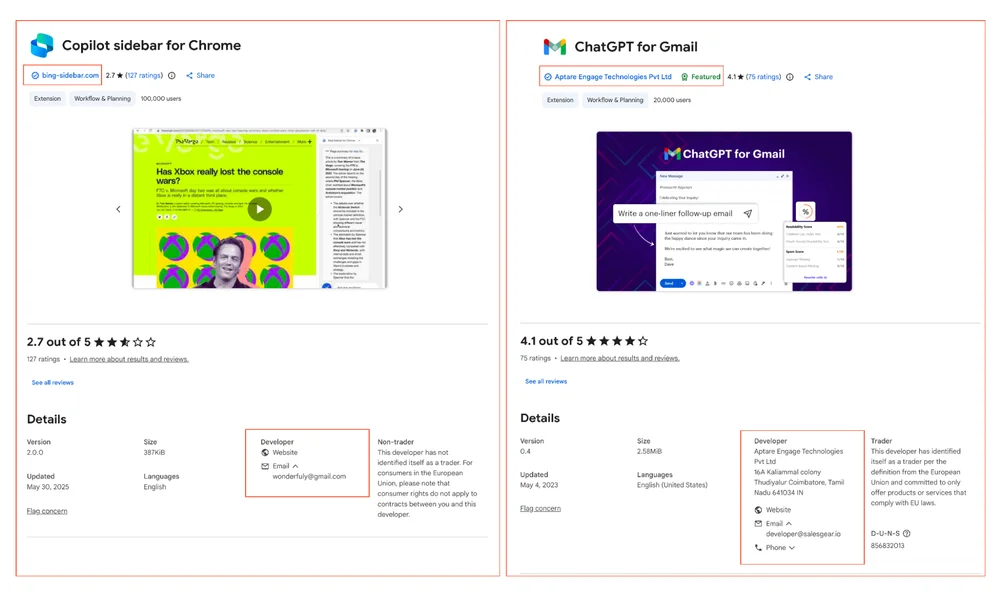
AI adoption is amplifying the extension problem. AI helpers designed to hook into LLMs and GenAI tools are flooding extension stores. These are particularly nefarious because they impersonate legitimate apps and masquerade as official add-ons, but are in fact built and maintained by unaffiliated third parties.
Even when not actually "malicious" (or at least, not yet) these present a significant data privacy risk and are highly abusable in terms of the functionality they are building into the browser, and the AI tools and accounts they integrate with to.
How do you protect users from malicious browser extensions?
Since you can't predict which extension will be compromised next, defense has to shift from reactive blocklisting to proactive governance: default-deny allowlisting combined with continuous supply chain monitoring.
Blocking known-bad extensions after they're identified is a key step (compensating for the fact that extension stores don't always auto-uninstall delisted extensions) but leaves a window between compromise and discovery where the extension is actively exfiltrating data from every browser that has it installed.
Allowlisting only the extensions that are business critical minimizes the attack surface.
You can also monitor for events that often precede the introduction of malicious capabilities in trusted extensions, such as ownership transfers, permission escalations, developer account changes, and delisting — so security teams are alerted before a trusted extension turns malicious, not after. The practical barrier to allowlisting has always been operational: you need a complete inventory, usage data to inform the allowlist, and a mechanism to enforce it on unmanaged devices where group policy doesn't reach.
How Push detects and blocks malicious browser extensions
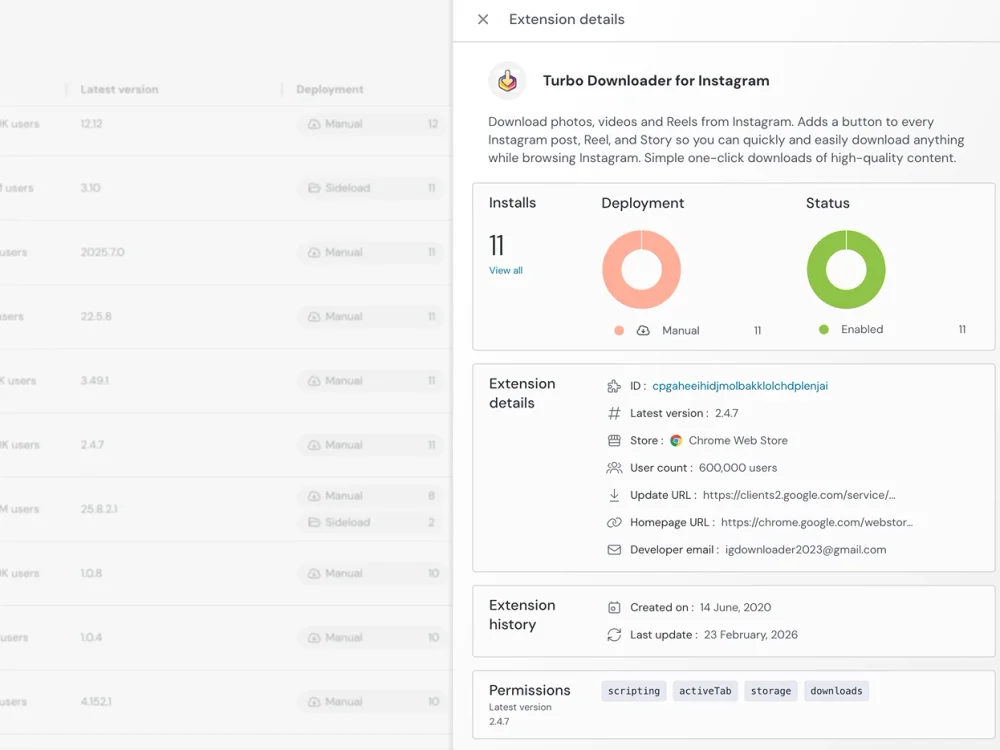
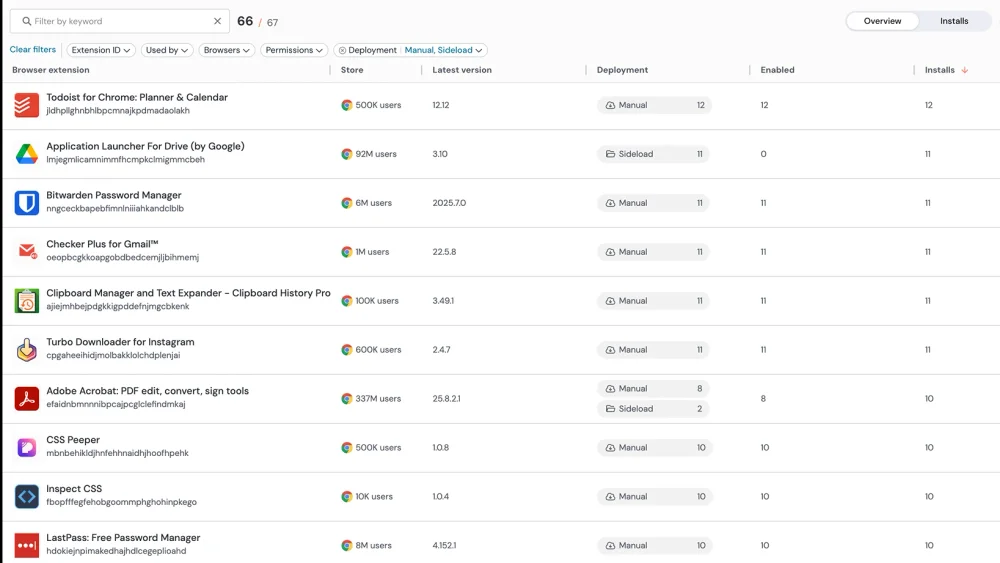
Push gives security teams visibility into every extension running across the environment, including what permissions each extension holds and where it was installed from. For each extension, Push provides permissions analysis, install count, usage data, and threat intelligence — the information needed to build and maintain an extension allowlist.
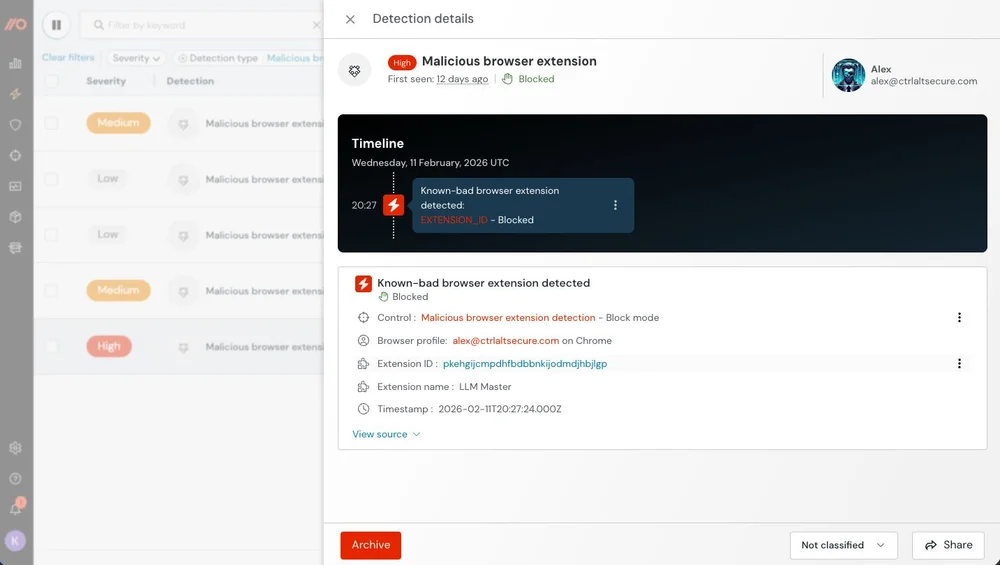
Known malicious extensions are blocked from running. Risky extensions can be flagged or removed without requiring device management or user intervention. Push detects extensions with known malicious behavior and identifies behavioral indicators that precede weaponization.
Push monitors for the events that precede extension weaponization — ownership transfers, permission escalations, developer contact changes, and delisting — alerting security teams before a trusted extension turns malicious. Because Push operates inside the browser, it even provides this monitoring and control on unmanaged devices where GPO and Chrome Enterprise policies don't reach.
Frequently asked questions
You need an extension inventory across your organization with permissions analysis and threat intelligence. Chrome Enterprise policies offer basic management but lack the threat intelligence to identify malicious or compromised extensions.
Push provides extension inventory, permissions analysis, malicious extension detection, and supply chain monitoring. It monitors for events that precede extension weaponization — ownership transfers, permission escalations, developer contact changes, and delisting — alerting you before a trusted extension turns malicious. Read about extension supply chain risk.
Default-deny allowlisting: block all extensions by default and maintain a vetted list of approved extensions. You can enforce allowlists natively through group policy (GPO) or Chrome Enterprise policies — both let you block by extension ID and restrict by permission type. The limitation is that these are static lists with no threat intelligence behind them. If an approved extension gets compromised through a supply chain attack, GPO and Chrome Enterprise keep allowing it. They also provide no visibility into what's actually installed, no permissions analysis, and no coverage on unmanaged devices.
Push adds the dynamic layer on top: extension inventory across your fleet, permissions analysis, supply chain monitoring (ownership transfers, permission escalations, developer account changes), and real-time detection if an approved extension becomes compromised after installation. For organizations not ready for full allowlisting, Push provides a tiered approach — inventory, analyze, detect known threats, and gradually build toward an allowlist. See the extension management guide.
Group policy and Chrome Enterprise give you basic enforcement — blocking extensions by ID, restricting by permission type, and force-installing approved ones. That covers policy enforcement on managed devices, but it's a static control with no threat intelligence, no fleet-wide inventory, and no way to detect a trusted extension that gets compromised after you've approved it.
Push provides both the security and enforcement layer: complete inventory with permissions analysis, malicious extension detection and blocking, extension allowlisting, supply chain change monitoring, and remote extension removal. It also works on unmanaged devices where GPO doesn't reach. While you can use native controls in some cases, Push provides a browser-agnostic, universal monitoring and enforcement layer for your workforce with intelligence and control in one place.
No. EDR monitors OS-level processes and file system activity. Browser extensions run inside the browser's extension framework — a sandboxed environment that EDR doesn't inspect. A malicious extension stealing session cookies, capturing keystrokes, or exfiltrating browsing data does so through browser APIs that are invisible to endpoint detection.
Session cookies, saved passwords, browsing history, form data, clipboard contents, and keystrokes. Extensions can also inject content into web pages (enabling phishing from a trusted context), redirect network requests, capture screenshots, and modify form submissions.
Push data shows that 47% of extensions installed in customer environments have the permissions required for direct account takeover in malicious hands.
A default-deny approach to extension management: all extensions are blocked unless they appear on an approved list. This is stronger than trying to detect and block known-bad extensions, which fails against supply chain compromises where previously-safe extensions become malicious.
Every major extension breach of the past 18 months involved extensions that scored as low-risk before compromise. Allowlisting combined with supply chain monitoring provides a much stronger posture. Push supports allowlisting with the operational tooling to make it practical — inventory, usage data, and automated enforcement. Read why risk scoring fails.
An attacker compromises a legitimate, trusted extension to weaponize it against its existing users. The main vectors are developer account takeover (phishing the developer's Chrome Web Store credentials), ownership transfers (buying or socially engineering the extension from its developer), and OAuth token theft.
Once the attacker controls the listing, they push a malicious update that Chrome auto-installs for all existing users. The extension's reputation and install count remain intact. Push monitors for pre-weaponization events — ownership transfers, permission escalations, developer contact changes, and delisting. See Push's supply chain monitoring.
Inventory all extensions currently in use, review permissions and usage data, build your approved list, communicate the policy, and enable enforcement.
Push provides the inventory and analytics to make this practical — showing which extensions are installed, their permissions, how many users have them, and whether they're actively used. Push's supply chain monitoring ensures the allowlist stays current — if an approved extension undergoes an ownership transfer or permission escalation, Push alerts you. See the extension management guide.
Chrome Enterprise and group policy both provide useful enforcement — blocking by ID, restricting by permissions, force-installing approved extensions. These are the right tools for policy mechanics on managed devices. The gap is threat intelligence: neither provides supply chain monitoring, permissions analysis across your fleet, or detection of previously-safe extensions that become compromised. If an attacker pushes a malicious update to an extension your policy allows, native management has no mechanism to catch it. And neither reaches unmanaged devices — a significant gap when BYOD and contractor access are in scope.
Push complements native policies by adding the detection and intelligence layer: supply chain monitoring, dynamic risk assessment, fleet-wide inventory, and coverage on any device where the extension is installed. Read about the limits of extension risk management.
Push provides a centralized extension inventory across all browsers with detailed permissions analysis. You can see which extensions have broad permissions (access to all URLs, cookie access, webRequest interception), how many users have each extension, and which are actively used versus dormant.
Without a dedicated tool, auditing permissions requires manual inspection of each browser — impractical at scale. Push's permissions analysis highlights extensions with dangerous permission combinations so you can prioritize remediation.
In December 2024, attackers phished Chrome Web Store OAuth credentials from extension developers, compromising approximately 35 extensions with 2.6 million total users — Cyberhaven being the most high-profile victim. They pushed malicious updates that exfiltrated session tokens and cookies, with different payloads targeting different applications per browser. Because the extensions were legitimate and widely deployed, the malicious updates auto-installed across all existing users before anyone detected the compromise.
The incident demonstrated why extension risk scoring fails — every compromised extension had a low risk score and trusted reputation before the attack. The compromise happened through the supply chain, not through inherently risky permissions. Push monitors for supply chain change events — ownership transfers, permission escalations, and developer account changes — that precede this type of weaponization. Read why risk scoring fails.
Chrome and Edge both support extension management through group policy (GPO) or Intune. The key policies are ExtensionInstallBlocklist (block specific extensions or wildcard-block all), ExtensionInstallAllowlist (permit specific extensions when a wildcard block is active), and ExtensionInstallForcelist (auto-install extensions without user interaction). You can also use ExtensionSettings for granular per-extension control including pinning specific versions and restricting by permission type.
The standard approach is wildcard-block all extensions, then allowlist the ones you've vetted by extension ID. This gives you a default-deny posture using native tooling at no additional cost.
The limitations are operational. GPO only reaches domain-joined devices — no coverage for BYOD, contractors, or personal machines. You need to know which extension IDs to approve, but GPO gives you no inventory of what's currently installed across your fleet. There's no permissions analysis to inform your decisions, no supply chain monitoring, and no mechanism to detect an approved extension that gets compromised after you've allowlisted it. Managing by extension ID at scale becomes an ongoing maintenance burden with no intelligence to prioritize reviews.
Push complements GPO enforcement with the security and operational layer: fleet-wide extension inventory, permissions analysis, supply chain monitoring, and real-time detection of compromised extensions — including on unmanaged devices GPO can't reach. See the extension management guide.
Latest resources


