This article explains why the gap between what EDR sees and what happens inside the browser is exactly where attackers have built their playbook, and what it takes to close it.
This article explains why the gap between what EDR sees and what happens inside the browser is exactly where attackers have built their playbook, and what it takes to close it.
Why endpoint security has a blind spot in the browser
Modern EDR makes compromising the OS hard. Process execution, memory behavior, file system changes: all of it under real-time scrutiny from an agent that never sleeps. Getting in through the endpoint is expensive, noisy, and increasingly not worth the effort.
So attackers expanded their focus.
The browser is the logical target. It's where work happens now. Authentication, data access, application administration, sensitive file handling — all of it inside a browser tab, with no real security instrumentation, no behavioral detection, and no one paying attention.
The endpoint got Falcon, Defender, Singularity, Cortex, etc. The browser didn't. And the economics made the choice obvious: a PhaaS kit that proxies credentials and steals session tokens costs about $1k a year, a credential list off a dark web marketplace runs $15, and an admin-level account from an initial access broker goes for a few thousand dollars. None of those require getting past an endpoint agent.
We've written before about how Push and endpoint security fit together and how the two layers complement each other. This post goes further into why succeeding at securing the endpoint isn't enough on its own, and why the gap between what EDR sees and what actually happens in the browser is exactly where attackers have built their playbook.
82% of attack detections are now malware-free, according to CrowdStrike's 2026 Global Threat Report, and that's not because attackers got more sophisticated. If anything, the barrier to entry is considerably lower now. It's because they got smarter about where to target their efforts.
What EDR actually sees
Before behavioral detection, defense meant chasing known-bad indicators: a malicious hash was identified, it got blocked, the attacker changed the hash, and the cycle repeated indefinitely. EDR broke that dynamic by running an agent inside the operating system and watching what actually happened on the host — process execution, file system changes, memory behavior, registry modifications.
The Pyramid of Pain explains why this worked. Tools and indicators at the bottom of the pyramid are trivially easy for attackers to rotate, while behavioral TTPs at the top are expensive to change. EDR moved detection up the pyramid, which is why fileless attacks, living-off-the-land techniques, and lateral movement started getting caught. It's also why attackers shifted their focus away from the OS.
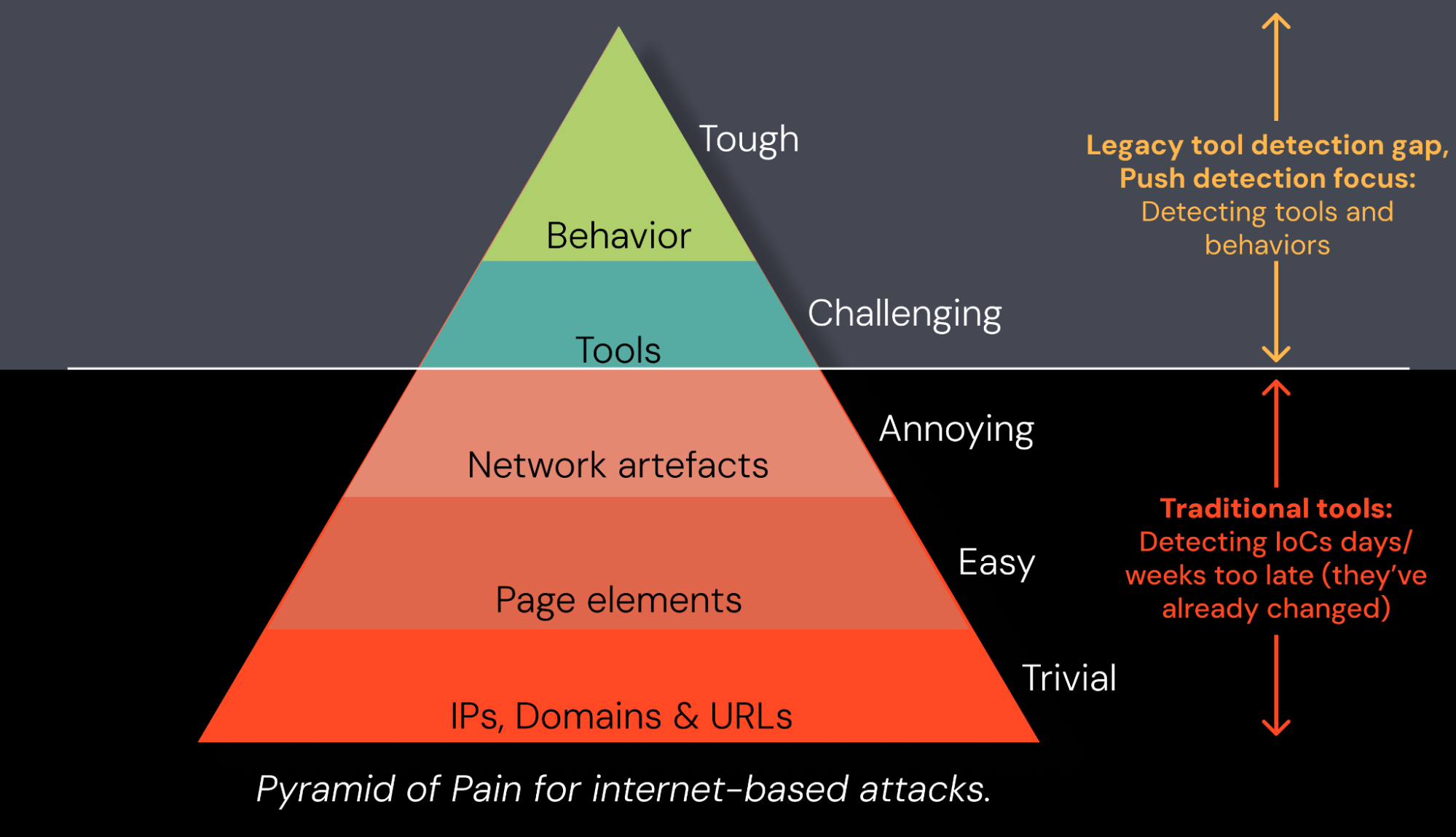
All of that visibility ends at the browser boundary. From the EDR agent's perspective, Chrome is a well-behaved process. It opens, connects to the internet, does browser things. The agent can see the process, but it can't see which tab is open, what the page is rendering, what scripts are executing, or whether the login form the user just submitted was real or a convincing cloned page. It doesn't know whether the session token that just got issued is about to leave the organization.
For browser-based attacks, EDR registers nothing unusual, because nothing unusual happened at the OS layer. EDR worked — but the attackers worked around it.
The attack surface has moved beyond the endpoint
Attackers didn't stumble into the browser. They moved there deliberately, and the tooling reflects it.
The numbers tell the story. PhaaS-driven account compromise surged 389% year-over-year according to eSentire. Fake CAPTCHA lures used in ClickFix attacks increased 563% in 2025, according to CrowdStrike, and ClickFix is now the most common initial access vector observed by Microsoft, accounting for 47% of attacks.
We see it too; in a single 30-day proof-of-value deployment at a financial services organization, Push detected 6 ClickFix attacks and 10 AiTM phishing attempts that were invisible to the existing security stack.
These aren't niche techniques. They're the dominant playbook, and none of them need to touch the endpoint to succeed, or for an attacker to achieve their goals.
AiTM phishing
AiTM phishing kits render a convincing login page inside the browser, proxy the authentication in real time, and lift the session token as it passes through. The user completes what feels like a normal login; the attacker gets a valid session. The OS saw a browser connecting to a website.
Session hijacking
Session hijacking skips authentication entirely by targeting an existing session. By stealing and replaying a token acquired by an infostealer, or a malicious browser extension, they can import the session into their own browser and continue using it — there's no password prompt, no MFA challenge, no re-authentication. The session blends into normal browser activity and generates nothing an endpoint agent was built to catch.
Device code phishing
Device code phishing is harder to spot, because the user authenticates on a legitimate identity provider page. The attacker initiates a device authorization flow and tricks the user into entering a code on the real Microsoft (or Google or GitHub) login page. The IdP issues a valid token. The phishing happened before the authentication page even loaded, and the session token goes straight to the attacker. Push has documented a 37x increase in device code phishing attacks this year, with 12+ unique kits now offering the technique.
ClickFix
ClickFix takes a different approach: the lure tricks the user into copying a malicious payload to their clipboard and running it themselves, framed as a verification step or a fix for a page that won't load. It's social engineering dressed up as a CAPTCHA. Unlike the attacks above, ClickFix is a hybrid — the delivery and lure happen in the browser, but the payload executes on the endpoint. That split is important when we get to how the detection layers divide.
The attacks look different on the surface, but the design principle is the same: stay out of the OS, stay inside the browser, and stay invisible to every tool that's watching the endpoint.
Once access to an app is established via a compromised identity, attackers can also achieve their goals without touching the endpoint. Most of the time, this involves data theft and extortion, but adversaries like ShinyHunters and Scattered Spider are also experts in cloud-based disruption and destruction techniques — with no ransomware binary dropped to user endpoints for an EDR agent to intercept.
The EDR you're using doesn't change the result
The constraint isn't vendor-specific. Every EDR's observation model stops at the OS layer because that's where the agent sits. What happens inside a browser session is outside that model by design. A better EDR doesn't close the gap; a different layer does.
Reputation-based filtering falls short too
Some platforms add URL filtering or domain reputation checks at the browser boundary, and that narrows the surface somewhat. But reputation-based filtering hits the same wall against PhaaS infrastructure engineered to rotate domains before reputation databases catch up. 89% of phishing domains are active for fewer than two days. A reputation engine can't flag infrastructure it hasn't seen, and modern phishing operations are designed around that window.
Some vendors recognize the problem
The market has started to acknowledge this. CrowdStrike's acquisition of Seraphic is a direct signal that endpoint vendors see the browser gap and want to close it, and it validates what we've been building here at Push since day one. That's a good thing for defenders — the more coverage at this layer, the better.
But endpoint vendors see the world through the endpoint. Their platforms, their telemetry models, and their detection logic are all structured around what happens at the OS layer. When they acquire browser capability, it gets pulled into that orbit. Seraphic was built to detect browser exploits by injecting into the browser's JavaScript runtime from the OS.
Attacks in vs. on the browser: why this distinction matters
In other words, their focus is on attacks on the browser itself, rather than those happening inside the browser session. That's a meaningful capability, but it's a different problem from detecting the identity attacks that dominate the threat landscape today — AiTM phishing, session hijacking, OAuth consent abuse, ClickFix — where the attacker never triggers an exploit and the browser works exactly as designed. We've written in detail aboutwhy that architectural distinction matters for buyers evaluating the category.
Push was built for the browser from the start, for exactly these attacks. The detection engine runs inside the session. The response actions operate at the session layer, blocking phishing pages, intercepting malicious clipboard payloads, and warning on suspicious OAuth consent grants, because that's where the attack is happening. That's not a philosophical matter. It determines what you can catch and how fast you can stop it.
What browser-native detection actually looks like
Network tools and reputation engines see where a user went and whether the destination had a known-bad reputation. What they can't see is what happened on the page once the user got there — whether the login form was real or a proxied clone, whether a session token was issued and where it went next.
Why network-layer detection can't keep up
At the network layer, a brand-new domain hosting a pixel-perfect Microsoft login page is indistinguishable from the real thing. There's no signal to act on — the domain is in good standing, the TLS cert is valid, and the traffic looks normal.
But it's not as simple as looking at the page itself. The phishing pages attackers are building now don't look like the clone-and-paste jobs of a few years ago. Attackers are vibe-coding imitations where the AI has constructed the page from scratch — visually identical to the real login page, but with a completely different underlying structure. They look the same to the user and to any tool doing a surface-level comparison. You need to understand how credential-harvesting mechanics actually work, how authentication relay is structured, and what behavioral fingerprints phishing kits leave behind regardless of how the page was built.
How Push detects what others miss
That's where Push's visibility and expertise intersect. Running inside the browser, Push sees DOM structure, script behavior, how credential forms are constructed, and how authentication is being relayed. Phishing attacks leave consistent behavioral fingerprints at this level regardless of what domain they're hosted on, which kit family they belong to, or whether the page was hand-coded or vibe-coded in minutes. Push catches attacks built on infrastructure that's never appeared on any blocklist, because it isn't looking at the infrastructure. It's looking at what the page is doing.
Where the detection layers divide
ClickFix illustrates how the layers split. Push identifies the page behavior delivering the lure and analyzes the clipboard payload before the user runs it — two detection points, both inside the browser, both before anything reaches the endpoint. EDR's window opens after execution. Push and EDR are watching the same attack from opposite ends of the kill chain.
Keeping pace with AI-accelerated attacks
That detection model has to keep pace with an attack surface that's evolving at machine speed. Attackers are using AI to vibe-code phishing kits, generate convincing cloned pages, and rotate infrastructure faster than any human team can track.
Push matches that pace with an agentic threat hunting pipeline: autonomous agents hunt continuously across browser telemetry from over 3 million browsers worldwide, develop hypotheses, analyze traces, and write detection rules without waiting for human initiation. Push's in-house threat researchers feed the agents the context they need — years of accumulated knowledge about how browser-based attacks actually work. The agents operationalize that expertise at a scale and speed no human team could sustain alone.
Since deploying the pipeline, we've 3x'ed our detection output (but with broad technique-level detections, not just IoC noise). New detections move from discovery to customer protection in minutes rather than the days or weeks a manual process required.
Two layers that fit together
Browser detection and endpoint detection cover different surfaces. Together they close the gap.
Response at the speed of the attack
Push doesn't just detect — the detection comes with response built in. Phishing pages are blocked before credentials are submitted. Malicious clipboard payloads are intercepted before the user can run them. Suspicious OAuth consent grants are flagged or blocked in real time, before the authorization completes. These aren't after-the-fact alerts that require an analyst to act; they're inline controls that operate at the speed of the attack.
For purely browser-based attacks like AiTM phishing, device code phishing, and OAuth consent abuse, Push is both the detection and the response layer. For ClickFix, the coverage divides: Push catches the delivery and the clipboard payload, and if the user runs it and something lands on the OS, EDR picks up what happens next.
The telemetry bridge
The integration with endpoint tooling is straightforward. Push feeds browser telemetry into the same SIEM and XDR workflows endpoint data already flows into.
EDR tells you what happened on the host. Push tells you what happened in the session before the host was involved — which login page loaded, how it behaved, whether a session token left the organization. That's the causal link most investigation timelines are missing: the bridge between "a user visited a URL" and "credentials were submitted to a phishing page that proxied authentication and captured the session token."
Without browser-layer telemetry, that chain of events is invisible — the EDR sees normal endpoint processes and the SIEM sees a successful login. An alert from either layer is more useful with context from the other, and the range of problems you can solve from inside the browser extends well beyond threat detection.
Deployment without disruption
Operationally, adding the browser layer doesn't mean adding complexity. Push deploys as a browser extension — no network changes, no TLS inspection, no browser replacement, and no impact on page load times or browsing performance.
Unlike approaches that route traffic through a proxy or render pages remotely, Push operates natively inside the browser session, which means there's no latency penalty and no disruption to how employees work.
Push has been deployed to 100,000 users in under an hour during normal business hours with zero downtime, and it sits alongside whatever endpoint and network tooling is already in place.
A quick check on your coverage
If you're running EDR and assume the browser is covered, these are worth thinking through.
Can you identify which browser extensions across your fleet have the permissions needed for account takeover?
Would anything stop a ClickFix payload before your user ran it?
Do you have visibility into every account your employees have created outside of SSO, and whether those accounts are protected by MFA or using weak, breached, or reused passwords?
When a session token gets stolen, do you have any signal when the attacker starts using it?
Push surfaces answers to all of them — across every browser session.
Defenders secured the endpoint. Attackers took note, and they've had the browser to themselves ever since. The attacker tooling that followed was built for an environment where the endpoint is watched and the session layer isn't. That's been a reasonable assumption for the better part of a decade. Endpoint vendors are starting to move toward the browser, but there's a case for purpose-built browser security rather than bolted-on features from platforms designed for a different layer. The endpoint is covered. The browser is where the work is now.
Push Security is the most powerful AI-native security tool in the browser. Think EDR, but for the browser — high-fidelity telemetry and real-time control across every session, on every device, with no browser migration required. Book a live demo to learn more.