Getting a clear picture of which solution is right for your team means understanding what problem you want to solve, and identifying if the browser is the best place to solve that problem. To help you navigate this, we've ranked the security problems you can solve in the browser by security value and browser fit.
Getting a clear picture of which solution is right for your team means understanding what problem you want to solve, and identifying if the browser is the best place to solve that problem. To help you navigate this, we've ranked the security problems you can solve in the browser by security value and browser fit.
Browser security solutions are one of the most significant additions to the enterprise security stack in recent years — and the data shows it. The browser is where 85% of work now happens, where AI tools are accessed, and where attackers increasingly choose to strike.
According to Omdia's 2026 research, browser security is already a top-five priority for 88% of organizations, and the top priority for 26%. Of those that have deployed browser security solutions, the results speak for themselves: security leaders consistently report high satisfaction with the visibility and control they gain at a layer that was previously a blind spot.
But browser security is a nascent category. Getting a clear picture of which solution is right for your team, and how to get the most out of it, isn't straightforward. Current solutions on the market serve a wide range of IT and security use cases, with varying degrees of depth and differentiation across them. Not all use cases are equal in terms of their security value, and not all of them are best addressed in the browser.
This article ranks the security problems that browser security solutions can address by the value they deliver: a combination of the risk reduction on offer, and the degree to which the browser is genuinely the best (or only) layer to solve the problem.
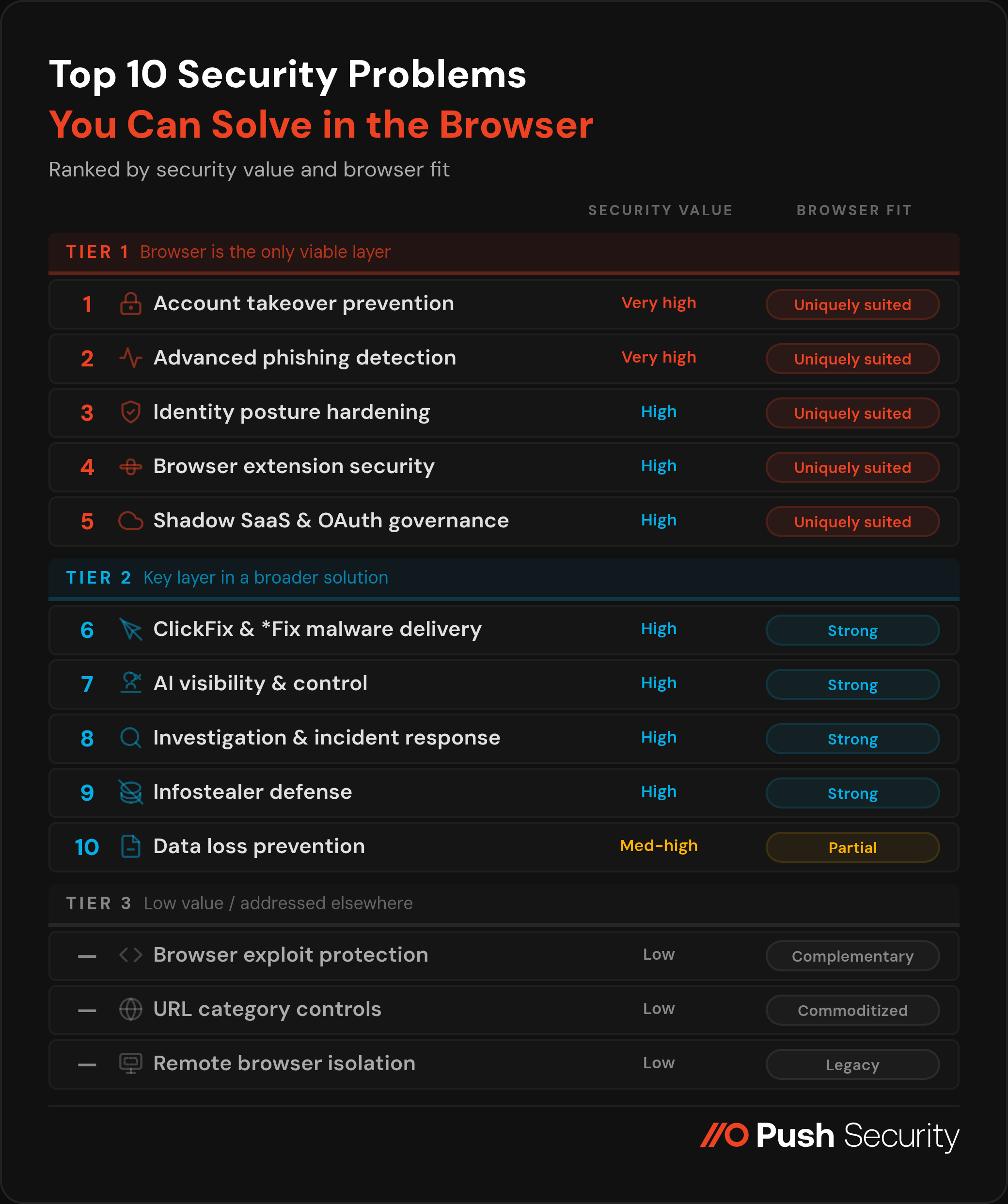
#1 — Account takeover prevention: detecting credential attacks across all vectors
Security value: Very high | Browser fit: Uniquely suited
Account takeover (ATO) is the dominant entry point for enterprise breaches: 80% of all modern breaches involve compromised or stolen identities. The attack surface is far wider than most identity tooling can see: credential stuffing, password spraying, ghost logins (password-based fallback authentication that persists after SSO is configured), weak or reused credentials on shadow SaaS apps, and accounts where MFA was never enforced.
According to Cloudflare's 2026 Threat Report, 63% of all human logins involve credentials already compromised elsewhere, and 94% of all login attempts originate from bots. The Snowflake breach — 165+ organizations compromised, 1 billion+ records stolen — was powered almost entirely by ghost logins: accounts missing MFA that were susceptible to credential stuffing. It's particularly telling that 80% of the accounts impacted had prior breach exposure.
Every login, regardless of method or app, happens inside a browser session. That makes the browser the only layer capable of observing the complete authentication picture. Push's telemetry illustrates the gap: of the last million logins observed, 1 in 4 were password logins rather than SSO, 2 in 5 lacked MFA, and 1 in 5 used a weak, breached, or reused credential — none of which is visible to an IdP that only surfaces authentications flowing through it.
For organizations with contractors and BYOD users, the browser extension is also the only enterprise control deployable on devices that can't be MDM-enrolled — extending ATO detection to exactly the place where, per Verizon DBIR 2025, 46% of infostealer infections originate.
#2 — Detecting and stopping advanced phishing: AiTM, multi-channel delivery, and zero-day lures
Security value: Very high | Browser fit: Uniquely suited
Adversary-in-the-Middle (AiTM) phishing — where an attacker's reverse proxy intercepts credentials and session tokens in real time — has become the standard technique for bypassing MFA at scale. eSentire's 2026 Threat Report attributes 63% of account compromise incidents to PhaaS kits, with account compromise surging 389% year-over-year.
Traditional phishing controls are also no longer in the right place to intercept these attacks. The delivery channel has shifted decisively away from email: Mandiant M-Trends 2026 found email phishing dropped from 14% to 6% as an infection vector, and Push data shows roughly 1 in 3 phishing payloads intercepted were delivered outside email entirely — via search engine malvertising, social platforms, and compromised websites. Meanwhile, 89% of phishing domains are active for less than two days, making blocklist-based detection structurally too slow — attackers can spin up, tear down, and move on before blocklists can catch up.
Modern phishing plays out entirely inside the browser session. The only detection layer that can see the phishing page structure, the credential entry, and the anomalous token context is the browser itself. Browser-native detection analyses page behavior rather than matching known-bad domains, which means it fires on zero-day kits regardless of how recently the infrastructure was stood up. Controls like credential entry guardrails add an additional layer — blocking corporate passwords from being submitted to unauthorized domains independently of content and behavior-based detections.
#3 — Identity posture hardening: enforcing security across the apps your IdP doesn't manage
Security value: High | Browser fit: Uniquely suited
The first challenge is knowing what you're protecting. Every identity an employee creates — every app they sign up to, every password they set, every login that bypasses SSO — is an authentication event that happens inside a browser session. The browser is the only layer that observes all of these events regardless of whether the app is sanctioned, managed, or even known to IT. Solutions that rely on API-level integrations with known apps, network traffic inspection, or email sign-up notifications can only ever build a partial picture, because they can only see apps they already know about. The browser sees the login itself, which means it discovers the identity at the moment it's created or used — authentication method, password strength, MFA status, and all.
The average employee logs into more than 15 applications, the majority with logins outside SSO coverage. IdP policies and SSPM findings have no mechanism to intervene in authentication flows they don't control. 47% of BEC victims had not enforced MFA in their Microsoft 365 environment (S-RM Cyber Insights 2026) — and the gap is larger still once you consider shadow SaaS.
But discovery without enforcement is just an inventory problem. Being in the browser means that you're in a great position to act on what it finds at the moment of authentication. Browser-native guardrails that prompt MFA enrollment, guide users toward stronger credentials, and redirect to SSO login paths close the gap at scale, on every app, including those the IdP has never seen. They also produce the continuous, auditable evidence of MFA coverage and credential hygiene across the full application estate that regulators, insurers, and auditors increasingly require — evidence that no IdP-centric tool can provide for apps outside its scope.
#4 — Browser extension security
Security value: High | Browser fit: Uniquely suited
Browser extensions have become one of the most talked-about attack surfaces in security over the past 18 months, and understandably so — a string of high-profile supply chain compromises have collectively impacted tens of millions of users since late 2024 (Cyberhaven, DarkSpectre, Trust Wallet, among many others).
Analysis of 20,000+ extensions across Push customers found 46.76% have the permission combinations needed to perform account takeover with no user interaction, making permissions-based risk scoring effectively useless as a triage tool. The real threat model is not malicious extensions at install time — it's legitimate extensions that become malicious after an ownership transfer, developer account compromise, or silent update push. Every major extension supply chain breach of the past 18 months scored as low-risk immediately before compromise.
SWGs and network tools are structurally blind to this attack surface: a malicious extension exfiltrating session tokens generates no anomalous network signal — its traffic is indistinguishable from normal browsing. Endpoint agents have no visibility into extension behavior at the session level. Extension inventory, supply chain change monitoring — ownership transfers, permission escalations, developer contact changes — and enforcement all require browser-layer access by definition.
#5 — Shadow SaaS discovery and OAuth integration governance
Security value: High | Browser fit: Uniquely suited
Shadow SaaS discovery shares DNA with identity posture hardening (#3) — both start with the same browser-native visibility into login events that no other layer can replicate. Where identity posture focuses on hardening how employees authenticate, shadow SaaS discovery focuses on what they authenticate to: surfacing the full estate of applications in use across the organization, including those that IT has never sanctioned or even heard of.
OAuth integration governance is the component of shadow SaaS that is both the most potentially damaging and the hardest to surface through other means. The SaaS-to-SaaS OAuth pivot is now an industrialized attack pattern.
The ShinyHunters Salesforce campaign — which compromised 1,000+ organizations and 1.5 billion records — demonstrated the full chain: the attacker didn't stop at stealing customer data but harvested OAuth tokens, AWS access keys, and Snowflake tokens from breached tenants and pivoted through connected services like Salesloft, Drift, and Gainsight to reach hundreds more organizations.
The Context.ai → Vercel chain followed the same logic — stored OAuth tokens from a forgotten AI app trial provided the bridge into Google Workspace, internal dashboards, and API keys. These are not isolated incidents; they are the repeatable playbook for extracting maximum value from a single compromise through the trust relationships that OAuth connections encode.
Every OAuth consent grant transits the browser — the authorization prompt, the scope disclosure, the user's approval click, and the redirect that completes the grant all happen inside a browser session — which makes the browser the only layer where an unwanted grant can be intercepted before the token is issued and the persistent access path is created. Once a token exists, the damage is done: it survives password resets, MFA changes, and session revocations, and revoking it after the fact requires first knowing it was granted, which most organizations do not.
#6 — Blocking ClickFix and social engineering-based malware delivery
Security value: High | Browser fit: Strong for interception — shared with endpoint security for execution. ConsentFix is a browser-native exception that is T1-aligned.
ClickFix was the most common initial access vector reported by Microsoft in 2025, accounting for 47% of observed attacks. CrowdStrike's 2026 Global Threat Report identified fake CAPTCHA lures as the most common malware download type, increasing 563% year-over-year. The technique writes a malicious command to the victim's clipboard and social-engineers them into executing it. It is fileless (bypassing download scanning), user-executed (bypassing endpoint behavioral detections), and 4 in 5 ClickFix payloads intercepted by Push arrived via search engines — not email (bypassing email anti-phishing controls).
The browser is the earliest and most effective intervention point — detecting the clipboard injection and social engineering lure before anything reaches the endpoint in executable form. But the problem doesn't end at the browser boundary: once the command has been pasted and run, detection and remediation become endpoint problems, and a mature defense requires both layers. The broader *Fix family — FileFix, InstallFix, and similar derivatives — follows the same pattern, with the browser providing the critical early-warning layer within a defense that spans browser and endpoint.
ConsentFix, a novel technique discovered by Push researchers when we intercepted a live campaign attributed to Russian state-linked APT29, is a notable exception: it is fully browser-native with no endpoint component, using a manipulated OAuth consent flow rather than clipboard-injected malware. ConsentFix is better understood as an OAuth attack than a malware delivery technique — it signals the direction of travel as attackers seek to eliminate the endpoint detection surface entirely and operate purely within browser-native mechanisms like OAuth.
#7 — AI visibility and control: enforcing which AI tools employees can use and how
Security value: High | Browser fit: Strong for access enforcement — but AI governance is not a new security problem so much as a force multiplier on existing ones
AI adoption is outpacing security governance at nearly every organization, and 71% of organizations are concerned about data leakage via unsanctioned AI apps. But the security problems that AI creates are not, for the most part, novel — they are existing Tier 1 problems amplified by a new category of tooling. Shadow AI apps are shadow SaaS (#5). AI OAuth integrations are OAuth governance (#5). AI browser extensions are extension security (#4). The risk of employees using personal AI accounts — 46% of sensitive inputs to AI tools are sent via personal accounts — is an identity posture problem (#3).
The component parts that allow you to govern AI are individually Tier 1 capabilities, and the browser is the best single layer for gaining visibility and control over AI usage — it sees the apps, the OAuth grants, the extensions, and the account context. But a complete end-to-end solution also requires a presence on the endpoint layer (for local AI tools, IDE-integrated agents, and API-level usage that never touches the browser), and prompt-level DLP on sanctioned tools is better handled by platform-native controls than by browser-layer observation.
Enterprise AI platforms — Claude, ChatGPT Enterprise, Microsoft Copilot, Gemini for Workspace — increasingly provide native prompt logging and DLP controls on their enterprise plans, and these are richer and more reliable for sanctioned tools than browser session-layer monitoring. The right architecture is complementary: use the browser to enforce which AI tools employees can access and ensure they reach the corporate tenant rather than a personal account, then rely on platform-native controls to govern activity within that environment.
The browser is what makes platform controls effective — if employees are using personal accounts, there are no enterprise audit logs to inspect. And for the growing category of AI agents, agentic browsers, and MCP-connected tools that operate through OAuth grants rather than direct user interaction, the browser is where the consent decisions that authorize those agents are made.
#8 — Investigation acceleration and incident response: closing the missing middle
Security value: High | Browser fit: Strong — fills a structural gap complementary to endpoint, network, and identity telemetry
Endpoint logs show what processes executed. Network logs show traffic destinations. IdP logs show authentication events. None of them show what happened inside the browser session — the phishing page the user saw, the credentials they entered, the malicious OAuth consent grant, the data uploaded or pasted to an unsanctioned service. This is the missing middle of modern incident investigations, and for the 48% of intrusions involving browser-based activity, the absence of browser telemetry is a significant investigative gap.
Browser-layer telemetry fills that gap with a fundamentally different quality of signal: what users actually clicked, what pages loaded and how they behaved, what credentials were entered, what session activity followed — structured, high-fidelity data from inside the session where the attack played out. That's the difference between inferring what happened and seeing it directly, and it determines scope, drives containment decisions, and provides the direct evidential record that neither endpoint DLP nor network monitoring can supply for browser-native attacks.
Browser telemetry is a key addition to the investigative picture. Investigations are inherently multi-source — without browser data, reconstructing an incident from EDR, network, and IdP logs won't tell you the full picture (particularly when attacks are increasingly delivered outside of email, intercepting users as they browse the internet normally).
The browser provides the causal link that other sources miss: the bridge between "a user visited a URL" and "credentials were submitted to a phishing page that issued a session token now being replayed from an attacker-controlled browser." Integrated with SIEM and SOAR platforms, that signal enables automated response workflows to execute on high-confidence detections without waiting for manual triage.
#9 — Infostealer defense: detecting exposure and blocking delivery
Security value: High | Browser fit: Strong for delivery interception and stolen factor detection — complementary to endpoint security for execution
Infostealers are the upstream supply chain for a disproportionate share of the most damaging enterprise attacks — harvesting credentials, session cookies, and browser profile data en masse from infected devices, then selling the outputs on infostealer markets for use in credential stuffing, ATO, and ransomware campaigns.
The 2025 Verizon DBIR found 54% of ransomware attacks traced back to infostealer-enabled credential theft. Microsoft reports 39,000 session token attacks per day, the majority sourced from infostealer-harvested cookies. The Snowflake breach we mentioned earlier was powered entirely by infostealer-harvested credentials: stolen years earlier, never rotated, and used to authenticate directly to tenants that lacked MFA. More than 80% of compromised accounts had prior credential exposure. The Okta breach followed the same pattern, beginning with an infostealer on an engineer's personal device harvesting credentials synced to their personal Google profile on a corporate browser.
The browser is relevant at two points in the infostealer kill chain. First, delivery interception: ClickFix (covered in #6) is now the primary infostealer delivery mechanism, and the browser is the only layer that can intercept it before execution. Second, detecting stolen factors when attackers attempt to use them — and infostealers produce two categories of stolen factor that the browser can guard against.
Stolen credentials can be identified at the point of login: browser-layer detection flags credentials that appear in known breach datasets, catching infostealer-harvested passwords being replayed in credential stuffing campaigns before the account is compromised.
Stolen session tokens are caught through a different mechanism: sessions originating in instrumented browsers carry a marker, and when a token subsequently appears in an un-instrumented browser it is a confirmed stolen session — catching infostealer-harvested cookies being replayed regardless of how or where the token was originally harvested.
This is particularly critical for the 46% of infected devices that are unmanaged where EDR is absent and the stolen credentials and session tokens will never be detected at the endpoint. Infostealer execution remains an endpoint problem; the browser closes the delivery and replay gaps that endpoint tools miss.
#10 — Data loss prevention: a key component of effective DLP, but not the full picture
Security value: Medium-high | Browser fit: Partial — complementary to dedicated DLP
File uploads to unsanctioned services, sensitive data pasted into AI tools, and exfiltration through personal accounts are genuine and growing risks that traditional email and endpoint-centric DLP tools were not designed to catch. Browser-layer controls provide real value here — particularly for BYOD users and contractors, where endpoint DLP agents cannot be deployed and the browser is the only available data loss visibility.
The honest scope: browser-layer DLP does not cover email-based loss, endpoint-to-endpoint transfers, or cloud API exfiltration. It closes specific and important gaps within a broader DLP strategy, not a replacement for one. A further distinction for organizations evaluating browser DLP for secure third-party access: full-stack enterprise browsers can enforce deeper output controls — watermarking, obfuscation, screenshot and print restrictions — at the OS rendering level that browser extensions cannot reliably replicate. Extension-based browser DLP is strongest for upload, input, and access control use cases rather than OS-level output restriction.
Tier 3 — Lower Value: A problem best addressed outside of the browser
Browser exploit protection (narrow RCE/sandbox sense) ranks lower because browser zero-days represent just 9% of all zero-days reported to Google, and 82% of attack detections are now malware-free (CrowdStrike 2026). This is a problem for browser vendors to solve, and it's not a big enough problem to warrant enterprises investing in additional mitigating controls.
Domain and URL category controls offer genuine browser-layer value but are commoditized by SWG and DNS filtering tools most organizations already operate. This can be provided in the browser, sure (and it's something we do at Push) but offers limited security value in terms of making a difference against modern attacks that quickly rotate these kinds of indicators and are designed to blend in.
Access management — ZTNA, VPN replacement, PAM, BYOD access control — is an IT infrastructure and access architecture problem, not a security operations problem, and belongs to a different buyer with a different evaluation frame. There are numerous (typically full-stack) Enterprise Browser solutions on the market that address IT use cases like this well.
Remote browser isolation addresses browser exploit risk rather than the identity-first attacks that represent the majority of current enterprise browser risk, and introduces UX friction that limits deployment at scale. When it triggers, it introduces latency but still fails to detect and stop browser-native attacks.
How Push Security maps to the highest-value security use cases
Push is purpose-built to address all of these problems using a flexible browser extension — plug into any browser with no migration, no host agent deployment, and no IT overhead — that delivers telemetry and control from day one, and extends coverage to every enrolled browser regardless of device ownership.
Security use case | How Push addresses it |
Account takeover prevention | Surfaces and fixes ghost logins, weak and breached credentials and missing MFA controls across every app and device — including shadow SaaS and unmanaged devices invisible to the IdP. Push also detects and stops the attack techniques that typically lead to ATO early in the kill chain and before an account can be compromised. |
Advanced phishing detection | Behavioral page analysis detects phishing kits regardless of whether the domain is known-bad. Credential entry guardrails block corporate passwords from being submitted to unauthorized domains. TTP-based detection remains effective as attacker infrastructure rotates. |
Identity posture hardening | Enforces MFA, strong credentials, and SSO adoption across every app the IdP doesn't manage. Produces continuous, auditable MFA coverage and credential hygiene evidence across the full application and device estate. |
Browser extension security | Live extension inventory with supply chain change event monitoring — ownership transfers, permission escalations, developer contact changes — rather than static risk scoring. Supports default-deny allowlisting and remote extension removal. Blocks known-bad malicious extensions automatically. |
Shadow SaaS and OAuth governance | Discovers shadow SaaS from actual login events with full authentication context. Monitors and blocks OAuth consent flows — including AI and MCP integrations — in real time before persistent access paths are created. |
ClickFix and the *Fix family | Detects and blocks ClickFix lures, clipboard injection, and browser-native variants like ConsentFix in real time — before the payload executes or OAuth key material is captured. |
AI visibility & control | Enforces which AI tools employees can access and routes usage to corporate tenants. Governs AI browser extensions and blocks OAuth consent grants to unapproved AI applications — drawing on the same Tier 1 capabilities (OAuth governance, extension security, shadow SaaS discovery) that make this possible. |
Security investigations & incident response | High-fidelity session telemetry — page loads, credential entries, DOM changes, OAuth grants — fills the missing middle that endpoint, network, and IdP logs leave open. Feeds directly into SIEM and SOAR for automated response. |
Infostealer defense | Intercepts ClickFix-based infostealer delivery before execution. Detects token replay in unenrolled browser contexts — catching post-theft abuse from AiTM-sourced tokens and infostealer-harvested cookies, including from unmanaged devices. |
Data loss prevention | Observes file uploads, downloads, and sensitive data inputs across all applications. Extends data loss visibility to BYOD and contractor devices where endpoint DLP cannot reach. |
Domain and URL category controls | Custom URL blocklists with wildcard support and REST API management for threat intelligence feed sync. Application category blocking restricts access to classes of apps (file-sharing, unsanctioned AI tools) configurable by user group. Domain categorization bringing SWG-style category blocking natively to the browser without a network proxy. |
Push Security is the most powerful AI-native security tool in the browser. Think EDR, but for the browser — high-fidelity telemetry and real-time control across every session, on every device, with no browser migration required. Book a live demo to learn more.