Mobile phishing: how to detect and stop QR code (quishing) and SMS (smishing) phishing
QR code phishing (quishing) and SMS phishing (smishing) bypass email security entirely. Learn how to detect phishing attacks regardless of how or where the malicious link was delivered.
QR code and SMS phishing bypass email security entirely
QR code phishing (quishing) and SMS phishing (smishing) deliver phishing links through channels that email security cannot inspect. QR codes encode URLs as images — embedded in emails, documents, or physical media — that text-based scanners can't parse. SMS messages arrive directly on mobile devices, often outside any corporate security perimeter. In both cases, the payload is typically the same as email-delivered phishing: an AiTM reverse proxy using a cloned login page, a device code phishing lure, or a malicious OAuth consent prompt. The attack technique at the destination is identical; only the delivery channel differs.
How mobile phishing attacks like quishing and smishing work
Phishing is not just an email problem. Attackers increasingly use mobile channels to deliver lures that lead users straight into a browser session.
- The attacker sends a phishing link via SMS, messaging apps, or embeds it in a QR code
- The user scans or taps the link on their mobile device
- The link opens in a browser, often outside corporate protections
- The user interacts with a phishing page, entering credentials or approving access
- The attacker captures credentials, sessions, or tokens and gains access
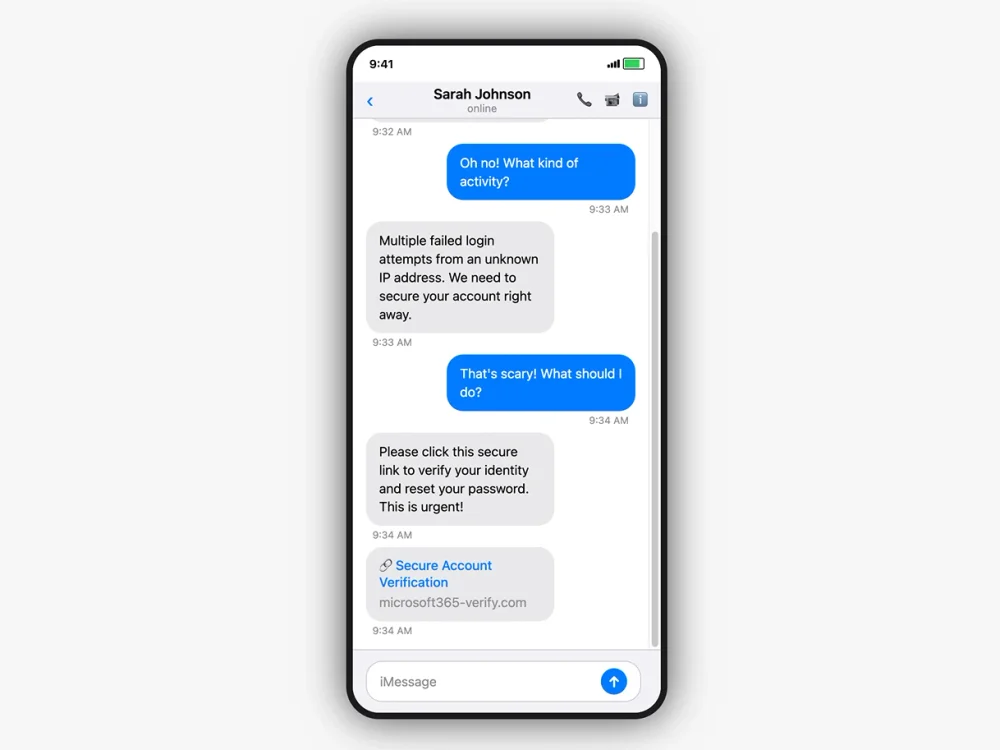
The attack at the destination is indistinguishable from email-delivered phishing — only the delivery channel differs. Attackers use techniques like splitting QR codes across multiple images, embedding them in PDF attachments, constructing them from Unicode characters, and adding multiple URL shortener redirects to evade the email gateways that do attempt QR code scanning. SMS phishing leverages the urgency and implicit trust of text messaging — messages impersonate IT helpdesks, MFA prompts, or delivery notifications. The Scattered Spider ecosystem has used SMS-delivered phishing extensively, often combined with helpdesk social engineering.
Why email security misses QR code and SMS phishing
Mobile phishing bypasses many of the controls organizations rely on. There is no email to scan, no attachment to analyze, and often no corporate device involved.
Even when QR codes are delivered by email, most gateways can't reliably parse them. The phishing URL is encoded in an image, not in text. Evasion techniques — splitting codes across images, SVG rendering, Unicode construction — make detection unreliable. When the phishing link is opened, the activity happens inside a mobile browser session, outside the visibility of traditional email and endpoint tools.
The fundamental limitation is architectural: email security operates at the delivery channel, and QR codes and SMS exist specifically to bridge to a different channel. Securing the delivery channel doesn't help when the attacker chooses a channel you don't control. Security teams may only see the result — a login event or suspicious activity — without visibility into how the user was targeted or what they interacted with.
How Push detects phishing regardless of delivery channel
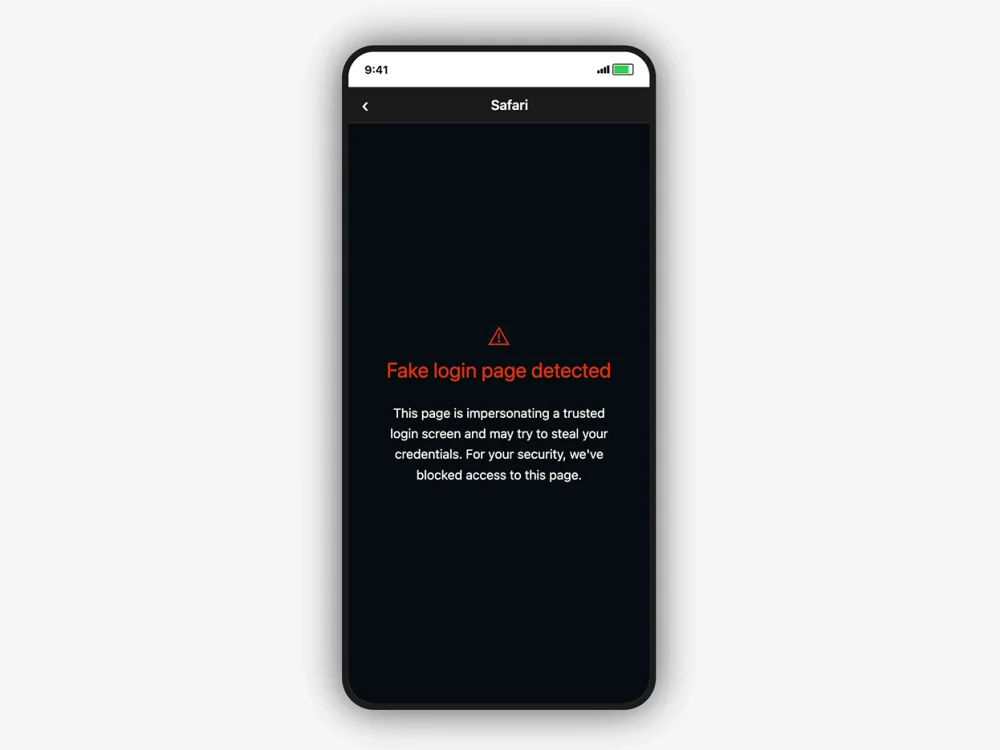
Push operates inside the browser, regardless of how the user got there. Whether a link is opened from SMS, a messaging app, or a QR code, Push analyzes the page and detects phishing behavior in real time. The same behavioral detection that catches email-delivered phishing — AiTM kit detection, cloned login page identification, credential harvesting prevention — applies regardless of delivery channel.
QR code and SMS phishing frequently target mobile devices — personal phones that users bring to work. Push's browser extension covers these BYOD devices without requiring MDM, providing phishing detection on the unmanaged and contractor devices that QR code attacks are designed to reach. Because detection happens at the point of interaction, Push can stop credential harvesting and malicious flows before access is granted — security teams gain visibility into attacks that originate outside traditional channels, without needing control over the delivery method.
Frequently asked questions
QR code phishing uses QR codes to deliver phishing links — typically embedded in emails, documents, or physical media. When the user scans the code, they're directed to a phishing page. The technique bypasses email security because the phishing URL is encoded inside an image that text-based scanners can't reliably parse.
QR codes are inherently opaque — the user can't see the destination URL before scanning. The phishing page loads on the user's phone, which may lack corporate security controls. Push detects the phishing destination regardless of how the user arrived at it.
Detection at the phishing page itself, because QR codes bypass the email delivery channel where most phishing controls operate. If the user opens the link in a Push-protected browser, the phishing page is detected by the same behavioral analysis that catches email-delivered phishing.
The channel-agnostic nature of browser-based detection is critical for QR code attacks — the entire purpose of QR code delivery is to evade email-centric controls.
A tool that detects phishing at the destination page level rather than the delivery channel. QR codes, SMS, and social media all bypass email security.
Push provides channel-agnostic detection — whether a phishing link arrives via QR code, SMS, WhatsApp, LinkedIn DM, or search ad, Push detects the phishing page when the user opens it in a protected browser.
Most email security tools struggle with it. The phishing URL is encoded inside an image, and many gateways don't reliably decode QR codes embedded in email bodies, attached PDFs, or images. Attackers use techniques like splitting QR codes across multiple images, using Unicode characters, and embedding them in PDF attachments.
Email security is also structurally limited to the email channel — it can't detect QR codes delivered via physical printouts, messaging apps, or social media. Push provides the backstop by detecting the phishing page when it loads in the browser.
SMS phishing bypasses email security entirely and arrives on mobile devices that may lack corporate security controls. The most effective defense is behavioral phishing detection in the browser — catching the phishing page regardless of whether the user clicked a link in a text message, email, or anywhere else.
Push detects phishing destinations regardless of delivery channel. If the SMS link opens in a Push-protected browser, the phishing page is detected behaviorally.
QR codes encode URLs as images. Email gateways scan text-based content — URLs, headers, and attachments. Even gateways with QR code scanning face evasion: QR codes split across multiple images, embedded in PDFs, constructed from Unicode text, or generated as SVG images.
The fundamental limitation is structural. Email gateways operate at the delivery channel, and QR codes exist specifically to bridge to a different channel. Push operates at the destination — detecting the phishing page when it renders.
Their device opens a URL — typically a phishing page designed to steal credentials, session tokens, or OAuth consent. The destination may be an AiTM reverse proxy, a cloned login page, or an OAuth consent page. The user experience feels normal: scan the code, see a login page, enter credentials. The attack is over in seconds.
If Push is deployed, it detects the phishing page behaviorally when it loads — regardless of whether the URL has been reported before.
Yes. Push detects phishing at the browser level — analyzing the destination page, not the delivery channel. Whether the link arrives via email, SMS, QR code, social media, search ads, messaging apps, or physical media, Push detects the phishing page when it loads in a protected browser.
Push's behavioral detection targets the phishing technique (AiTM kit behavior, cloned login pages, credential harvesting) rather than the delivery mechanism.
QR codes encode the phishing URL as an image rather than a clickable text link. Email gateways that scan URLs and rewrite them for time-of-click analysis can't parse URLs embedded in QR code images.
Evasion techniques include embedding QR codes in PDF attachments, splitting them across multiple images, generating them as SVGs, and constructing them from Unicode characters. Some campaigns add multiple URL shortener redirects before the phishing destination.
Phishing is the broad category — social engineering to steal credentials, authorization, or execution. Smishing is phishing via SMS. Quishing is phishing via QR codes. The technique at the destination is often identical (AiTM proxy, cloned login page, credential harvesting); only the delivery channel differs.
The distinction matters for defense because most security investments focus on email. Push's channel-agnostic detection addresses all three — detecting the phishing page regardless of delivery method.
Latest resources


