Blocking AI tools doesn't stop employees from using AI — it stops you seeing how they use it. The solution: make the governed path easier than the workaround.
Blocking AI tools doesn't stop employees from using AI — it stops you seeing how they use it. The solution: make the governed path easier than the workaround.
Every security team that's blocked an AI tool at the network level has had the same experience three months later: The tool they blocked isn't in use, but a dozen they've never heard of are.
The block didn't stop employees from using AI. It just prevented the security team from seeing what’s actually happening.
The data backs up this pattern. Push telemetry shows that the average organization has 16 AI apps, 17 AI browser extensions, and 17 AI OAuth integrations in active use during a typical week — most unapproved. Meanwhile, Okta found that 80% of employees who use unapproved AI tools do so because it's easier to use their own accounts, and 57% because the approval process is too slow.
The organizations getting this right have stopped treating AI governance as an access-control problem — which tools to allow, which to block — and started treating it as an invitation to build out an infrastructure to enable appropriate use. Employees are going to use the tools they need to get their work done. The question is whether they'll use them on a path you built and instrumented, or on one they carved themselves.
This guide walks through how to build that paved path. Using Push, you can:
Identify shadow AI, including personal accounts on approved corporate apps, AI browser extensions, OAuth integrations into sensitive systems, and AI browser usage.
Enforce policies on data flows into and out of AI apps, including blocking unapproved file uploads, downloads, and clipboard pastes; and monitoring AI chat transcripts.
Use just-in-time guardrails to intercept users accessing unapproved AI tools and point them at approved alternatives.
Block personal account access to AI apps, even those approved for corporate use, preventing data loss in unapproved tenants.
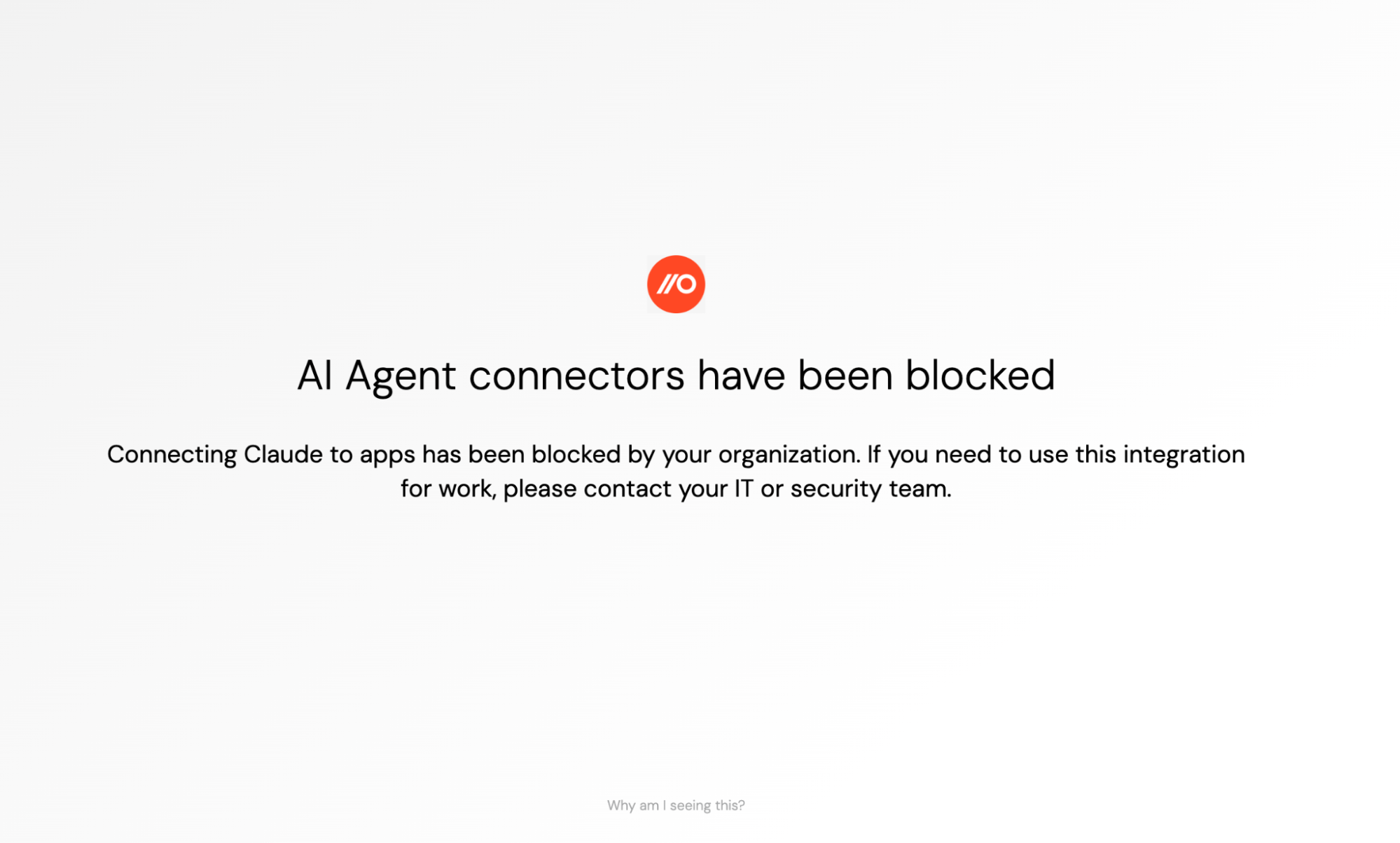
Prevent unwanted MCP connections with app-agnostic controls.
Automate a lot of the work so you don’t burn out your team as the AI landscape continues to shift.
What is shadow AI, and why can't you manage it like shadow IT?
Shadow AI is any use of AI tools, services, or integrations that happens outside an organization's security governance and visibility. Security teams have been managing shadow SaaS for years, but shadow AI can't be addressed with the same playbook — for three reasons.
First, it spans multiple categories that each need different controls: unapproved AI apps, personal accounts on approved corporate AI tools, AI browser extensions, and OAuth integrations into corporate systems. Blocking unapproved apps doesn't address personal accounts on approved ones, and neither solves the extension or OAuth problem.
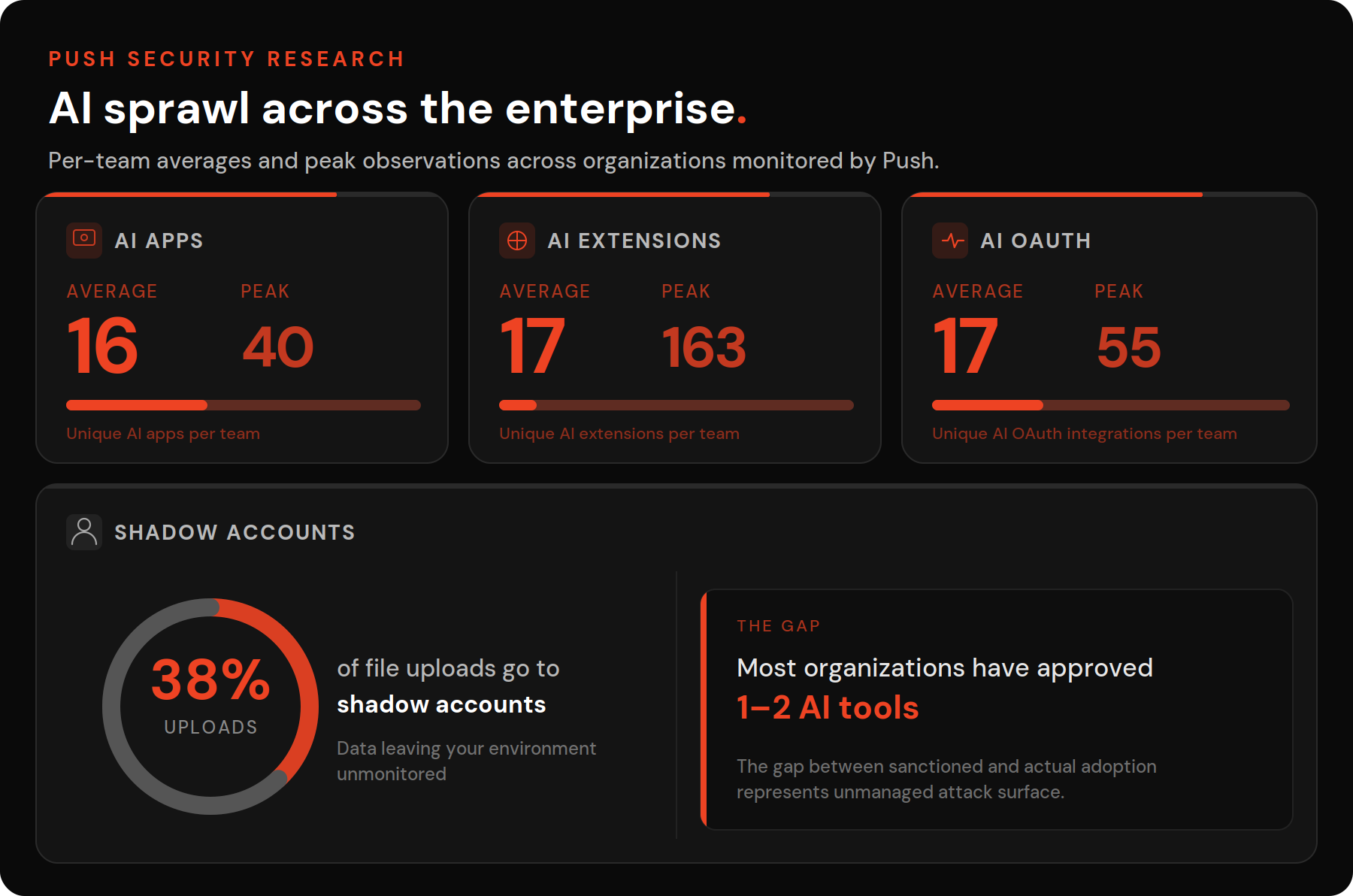
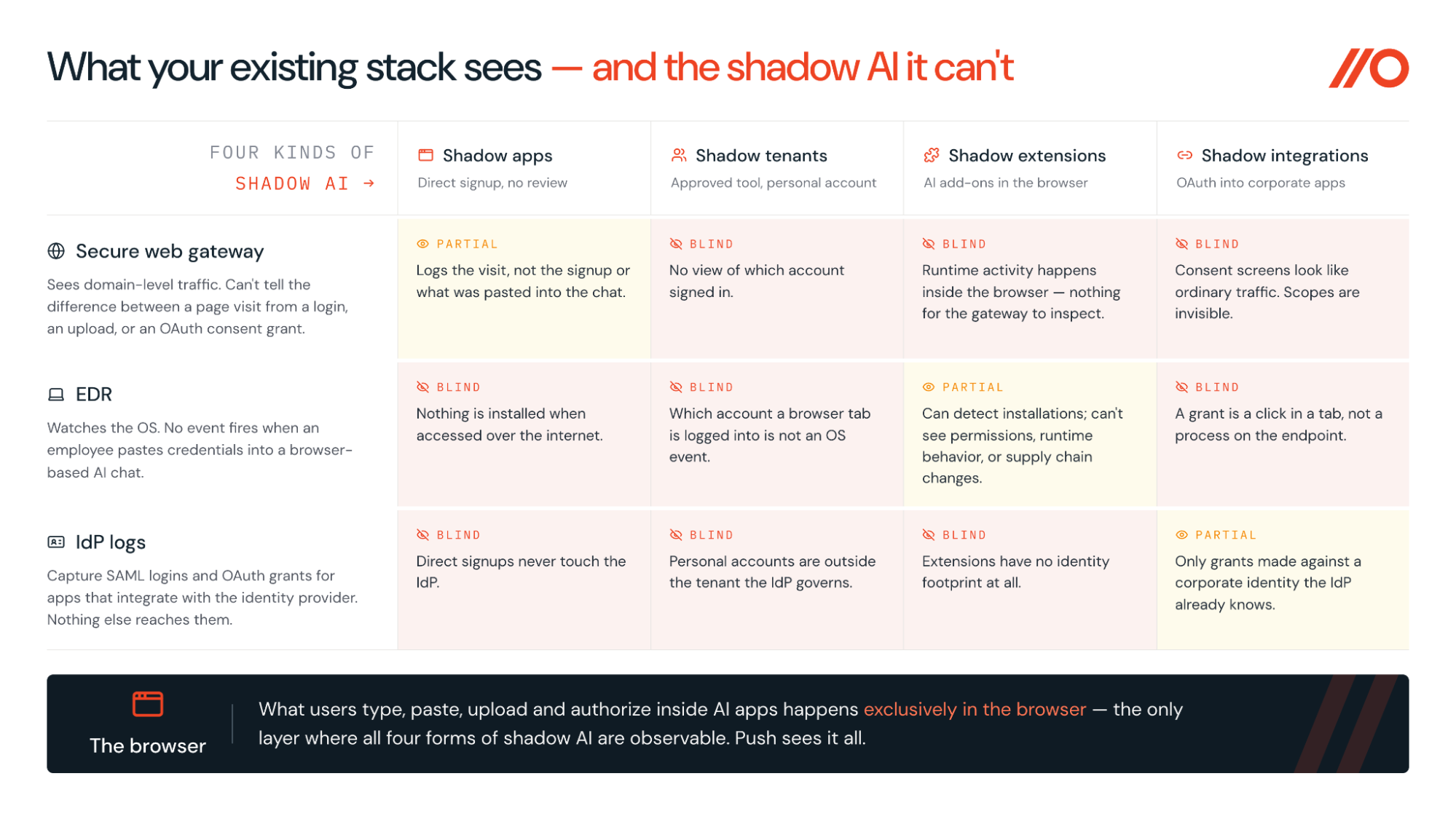
Second, the tools most organizations rely on to manage shadow SaaS — SWGs, CASBs, EDR, IdP logs — are structurally blind to shadow AI. An SWG sees that someone visited an AI domain but can't tell you whether they logged in, pasted source code into a prompt, or granted OAuth access to your Google Workspace tenant. EDR doesn't see browser-layer activity at all. IdP logs capture OAuth grants routed through the identity provider but miss tools accessed via direct signup or personal accounts. Instead, the activity security teams need to see happens primarily inside the browser.
Third, the risk profile is different. Shadow AI tools increasingly function as hubs — connected via OAuth integrations and MCP to email, cloud storage, code repositories, and other high-value systems. They leak sensitive data outward (employees paste source code, credentials, and internal documents into prompts daily) while simultaneously expanding the attack surface inward (compromise a single AI app and an attacker inherits whatever access the employee granted it, turning one ungoverned tool into a pivot point across the SaaS estate).
Attackers are already exploiting this interconnectivity — from malvertising campaigns that impersonate AI tools to steal credentials, to leveraging OAuth consent grants in supply chain attacks.
Why blocking AI usage fails
The instinct to block AI tools makes sense. Executives are asking about AI risk to the business, a new tool appears every week, and blocking unapproved apps feels like a quick way to stop the bleeding.
Unfortunately, blocking doesn't work for long. The latest security frameworks — including the SANS AI Security Maturity Model — all agree: Block-based AI policies drive usage underground rather than preventing it.
A block-based AI policy may feel like risk management, but practitioner experience shows that it typically drives AI usage underground rather than preventing it. The goal is not to eliminate AI use; it is to bring it into visibility where it can be governed.
These kinds of barricades also fail for a structural reason: They're built on the network perimeter, and AI usage doesn't cross the perimeter in ways network tools can inspect.
The most damaging consequence of blocking isn't the workarounds themselves — it's the loss of visibility. To begin building a better path for employees, you have to start with seeing what's actually happening.
Using Push to discover, govern, and control shadow AI
Push Security is a browser security platform that gets you the vantage point you need to start addressing shadow AI. Push deploys as a lightweight extension to employees' existing browsers rather than requiring a full browser migration, giving security teams visibility into browser-layer activity that network and endpoint tools structurally lack.
Push discovers AI tools through automatic app discovery, allowing you to identify applications from actual browser login events rather than network traffic logs.
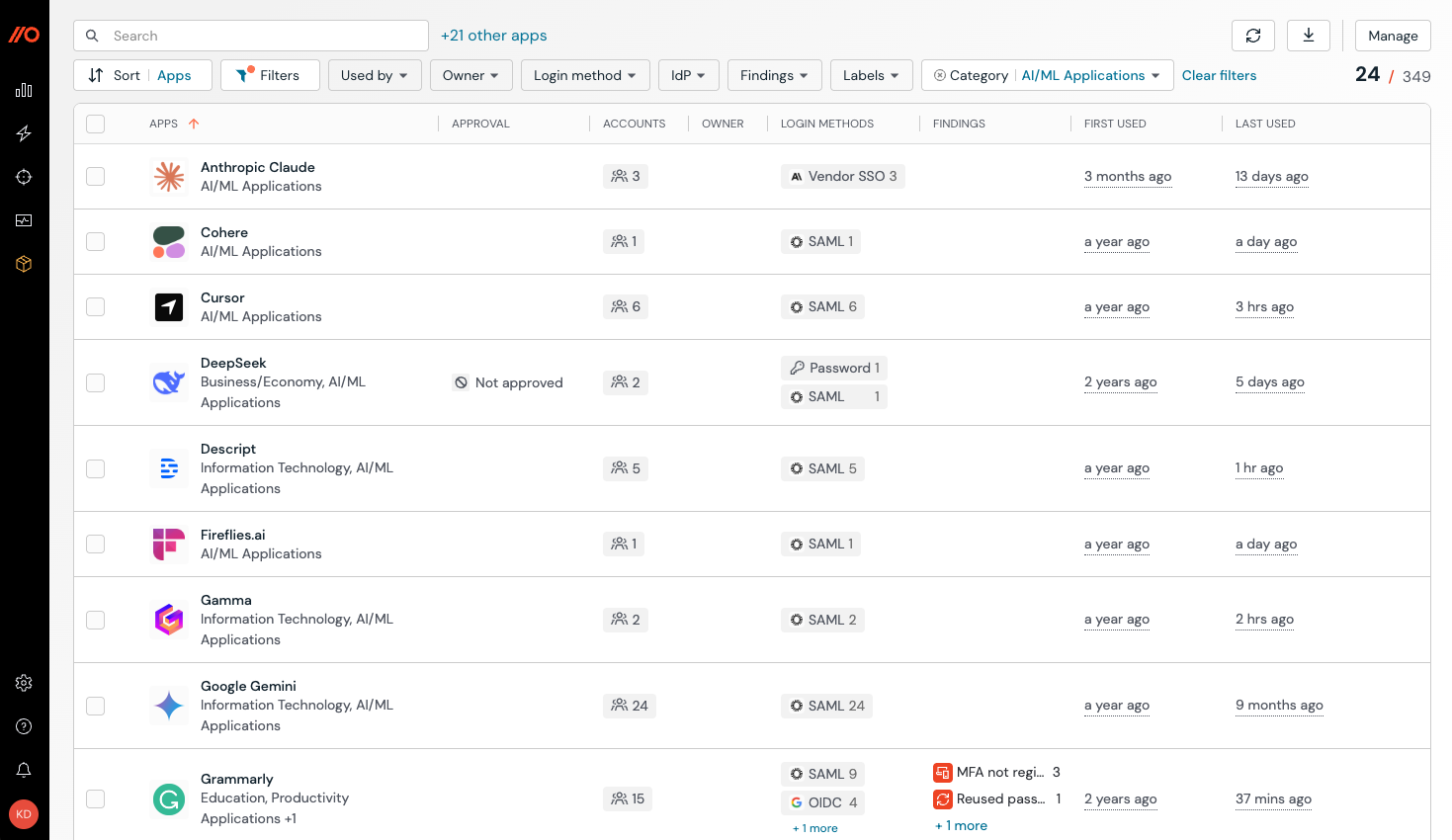
When an employee signs into a new AI service, Push registers the authentication event, identifies the application, and logs how the employee authenticated — corporate SSO, OIDC, a standalone password, or a personal account.
Push then applies app categories automatically, classifying the discovered application by type without requiring security teams to build or maintain manual lists.
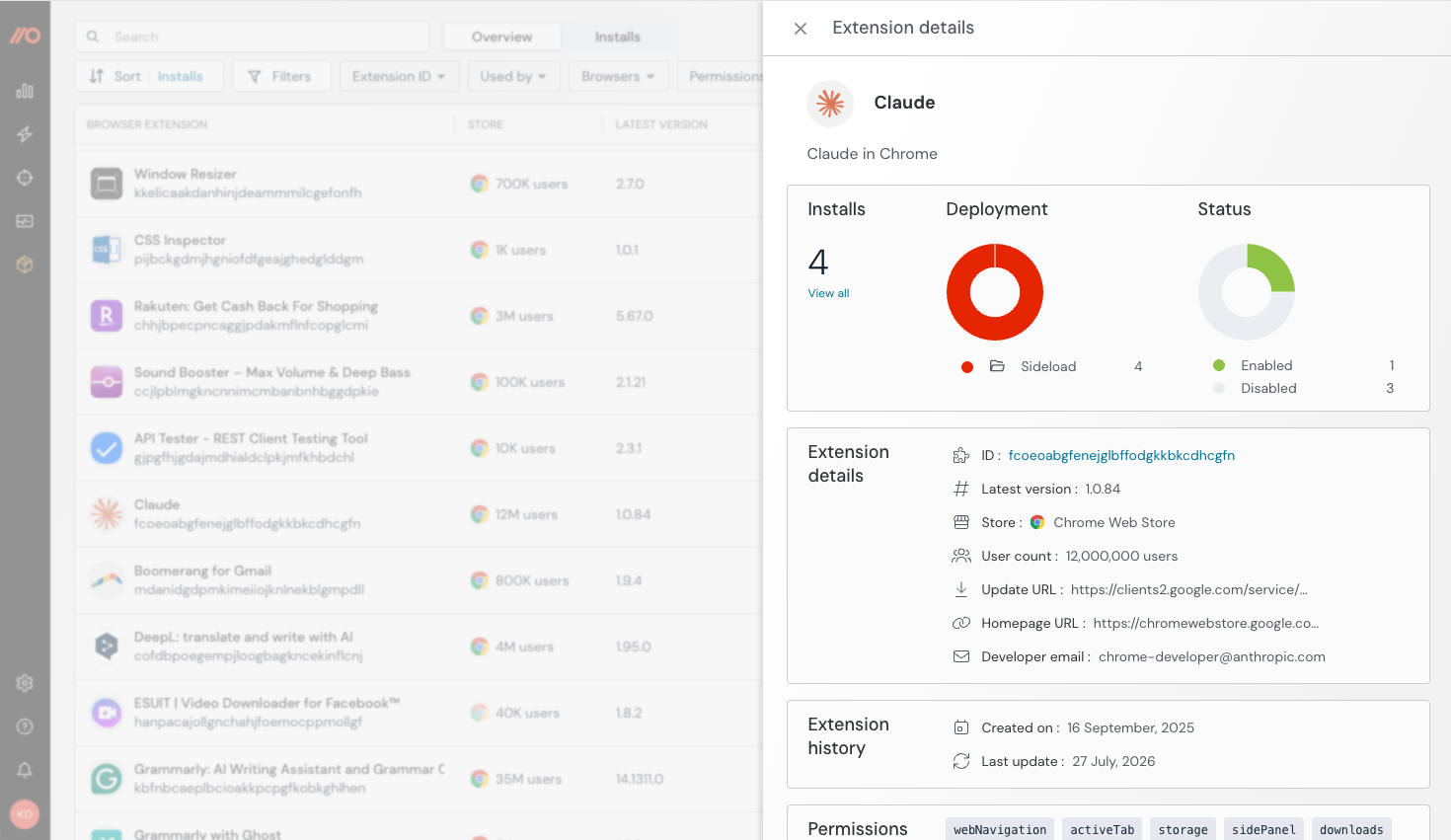
Push extends the same discovery across the other three shadow AI dimensions. The platform’s browser extension discovery capability catalogs every AI-related extension installed across the workforce, including the specific permissions each extension has requested (access to page content, browsing history, clipboard data), allowing you to review whether those permission combinations could enable data exfiltration or account takeover.
Push’s OAuth integration discovery identifies OAuth connections between AI tools and corporate systems — the grants that create persistent API-level access to platforms like Google Workspace.
For each discovered tool, Push also captures authentication context that points to where hidden security risks lie: SSO vs. password vs. personal account, MFA status, and password strength. An AI tool accessed via corporate SSO with MFA is a different risk than the same tool accessed through a personal Gmail account with a reused password. Similarly, employees using only a password to access AI tools that they’ve integrated with other sensitive corporate systems introduces another level of downstream risk. That context is what makes the inventory actionable.
Push also detects when employees are adopting agentic browsers — autonomous AI-powered browsers like Comet, Atlas, and Dia that browse the web and interact with applications on behalf of users or automated workflows.
These represent an emerging category of non-human AI identity. They authenticate to SaaS applications, access corporate data, and make API calls, but they aren't managed through traditional identity infrastructure. Push helps you identify these agentic browsers as they appear in the environment, before they become a blind spot.
Returning to the paved path metaphor, this step is about surveying the site before you figure out where to put in the path. You need to understand who’s already doing what, where, so you can find the risks you need to address.
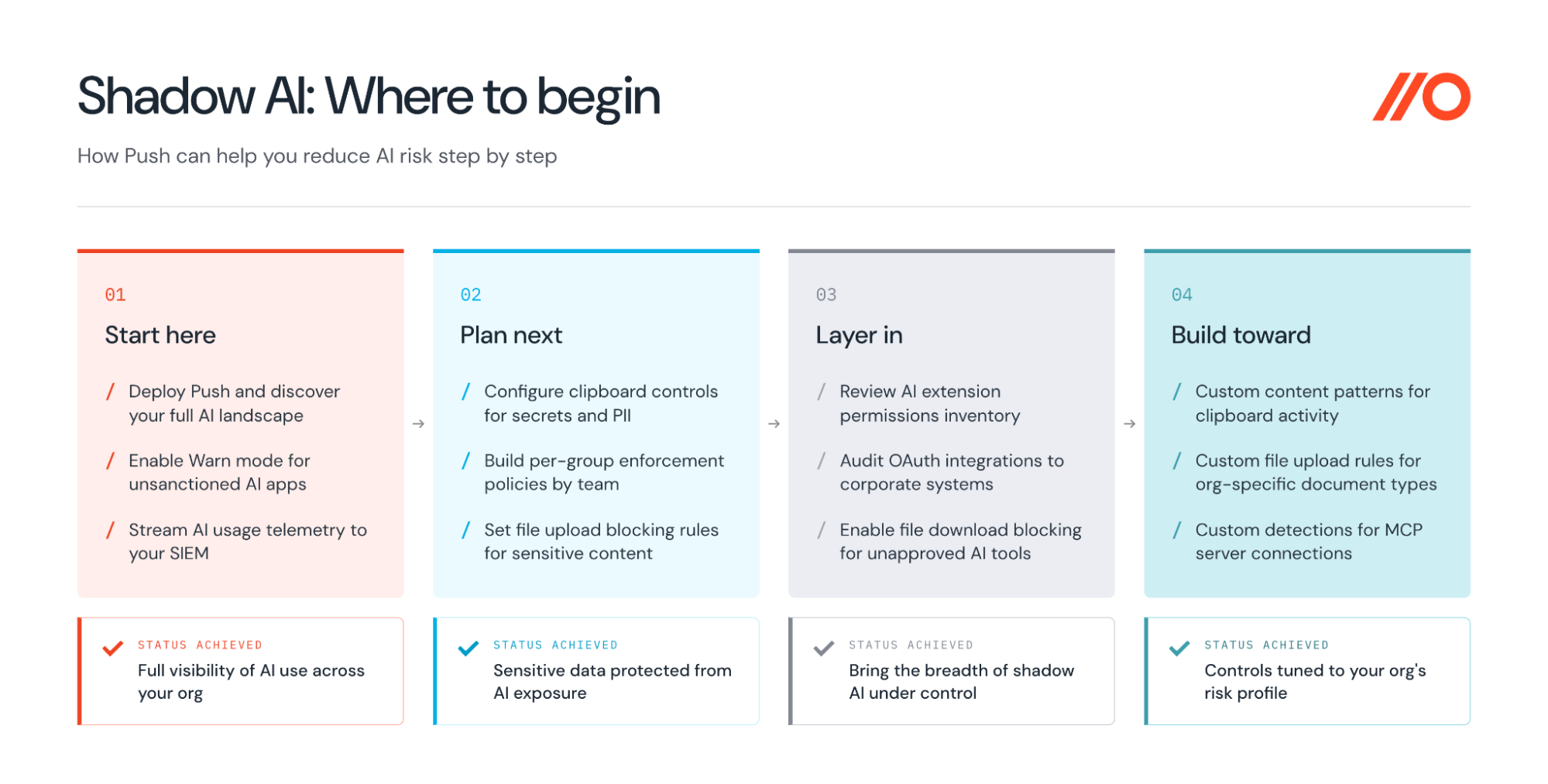
Step-by-step guide to enforcing AI governance without blocking everything
The barricade approach favored by existing solutions like network proxies gives you two options: Allow or block. Enforcing AI policy effectively requires a third approach with a bit more nuance: Guide the user to do the right thing.
Building the "paved path" with Push
Push provides all three options as configurable enforcement modes for a variety of readymade controls. Progressing between them is how organizations can move from "we don't know what people are doing with AI" to evidence-based governance.
Push can be deployed silently and begin observing AI usage with no employee-facing intervention. This is effectively Push in Monitor mode.
The platform records which tools are in use, how employees authenticated, and what usage patterns are emerging. Most organizations should start here to generate a baseline. Telemetry can be streamed to your SIEM or other downstream system to get alerted to newly adopted apps and extensions, and to surface security risks like insecure accounts.
Next, most organizations will transition to Acknowledge mode for controls like in-browser App banners. With this control, you can warn employees when they attempt to use an unapproved AI tool and point them to approved alternatives.
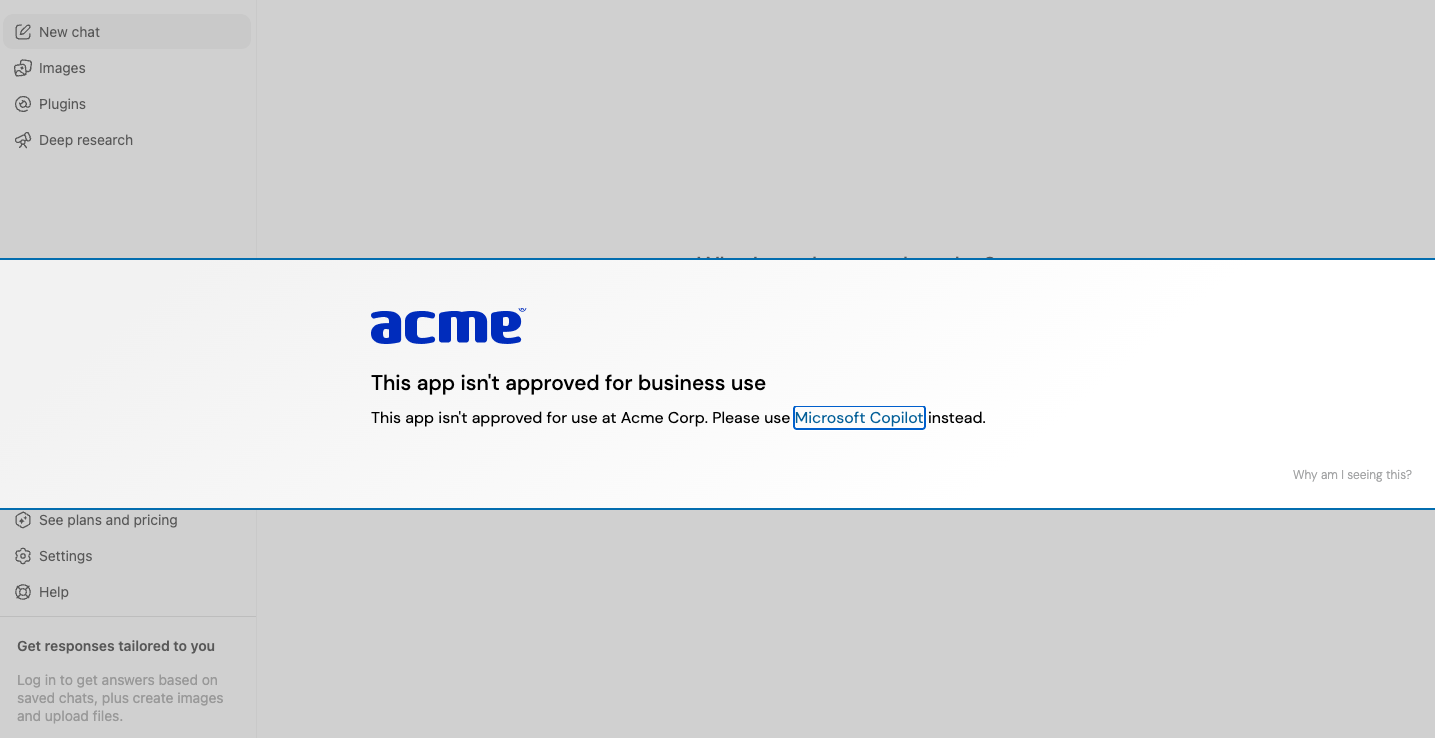
The employee isn't blocked — they're guided toward the governed path at the moment they're about to step off it. This is more effective than a policy document because it arrives right when they need the reminder.
“A published policy is not the same thing as people actually doing that,” explains Push customer Stephen Shkardoon, cybersecurity manager at Te Herenga Waka — Victoria University of Wellington in New Zealand, on one of the drivers for their selection of Push Security to get control of AI usage at their organization.
Block mode prevents access entirely — Push presents a blocking banner to users who attempt to log in to unapproved apps.
Push makes the Monitor → Acknowledge → Block progression practical through automatic app categorization. This means that new AI tools inherit whatever governance mode the team has set for that category, without manual blocklist updates. All controls are configurable per user group — the data science team can use AI coding assistants while uploads from finance are restricted — because different teams have different risk profiles.
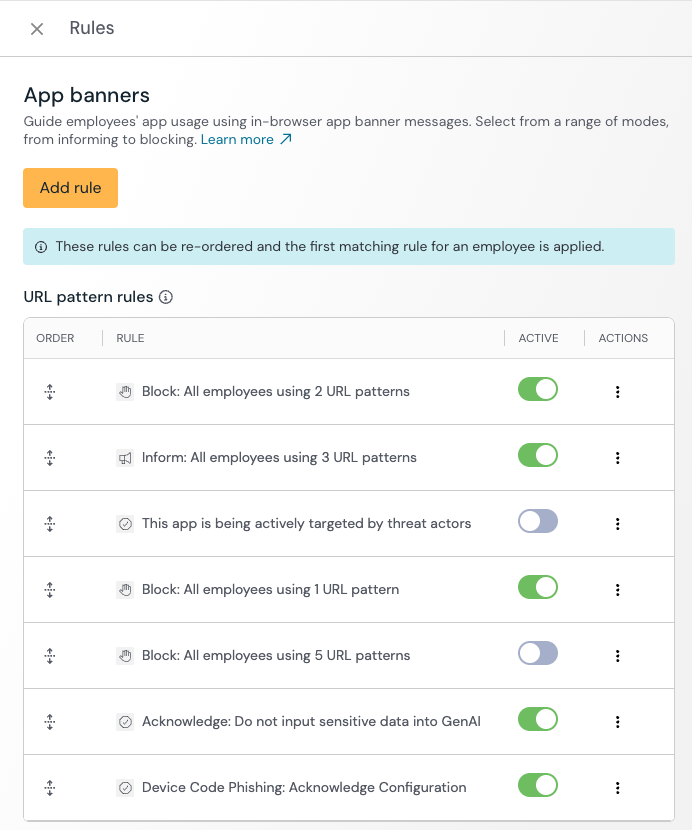
Push customers love the flexibility of this control compared to an SWG or CASB, which often rely on binary enforcement at the domain level only.
Guardrails: how to prevent data loss to AI tools
Even on the paved path, you need guardrails because preventing data loss to AI tools is a separate problem from controlling which tools employees use. An employee on an approved AI tool can still paste an AWS access key into a prompt, upload a customer spreadsheet, or share confidential documents in a conversation. Or they can access an approved AI tool but using a personal account, landing in a different tenant and effectively bypassing enterprise agreements that govern safe data sharing or model training.
Okta's data on what employees actually share shows what’s at stake: 54% share internal messages and emails with AI tools, 39% share confidential company documents, and 28% share banking and payment information.
Blocking is too much of a blunt instrument here, as obviously, you want employees to be able to use approved tools. The answer is controlling what data enters them.
Browser-layer controls for AI data leakage
Push addresses this problem with five browser-layer data controls, each targeting a distinct exfiltration path and supporting the same Monitor → Warn → Block enforcement modes:
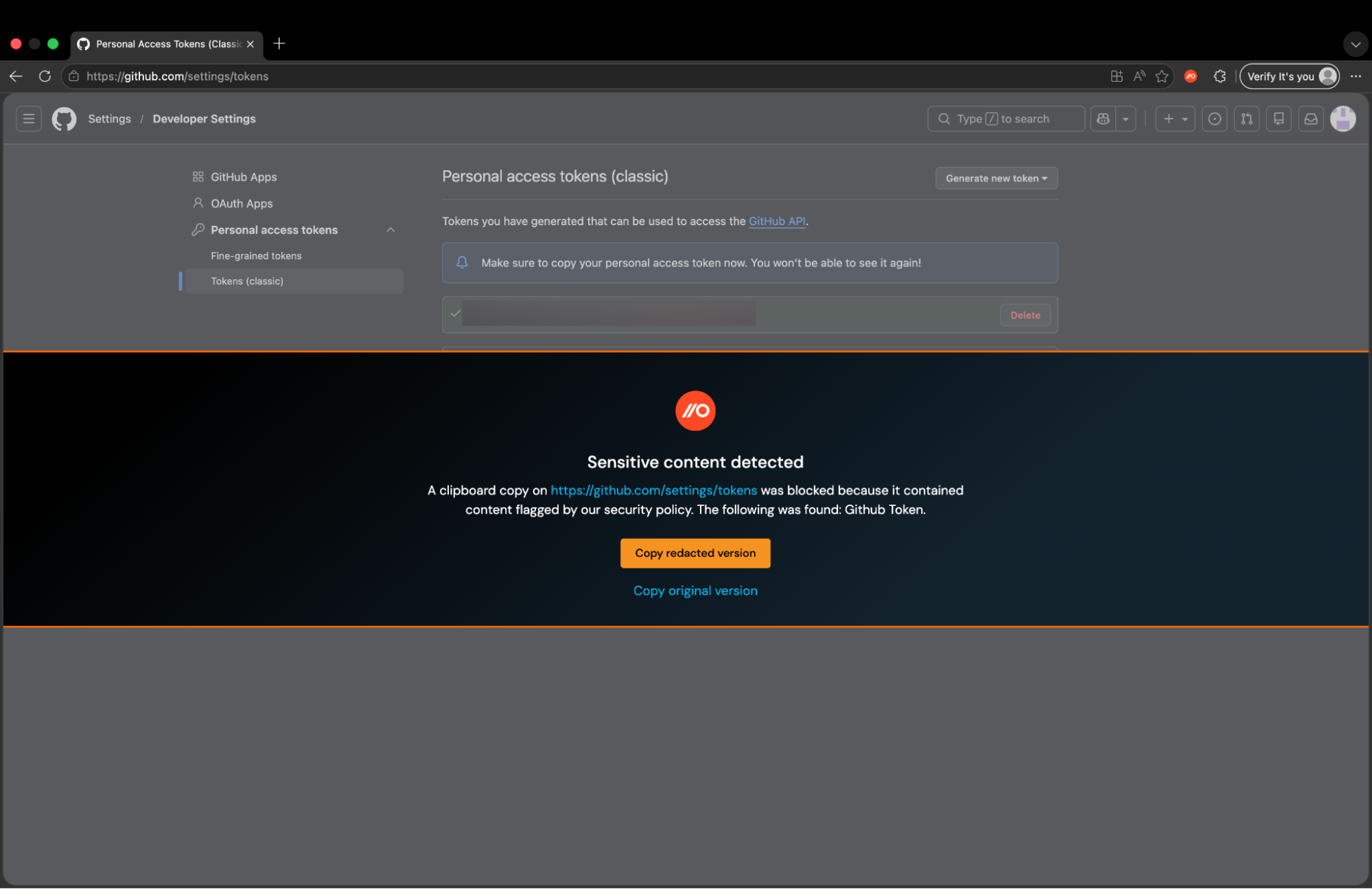
Clipboard blocking addresses the most common path for sensitive data into AI tools: copy-paste. Push matches clipboard content against preconfigured patterns for AWS access keys, GitHub tokens, API keys, credit card numbers, and personal identifiers, plus custom content rules for organization-specific data like internal project codes.
In Warn mode, Push offers a redacted version of the sensitive data so the employee can continue their work — getting help with their code, for instance — without exposing the actual credential.
File upload blocking prevents files from being uploaded to specific AI apps, configurable by app, user group, and file type (Push provides a list for fast configuration).
File download blocking addresses a different common risk: Employees downloading desktop versions of AI tools, which moves usage outside the browser where Push has visibility. Download blocking also covers files generated inside web applications, such as an AI tool that produces a downloadable asset. (Push’s detection and response capabilities also protect against scenarios in which attackers present users with faked AI tool download pages as part of phishing campaigns, a technique we dubbed LLMShare.)
Push also provides telemetry streams on all file upload and download events in your environment, so you can get a baseline pattern of life and identify anomalies that could indicate insider risk.
The Push platform also provides the capability to write your own custom detections, which you can use for other organization-specific use cases, or even to extend your control over GenAI tool usage, such as by blocking unapproved MCP server connections.
Account condition enforcement allows you to prevent employees from accessing AI apps with personal accounts, enforcing only corporate identity access to those tools. Shadow personal account usage of even approved AI apps can lead to data compliance issues, since anything shared during that session goes into a tenant not governed by your usual enterprise plan. Personal account access of approved AI tools is also challenging to audit or secure.
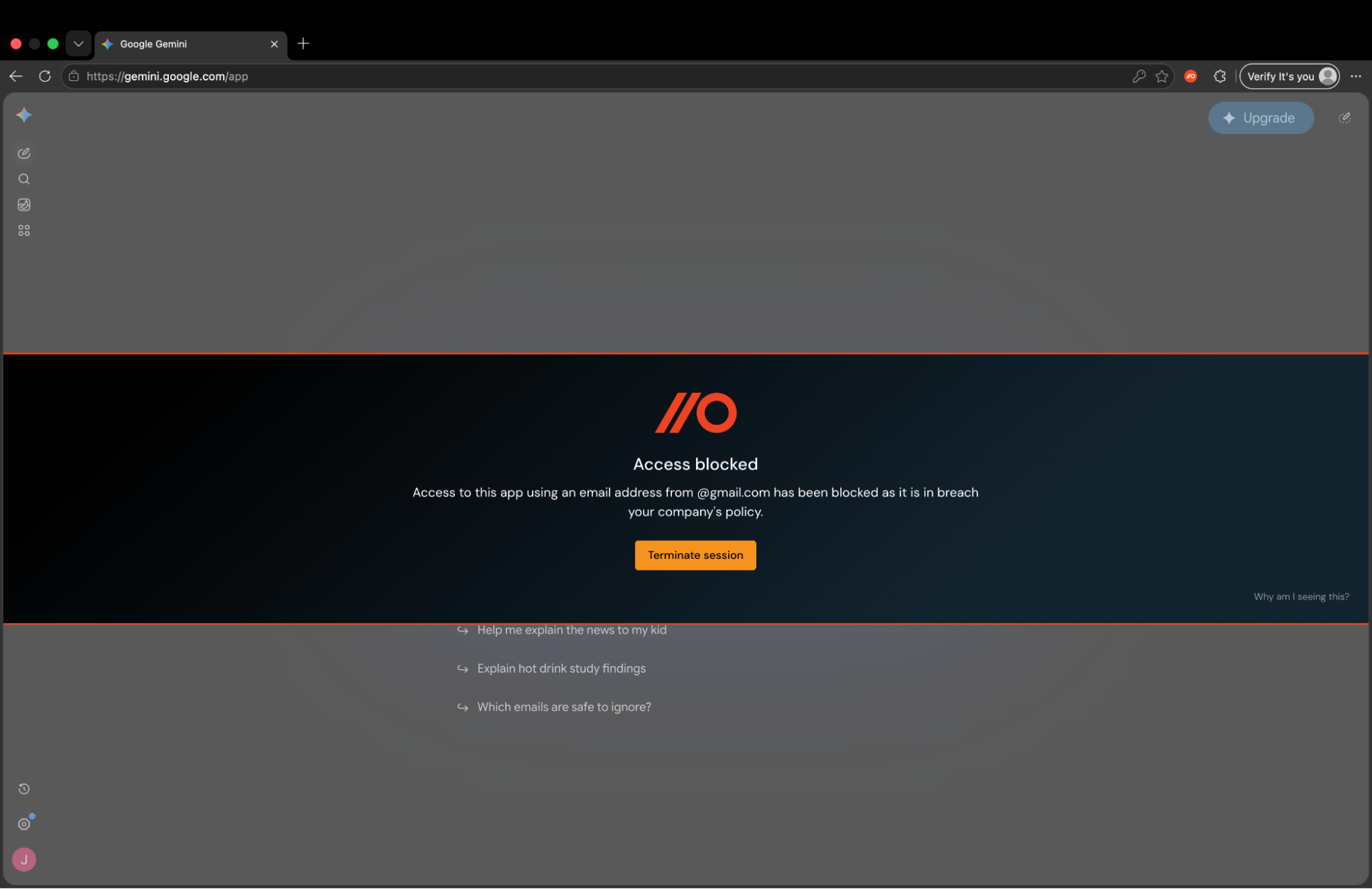
Push’s Account condition enforcement control also allows you to set access conditions based on approved (or unapproved) browsers and login methods (e.g. password, OIDC).
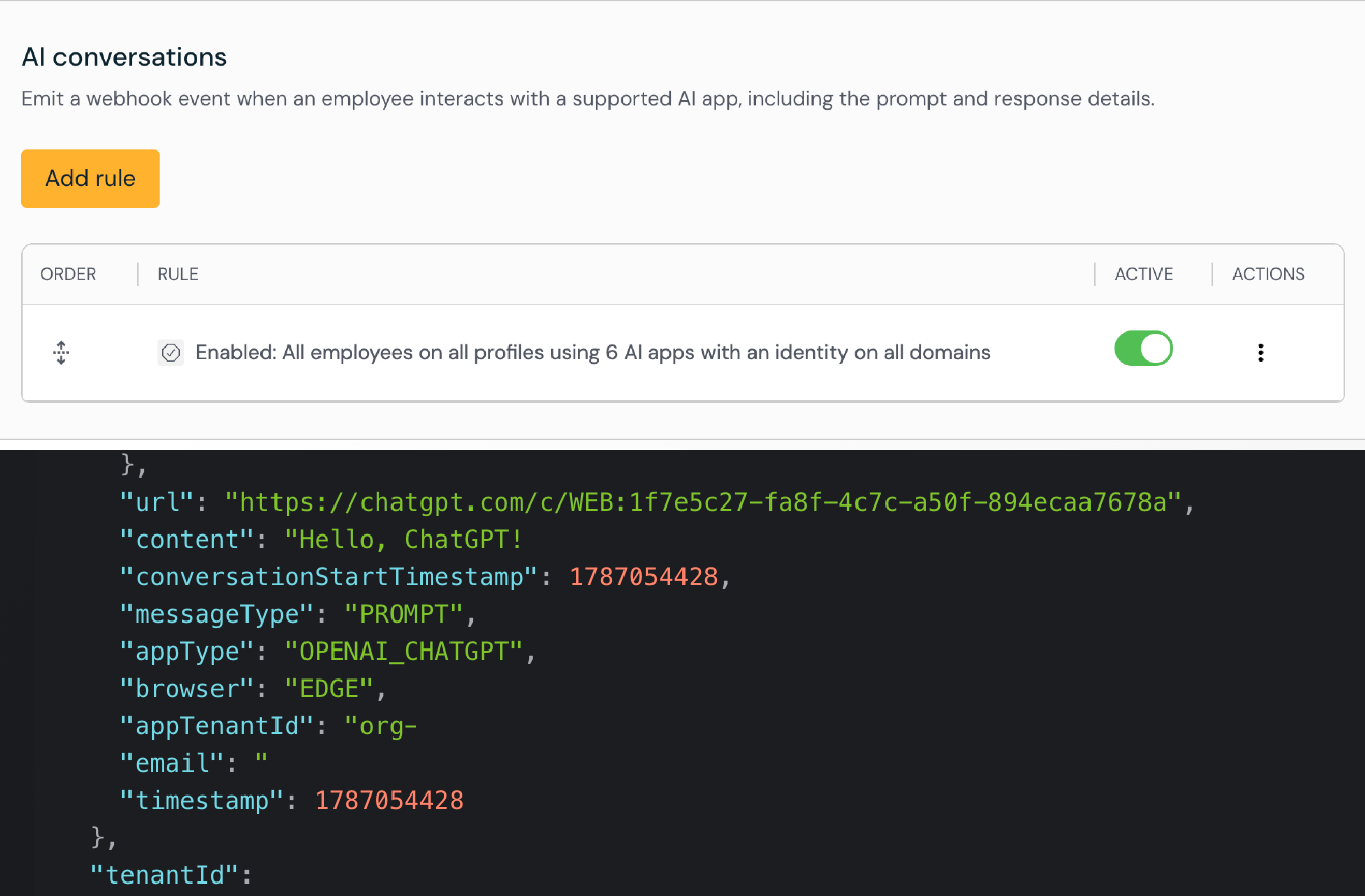
Finally, AI conversation visibility gives you a window into what is being shared in AI chats, consumable as a stream of events to your SIEM or SOAR. Over time, you can build up a picture of what’s normal or what violates company policy, and create a queryable history to identify potential data loss during an incident response process.
Traditional DLP at the endpoint or network layer misses these paths. Network DLP and SWGs can't inspect clipboard pastes into AI prompts — there's no network event to intercept. Endpoint DLP sees file-system operations but not in-browser activity.
Push's controls operate where the data is flowing — inside the browser session.
How to keep up with AI tool sprawl
Pragmatically, the hardest part of generative AI security isn't the initial steps you take — it's keeping up with the sprawl. Point-in-time audits quickly become outdated when the landscape changes so quickly.
Push addresses this with continuous discovery, telemetry streams for the most important points of user interaction with AI apps, and controls that allow you to adapt quickly with simple configuration changes.
With automatic app categorization, if an employee starts using a new AI code assistant that didn't exist last quarter, Push discovers it, classifies it, and applies your governance rules — no manual intervention required.
All AI-related telemetry — app logins, file uploads and downloads, clipboard events, browser extensions, AI chat transcripts — can be sent as structured data to your SIEM.
This gives you all the information you need to track your progress, check your compliance status, and identify trends in AI usage and risk across your business as you make progress toward your goal, armed with the right data you didn't have before.
The goal isn't perfect control over every AI interaction. It's having enough visibility to make informed decisions and enough control to enforce them, without intensifying the shadow AI usage problem you set out to solve. Push can help you get there.
Push Security is the most powerful AI-native security tool in the browser. Think EDR, but for the browser — high-fidelity telemetry and real-time control across every session, on every device, with no browser migration required.
Security teams use Push to detect and stop advanced browser-based attacks like AiTM phishing, ClickFix, and session hijacking; gain visibility and control over AI tool usage across their workforce; harden identities by surfacing credential reuse, SSO gaps, and shadow IT; and support data loss and insider investigations with browser-layer telemetry that other tools can't see.
Shadow AI discovery and governance: Frequently asked questions
How do you monitor what employees are doing with AI tools?
Network monitoring tools see domain-level traffic but can't tell you what's actually happening inside an AI session — whether an employee is browsing a tool's marketing page or pasting source code into a prompt. IdP logs capture OAuth grants routed through the identity provider but miss AI tools accessed via direct signup or personal accounts. Browser-based security tools like Push Security monitor AI activity where it actually happens: inside the browser session. Push captures login events, clipboard pastes, file uploads, extension installations, and OAuth grants, providing structured telemetry on what data is moving into which AI tools, through which accounts, and whether those accounts are corporate or personal.
How do you restrict AI usage without blocking everything?
Binary allow/block decisions — whether enforced through a SWG, CASB, or enterprise browser — treat every AI interaction as equivalent, which pushes employees toward tools you can't see at all. Graduated enforcement offers a middle path. Push Security lets teams start with monitoring to build an accurate picture of AI usage, then introduce in-browser prompts that explain why a tool hasn't been approved and direct employees toward sanctioned alternatives, before applying hard blocks only where the data sensitivity or tool risk justifies it. Controls are configurable per user group, and new AI tools automatically inherit governance rules through automatic categorization — so enforcement keeps pace with the landscape without manual blocklist updates.
How do you discover what AI tools employees are using?
Network monitoring tools, IdP logs, and endpoint agents each catch a slice of shadow AI but miss entire categories. SWGs see domain traffic but can't confirm whether someone authenticated or what they did after login. IdPs capture OAuth grants routed through the identity provider but miss AI tools accessed via direct signup or personal accounts. EDR is blind to browser-layer activity entirely.
Browser-based security tools like Push Security identify AI tools from actual login events, catching the four categories other tools miss: unapproved AI apps, personal accounts on approved tools, AI browser extensions with broad permissions, and OAuth integrations granting persistent API access to corporate systems. Each discovered app is automatically categorized and enriched with authentication context — SSO vs. password, MFA status, corporate vs. personal account — so security teams can assess actual risk rather than treating every AI tool as equivalent.
How do you prevent sensitive data from being pasted into AI tools?
This is a gap that traditional DLP architectures weren't designed for. Network DLP and SWGs can't intercept clipboard pastes into AI prompts because there's no network event to inspect — the data moves from the clipboard to the browser DOM without crossing the wire. Endpoint DLP sees file-system operations but not in-browser activity. Browser-based controls operate where the paste actually happens.
Push Security matches clipboard content against patterns for credentials, API keys, credit card numbers, and custom content rules, then offers the employee a redacted version so they can continue working without exposing the actual sensitive data. The same approach extends to file uploads and downloads, covering the exfiltration paths that network and endpoint DLP leave open.
How do you enforce an AI acceptable use policy in real time?
Policy documents distributed during onboarding don't change behavior at the moment someone reaches for an unapproved AI tool. SWGs can block a domain, but they can't explain why or point to an approved alternative — the employee sees an error page.
Enterprise browsers like Push Security can deliver policy enforcement at the point of decision: when an employee navigates to an unsanctioned AI tool, an in-browser message explains why the tool hasn't been approved and directs them to approved alternatives. Controls are configurable per user group — and new AI tools automatically inherit governance rules through automatic categorization, without manual blocklist updates.
What tools do you need to manage shadow AI?
No single traditional tool covers all aspects of shadow AI (apps, tenants, integrations, extensions) and the user interaction with those categories of tool. SWGs and CASBs see domain-level traffic but can't identify personal account usage, extension activity, or clipboard pastes into AI prompts. IdPs capture federated logins but miss direct signups and personal accounts entirely. EDR doesn't see browser-layer activity. DSPM monitors data at rest in cloud storage but not data in motion through browser sessions.
Most organizations will need browser-layer visibility alongside their existing stack — not as a replacement, but to close the gaps those tools weren't designed to address. Tools like Push Security operate at the layer where AI activity actually happens, covering all shadow AI categories with graduated enforcement (monitor, warn, block), per-user-group policies, and telemetry on authentication methods, clipboard events, file uploads, and OAuth grants.
How do I stop employees installing AI browser extensions?
AI browser extensions are a blind spot for most security stacks. Endpoint management tools may detect that an extension is installed but typically can't evaluate what permissions it has requested or whether those permissions create data exfiltration risk. SWGs and CASBs don't see extension activity at all — extensions operate within the browser, not over the network.
Push Security inventories every AI-related extension installed across the workforce, surfaces the specific permissions each extension has requested (access to page content, browsing history, clipboard data), and identifies permission combinations that could enable account takeover or data exfiltration. Security teams can then apply monitor, warn, or block enforcement to extension categories — and new extensions automatically inherit governance rules without maintaining manual allowlists that go stale as new AI extensions appear daily.
How do you get visibility into AI tool sprawl?
Point-in-time audits — whether run through an IdP, a CASB, or manual surveys — tell you what was true when you ran them. AI tool adoption changes weekly; Gartner projects 150,000 AI agents per Fortune 500 enterprise by 2028. SWGs can log new domains but can't classify them or apply governance rules automatically.
Push Security discovers new AI tools as employees start using them: when someone logs in to a new AI app, Push identifies it from the login event, automatically categorizes it, and applies the organization's existing governance rules without manual intervention. All AI-related telemetry — app access, file uploads, clipboard events, extension activity — streams as structured data to the customer's SIEM, providing the material for governance dashboards and compliance reporting that stays current as the landscape shifts.
What is the difference between AI governance, AI visibility, and AI control?
AI visibility means knowing which AI tools employees are using, how they're accessing them, and what data flows into those tools. AI control is the ability to enforce rules on that usage — blocking unapproved tools, restricting data flows, requiring approved accounts. AI governance is the broader program that encompasses both: defining acceptable use policies, establishing risk frameworks for evaluating new tools, and building the organizational processes that turn visibility and control into sustained security outcomes.
Most organizations that struggle with AI governance have a visibility problem first — they're trying to write policies for tools they don't know their employees are using. But visibility without control is just watching the problem happen. Push Security provides both: discovery and monitoring across all four categories of shadow AI, plus graduated enforcement controls that let you apply different responses based on the risk profile of each tool, account, and data flow, at the point of interaction in the browser for real-time enforcement.
Does Data Security Posture Management (DSPM) prevent shadow AI?
Data Security Posture Management (DSPM) tools monitor data at rest in cloud storage and SaaS applications, identifying misconfigurations, overly permissive access, and sensitive data exposure. They don't monitor data in motion through browser sessions — which is the primary path for shadow AI risk.
When an employee pastes source code into an AI prompt or uploads a customer spreadsheet to an unapproved AI tool, that data movement happens entirely inside the browser and never touches the cloud storage layer that DSPM tools monitor. DSPM and browser security are complementary: DSPM secures data where it is stored, while browser-layer tools like Push Security secure data where it moves.