Malicious files and drive-by downloads: how they work and how to detect and block them
Malicious file downloads deliver malware through fake updates, trojanized installers, and drive-by attacks. Learn how to detect and block them.
Malicious file downloads deliver malware via the browser
A malicious file download is any file delivered through the browser that installs malware, steals data, or establishes attacker access on the user's device. Common delivery methods include drive-by downloads from compromised or malicious websites, fake software updates, trojanized installers hosted on legitimate platforms, and files delivered through malvertising or SEO-poisoned search results.
The browser is the initial delivery point — the user clicks, downloads, and opens the file before endpoint detection has a chance to intervene. Most security architectures treat the endpoint as the primary interception point for malicious files, but by the time a file reaches the endpoint, the download has already succeeded — and the gap between download and execution is where organizations are most exposed.
How malicious download attacks work
Malicious file downloads remain a common way to establish initial access. Instead of exploiting software vulnerabilities, attackers rely on user interaction to deliver payloads directly through the browser.
- The victim lands on a webpage through a phishing link, search result, or compromised site
- The page prompts a download, often disguised as a required update or document
- The user downloads and opens the file
- The payload executes, installing malware or stealing credentials and session data
- The attacker gains access to the device or associated accounts
FakeUpdates (SocGholish) remains one of the most persistent malware delivery campaigns, using compromised websites to serve fake browser update prompts. The LLMShare campaign demonstrated a newer vector — using ChatGPT's shared conversation feature to host malware delivery pages on chatgpt.com, a domain no reputation filter would block.
Drive-by downloads — where visiting a page triggers an automatic file download — still occur, but attackers increasingly rely on social engineering (fake update prompts, fake document previews) with a user interaction required, rather than browser exploits. Infostealer malware is the dominant payload, harvesting browser-stored credentials and session cookies that feed downstream account takeover attacks weeks or months later.
ClickFix has overtaken traditional file downloads as the dominant browser-based malware delivery technique, but file-based delivery remains a parallel vector — particularly through fake updates and trojanized software distributed via malvertising.
Why most security tools miss malicious downloads
Email and web security tools have key limitations and coverage gaps, making endpoint inspection the last and only line of defense. If EDR doesn't catch it, or isn't in place (for example in the case of unmanaged BYOD or contractor machines) there's nothing to stop the attack.
Secure email gateways and email sandboxing analyze attachments before they reach the inbox — but that protection only covers files delivered via email. When a user downloads a file from a web page, a search result, a malvertising redirect, or a shared link on a messaging platform, email security never sees it. And while SWGs inspect traffic at the network layer, HTML smuggling assembles malicious files client-side from encoded JavaScript — the SWG sees a legitimate HTML page while the browser assembles and prompts a malware download. Files hosted on trusted platforms — GitHub, SharePoint, Google Drive, ChatGPT — inherit the domain's reputation, and SWGs that rely on URL categorization pass them through.
EDR and AV scan files after download — which means the file has already reached the device before detection begins. If this detection layer fails, there's no fallback.
How do you stop malicious file downloads?
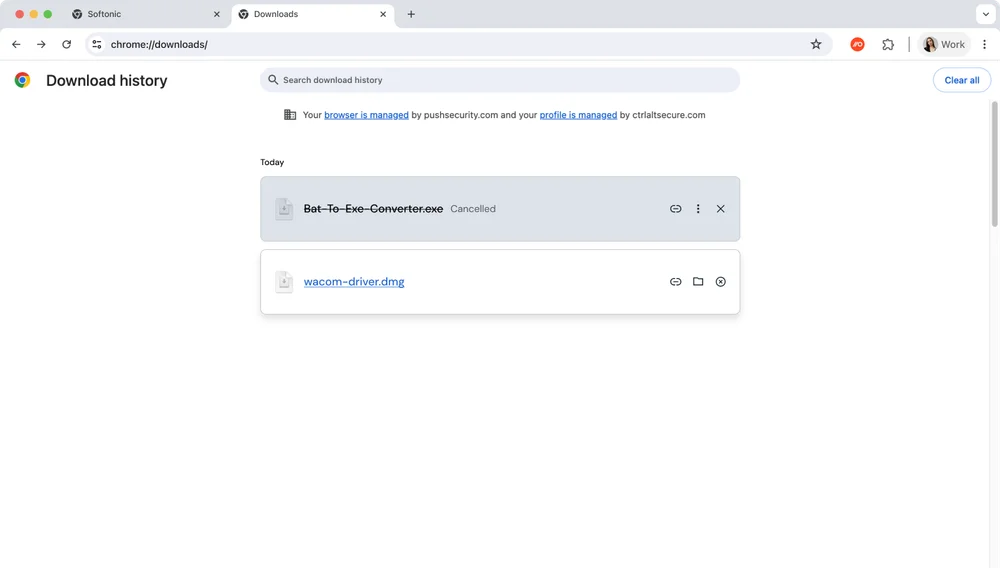
You can't prevent users from encountering malicious download prompts — they arrive through search results, ads, compromised sites, and shared links on platforms you don't control — so defense has to intercept the download before the file reaches the endpoint, rather than relying on the endpoint to catch it after.
Email security covers one delivery channel. SWGs cover network-visible downloads but miss client-side assembly and trusted-domain abuse. Endpoint protection catches known malware but only after the file is already on disk. Each tool covers part of the problem, but the gap between them — downloads that originate in the browser, from sources that bypass network inspection, carrying payloads the endpoint hasn't seen before — is where malicious file delivery succeeds.
Closing that gap requires visibility and control at the browser layer itself: knowing what files users are downloading, from where, and enforcing policy before the file reaches the endpoint. Browser-level controls don't replace endpoint protection — they reduce what the endpoint has to catch by filtering out risky file types and untrusted sources upstream.
How Push detects and blocks malicious file downloads
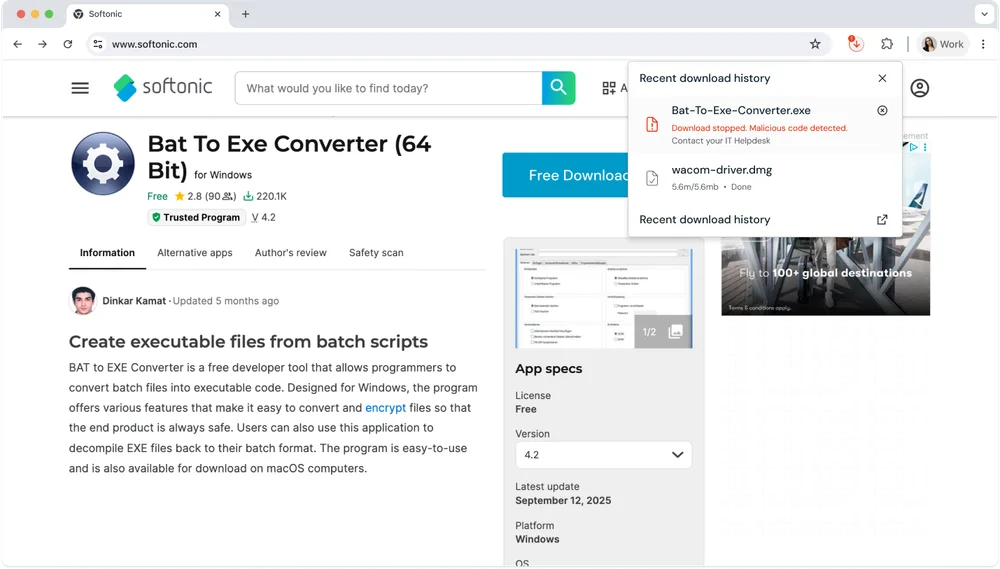
Push operates inside the browser, where downloads originate. It provides visibility into which files users download, where they come from, the file type and name, and how often they appear across the environment.
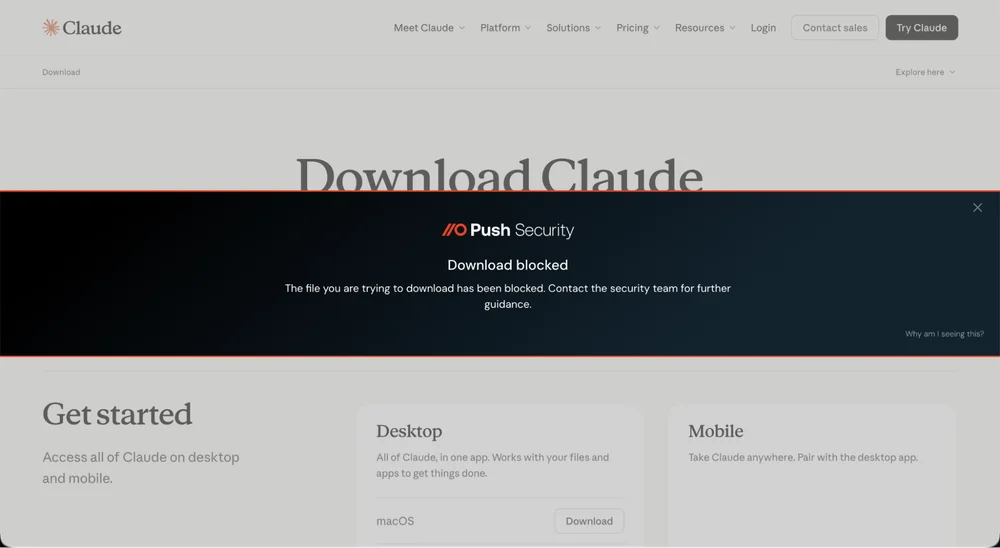
Security teams can monitor downloads in real time, identify patterns, and detect when risky file types or suspicious sources are involved. Policies can be applied to warn users or block downloads based on file type, source domain, file name patterns, and user group — giving teams a direct way to reduce exposure before files reach the endpoint.
Push enforces policy before the file reaches disk (which file types, from which sources, for which users). EDR scans files after download for malware signatures and behavioral indicators. Together they provide layered coverage across the full download-to-execution chain. Because controls are enforced in the browser, Push provides this protection on unmanaged devices that aren't protected by MDM-enforced security controls like EDR.
Frequently asked questions
Combine browser-level download controls (blocking risky file types from untrusted sources) with endpoint protection for files that get through.
Push provides configurable download blocking at the browser layer — rules based on file type, source domain, file name patterns, and user group. This lets you create targeted policies (e.g., block executables from uncategorized domains while allowing them from known vendors). Pair with your endpoint protection for threat-level malware scanning of files that get through. See Push's download controls.
A malware delivery technique where visiting a compromised or malicious website triggers an automatic file download — sometimes without user interaction beyond navigating to the page. Modern drive-by downloads increasingly use social engineering rather than exploits, as browser zero-days are expensive and uncommon.
Attackers compromise legitimate websites or use malvertising to redirect users to pages that initiate downloads. The file — often disguised as an update, document, or utility — contains malware. Push's file download controls can block downloads by file type and source at the browser layer. Learn more about browser-based threats.
No single tool covers the full download-to-execution chain. Email security only sees email-delivered files. SWGs only see network-visible downloads. EDR only acts after the file reaches disk. Each has coverage gaps that attackers actively exploit — and none of them work on unmanaged devices. Browser-level download controls sit at the point where every web-based download originates, regardless of delivery channel or device management status, making them either a complement to existing layers or a replacement for the ones you can't deploy (SWGs on BYOD, EDR on contractor machines).
The layered approach is EDR for malware detection + browser-level controls for policy enforcement + SWG or email security for channel-specific coverage. That said, browser-layer controls naturally provide the broadest coverage across delivery channels and are increasingly important for tackling the nature of modern file-based attacks that increasingly avoid email.
No. AV/EDR is effective against known malware signatures and many behavioral patterns, but it misses novel payloads, polymorphic malware, and environment-aware samples that detect sandboxes. It's also structurally reactive — scanning happens after the file reaches the endpoint. And the dominant malware delivery method, ClickFix, bypasses file-based scanning entirely because the user executes a command from the clipboard rather than downloading a file.
Browser-level download controls operate at a different point in the chain — blocking the download before the file reaches disk, based on policy rules (file type, source, user group). This is complementary, not a replacement: Push's download policies reduce the volume of risky files reaching the endpoint, while AV/EDR handles threat-level scanning of files that get through.
Push's file download blocking lets you define policies by file type, extension, file name, file name patterns, browser profile, and user group. You can block executables from all sources, allow them from specific trusted domains, or restrict different file types for different teams.
Policies are enforced at the browser layer before the file reaches the endpoint. Download events are logged and streamed to your SIEM. See Push's download controls.
SEO poisoning (manipulating search results), malvertising (placing malicious ads on legitimate ad networks), CMS compromise (injecting malicious redirects into legitimate sites), and abusing trusted platform features (hosting malware on GitHub, SharePoint, or ChatGPT shared conversations).
The LLMShare campaign showed attackers using ChatGPT's shared conversation feature to host malware delivery pages on chatgpt.com — a domain no blocklist would flag. The common thread is leveraging domain reputation of legitimate platforms to bypass URL filtering. Read about LLMShare.
No. SWGs rely on URL reputation and file categorization, which miss zero-day payloads on novel or legitimate infrastructure. TLS inspection causes application breakage and performance degradation. And ClickFix payloads — now the dominant delivery mechanism — arrive via search engines using legitimate or freshly-registered infrastructure.
Push complements SWGs by operating inside the browser — enforcing download policies without requiring TLS interception. See how Push complements SWGs.
Executables (.exe, .msi), scripts (.ps1, .bat, .vbs, .js), Office documents with macros (.docm, .xlsm), disk images (.iso, .img), compressed archives (.zip, .rar, .7z), and shortcut files (.lnk). The mix shifts as vendors tighten controls — macro-enabled documents have declined while ISO and LNK files have increased.
ClickFix variants bypass file-type controls entirely by tricking users into executing clipboard content directly. Push's file download blocking covers file-type policies, and its malicious copy and paste detection covers the ClickFix vector. Learn about ClickFix delivery.
Push streams file download events to your SIEM via webhooks — including file type, source domain, file name, and user identity. You can configure alerting on specific file types, sources, or patterns without blocking downloads entirely.
This monitoring-first approach lets you understand download patterns before implementing blocking.
A layered approach: browser-level download policies to block risky file types, ClickFix detection to catch clipboard-based malware delivery, and endpoint protection to scan files that reach disk.
Push's download controls enforce policies by file type, source, and user group. Its malicious copy and paste detection catches ClickFix/InstallFix attacks that deliver malware via clipboard rather than file downloads. Combine with your existing EDR for comprehensive coverage. See Push's browser security controls.
Each tool category operates at a different layer with different trade-offs. EDR/AV scans files on the endpoint after download — the most mature malware detection capability, but reactive (the file has already landed). SWGs inspect downloads at the network layer and can block inline, but HTML smuggling assembles payloads client-side to bypass inspection, TLS inspection causes application breakage, and coverage requires traffic routing through the proxy. Email security sandboxes attachments effectively but only covers email — not downloads from web browsing, search ads, or direct navigation. OS-level controls (SmartScreen, Gatekeeper, AppLocker) block execution of untrusted files but only on managed endpoints and don't prevent the download itself. File sandboxes detonate suspicious files in isolated environments but add latency, get bypassed by environment-aware malware, and see nothing when delivery is fileless.
None of these covers the full chain individually, and the biggest shared blind spot is ClickFix-style delivery where the user executes a clipboard command rather than downloading a file — no file means nothing for any file-scanning tool to inspect. Push operates at the browser layer with policy-based download controls (blocking by file type, source, user group before the file reaches disk) and ClickFix detection that catches clipboard-based delivery. The browser-layer advantages are earlier enforcement, source context, and coverage on unmanaged devices.
Latest resources


