Ghost logins: what they are and how to find and fix them
Ghost logins are local SaaS accounts that persist after SSO is configured — bypassing your IdP, MFA, and offboarding. Learn how to find and eliminate them.

Ghost logins: the SaaS accounts your IdP can't see or control
Ghost logins are local password-based accounts on SaaS applications that persist alongside or after SSO configuration. When an organization rolls out SSO, users who previously signed up with a direct password retain that local credential — the federated login is added, but the original method isn't deactivated. These shadow access methods sit outside your identity provider's control: no MFA enforcement, no conditional access policies, no centralized monitoring, and no automatic deactivation when the user is offboarded. Push coined the term to describe this structural gap between SSO adoption and actual identity coverage across SaaS environments.
How ghost logins work
Most SaaS applications support multiple ways to log in. When an account is first created, it often includes a username and password. Even after SSO is configured, that original login method frequently remains active.
- A user creates an account with a username and password, and no MFA
- SSO is later enabled for the application, providing an MFA-protected secure access method
- But the original credential remains valid unless explicitly removed
- The account can now be accessed through both SSO and direct login, and MFA is only applied at the IdP layer
- Attackers with a stolen credential can access the app directly without routing through the IdP
These unmanaged login paths — also known as shadow accounts — sit outside centralized identity controls and are rarely tracked or audited.
In large SaaS environments, this happens at scale. Users adopt applications independently, configure credentials, and continue using them long after identity policies change. Push data shows one in four enterprise logins still use passwords instead of SSO, and the average organization has hundreds of applications with local account access paths that were never federated.
When an employee leaves and their IdP account is deactivated, every ghost login they created remains active — the credentials still work, and the application has no signal that corporate access was revoked. The risk compounds over time as former employees, contractors, and temporary staff leave behind dormant credentials on applications containing customer data, source code, and financial records. These dormant ghost logins are prime targets for credential stuffing — an attacker who obtains the credentials from a breach or infostealer can access the application directly without encountering any identity controls.
Why most security tools miss ghost logins
Ghost logins aren't inherently malicious. They are legitimate login paths that were never fully disabled. According to Push research, two in five logins were not protected by MFA, and many occurred outside SSO flows.
Identity providers only see and control authentication events that pass through SSO. To enforce local MFA or restrict logins to SSO only, you need an app that supports this kind of admin control at your subscription tier, and naturally it needs to be an app that your security team knows about and manages. This isn't always the case given the rate that users and teams self-adopt apps.
The logging problem is the same — you need admin access and to hook the app up to your SIEM, if sign-in logs are available at all. CASBs and SaaS Security Posture Management tools can inventory applications, but they rely on API connections that must be configured per-app (the same problem again), or unreliable email-based discovery that is notoriously false positive prone.
Ultimately, an attacker using a stolen credential through a ghost login appears to be a normal user. The risk isn't a single misconfiguration. It's the accumulation of unmanaged identities and access paths that exist outside policy.
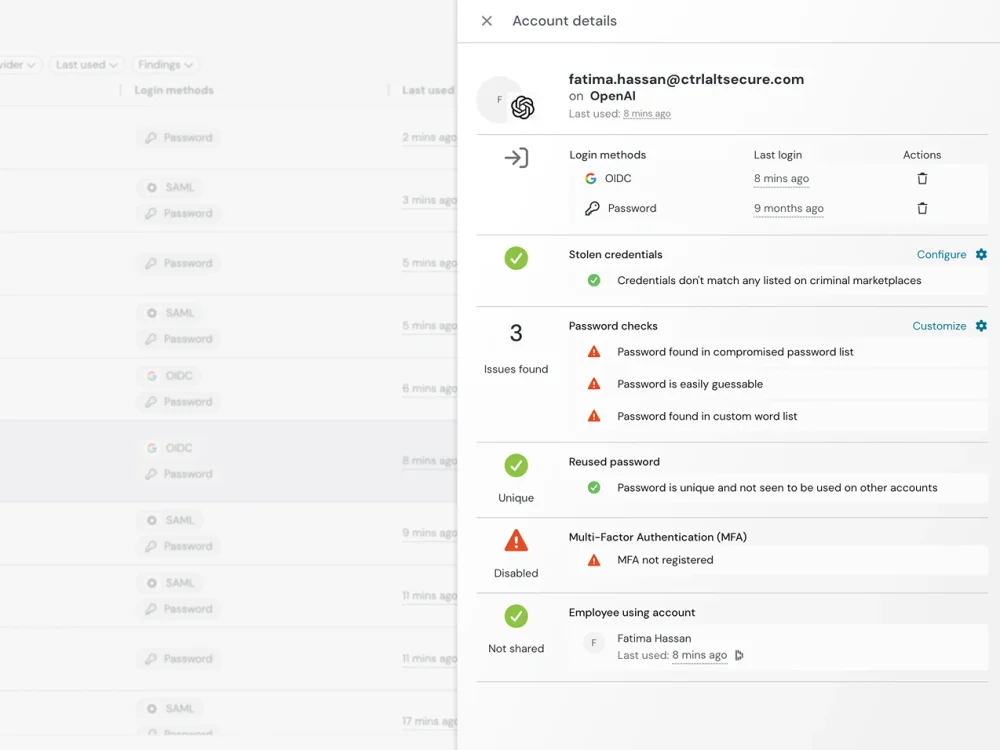
Ghost logins are both an initial access and persistence problem
You can't eliminate ghost logins by securing the identity provider alone, because they exist outside it — which makes them both the entry point attackers use to get in and the foothold that survives remediation.
As an initial access vector, ghost logins are the path of least resistance. No SSO, no local MFA, no conditional access, no visibility from the IdP. The Snowflake breach demonstrated this at scale: attackers used infostealer-harvested credentials to access customer environments through direct logins that sat outside centralized identity controls.
As a persistence mechanism, ghost logins let access survive the actions security teams take to contain a breach. Resetting the user's IdP password doesn't invalidate a local credential, API key, or backup email address. Even if the session is terminated, the ghost login remains. This is the same structural problem that makes ghost logins an offboarding risk: any remediation that flows through the IdP structurally misses accounts that were never governed by it.
How Push detects and eliminates ghost logins
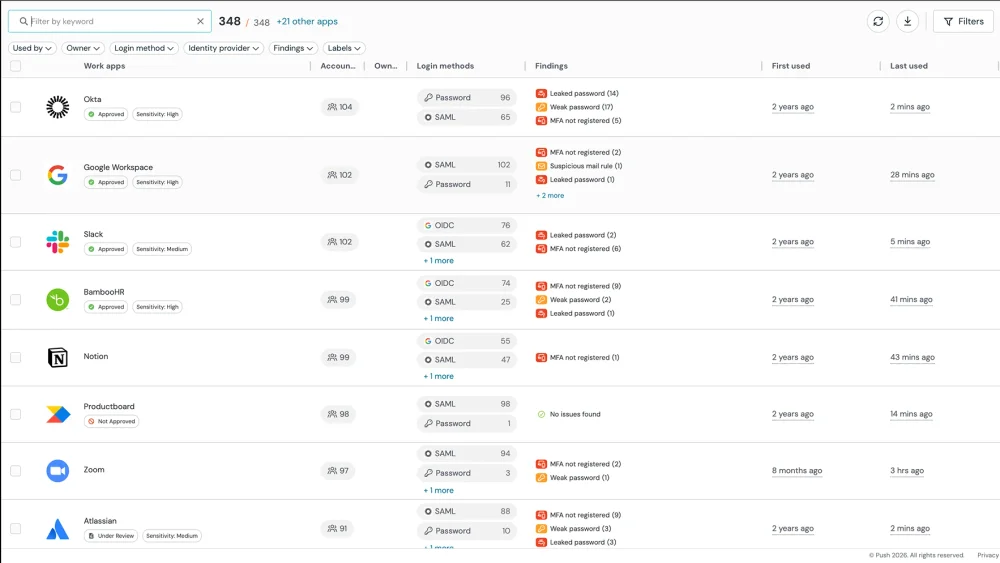
Push observes how users log in across applications — capturing the authentication method, application, MFA status, and credential strength for each login — regardless of whether the flow goes through SSO or a direct login. Security teams can identify applications that still allow local credentials, detect when users authenticate outside expected flows, and surface accounts missing protections like MFA. Push prioritizes ghost logins by risk: compromised passwords, missing MFA, and dormant accounts surface first.
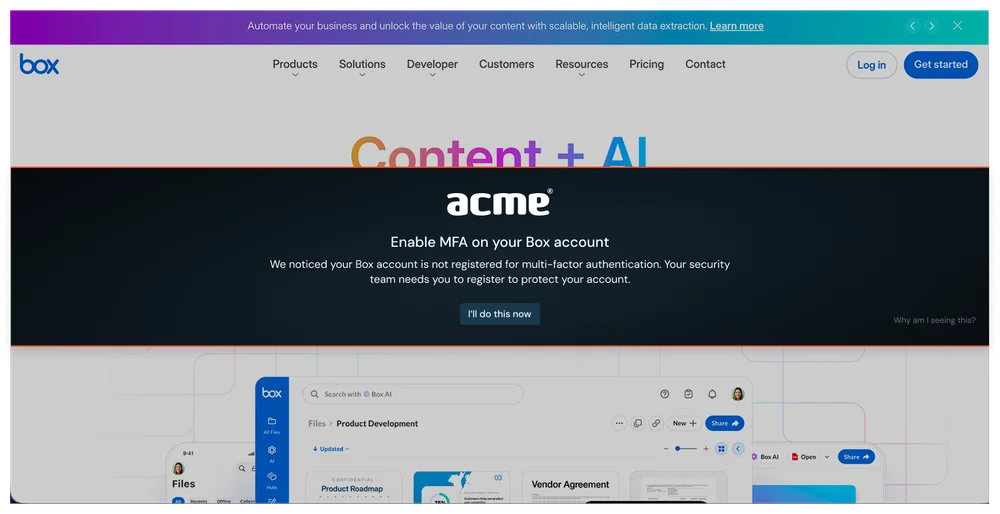
Push also helps prevent new ghost logins from forming. SSO login guidance nudges users toward SSO when available, reducing the rate of new local account creation. Ghost logins on downstream applications like Snowflake, Salesforce, and Atlassian are often the real target in identity-focused attacks — these apps hold customer data, intellectual property, and abusable functionality that's far more valuable than IdP access alone.
Frequently asked questions
Local accounts on SaaS applications that persist after SSO is configured — legacy password-based logins that bypass your identity provider entirely. When an organization rolls out SSO, users who previously signed up with a direct password often retain that local credential alongside their federated login. The local account remains accessible even after SSO access is revoked.
Push coined the term "ghost logins" to describe this gap. The problem is structural: SSO replaces the authentication path but doesn't deactivate the original local account. Push detects ghost logins by observing login behavior in the browser — identifying when users authenticate via password instead of SSO.
You need a tool that observes actual login behavior across all applications. Your IdP only sees federated logins — it's structurally blind to local accounts where users authenticate directly with a password.
Push detects ghost logins by monitoring login events in the browser: apps where SSO is configured but users still use password fallback, apps that were never federated, dormant accounts, and shared accounts with locally managed credentials. Push shows MFA status, password strength, and authentication method for each login.
A tool with browser-level visibility into login events — one that sees how users actually authenticate, not just what your IdP reports. IdPs, CASBs, and SSPM tools are structurally blind to local password-based logins on SaaS apps because those logins don't pass through the identity provider.
Push provides this visibility as a browser extension that monitors login events across every application employees access. It also provides SSO login guidance — in-browser guardrails that nudge users toward SSO when available — reducing new ghost login creation over time.
Yes. If a user created a local account before SSO was configured, that local account persists after SSO access is revoked. The original password still works. The local account bypasses your IdP's MFA requirements and conditional access policies. Offboarding the account via your IdP feels comprehensive but leaves these access paths intact.
Push identifies ghost logins proactively so they can be addressed as part of identity hygiene rather than discovered after a breach.
SSO controls the federated authentication path only. If the user ever set a local password on the application, that credential is managed by the SaaS app itself, not by your IdP. Revoking SSO doesn't touch it.
This gap exists because SSO adoption is additive — applications add SSO as an option rather than removing local authentication. To fully deactivate a user's access, you need to deactivate their local account on each application separately, which requires knowing which apps have local accounts. Push provides this visibility.
Push shows exactly where users authenticate with passwords instead of SSO by observing login events in the browser. For each login, Push captures the authentication method, application, and credential strength — giving you a complete map of SSO coverage gaps.
Your IdP only reports on federated apps. Network-based tools can tell you an application was accessed but can't determine the authentication method. Push's login-event-based approach is the most reliable way to identify where SSO isn't being used.
Push identifies dormant accounts using login recency data observed through browser telemetry. If an account hasn't been accessed within a defined period, it's flagged as dormant. These accounts represent both a security risk (unused credentials that could be exploited) and a licensing cost.
Dormant accounts are a variant of the ghost login problem — created months ago, used briefly, then abandoned with their original password. Push combines dormant account detection with compromised credential detection to identify the highest-risk accounts: dormant, using a breached password, with no MFA.
You can't fully prevent it — most SaaS apps allow self-service signup. What you can do is detect it immediately and enforce credential hygiene at the point of account creation.
Push identifies new non-SSO logins as they happen. SSO login guidance nudges users toward SSO when available, reducing new ghost login creation. Password strength enforcement ensures any local accounts meet your policy requirements. Detection plus guardrails is more effective than trying to block self-service signup entirely, which drives usage underground.
Local SaaS accounts sit outside your identity provider's control — typically lacking MFA enforcement, password policy compliance, conditional access protections, and centralized monitoring. They're vulnerable to credential stuffing (if the password is reused), invisible to your SIEM and IdP-based detection, and persist after employee offboarding.
Push addresses these risks by detecting local accounts, enforcing password strength at login, detecting compromised credentials, enforcing MFA via in-browser guardrails, and providing SSO login guidance.
An attacker who obtains credentials for a ghost login — via data breach, infostealer, or credential stuffing — can access the application directly without encountering SSO, MFA, or conditional access controls. The local account bypasses every identity security control because those controls only govern the federated authentication path.
Direct access to a key SaaS app provides access to data and functionality that is incredibly lucrative to attackers. Often, downstream apps like Snowflake, Salesforce, and Atlassian (Jira/Confluence) are the real target in IdP-focused phishing and session hijacking attacks — because it’s where customer data, valuable IP, and abusable functionality lives. This pattern has been seen in many recent breaches.
Ghost logins are particularly valuable to attackers because they're invisible to the organization's detection stack. An IdP-based anomaly detection tool won't see the login. Push detects ghost login exploitation by observing the login event in the browser — identifying the authentication method and credential status regardless of whether the app is IdP-managed.
Latest resources


