Tycoon 2FA
- Technique
- Credential phishing Authorization phishing
- Sub-technique
- AitM Device code phishing
- Targeted platforms
- Microsoft Google
- Also tracked as
- Storm-1747
Updated · First published
Current breakthrough rate
Inactive
- Mar 2026: High
- Apr 2026: High
- May 2026: High
- Jun 2026: High
- Jul 2026: Inactive
- Aug 2026: Inactive
Tycoon 2FA is an adversary-in-the-middle phishing-as-a-service platform targeting Microsoft 365 and Google accounts, tracked by Microsoft as Storm-1747. Once the dominant AiTM kit, it combines rotating custom CAPTCHA gates, layered JavaScript obfuscation and AES-encrypted relay traffic to resist analysis. Push detections dropped sharply from June 2026.
URL patterns
- Domain name is typically a short, pronounceable nonsense word (such as
coostosoo,joolioshu,liviogea) and often registered on an uncommon TLD (such as.company,.finance,.email,.com.de,.it.com,.za.com,.sa.com) - The landing page URL path is often a short random string containing a
!symbol - for example,/U0!JfZbhJkZ/- Auto-grab email addresses may be separated from the path with a
$symbol
- Auto-grab email addresses may be separated from the path with a
- After passing the custom CAPTCHA, the URL path will typically be a 10-15 character lowercase alpanumeric slug with an
idparameter value consisting of a long chain of hex groups joined with hyphens - similar to an extra long, non-standard UUIDhttps://disisho[.]ru/txys2fiky3psc?id=c543ef673adb49b85-aa7449953d0-a4b76d237668b3-62f41160ec8-eadff1a14-6b93e3d75-0d4211a554-a03f1c60702e42a-5cedb0567d4bbf6-58671e1f01cb-9f4acb4a0d04704f0
Custom CAPTCHAs
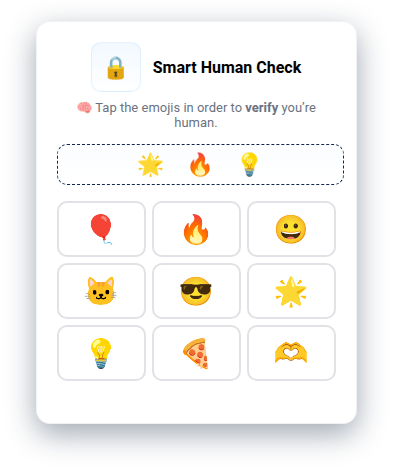
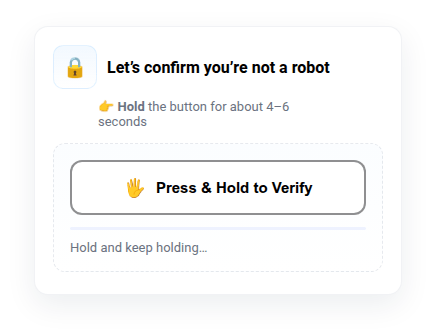
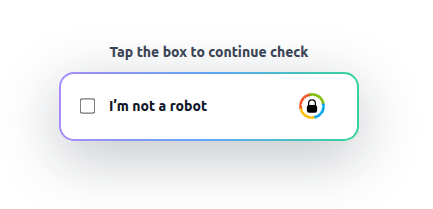
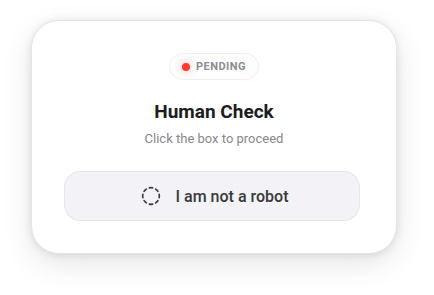
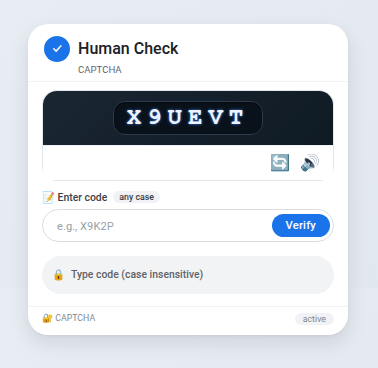
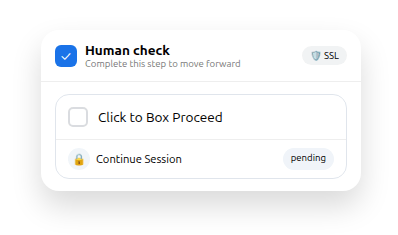
Tycoon 2FA makes use of a wide variety of custom CAPTCHAs pages that have regularly changed over time. These are used as an initial gate prior to serving the cloned login pages in an attempt to defeat automated analysis by security scanners.

Network traffic
Kill switch check
Before displaying the cloned login page, a cross-origin GET request is sent to a central server. If the response body is simply 0, then
the phishing page is displayed. Any other response and the attack aborts by displaying benign decoy content instead.
Session initiation
Multiple recognisable network requests are made during the preparation of the phishing page. Starting with a multi-part
form POST request containing the parameters:
bltpgsid
When operational, the response from the server is the JSON {"status":"success"}.
Then a standard URL encoded form data POST request with the parameter data containing the auto-grab email address.
The response from the server is JSON containing an encrypted URL to redirect to for the credential capture stage:
{"data":"<base64 encoded blob>", "key":"<32 character hex>"}
Microsoft credential relay
User actions and credentials are sent cross-origin to a central backend server as base64 encoded, encrypted blobs in the
data parameter of POST requests. For example, the checkemail step that occurs after the victim enters their email
address has the following plaintext format:
/john.doe@example.com/Cqic/chrome/198.51.100.44/United Kingdom/1/1

/<email>/<bltpg>/<browser>/<ip>/<country>/<appnum>/<getresponse>
The data is encrypted with AES in CBC mode using static IV and key (1234567890123456) with the CryptoJS library.
Randomised URLs are generated on the client side by appending a random suffix to the base relay URL. The random suffix is
created according to a regular expression pattern using the randexp JavaScript library.
Google credential relay
User actions and credentials are sent over a WebSockets channel using the Socket.IO library. Events sent over the
sockets channel include: send_to_browser, response_from_browser, user_reconnected, browser_connected, recieveid,
getprevresponse, responserecieved.
Evasion techniques
How this tool resists automated analysis and takedown.
Anti-bot gate
Interstitial checks a visitor must clear before the lure is served.
- Rotating custom CAPTCHA designs
- Client-side bot filter on lure page
Browser fingerprinting
Client-side signals used to tell a real victim from an analysis environment.
- Automation globals (WebDriver, PhantomJS)
- Bot/scanner User-Agent regex
- Burp User-Agent check
- WebGL, languages, window.chrome checks
- Screen size and CPU timing checks
Network filtering
Decisions made on where the request comes from rather than what it looks like.
- Hosting provider ASN blocklist
Cloaking
Benign content served in place of the lure when a visitor fails a check.
- Benign decoy site redirects
Anti-indexing
Keeping infrastructure out of crawlers, feeds and each other’s reach.
- noindex, nofollow robots meta tag
- RandExp-randomised URL paths
- Per-victim single-use link ids
HTML & JS obfuscation
Hiding page logic from static inspection of the delivered source.
- 3-5 nested self-decrypting JS layers
- Reversed and sliced strings
- obfuscator.io string-array packing
C2 obfuscation
Disguising the traffic between the phishing page and its backend.
- AES-128-CBC with static key and IV
- Binary-encoded then base64 beacons
Anti-debugging
Frustrating manual inspection of a page while it runs.
- debugger-statement timing trap
- DevTools shortcuts blocked
- Right-click context menu disabled
Representative samples
Public analysis
Third-party research on this tool.