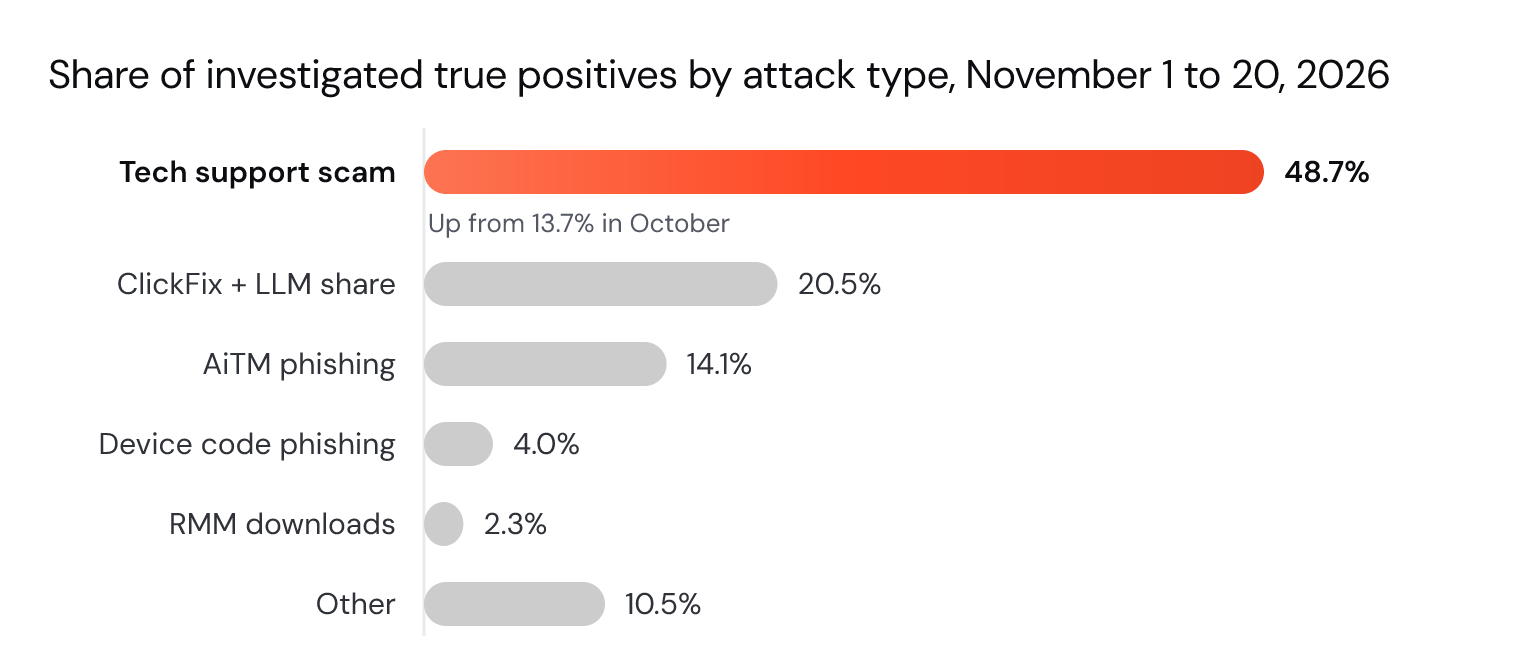
Tech support scams made up almost half of the attacks our team investigated in November, and one kit, GhostCursor, served most of them. Here's how these scams and related lures get employees to install legitimate RMM tools, why EDR and other controls miss them, and what you can do about it.
Attackers are increasingly turning to legitimate remote access tools to get remote, hands-on-keyboard access to corporate devices. Some attacks are targeted, with tailored emails, messages, and calls from a fake IT help desk. Others are opportunistic: A fake virus warning or locked browser page, often reached through malvertising, tricks the user into calling a "tech support" number.
Across all of these attacks, the goal is the same: trick the user into installing a legitimate tool such as ScreenConnect, AnyDesk, UltraViewer, Quick Assist (any one of literally hundreds of RMM tools will do). The tool gives the same hands-on control as a remote access trojan and leads to anything from ransomware to bank fraud. Unlike malware, it's signed, often already allowed, and connects through the vendor's own relays, so it draws little attention on the endpoint or the network. EDR sees a signed tool that the user chose to install.
These scams are usually treated as consumer fraud, but we're seeing them increasingly target the business networks that we protect.
Tech support scams are on the rise
Tech support scams are now the largest attack type in the detections that our team investigates. They made up 48.7% of investigated true positives from November 1 to 20, up from 13.7% in October.
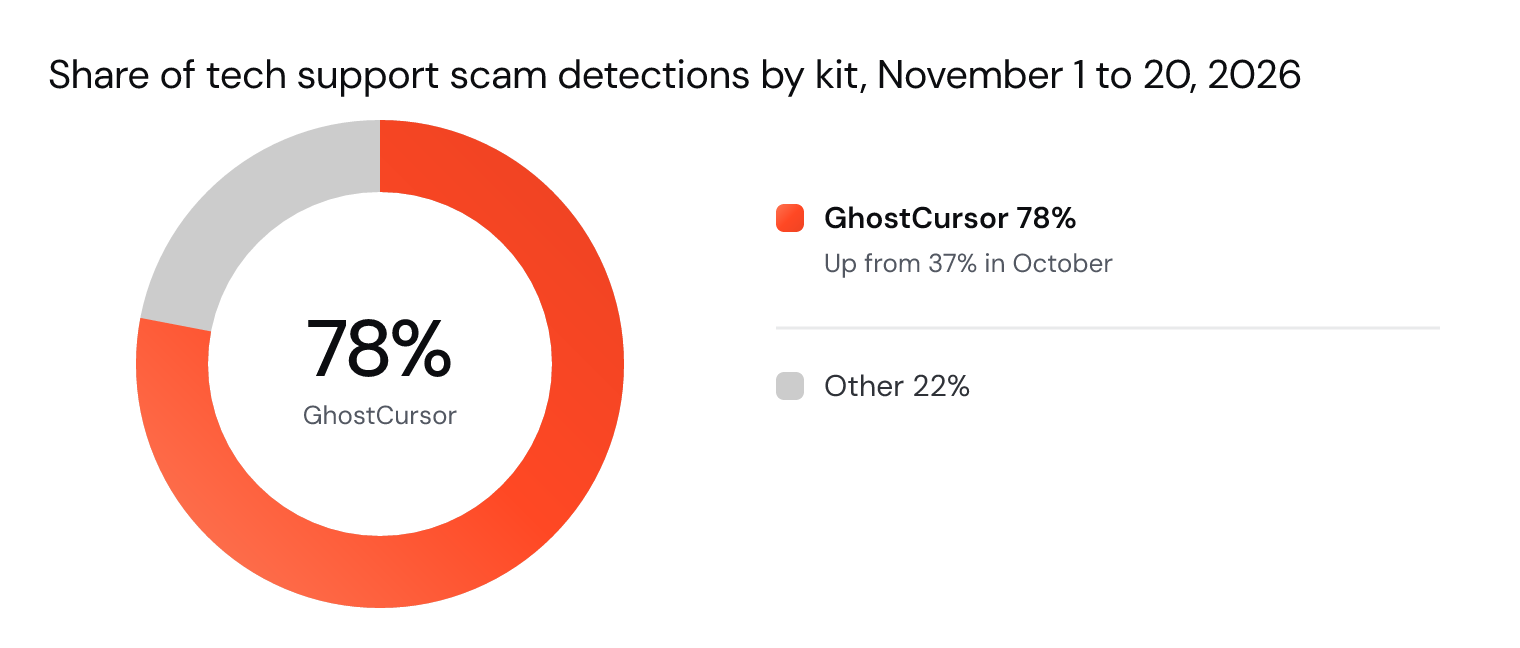
A small number of kits deliver this volume too. GhostCursor alone accounted for 78% of the tech support scam pages that we detected in November, up from 37% in October, showing a clear spike. The kits constantly rotate their infrastructure, page HTML, and lures, so a block on one domain or page version doesn't last long either.
This is supported in external data: The FBI received 47,794 tech and customer support scam complaints in 2025, with reported losses of $2.13 billion.
How tech support scams are impacting businesses through RMM tool abuse
A tech support scam detection marks the first step of the attack: a user on a work device landed on a scam page. To reach the payload, the user has to call the number and then follow the operator's steps to the end: a remote access tool download, a phishing page, or handing over their credentials and approving a sign-in.
Reports from 2025 and 2026 show a significant rise in RMM abuse against business targets. Microsoft found RMM tools in 79% of the ransomware cases that its incident response team handled. Huntress recorded a 277% rise in RMM abuse in 2025. The 2026 Verizon DBIR reports RMM abuse up 240% and traditional command-and-control and backdoor use down 27%.
When MFA became standard, attackers moved to AiTM phishing to steal the session instead of the password. EDR is doing the same thing to malware. A loader or a RAT gets caught, so attackers have the user install a legitimate remote access tool that EDR has no reason to block.
It's worth pointing out that our RMM download detections are much lower than our tech support scam detections. The gap suggests that conversion rates are relatively low compared to the overall presence of these scam pages online. But the amount we're seeing these pages reflects their sheer volume, how readily they're getting in front of users, and ultimately how other safe-browsing-type controls aren't picking them up as reliably as you'd expect for a "commodity" attack type.
How the attacks reach users
We group the activity into 6 lure types, based on what gets the user to install or approve the tool: a phone call, a page that leads to a phone call, or a page alone. They range from targeted to untargeted:
Help desk impersonation picks employees at a chosen organization and calls them.
Bank-support fraud is aimed at customers of specific banks.
Callback phishing and lure pages reach people in bulk through mass email and search, with pretexts such as an invoice, an invitation, or a software download.
Browser lockers and ClickFix pages are watering holes that take whatever traffic compromised sites, ads, and search results send them.
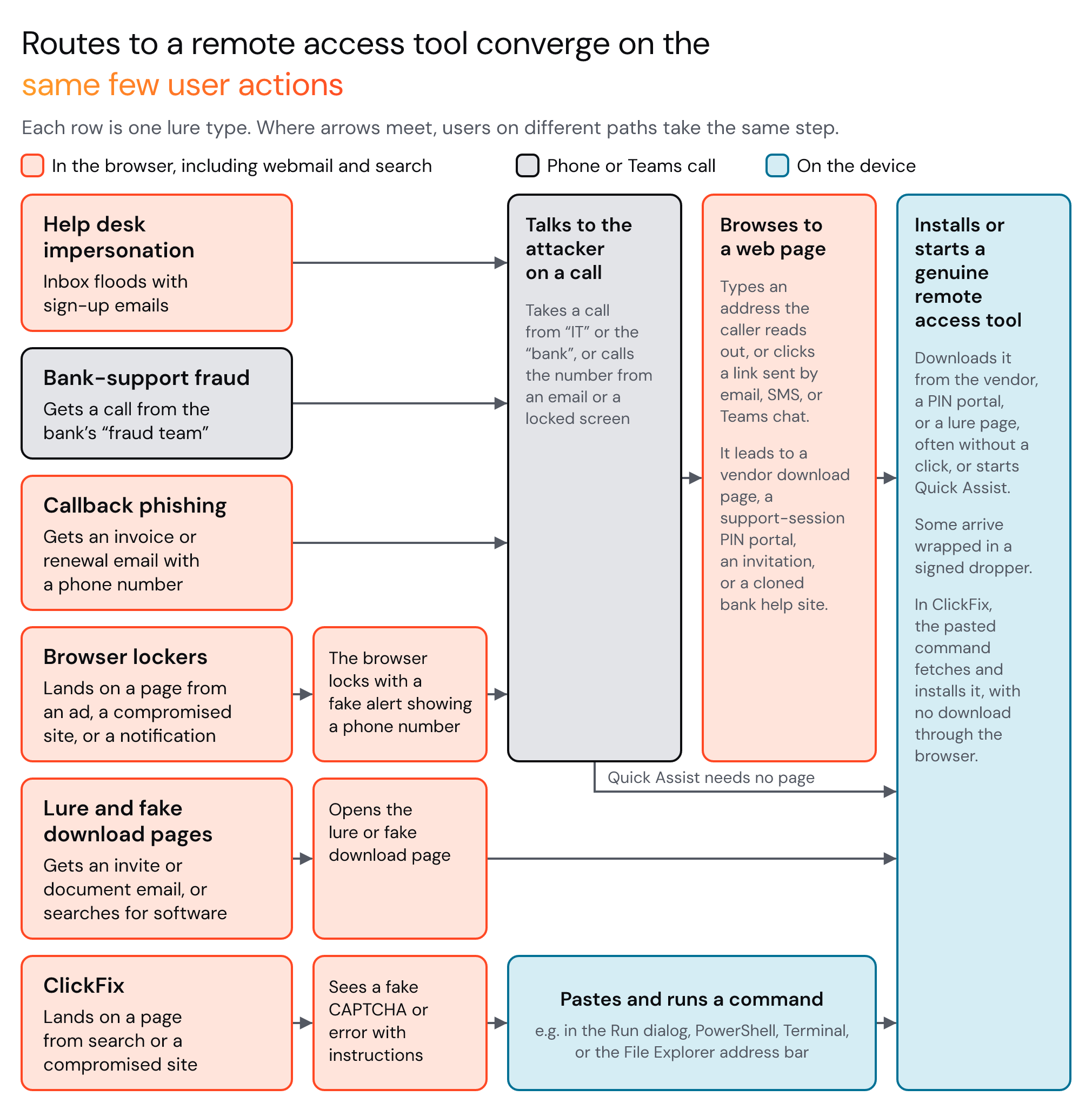
Attackers use these lure types interchangeably, often within the same campaign. Silent Ransom Group, (aka. Luna Moth, the group behind this year's data theft and extortion at several Am Law 100 firms) runs both callback phishing and IT impersonation, and ClickFix prompts also appear on lure pages, such as a spoofed Social Security site.
A breakdown of each route is provided below.
Lures where a page leads to a call
Browser lockers that end in a phone call
A scam page, reached from compromised sites, ads, parked domains, push notifications, or email, locks the browser and shows a phone number. The call can lead to a genuine remote access tool, or to credential theft or a payment scam.
A tech support scam page takes over the browser. It goes full screen, locks the keyboard, plays an alarm, and runs a fake Defender scan beside a "Microsoft" phone number. Traffic reaches these pages from compromised WordPress sites and malicious plugins, paid ads, and mass and gated phishing emails. Parked domains and push notifications send visitors too. One email campaign switched to HR and IT audit lures aimed at employees.
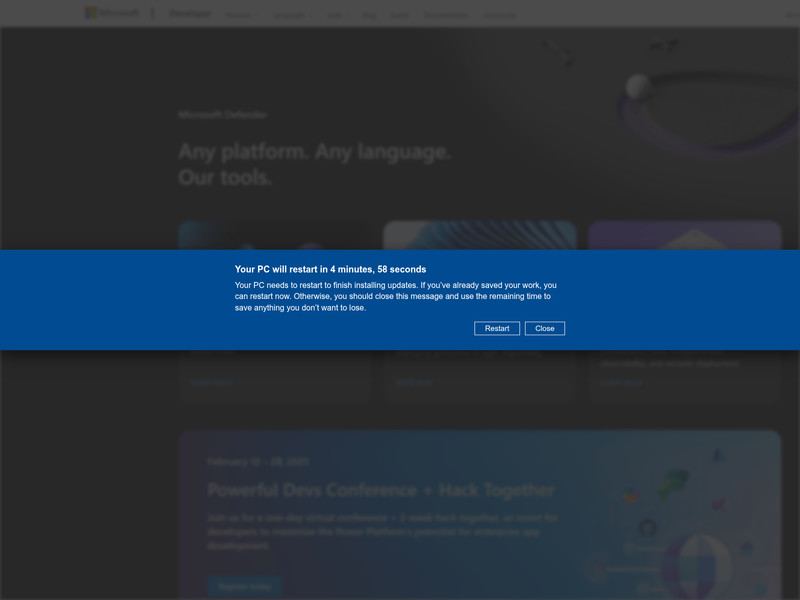
The remote access tool arrives during the call. In one test call to a Help TDS number, the operator cleared the lock and had the caller download UltraViewer. In another recent case, an employee called the number on a generic browser scam pop-up and then gave the attacker remote access to a corporate device. Operators also send victims to vendor or session-join pages for AnyDesk, TeamViewer, ScreenConnect, LogMeIn, and similar tools.
An attacker who steals credentials or access to sell on doesn't need to choose a consumer or a business target, because whatever the lure collects gets sorted and sold afterward. This is a familiar pattern in the world of infostealer logs. In 2024s Snowflake attacks, most of the credentials came from old infostealer infections, some on contractor laptops that were also used for gaming and pirated software. The 2026 Verizon DBIR found an infostealer on 54% of the devices in initial access broker logs.
Video: A browser locker from GhostCursor, the most prevalent tech support scam kit that Push tracks. When the user clicks to confirm their identity, the browser goes full screen into a fake Microsoft support page with stacked security alerts, a phone number, and a fake support chat.
Lures that rely on the page alone
Lure and fake download pages
A fake invitation, document, meeting, or download page, reached from an email or a search result, serves a genuine RMM installer that is tied to the attacker's own account and renamed to fit the lure.
Common lures include:
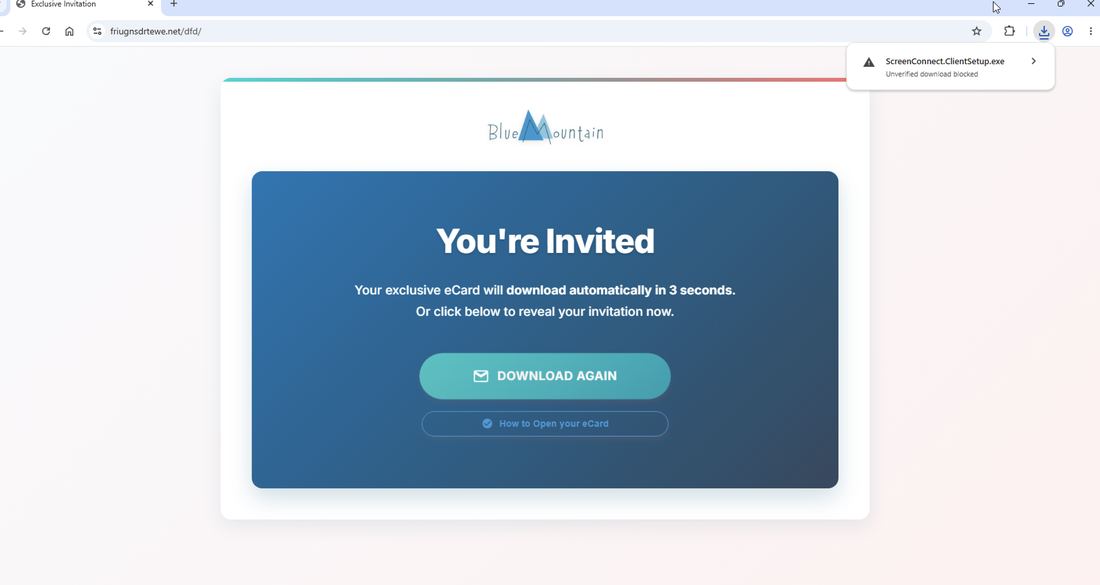
Invitations and e-cards. Pages imitate legit sites like Evite, Punchbowl, or Blue Mountain and often start the download without a click. In one campaign, invite pages pushed an Atera MSI named EVENTBITE.msi.
Tax, government, and document lures. One IRS-themed campaign served a repackaged ScreenConnect installer named TranscriptViewer5.1.exe, then redirected the victim to the real IRS site.
Fake meeting updates. Typosquatted Zoom and Teams pages say an update is needed to join. The "update" is a signed LogMeIn, Datto, or ScreenConnect installer renamed to look like the meeting app.
Fake software download sites. Fake download sites for utilities such as OBS Studio appeared among the top Google and Bing results, serving an archive that side-loaded ScreenConnect. Fake Notepad++ and 7-Zip pages served a renamed LogMeIn Resolve installer.
The same lures also carry phishing kits, and some kits choose the payload per visitor. XXEVITE, a kit we track on fake invitation lures, sends Windows visitors to a ScreenConnect or FleetDeck installer and macOS visitors to a Google credential phishing page.
ClickFix that installs the RMM
A fake CAPTCHA or error page, reached mostly from search results and compromised sites, has the user paste a command that installs a remote access tool, most often NetSupport Manager, with no download through the browser.
A fake CAPTCHA tells the user to paste a command, and the command installs the remote access tool, most often NetSupport. No file is downloaded through the browser, so download security controls don't apply.
Case study: NetSupport Manager. NetSupport Manager is a commercial remote control tool that IT teams and schools use, and it's commonly abused by ClickFix operators. The IClickFix framework served it from more than 3,800 compromised WordPress sites, and fake Zillow review pages installed it the same way. Attackers use the genuine, signed client, hide its window, set it to start at login, and point it at a gateway server they run.
Lures that start with a call
Help desk impersonation over Teams and phone
A caller posing as IT gets the user to start a remote session in Quick Assist or install an RMM tool, usually after an email bombing, over Teams chat, Teams calls, or the phone.
The attacker floods a user's inbox with sign-up emails, then calls on Teams or the phone as IT support, offering to fix the spam. The user starts a remote session with a built-in tool such as Quick Assist, or installs an RMM tool. Researchers first described the pattern in 2024 with Storm-1811 and Black Basta, and other groups have used it since:
3AM ransomware actors spoofed the company's IT phone number.
The STAC4749 campaign ran from IT-themed .top tenants and used the RemSupp RMM when Quick Assist was blocked. Several intrusions ended in Chaos ransomware.
In 2 intrusions in October 2026, Teams calls to employees gave the attacker a foothold, from which it obtained certificates for privileged accounts and took data from a file server.
The same pretext also sends employees to AiTM or device code phishing pages instead of a remote access tool, as in a recent SLH campaign. Scattered Spider runs it in reverse too, calling the help desk as an employee to get a password or MFA reset. Its members also call or text employees as IT and get them to install TeamViewer, ScreenConnect, or Splashtop.
Bank-support fraud with cloned help centers
A caller posing as the bank's fraud team sends the user to a cloned help-center page, where the caller's code unlocks a genuine RMM installer or a signed dropper that installs one.
One such operation ran from at least 383 domains from March 2026, aimed at both consumers and businesses. The cloned page added buttons such as "Verify Call" and "Fraud Report", where entering a code from the attacker installed AnyDesk or ScreenConnect. In a related pattern against federal staff, a help desk email or call led to a portable copy of AnyDesk (an .exe that runs without being installed or needing admin rights).
Windows asks for admin rights when software writes to Program Files, registers a service, or changes machine-wide settings. A portable build is a single executable that runs as the logged-in user and writes only to that user's own folders, so any standard user can run it unless application control blocks it. There's also no install event or entry in the installed software list for controls to act on. The trade-off for the attacker is that, without a service, access ends when the user logs off, so operators often push the full installer later in the call.
Callback phishing
An email with no link gives a phone number, and on the call the operator sends a genuine remote support invitation or names a web page to download a tool from.
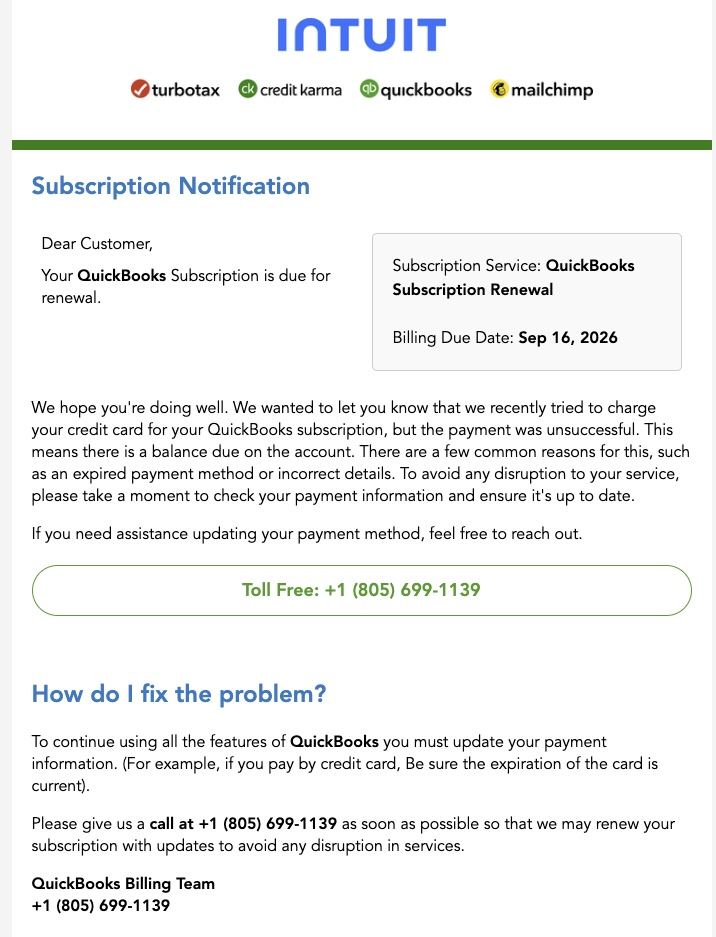
Callback phishing puts the phone number in an email. The message is an invoice or subscription notice with no malicious link, which email filtering is unlikely to flag. The caller then walks the victim to a remote support tool.
Silent Ransom Group, also known as Luna Moth, runs callback phishing and now also poses as internal IT. Its recent victims are mostly law firms, including Am Law 100 firms. Citing unnamed sources, press reports say that WilmerHale paid at least $18 million and Goodwin Procter about $10 million, and that Weil, Gotshal & Manges paid up to $20 million to stop the publication of client data.
A separate operation registered more than 350 QuickBooks lookalike domains to send billing emails with a number to call.
Why existing controls miss these attacks
Each control sees one part of the attack, and in these attacks that part is either legitimate or newly created:
EDR sees a vendor-signed installer that the user ran, or a Quick Assist session that the user approved. The attacker's build comes from their own free trial, so it has a new hash but keeps the vendor's valid signature. Hundreds of RMM tools are in legitimate daily use, so an alert on every install is noisy, and the signature doesn't show whose account the tool connects to.
Email security and safe browsing checks see real mailboxes, links sent through reputable services, and new domains on trusted platforms. A callback email has no link to scan at all, and the domains rotate fast: in one campaign, 90% of the scam sites were used for a single day.
Sandboxes and scanners don't get past CAPTCHAs, operating-system checks, or the caller's code. ClickFix and Quick Assist involve no download at all.
Browser scam protections such as Edge's scareware blocker and Chrome's on-device scam detection look for full-screen lockers, not lure pages, cloned help centers, or ClickFix prompts. (And in any case, we didn't see these fire for any of the pages we intercepted).
Traffic brokers hide the scam from scanners. Browser lockers and ClickFix pages typically reach users through traffic distribution systems (TDS). A TDS sits between the ad or compromised site and the scam page, so each click goes to the TDS first. It checks the visitor's IP address, location, browser, operating system, and time of day, and looks for signs of a bot or security scanner. It sends selected visitors to the scam, and redirects the rest to a harmless page or sells them on to other affiliates.
What you can do about it (and how Push can help)
Start by blocking the remote access tools that your organization doesn't use. That reduces exposure, but it doesn't cover every case. It's difficult to outright block a tool that your own IT team uses, and attackers can install that same tool linked to their own account. There are hundreds of legitimate RMM tools that can be abused by attackers, and attackers also use portable builds and droppers that wrap the installer to mask it and evade fingerprinting.
Push covers these gaps in the browser, where the lure page loads and the user acts on it. Push analyzes the rendered page rather than the domain, so one detection covers a technique across many kits and domains:
Real-time page analysis covers lure pages, browser lockers, cloned help centers, and the sign-in pages that callers send employees to, whatever payload sits behind them.
File download controls can be set to block or warn on remote access installers that your organization doesn't use, before the file reaches the endpoint.
Malicious copy and paste detection blocks the ClickFix step.
Employee identity verification codes let an employee check that a caller who claims to be IT is a real colleague.
Book a live demo to learn more.