Device code phishing: how to detect and stop it
Device code phishing abuses the OAuth device authorization flow to steal access tokens while bypassing MFA and passkeys. Learn how to detect and stop it.

Device code phishing bypasses MFA and passkeys by targeting the authorization layer
Device code phishing is a form of authorization phishing that abuses the OAuth 2.0 device authorization grant — a flow designed for input-constrained devices like smart TVs and IoT hardware — to trick users into connecting an attacker-controlled app instance to their account. The user authenticates on the real identity provider page, completes MFA normally, and authorizes the attacker's request to connect an attacker-controlled app to their account — granting it persistent OAuth access to their account. There's no credentials or MFA to intercept, and the attack plays out on legitimate identity provider infrastructure.
Device code phishing has seen explosive growth in 2026. Push is tracking 30+ distinct kits now offering the technique — up from one or two at the start of the year. PhaaS platforms like EvilTokens, alongside established AiTM vendors like Tycoon 2FA adding device code capability, have made the technique accessible to any operator with a subscription. Device code phishing is now a core capability across the PhaaS ecosystem, following the same commoditization arc that turned AiTM phishing from a specialist technique into the default attack method.
Device code phishing is one of three techniques in the broader authorization phishing category, alongside consent phishing and ConsentFix. All three target authorization flows that operate after authentication has succeeded, making every form of MFA — including passkeys — irrelevant to the attack.
How device code phishing works
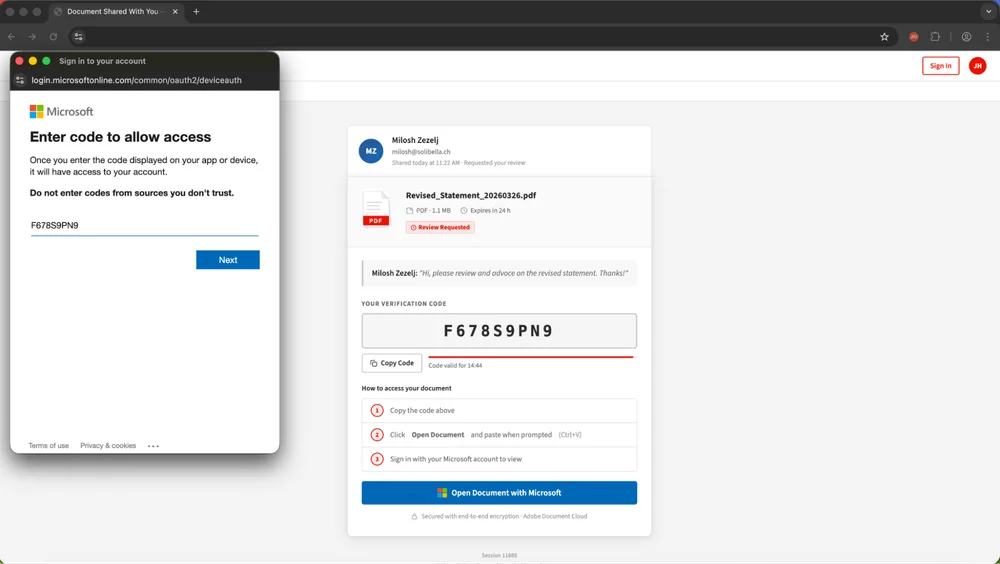
The OAuth device authorization grant (RFC 8628) was originally designed for devices without keyboards — smart TVs, printers, conference room hardware — where a user authenticates on a separate device by entering a short code. In practice, the flow's primary use in enterprise environments is CLI tooling: Azure CLI, GitHub CLI, and similar developer tools use it as their default sign-in method. The identity provider connects the requesting application to the user's account once they authenticate. Device code phishing repurposes this flow: the attacker generates the code tied to an app instance they control, the user enters it on the real identity provider page, and the attacker's app instance is authorized to connect to the victim's account.
- The attacker initiates a device authorization request with the target identity provider, generating a legitimate device code tied to an application they control
- The victim receives a phishing lure — via email, Teams message, LinkedIn DM, voice call, malvertising, or a compromised website — containing a link to the identity provider's real device code entry page
- The phishing page typically auto-polls for a fresh code on load, so the code is live and valid when the user arrives
- The victim enters the code on the genuine login page (e.g., microsoft.com/devicelogin). If not already signed in, they authenticate normally, including completing MFA
- The identity provider completes the authorization — connecting the attacker's app instance to the victim's account with full OAuth access
- The attacker now controls an authorized app instance with persistent access to the victim's email, files, and cloud applications
Because device code phishing targets apps that are already consented in the user's tenant — usually first-party Microsoft apps like Azure CLI or Microsoft Office — it sidesteps the consent restrictions that have reduced traditional consent phishing volume in the wild. (Most enterprise cloud environments prevent users from adding third-party apps unless approved by an admin, by default.)
In Microsoft environments, the impact extends beyond API access to a single application. If the attacker targets the Microsoft Authentication Broker, they can register a virtual device against the victim's account and escalate to a full Primary Refresh Token (PRT), gaining an SSO-enabled session that can move laterally across every SSO-joined application. And because these apps support Microsoft's Family of Client IDs (FOCI), a token obtained for one app can be silently exchanged for access to Outlook, Teams, OneDrive, SharePoint, and more — turning a single device code phishing success into access across the entire Microsoft ecosystem.
Why most security tools miss device code phishing
Device code phishing is designed to evade the controls most organizations rely on.
Email security can flag the initial lure, but the link points to a legitimate, trusted domain. The phishing pages and infrastructure used to deliver the lure are frequently rotated to evade blocklists, and delivery increasingly comes through channels email security doesn't monitor — LinkedIn DMs, Teams messages, voice calls, and malvertising.
Phishing-resistant MFA and passkeys don't help. The user authenticates on the real identity provider page, and the MFA challenge is satisfied legitimately. The attack doesn't intercept authentication; it tricks the user into authorizing an attacker-controlled app on their account. This is the defining characteristic of authorization phishing: the authentication is real, and the controls built to protect it are working exactly as intended.
Conditional access policies are the primary defense cited against device code phishing, and some configurations do work. "Block device code flow" is the most direct control, and Microsoft now recommends enabling it for tenants where device code flow isn't routinely used. "Require compliant device" also blocks device code phishing because the flow can't present proof of device compliance. But both require careful scoping — Azure CLI, developer tooling, and conference room hardware depend on device code flow, so organizations with real dependencies need per-user or per-app exceptions that create gaps. And conditional access only applies to Microsoft. Google mitigates the risk by restricting which scopes are available through device code, but GitHub, Salesforce, and other platforms that support the flow don't offer equivalent blocking controls.
How do you stop device code phishing?
You can't eliminate the device authorization grant from every platform that supports it — it's a standard OAuth flow with legitimate use cases — so defense has to combine platform-level restrictions with real-time detection of the phishing itself.
Conditional access hardening is the first layer for Microsoft environments: block device code flow for users and apps that don't need it, require compliant devices where possible, and regularly audit whether your exceptions are still necessary. These controls are effective against device code phishing specifically, but they don't protect against the other authorization phishing techniques, they only apply to Microsoft, and the gap between a default deployment and a hardened one is wide. Testing your conditional access configuration against actual device code phishing scenarios is essential — it's common to find policies in report-only mode or exceptions that inadvertently leave the attack surface open.
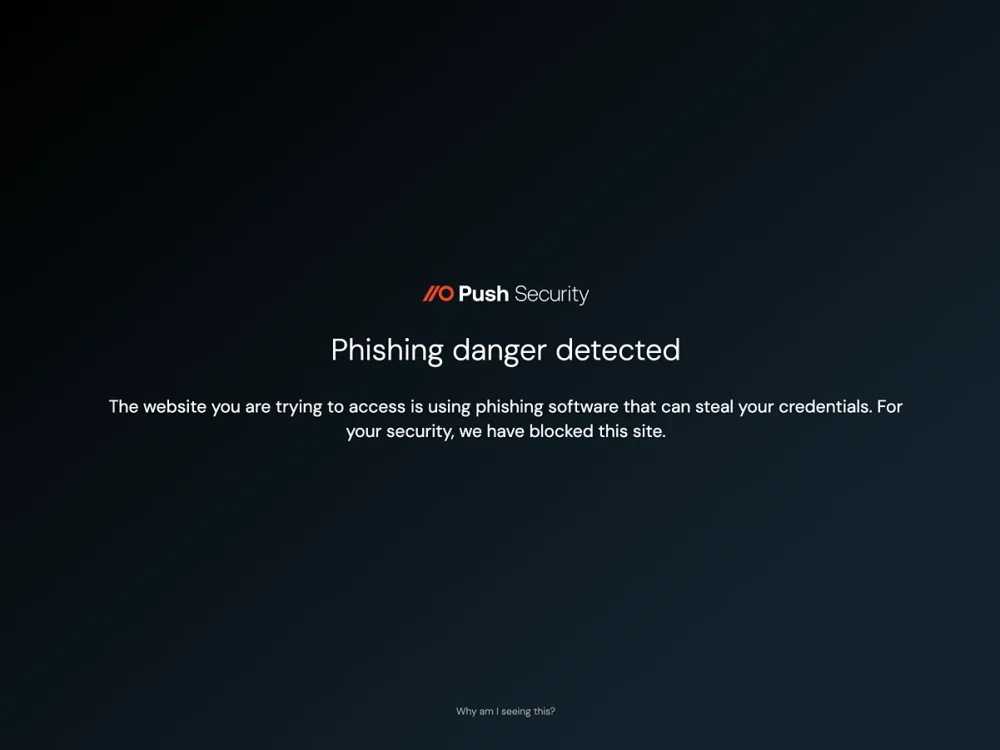
Detecting the phishing itself requires browser-level visibility. The device code phishing lure, the device code entry page, and the authorization flow all execute in the browser. Push detects device code phishing kits behaviorally — the same detection model that catches AiTM phishing kits — and blocks them before the user completes the authorization flow. This catches the attack regardless of which conditional access policies are in place, and it works across identity providers, not just Microsoft.
How Push detects and blocks device code phishing
Push detects device code phishing kits in real time, using the same behavioral detection model as AiTM phishing. This is the primary control — Push identifies device code phishing pages and blocks them before the user completes the authorization flow and the attacker's app gains access to the victim's account. Because detection targets the behavioral signatures of the phishing kits rather than specific domains or indicators, it catches both known kits (EvilTokens, Tycoon's device code module, Venom, ODx, Kali365) and novel ones that haven't been catalogued yet.
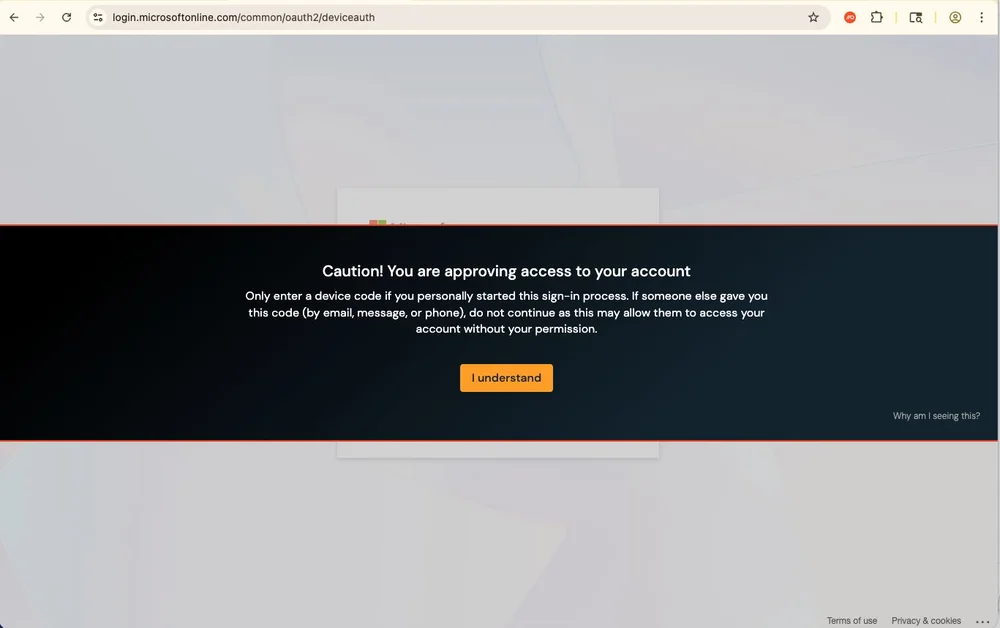
As a supporting layer, Push provides configurable warnings on device code login pages. In "Acknowledge" mode, clicking through the warning generates a security alert, giving security teams visibility into device code authentication activity across their environment — whether legitimate or malicious. This app-agnostic warning covers Microsoft, Google, and other identity providers that support the device authorization grant.
Frequently asked questions
Device code phishing is a phishing technique that abuses the OAuth 2.0 device authorization grant (RFC 8628) to connect an attacker-controlled app instance to the victim's account. The attacker generates a legitimate device code tied to an app they control, delivers it to the victim via a phishing page, and the victim enters the code on the real identity provider page — authenticating normally, completing MFA, and authorizing the attacker's app on their account.
It is a form of authorization phishing: the attack targets the authorization layer rather than authentication, so every form of MFA including passkeys is bypassed.
AiTM phishing targets authentication — a reverse proxy sits between the user and the real login page, intercepting credentials, MFA tokens, and the resulting session cookie as they pass through. Device code phishing attacks authorization — the user visits the real identity provider page, authenticates normally, and the attacker's app instance is authorized on the victim's account. AiTM defeats MFA by proxying it; device code phishing makes MFA irrelevant because the authentication succeeds legitimately. The post-compromise outcomes differ too: AiTM produces a stolen session cookie with a limited lifetime, while device code phishing grants the attacker a persistent app connection with OAuth refresh tokens that can last indefinitely and be exchanged across applications via FOCI.
No. Device code phishing targets the authorization layer, which operates after authentication has succeeded. The user authenticates on the real identity provider page with their real credentials and MFA — including passkeys. Passkeys verify that the domain is genuine, and it is: the user is on microsoft.com or accounts.google.com. The attack tricks the user into authorizing an attacker-controlled app, not into revealing credentials or session tokens. Passkeys remain the strongest defense against authentication phishing (AiTM, credential theft), but they're irrelevant to authorization phishing.
Some can, but effectiveness is configuration-dependent and Microsoft-specific. "Block device code flow" is effective but also blocks legitimate use cases (Azure CLI, developer tooling, conference room hardware). "Require compliant device" blocks device code phishing because the flow can't present device compliance proofs. "Require phishing-resistant authentication" doesn't apply — the authentication in device code phishing is already legitimate. Token Protection (currently in preview) has limited applicability. Testing is essential: it's common to find conditional access policies in report-only mode or exceptions that leave the attack surface open. See the full conditional access analysis in Push's authorization phishing research.
Microsoft has the broadest exposure because of unrestricted scopes, reusable first-party client IDs, and FOCI token exchange, which is why the overwhelming majority of observed attacks target Entra ID. But the technique is not Microsoft-exclusive. GitHub is an obvious target — device code flow is the default CLI sign-in method, and broad scopes including full repository access are available. Salesforce was targeted in the 2025 ShinyHunters campaign. AWS also supports the flow. Google is lower risk for device code phishing specifically — Google explicitly limits which scopes are accessible through the device code flow, making Gmail, Calendar, and most Workspace APIs unavailable through this mechanism. Any platform that supports the device authorization grant is a potential target. Push's device code phishing detection is app-agnostic and works across identity providers.
In Microsoft environments, if the attacker targets the Microsoft Authentication Broker, they can register a virtual device against the victim's account and escalate to a full Primary Refresh Token (PRT). A PRT provides browser-level SSO — the attacker gets an interactive session that can move laterally across every SSO-joined application, equivalent to owning the user's authenticated browser. Even without PRT escalation, FOCI (Family of Client IDs) allows tokens obtained for one Microsoft app to be silently exchanged for access to others — Outlook, Teams, OneDrive, SharePoint, and more. A single device code phishing success can cascade into access across the entire Microsoft ecosystem.
FOCI (Family of Client IDs) is a Microsoft mechanism that allows tokens obtained for one first-party app to be exchanged for tokens to other apps in the same family — without additional consent or authentication. If an attacker obtains a token for Azure CLI through device code phishing, they can silently exchange it for access to Outlook, Teams, OneDrive, SharePoint, and dozens of other Microsoft applications. FOCI is what turns device code phishing from a single-app compromise into full ecosystem access. The same token-exchange mechanism applies to ConsentFix, which targets the authorization code grant rather than the device code flow but produces functionally identical post-compromise outcomes.
Start with your authentication logs. In Microsoft Entra ID, sign-in logs show device code grants — filter for the device code authentication protocol and look for anomalies: grants where the IP address at authorization differs from the IP used for subsequent account activity, grants against apps your organization doesn't typically use via device code, or unusual volumes of device code grants from non-developer users. These signals aren't conclusive on their own — a legitimate remote worker using Azure CLI will also show split IPs — but they establish a baseline and surface outliers worth investigating.
For platforms beyond Microsoft, log coverage varies. GitHub audit logs capture device code grants; Salesforce and AWS provide equivalent logging if enabled. Ensuring you're actually collecting these logs across every app that supports the device authorization grant is the first step — many organizations discover gaps only after an incident.
The core detection challenge is that a phishing-initiated device code grant looks identical to a legitimate one at the IdP layer. The authorization is real, the app is a legitimate first-party app, and the user authenticated normally. This is why browser-level detection adds a fundamentally different signal: Push detects and blocks the phishing kit that delivers the device code, not the grant itself, and blocks it before the user completes the authorization flow. Push also provides configurable warnings on device code login pages — in "Acknowledge" mode, any user who encounters a device code page generates a security alert, giving you app-agnostic visibility into device code authentication activity across your environment.
No single tool covers the full attack chain. Conditional access can block the device code flow for Microsoft, but only for users and apps you've scoped — and it doesn't apply to other platforms. Email security can flag lures delivered by email, but misses Teams, LinkedIn, voice, and malvertising delivery. IdP logs show device code grants, but can't distinguish legitimate from phishing-initiated grants without additional context. Browser-level detection is the most effective interception point because Push sees the phishing page itself, regardless of which platform is targeted or how the lure was delivered. Push detects and blocks device code phishing kits in real time before the authorization flow completes, and provides app-agnostic warnings on device code login pages as a supporting control.
Latest resources


