
'%3e%3cpath%20d='M248.027%20159.993C292.176%20159.993%20328.105%20124.1%20328.105%2079.996C328.105%2035.892%20292.191%200%20248.027%200C203.863%200%20167.95%2035.892%20167.95%2079.996C167.949%20124.101%20203.878%20159.993%20248.027%20159.993ZM213.969%2045.973C223.069%2036.882%20235.155%2031.873%20248.027%2031.873C260.899%2031.873%20272.986%2036.882%20282.086%2045.973C291.186%2055.064%20296.2%2067.154%20296.2%2079.997C296.2%2092.84%20291.186%20104.93%20282.086%20114.021C272.986%20123.112%20260.899%20128.12%20248.027%20128.12C235.155%20128.12%20223.069%20123.111%20213.969%20114.021C204.869%20104.93%20199.871%2092.84%20199.871%2079.997C199.871%2067.154%20204.884%2055.063%20213.969%2045.973Z'%20fill='%23EE4323'/%3e%3cpath%20d='M150.16%200L57.6821%20159.993H94.5381L187%200H150.16Z'%20fill='%23EE4323'/%3e%3cpath%20d='M92.478%200L0%20159.993H36.856L129.334%200H92.478Z'%20fill='%23EE4323'/%3e%3c/g%3e%3cdefs%3e%3cclipPath%20id='clip0_296_834'%3e%3crect%20width='328.105'%20height='159.993'%20fill='white'/%3e%3c/clipPath%3e%3c/defs%3e%3c/svg%3e)



Incident investigations with browser telemetry
From phishing to ClickFix to session hijacking, attacks increasingly play out in the browser. Push captures high-fidelity telemetry so you can investigate quickly, contain confidently, trace the source of an attack, and shut it down before it spreads.
- Reconstruct full browsing sessions with linked traces across tabs and redirects
- Accelerate investigations with high-fidelity telemetry
- Trigger response actions through your SIEM or SOAR








See attacks unfold, not just their aftermath
Most incident investigations involve reconstructing what happened in the browser — which phishing page did the user click? Did they enter credentials? Was a session stolen? Did the attacker access any applications? Traditional investigation tools piece this together from proxy logs, IdP events, and endpoint process data, but none of these sources show what actually happened inside the browser session.
Push captures the activity inside the browser session itself: the pages a user visited, the login flows they encountered, and the actions that followed. That context helps investigators understand how the attack actually happened instead of piecing together assumptions.
Investigate faster with high-fidelity data
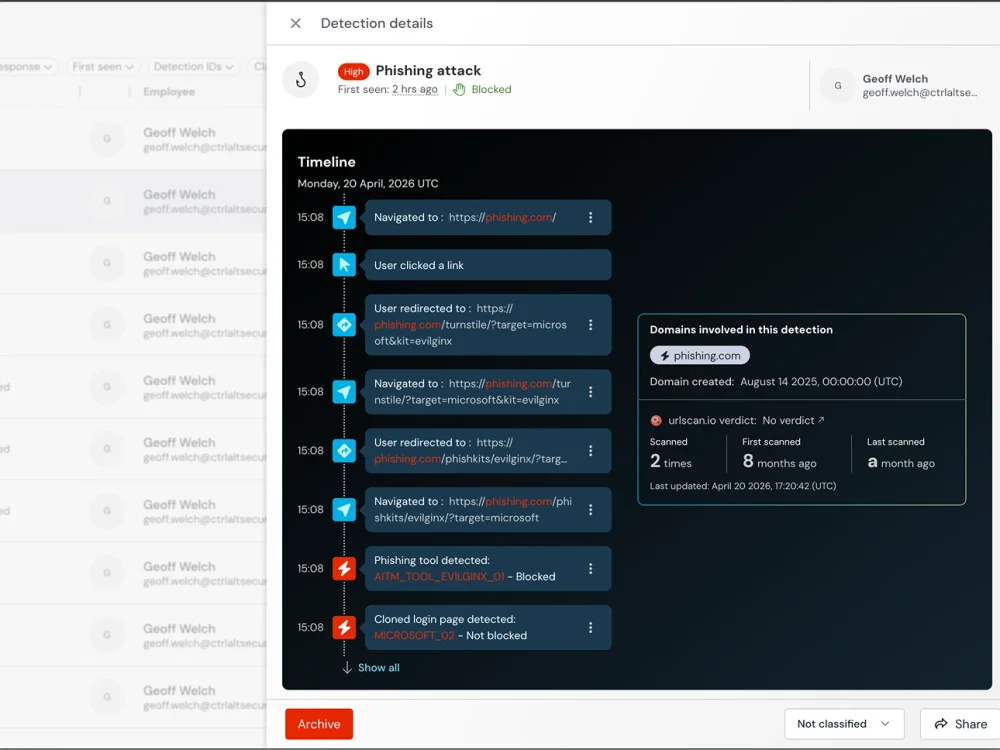
Push reconstructs complete browsing sessions with linked traces across tabs, pop-ups, and redirects. When an incident occurs, investigators can see the full path: the initial page load, any redirects or pop-ups, credential entry events, session token creation, and subsequent application access.
This is particularly valuable for phishing investigations. A user reports a suspicious page, or Push detects a phishing page behaviorally. The trace shows the complete journey — how the user arrived at the page (email link, search result, QR code), what the page did (captured credentials, proxied authentication, injected clipboard payloads), and what happened next (was a session created? did the attacker access any applications?).
Contain and respond in real time
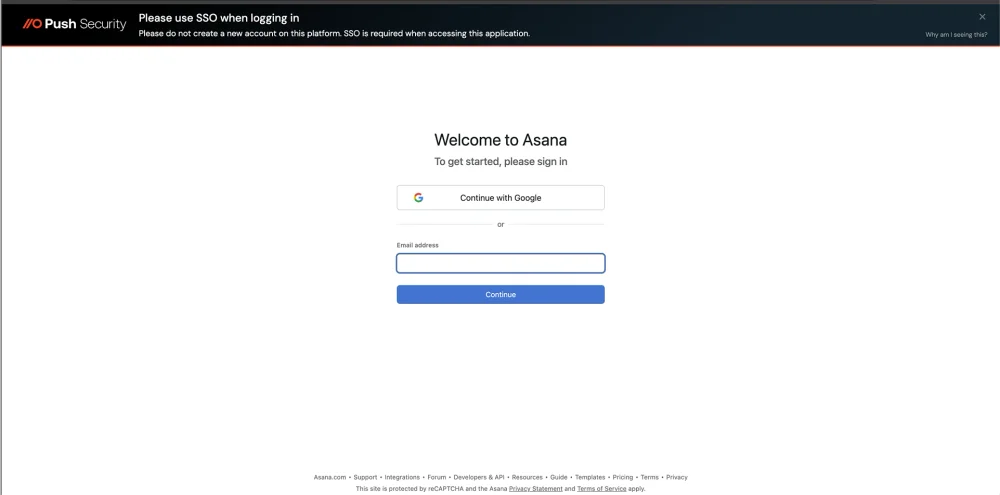
Once suspicious activity is identified, Push enables immediate response. Security teams can guide users with in-browser prompts, trigger automated response actions through existing SIEM or SOAR workflows, and terminate active sessions. The result is faster containment with clear context around what the attacker was attempting to do.
Prevent future attacks
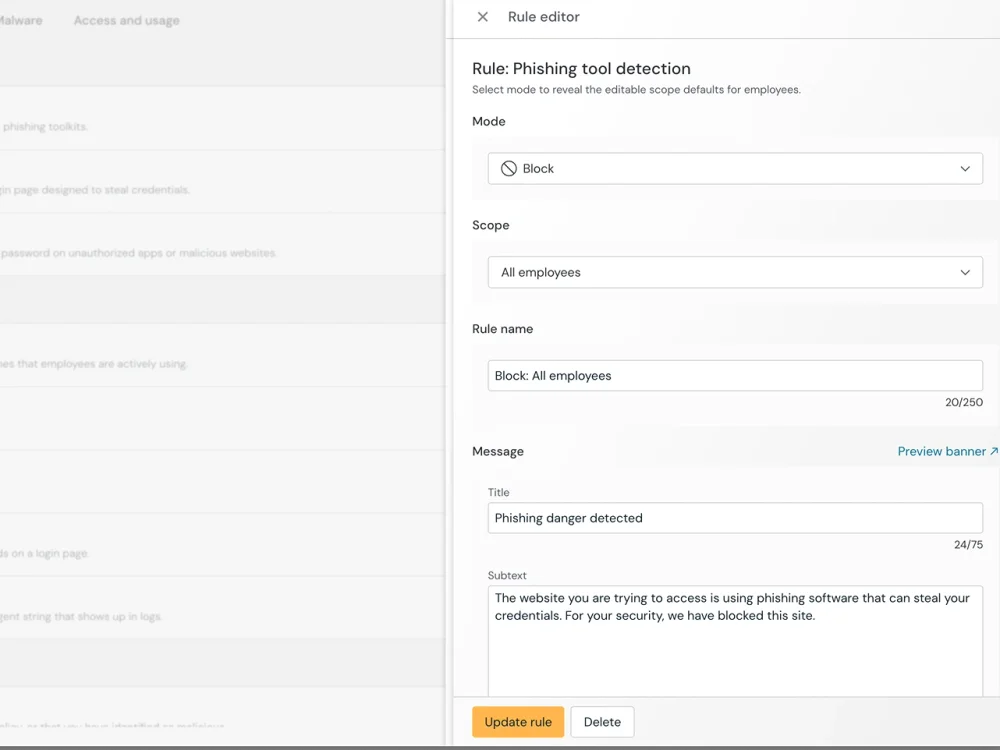
Push helps you respond fast, but it also helps you fix what went wrong. The platform highlights misconfigurations and risky authentication patterns that made the attack possible. Security teams can then guide users directly in the browser to remediate those issues, reducing the chance that the same technique will work again.
Integrate with your investigation and response workflow
Push integrates with your SIEM via webhooks and API, sending browser-level telemetry and detection events into your existing investigation workflow. This means browser evidence sits alongside IdP events, EDR alerts, and network logs in the same timeline — giving investigators a complete picture rather than requiring a separate tool for browser-layer evidence.
For analysts working directly in Push's admin console, detection classification workflows let teams triage and classify detections, track investigation status, and document findings.
Push vs traditional investigations data sources
| Dimension | Push Security | Traditional data sources |
|---|---|---|
| Phishing page evidence | Yes — Screenshots, page content, script behavior captured at detection | No — IdP/SIEM logs show the URL if it appeared in a log but not the page itself. EDR may see the browser process accessing a URL but captures no page content. SWG logs the domain and URL category — no page-level evidence |
| Credential entry events | Yes — Records when and where credentials were entered in the browser | No — IdP sees successful authentication on SSO-connected apps only. EDR and SWG have no visibility into browser credential events. None sees credential entry on non-SSO apps or phishing pages |
| Session creation and replay | Yes — Session marker injection provides deterministic proof of stolen sessions | No — IdP logs show session events but can't distinguish legitimate from stolen sessions without additional signals. EDR and SWG have no session-level visibility |
| Navigation path reconstruction | Yes — Full trace across tabs, pop-ups, redirects — shows how the user arrived at the attack page | No — IdP/SIEM logs show individual events with no navigation context. EDR sees browser process execution but not in-browser navigation. SWG/CASB logs show URL requests but not the tab-level journey |
| File transfer evidence | Yes — File upload and download events with file type, name, and destination | No — SIEM may correlate network-level metadata. EDR sees file system events but not browser-specific uploads. SWG/CASB sees traffic to cloud storage domains but not file-level context within encrypted sessions |
| AI interaction evidence | Yes — AI prompts, responses, and data sharing captured at the browser layer | No — No visibility into AI tool interactions from IdP, SIEM, EDR, or SWG — AI usage in the browser generates traffic to AI domains but no telemetry on what was shared |

Frequently asked questions
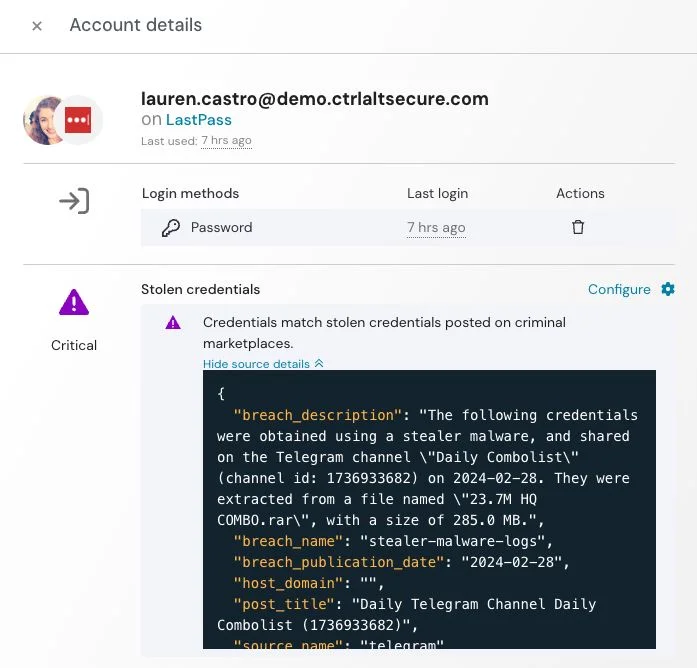
When investigating phishing, account takeover, or data exfiltration incidents, the evidence that matters most lives in the browser session: phishing page evidence, credential entry events, session creation and replay events, navigation traces showing how the user reached the attack page, file transfer events, and AI interaction logs. Traditional investigation tools — SIEM, IdP logs, EDR — can't see inside the browser session where these events occur.
Push captures all of this browser telemetry: page screenshots and behavior, credential entry events, session markers for stolen token detection, full navigation traces across tabs and redirects, file transfer records, and AI interaction logs. This evidence feeds into your existing investigation workflow via SIEM integration.
Phishing investigations require evidence that most security tools can't provide: what the phishing page looked like, whether the user entered credentials, whether a session token was created, and what the attacker did next. IdP logs show authentication events but not the phishing page itself; email security shows the lure but not the landing page interaction.
Push's detection event includes a screenshot of the phishing page, the domain and URL, and the detection category (AiTM, cloned login, credential harvesting, device code phishing). The trace view shows the full navigation path — how the user arrived, what the page did, and what happened afterward. For blast radius assessment, the behavioral query engine searches for other users who visited the same phishing infrastructure.
Session hijacking is difficult to detect because the attacker uses a valid token — there's no failed authentication, no brute force, and no exploit signature. IdP-based detection relies on probabilistic signals (impossible travel, new device alerts) that sophisticated attackers evade with residential proxies and matched user agents.
Push injects a unique marker into sessions originating in Push-protected browsers. If a session token subsequently appears in an uninstrumented browser, it's been stolen — this is deterministic proof, not a probabilistic anomaly. The detection event includes the application, the user, and the timestamp, enabling immediate investigation and response.
Insider threat investigations involving browser-based activity — unusual file downloads, data uploads to personal accounts, shadow SaaS usage, AI data sharing — require evidence that endpoint and network tools have limited visibility into. The activity happens inside the browser session, between the user and the web application.
Push provides browser telemetry for these investigations: file transfer records, SaaS login activity, AI interaction logs, and browsing patterns. Customer-requested collection enables broader telemetry gathering for specific investigations at the customer's explicit request. Push complements UEBA, DLP, and endpoint investigation tools as a browser-level evidence source.
Latest resources


