
'%3e%3cpath%20d='M248.027%20159.993C292.176%20159.993%20328.105%20124.1%20328.105%2079.996C328.105%2035.892%20292.191%200%20248.027%200C203.863%200%20167.95%2035.892%20167.95%2079.996C167.949%20124.101%20203.878%20159.993%20248.027%20159.993ZM213.969%2045.973C223.069%2036.882%20235.155%2031.873%20248.027%2031.873C260.899%2031.873%20272.986%2036.882%20282.086%2045.973C291.186%2055.064%20296.2%2067.154%20296.2%2079.997C296.2%2092.84%20291.186%20104.93%20282.086%20114.021C272.986%20123.112%20260.899%20128.12%20248.027%20128.12C235.155%20128.12%20223.069%20123.111%20213.969%20114.021C204.869%20104.93%20199.871%2092.84%20199.871%2079.997C199.871%2067.154%20204.884%2055.063%20213.969%2045.973Z'%20fill='%23EE4323'/%3e%3cpath%20d='M150.16%200L57.6821%20159.993H94.5381L187%200H150.16Z'%20fill='%23EE4323'/%3e%3cpath%20d='M92.478%200L0%20159.993H36.856L129.334%200H92.478Z'%20fill='%23EE4323'/%3e%3c/g%3e%3cdefs%3e%3cclipPath%20id='clip0_296_834'%3e%3crect%20width='328.105'%20height='159.993'%20fill='white'/%3e%3c/clipPath%3e%3c/defs%3e%3c/svg%3e)


ClickFix attacks: how they work & how to block them
A ClickFix attack tricks users into pasting malicious commands via fake CAPTCHAs and error prompts. Learn how ClickFix works and how to detect it in the browser.
ClickFix attacks trick users into installing malware themselves
A ClickFix attack is a social engineering technique where a malicious web page displays a fake CAPTCHA, error message, or troubleshooting prompt and silently copies a malicious command to the user's clipboard. The user is instructed to paste and run the command — typically PowerShell or mshta — believing they're completing a routine verification or fix. The technique has spawned a family of variants (CrashFix, InstallFix, FileFix, ConsentFix) that share the same clipboard-injection mechanic but use different social engineering wrappers. ClickFix is a primary delivery vector for infostealer malware, and four in five payloads intercepted by Push arrived via search engines rather than email.
How ClickFix attacks work
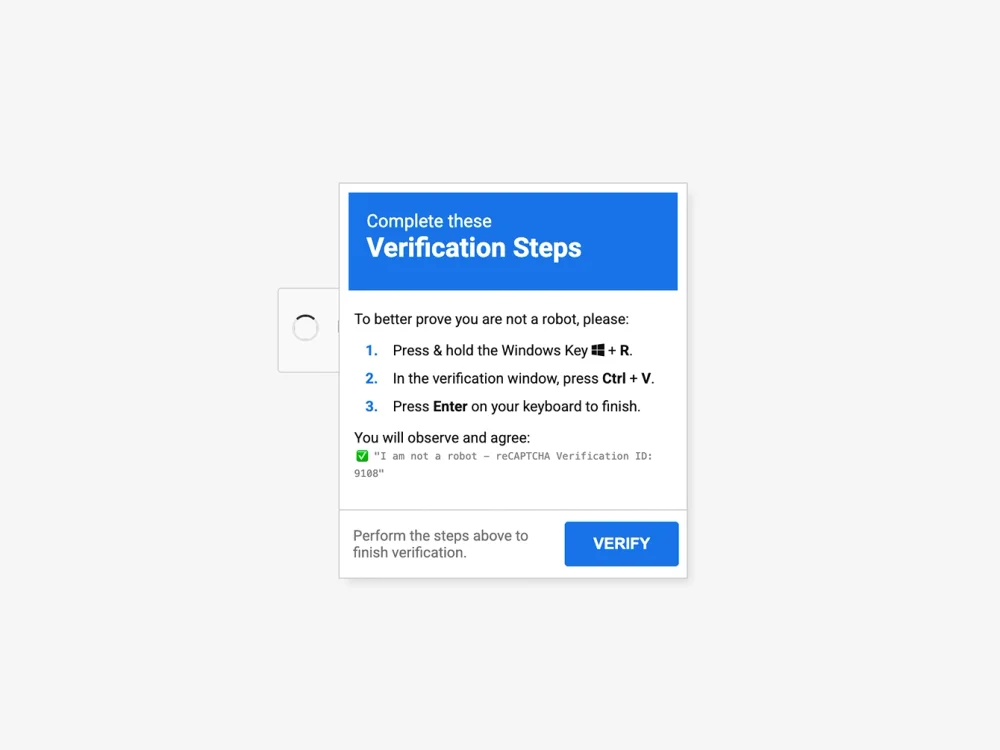
ClickFix lures are built to feel familiar. Fake CAPTCHAs and browser errors are styled to mimic the verification challenges users encounter every day. The mechanic is straightforward but highly effective.
- The user lands on a compromised or malicious page and is prompted to complete a verification step
- Clicking the prompt copies a malicious command to the clipboard
- The user is instructed to open their terminal and paste the command to fix the issue
- The command executes using legitimate, pre-installed system utilities to pull down infostealer malware or a remote access tool
- Malware installs on the endpoint, and the user believes the verification completed successfully
The *Fix family keeps expanding. InstallFix, discovered by Push, clones developer tool installation pages and replaces legitimate commands with malicious ones delivered via Google Ads. ConsentFix, another Push discovery, goes fully browser-native; the victim pastes OAuth key material from a legitimate Microsoft page into a phishing site, handing over account access without touching the terminal.
The dominant payload is infostealer malware — Lumma Stealer, StealC, and others — which harvests browser-stored credentials and session cookies, feeding downstream credential stuffing and session hijacking attacks that can play out weeks or months later.
ClickFix is used by a wide range of criminal and nation-state actors and is a core attacker technique today in the same category as traditional phishing and social engineering. Attacks categorised under the *Fix umbrella make up more than half of Push's monthly detections today.
Why most security tools miss ClickFix
Endpoint tools are built around the assumption that malware arrives as a file. ClickFix turns this assumption on its head. The payload is executed by the user through a legitimate system utility, so there is no download to intercept or suspicious process to flag. Web sandboxes and email filters face the same problem when the delivery channel is a malicious ad or a compromised website rather than an attachment.
Browser-native variants like ConsentFix remove even the endpoint execution step, leaving traditional tools with nothing to act on. The attack completes inside the browser session, where most security tools have no visibility.
Unlike traditional phishing, ClickFix lures mimic interactions users encounter legitimately every day — CAPTCHAs, error messages, install prompts — making them harder to train against than a suspicious email.
How Push detects and blocks ClickFix attacks
Push intercepts ClickFix and its variants at the source, before the user interacts with the lure, regardless of delivery channel. It identifies the ClickFix page behavior — across fake CAPTCHAs, error messages, and install lures — as they load in the browser, whether the lure arrives through a search ad, a compromised site, or a messaging platform.
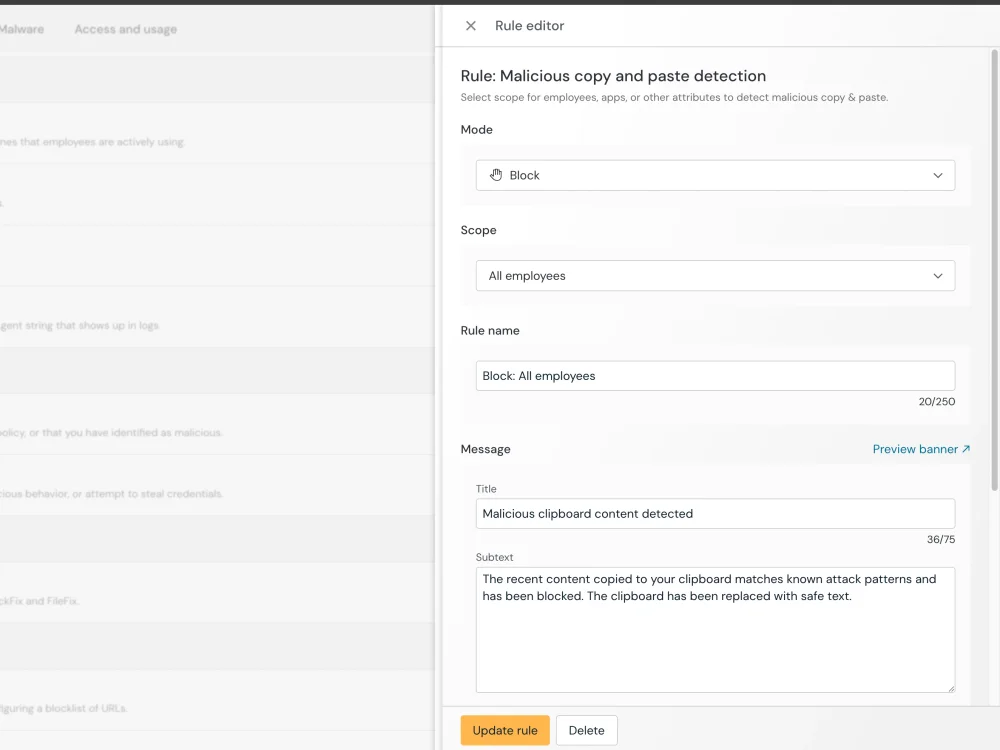
Push also analyzes clipboard contents for malicious commands. When a page writes PowerShell, mshta, curl, or other suspicious commands to the clipboard, Push detects the payload and can block or warn in real time. This clipboard analysis is scoped to malicious actions — legitimate clipboard use is unaffected.
For browser-native variants like ConsentFix, where there is no endpoint activity to detect, browser visibility is the only reliable detection point. Push operates there by default. Because Push operates in the browser, it provides ClickFix detection on unmanaged devices where EDR is absent — contractors, BYOD users, and developer machines with tuned-down endpoint controls.
Frequently asked questions
A ClickFix attack tricks users into copying and executing malicious commands by displaying a fake error message, CAPTCHA verification, or troubleshooting prompt in the browser. The page loads a malicious payload (typically PowerShell or mshta commands) onto the clipboard and instructs the user to paste it into the Windows Run dialog or terminal. The user believes they're fixing a problem; they're actually executing malware.
The technique exploits user trust in familiar UI patterns — CAPTCHAs, error messages, install instructions. The growing list of variants includes CrashFix (fake crash pages), ConsentFix (combining clipboard hijacking with OAuth consent abuse), and InstallFix (fake software installation pages).
There are two stages where ClickFix can be detected — in the browser where the social engineering and clipboard hijacking happen, and at the endpoint where the malicious command executes.
Browser-layer detection is the earliest interception point because it sees the fake CAPTCHA or error page and the clipboard manipulation before the user acts. Endpoint detection is the fallback — EDR can potentially catch the malicious command execution after the user pastes it, but the payload is already running, and because the command is user-executed rather than launched by a program it can evade behavioral detections that expect malicious process chains.
The endpoint layer is also absent for a significant portion of the workforce. Contractors, BYOD users, and developers often operate with EDR tuned down or missing entirely, making browser-layer detection the only control that reliably covers these populations.
Several commonly recommended mitigations have practical limitations:
- Disabling the Run dialog via GPO — blocks the Win+R paste path but doesn't cover terminal windows, PowerShell directly, or macOS users. Also breaks legitimate workflows.
- Blocking PowerShell for standard users — reduces one execution path but ClickFix payloads also use mshta, curl, and other living-off-the-land binaries. Attackers adapt the payload to whatever is available.
- Restricting clipboard access — blanket clipboard restrictions are operationally impractical for most organizations. ClickFix doesn't require any special clipboard permissions; it uses standard JavaScript clipboard APIs.
- Email security — misses most ClickFix because the majority (4 in 5) payloads arrive via malvertising and search engines, not email.
- Security awareness training — ClickFix lures mimic routine interactions (CAPTCHAs, error messages, install instructions) that users encounter daily, making them harder to distinguish from legitimate prompts than traditional phishing.
Push provides two-stage ClickFix detection: it identifies the ClickFix page behavior (fake CAPTCHAs, fake error messages, fake install pages) and analyzes clipboard contents for malicious commands. This detection is technique-class — it covers ClickFix, CrashFix, ConsentFix, InstallFix, and future variants that use the same clipboard-injection mechanic.
A tool that operates inside the browser and can detect both the social engineering page and the malicious clipboard payload. Email security sees the lure only if it arrives by email, and since 4 in 5 ClickFix attacks detected by Push are delivered via search engine, this is a significant gap. SWGs see the URL but can't inspect rendered page behavior or clipboard contents. EDR can detect malware execution after the user pastes the command, but the payload is already running by that point, and if undetected, the final line of defense pre-compromise has been bypassed.
Push detects ClickFix inside the browser by identifying the page behavior patterns and analyzing clipboard contents for malicious commands. See why EDR misses ClickFix.
EDR and antivirus can potentially detect the malware execution after the user pastes and runs the command — but they don't see the browser-side delivery at all. The ClickFix page, fake CAPTCHA, clipboard hijacking, and social engineering all happen inside the browser session, invisible to endpoint tools. The attack also doesn't drop a file or exploit a vulnerability — the user voluntarily pastes a command, which looks like legitimate user behavior from the endpoint's perspective.
Push catches ClickFix at the source — in the browser, before the clipboard payload is executed. EDR serves as the safety net for anything that gets past. Read why EDR misses browser-based attacks.
The most common form of ClickFix. The attacker creates a page mimicking a legitimate CAPTCHA verification ("Verify you are human") that silently loads malicious commands onto the clipboard. The page instructs the user to press Win+R and paste — supposedly to complete verification, but actually to execute malware. The payloads commonly deliver infostealers, RATs, or other malware.
These attacks are effective because CAPTCHAs are routine — users follow the instructions without suspicion. Push detects fake CAPTCHA attacks by identifying the combination of CAPTCHA-like visual elements with clipboard manipulation, in the browser in real time — before the victim tries to paste and run the malicious command.
The page displays a fake CAPTCHA, error message, or installation prompt, then silently loads malicious commands (usually PowerShell) onto the clipboard. Instructions tell the user to press Win+R, paste, and press Enter — framed as a fix, verification step, or install procedure. The clipboard manipulation is invisible to the user.
The technique exploits trusted patterns. Users encounter CAPTCHAs daily and follow verification instructions reflexively. Fake error messages trigger troubleshooting instincts. Fake install pages (aka. InstallFix) leverage the normalization of command-line installation workflows among developers.
All variants share the same core mechanic — silently loading malicious content onto the clipboard and instructing the user to paste and execute it. The names describe the social engineering wrapper used to make the paste action feel routine:
- ClickFix — fake CAPTCHAs, verification prompts, or "prove you're human" challenges. The most common variant and the one that established the technique.
- FileFix — fake file preview pages (PDFs, documents, images) that claim the file can't render and prompt the user to paste a command to "repair" or "download" it.
- CrashFix — fake browser or application crash pages that instruct the user to paste a "fix" command.
- InstallFix — cloned installation pages for legitimate developer and AI tools (Claude Code, Homebrew, VS Code extensions) that deliver infostealers via "paste this to install" workflows.
- ConsentFix — combines clipboard injection with OAuth consent abuse, exploiting the Azure CLI's localhost redirect to achieve MFA bypass without proxying credentials. Unlike the other variants, ConsentFix is fully browser-native — there is no malware execution or endpoint component. The user is tricked into copy-and-pasting a legitimate URL containing OAuth material into the attacker’s page to complete the attack.
The technical mechanism is consistent across all variants — the distinction is in the social engineering pretext and, in ConsentFix's case, an entirely browser-native attack chain that eliminates the endpoint detection surface. Push detects the underlying technique at the page and clipboard-injection level, covering all current and future variants regardless of the lure.
The most common recommendation is to restrict clipboard access at the browser or endpoint level, but blanket clipboard blocking is operationally disruptive — copy and paste is fundamental to how people work, and broad restrictions generate friction and workarounds without distinguishing between legitimate use and malicious injection. Enterprise browsers that offer clipboard controls typically apply them as a DLP measure (blocking paste into certain apps) rather than detecting when a web page writes malicious content to the clipboard, which is the actual ClickFix mechanic.
The effective approach is monitoring what web pages write to the clipboard and intervening only when the content is malicious. Network and endpoint tools don't have visibility into browser clipboard operations — the clipboard manipulation happens entirely within the browser's JavaScript execution context.
Push detects when a page writes malicious commands to the clipboard (PowerShell, mshta, curl indicators) and can block or warn in real time. Clipboard blocking is scoped to malicious actions, not blanket copy/paste restriction, meaning legitimate clipboard use is unaffected.
Push also supports configurable regex-based clipboard rules for detecting sensitive data patterns being pasted into unauthorized applications, giving security teams DLP-style clipboard controls without the blunt instrument of blocking all clipboard activity.
No. SWGs inspect web traffic at the network or proxy layer — they see URLs, domains, and traffic metadata. They cannot inspect rendered page behavior, DOM manipulation, or clipboard operations inside the browser session. A ClickFix page looks like normal HTTPS traffic; the malicious behavior happens in JavaScript after rendering.
SWGs can block known-bad domains, but ClickFix commonly uses legitimate or freshly registered domains. Push operates inside the browser where the attack plays out — detecting the page behavior and clipboard payload at the point of execution.
ClickFix has become a general-purpose delivery mechanism used by financially motivated criminals and nation-state groups alike. The most common payloads are:
- Infostealers — the dominant payload category. Lumma Stealer is the most frequently observed, alongside StealC, Rhadamanthys, DanaBot, SnakeStealer, and AMOS/Atomic Stealer (targeting macOS). These harvest browser-stored credentials, session cookies, cryptocurrency wallets, and saved passwords.
- Remote access trojans (RATs) — NetSupport RAT, AsyncRAT, VenomRAT, XWorm, and Quasar RAT provide persistent remote access to compromised machines.
- Loaders and backdoors — Latrodectus, DarkGate, and GolangGhost serve as intermediate stages that download additional payloads or establish persistent backdoors.
The infostealer connection is particularly significant because stolen session cookies enable session hijacking and stolen credentials feed credential stuffing campaigns — creating a direct chain from ClickFix to downstream account takeover that can play out weeks or months later.
Push catches ClickFix at the delivery stage, before the payload executes — detecting the page behavior and malicious clipboard content inside the browser.
Latest resources


