Our browser-based security platform recently intercepted a malvertising attack against Push customers. This attack was notable in that it used malvertising via Google Search as the delivery vector, circumventing email-based security controls. Here’s our breakdown.
Our browser-based security platform recently intercepted a malvertising attack against Push customers. This attack was notable in that it used malvertising via Google Search as the delivery vector, circumventing email-based security controls. Here’s our breakdown.
Attack breakdown
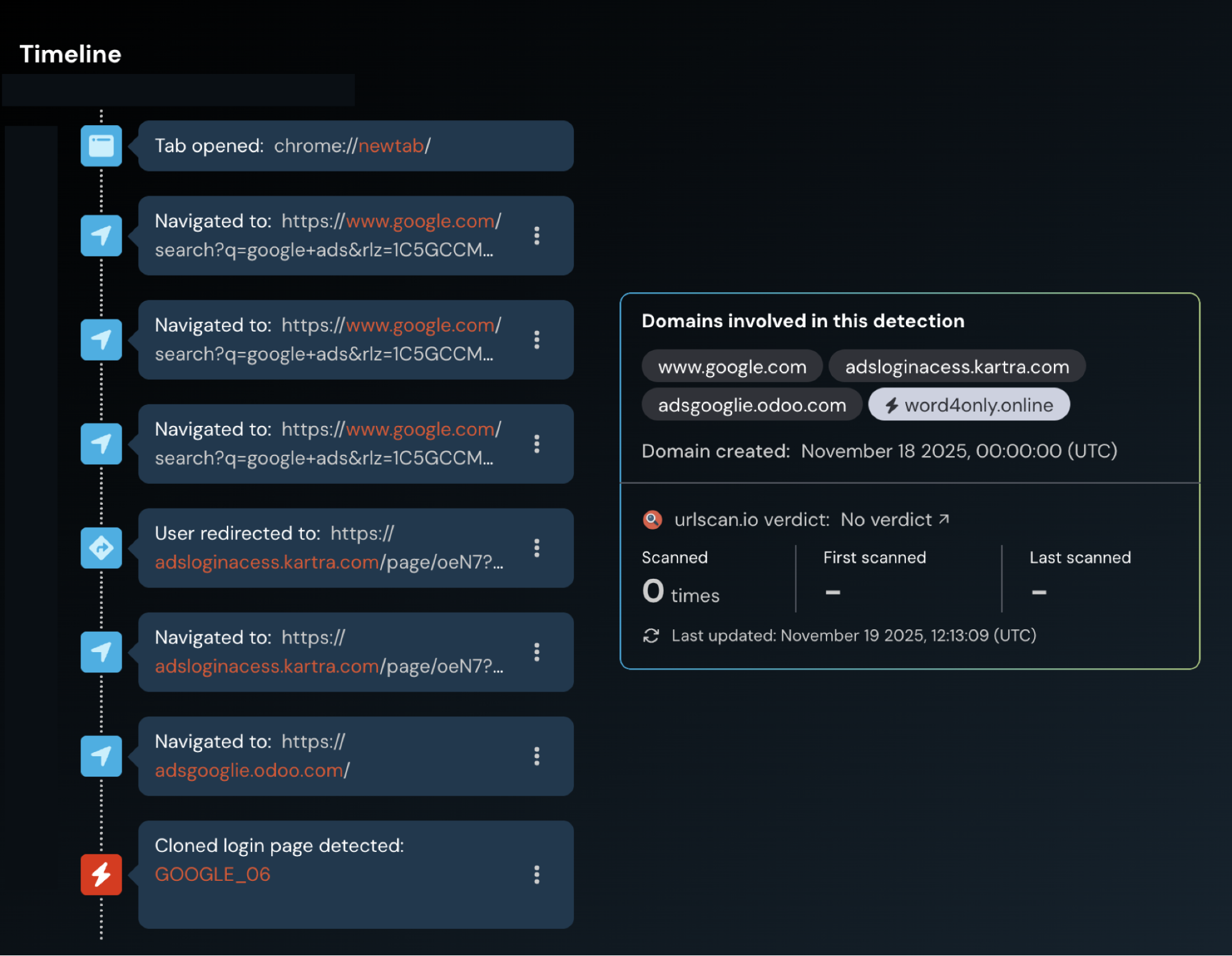
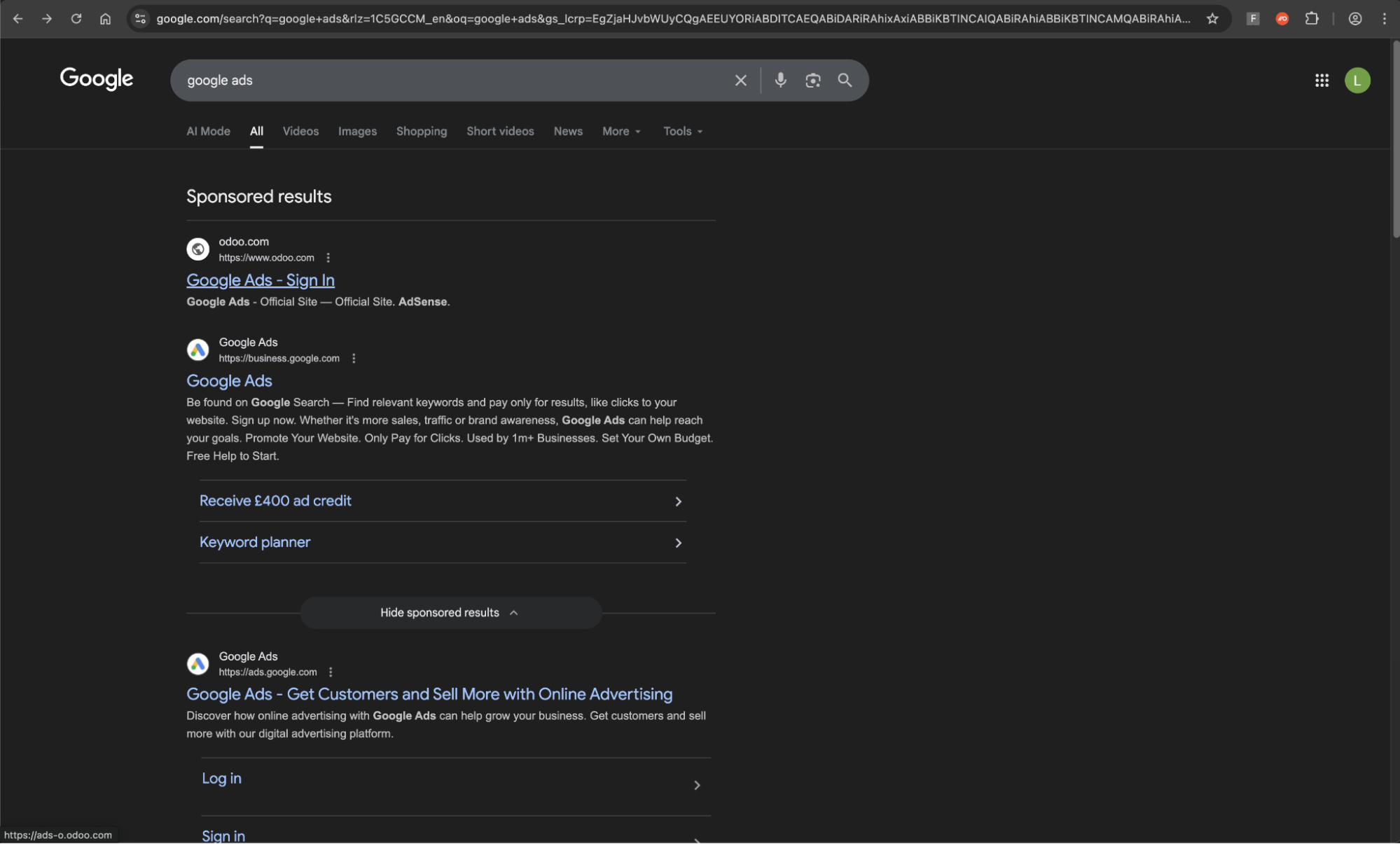
We recently detected and blocked a malvertising attack impacting one of our customer’s employees. The employee had searched for “Google ads” in Google Search to log into their Google Ads Manager account.
We regularly come across malvertising attacks where attackers take out ads against commonly used apps and websites to intercept users Googling for the login URL rather than accessing it from a bookmark. If you’re not on guard against possible malicious ads, it can be easy to miss that you’re not accessing the legitimate URL.
The user:
Searched for “Google ads” in Google Search
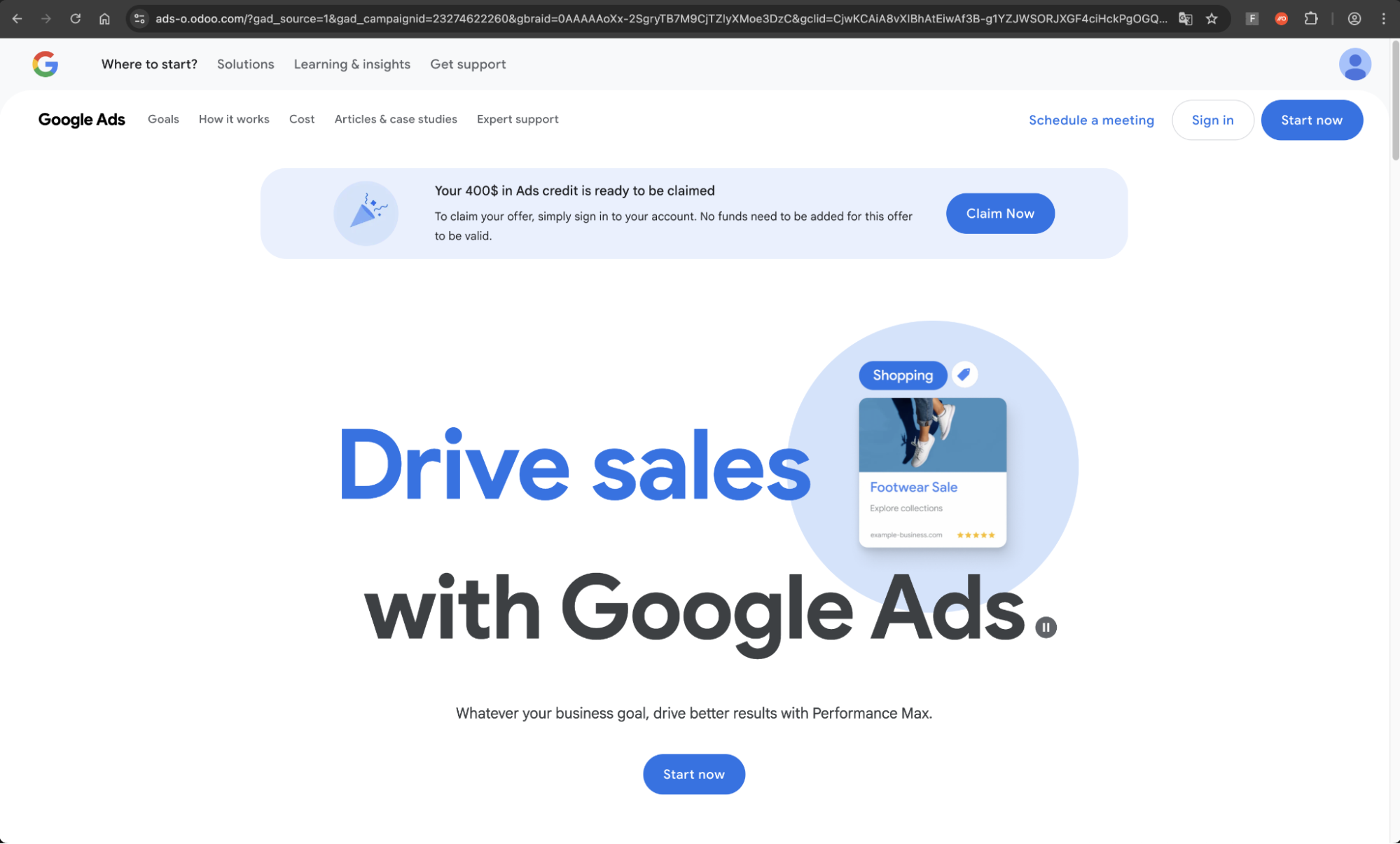
Click the ad for hxxps://ads-adsword1.odoo.com/…
Was redirected to hxxps://sing-operador2.click/accounts/v3/login/ where the phishing form was blocked.
When we came to investigate this detection further, we found that the site had already been taken down.

However, we were able to replicate the user’s activity to find other examples that show clear signs of being linked to the same campaign — both hosted on Odoo, with one also using Kartra as a redirect.

Why malvertising & Google ads?
Malvertising attacks delivered over channels like Google Search are a great way to catch victims unawares while also evading typically email-based anti-phishing controls.
The flipside of this is that malvertising attacks are less likely to be targeted than phishing delivered directly to the victim via a direct message (i.e. email, social media DM, instant messenger app, SMS, etc.). This appears to be true in this case: we were served the ad from a UK location despite the initial ad targeting an EU-based company.
However, that isn’t to say that malvertising attacks can’t be targeted. For example, Google Ads can be targeted to searches coming from specific geographic locations, tailored to specific email domain matches, or specific device types (e.g. desktop, mobile, etc.). If you know where your target organization is located, you can tailor the ad to that location. Even more precise ad targeting can be achieved on social media platforms.
In this case, it appears that the attacker was specifically targeting Google Ad Manager accounts.
Campaigns targeting Google accounts specifically are becoming increasingly common. We also identified a campaign targeting Google Ad accounts via highly targeted phishing emails around the same time that this attack was identified. Similarly, we’ve also blogged about Scattered Spider-linked malvertising campaigns earlier this year.
With malvertising on the rise as an increasingly popular attack vector for the delivery of AITM phishing, malware downloads, and ClickFix (4 in 5 ClickFix attacks intercepted by Push were delivered via Google Search), it makes sense that attackers are looking to increase their web of accounts from which to launch malicious ads.
Particularly for organizations that are running large numbers of ads with pre-allocated budget/cards for their ad account, or organizations performing ad management/marketing services on behalf of other organizations, it’s easy to see how attackers can take over these accounts and spin up malicious ads.
Malvertising via Google Search is an effective way to launch “watering hole” style attacks, casting a wide net to harvest credentials and account access that can be re-sold to other criminals for a fee, or leveraged by partners in the cybercriminal ecosystem as part of major cyber breaches (such as the recent attacks by the “Scattered Lapsus$ Hunters” criminal collective, all of which began with identity-based initial access). For this reason, credentials and account access are an increasingly profitable commodity for cyber criminals.
IoCs
The following domains were involved in the attacks:
hxxps://ads-adsword1.odoo.com
hxxps://sing-operador2.click/accounts/v3/login
hxxps://adsgooglie.odoo.com/
hxxps://word4only.online/
hxxps://adsloginacess.kartra.com/page/oeN7
hxxps://ads-o.odoo.com
hxxps://operador8-ads.lat/accounts/v3/login/
However, with the rate at which these domains were spun up and subsequently taken down (by the attacker or the site hosting the links) IoC-based detections for campaigns such as this are of limited value.
How Push stopped the attack
Regardless of the delivery channel, all roads lead to a web page accessed in the victim’s browser — where Push is waiting to detect and block the attack.
By seeing what your users see, and getting an unfiltered, real-time view of the page as it loads, Push is able to pinpoint malicious content, code, and behaviors and shut the attack down before it happens. Whether it's entering credentials onto a phishing page, approving a malicious OAuth grant, installing a risky browser extension, or insecurely accessing an app with a weak password and no MFA, Push detects the action and responds in real-time.
Push blocks browser-based attacks like AiTM phishing, credential stuffing, malicious browser extensions, malicious OAuth grants, ClickFix, and session hijacking. You don’t need to wait until it all goes wrong either — you can use Push to proactively find and fix vulnerabilities across the apps that your employees use, like ghost logins, SSO coverage gaps, MFA gaps, vulnerable passwords, and more to harden your identity attack surface.
To learn more about Push, check out our latest product overview or book some time with one of our team for a live demo.