In December, we reported on malvertising attacks delivered via Google Search specifically targeting Google Ad Manager accounts. Now, we’ve intercepted more attacks targeting Push customers, this time impersonating Ahrefs. Here’s what you need to know.
In December, we reported on malvertising attacks delivered via Google Search specifically targeting Google Ad Manager accounts. Now, we’ve intercepted more attacks targeting Push customers, this time impersonating Ahrefs. Here’s what you need to know.
In recent months, we’ve seen a significant increase in the number of attacks targeting ad manager accounts. These attacks ultimately serve up an Attacker-in-the-Middle (AITM) phishing page designed to steal the victim’s Google account.
Most recently, we reported on:
A campaign running fake malvertising ads for “Google Ads” in Google Search.
A campaign using sophisticated Calendly-themed phishing lures targeting marketing professionals.
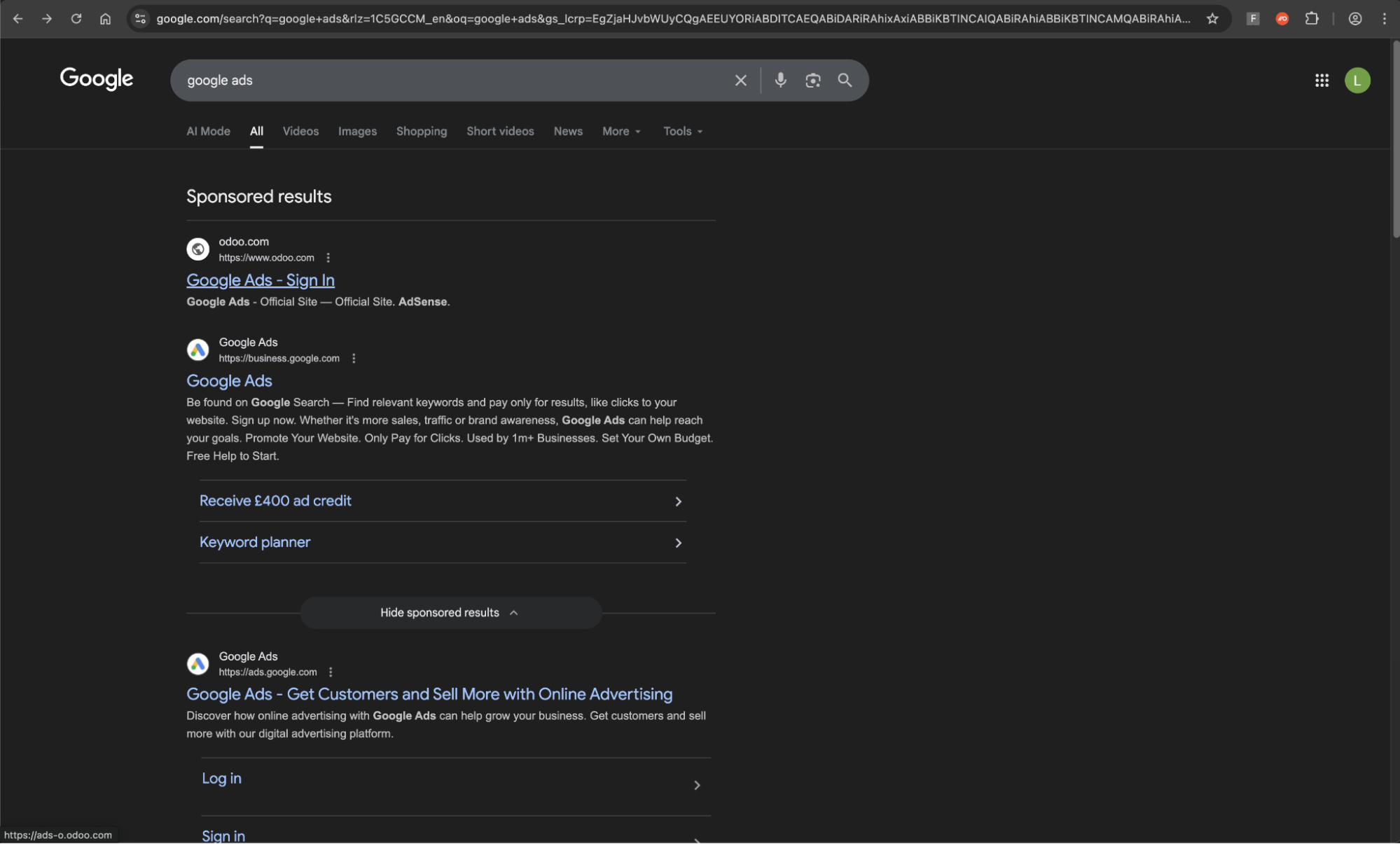
Now, we’ve seen the Google Ads malvertising campaign expand to run additional ads impersonating Ahrefs, an AI marketing platform. Crucially, employees with access to Ahrefs are highly likely to also have access to Google Ads, meaning that attackers can reliably target Google accounts via Ahrefs.
You can see a demo of the phishing chain below.
Update 24th February: We discovered additional activity relating to this campaign with more Ahrefs malvertising on Google Search, this time pointing to fake domains hosted on surge[.]sh. We also blocked Push customers from interacting with a similar ad impersonating Semrush, also hosted on surge[.]sh.
New IoCs have been added and you can see a video of this new attack below.
Attack breakdown
Users searching for “ahrefs” on Google Search were served with a fake ad impersonating Ahrefs, hosted on Squarespace, a legitimate website building and hosting platform. Previously, we’d seen this campaign use hosting sites Odoo and Kartra to similar effect.
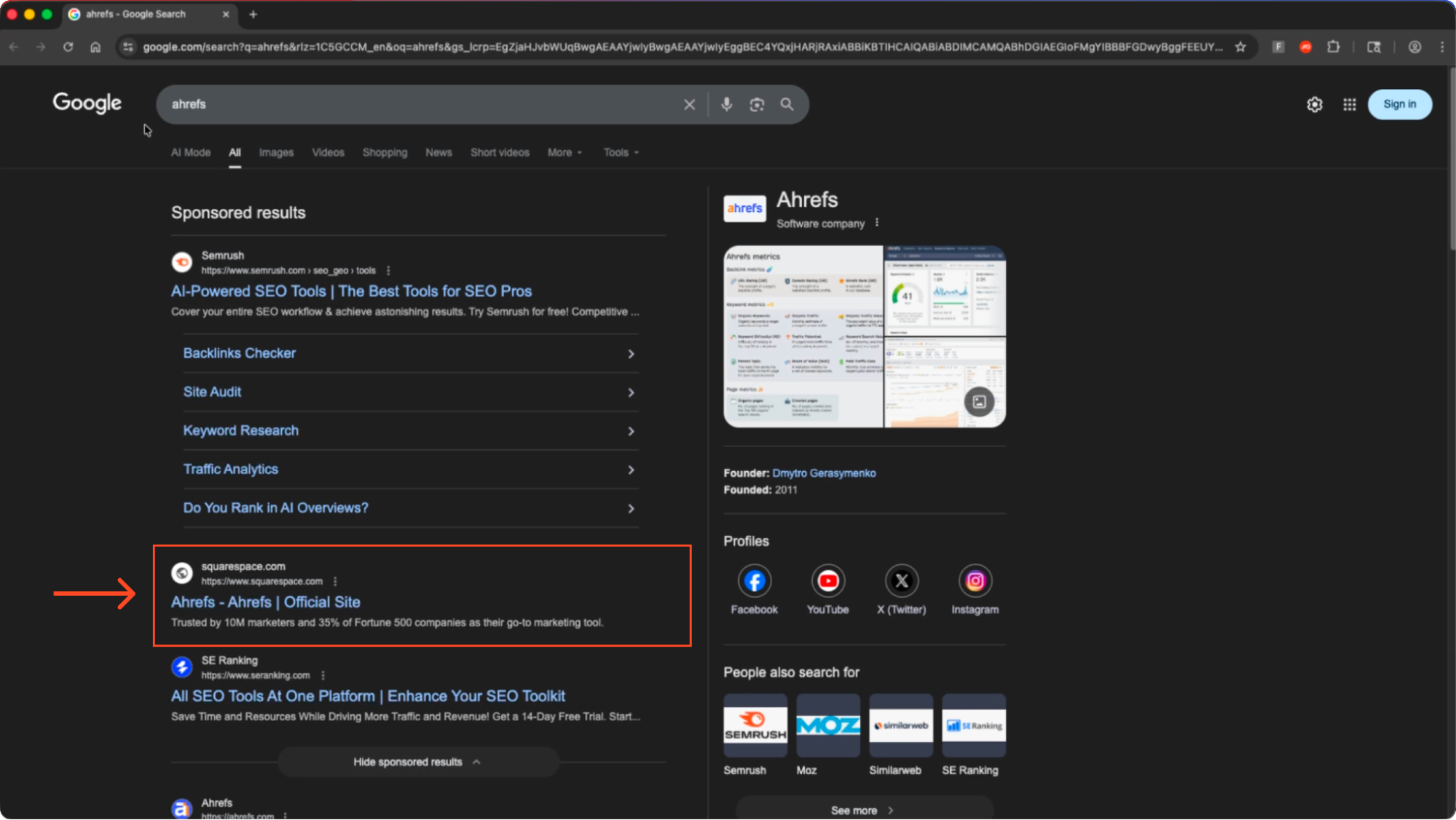
Upon clicking the link, the victim was taken to a clone of the real Ahrefs site. Crucially, you can see that the domain is not the official Ahrefs domain.
Notably, the site’s language is set to Brazilian Portuguese in the HTML (lang="pt-BR"). Based on this, the campaign is likely linked to the same threat actors reported by MalwareBytes in January 2025.
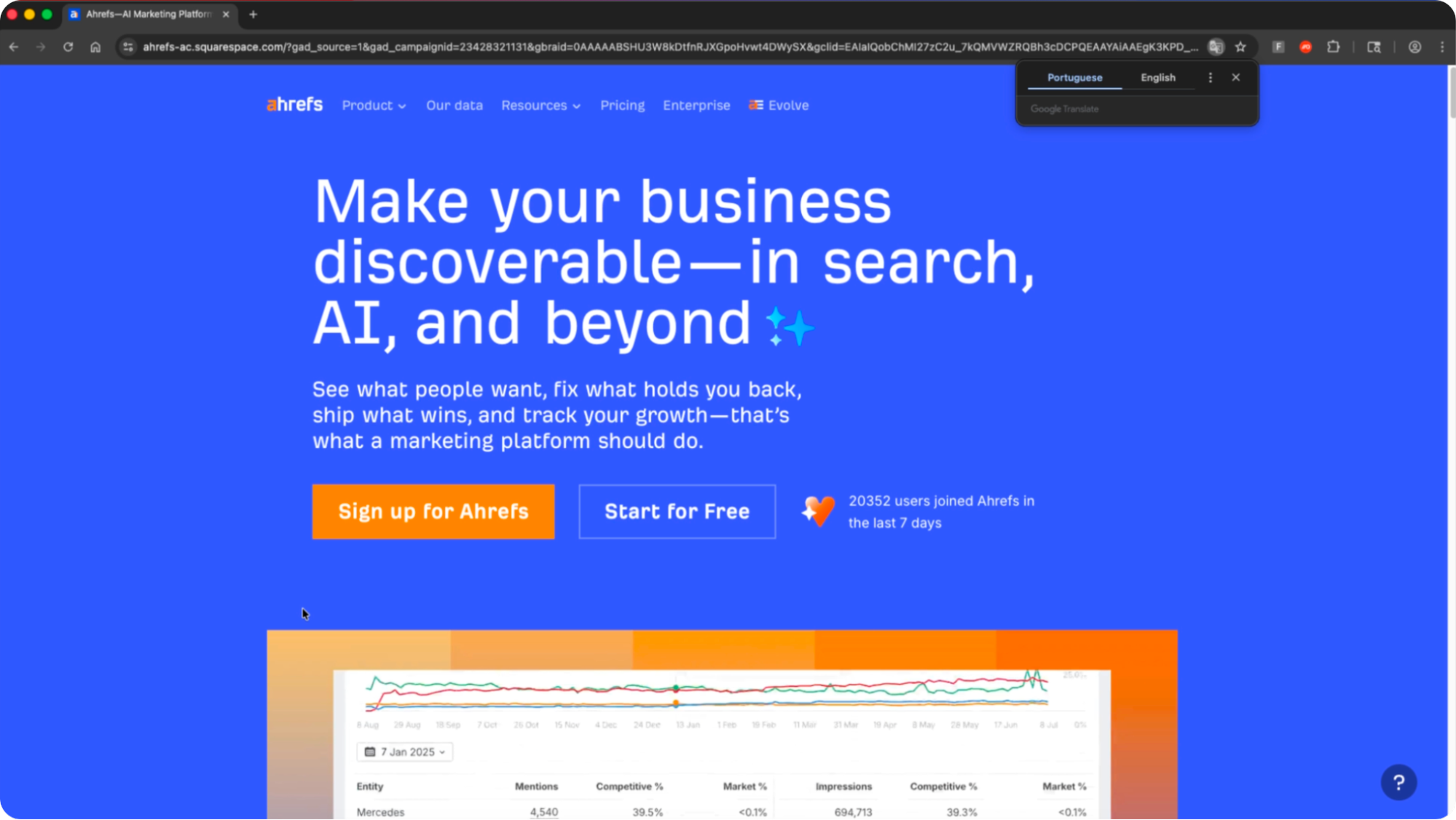
However, the site is not fully interactable beyond the front page. Clicking on any link takes the user to a Google sign-in page.
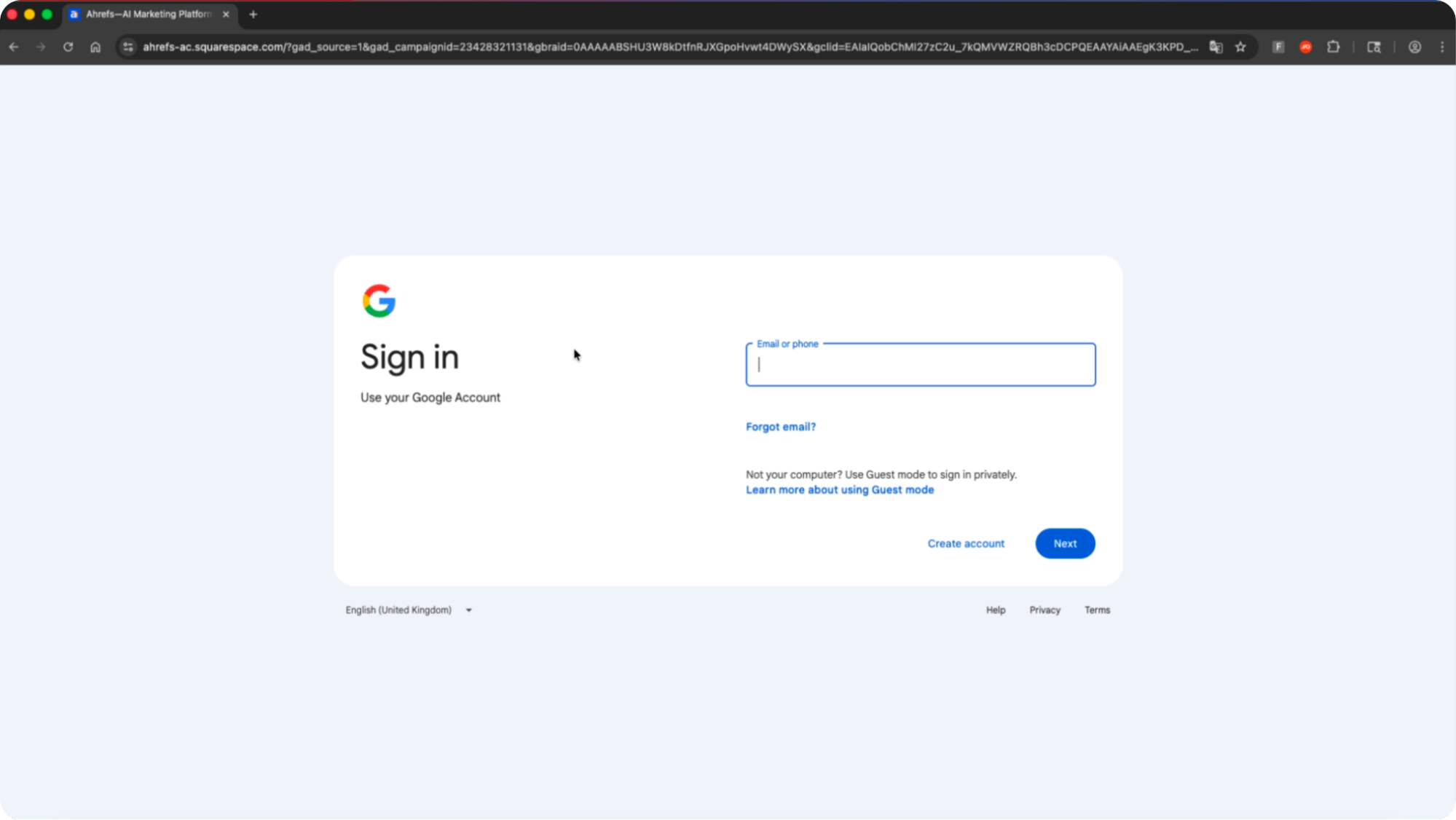
This is in fact an AITM phishing page that is designed to hijack the victim’s Google account. Entering credentials and completing the MFA check will result in the attacker stealing the app session and effectively taking over the account. The phishing kit used matches the previous malvertising detected impersonating Google Ads.
Why are attackers targeting ad manager accounts?
Ad Manager accounts on platforms like Google, Facebook, and LinkedIn have become lucrative targets for cybercriminals. By compromising these accounts, attackers can exploit the digital advertising ecosystem in various ways for financial gain.
The ad industry’s scale makes it attractive to fraud. Estimates suggest digital ad fraud cost advertisers tens of billions, potentially nearing $100 billion or more, with projections reaching $172 billion by 2028.
A hijacked Google Ad Manager account gives attackers access to significant ad spend and account data which can be monetized illicitly. The tactics range from stealthy ad fraud to overt abuse like malicious ads or extortion schemes.
Pretty much every enterprise today advertises their services via Google ads — this makes attacks on these accounts pretty much a unanimous problem. Agencies managing numerous client accounts are put further at risk. For example, if an attacker can compromise an MCC account (used to manage several ad accounts) they get full access to the customer portfolio.
It’s also worth noting that a Google Ad Manager account is also an enterprise SSO account that can be used to access broader Google Workspace services and any connected apps that are SSO-enabled.
Even if the victim isn’t predominantly a Google house, a Google account using the same email as a different identity provider account (e.g. Microsoft) can still be used to access downstream apps via SSO. This is because most apps use email as an identifier, while 3 in 5 apps also allow you to access an account using a new login method without doing any further verification checks.
Read our blog post on cross-IdP impersonation for more information.
Learn more about why attackers are targeting ad manager accounts in our blog post.
Why malvertising?
Malvertising scams happen across lots of different sites, but the most common platform we see targeted is Google Search. This takes advantage of users browsing to find a website and clicking the first link that appears — in this case a fake sponsored link taking you to the attacker’s page.
Malvertising attacks delivered over channels like Google Search are a great way to catch victims unawares while also evading typically email-based anti-phishing controls. Malvertising is an increasingly popular attack vector for the delivery of AITM phishing, malware downloads, and ClickFix (4 in 5 ClickFix attacks intercepted by Push were delivered via Google Search). This isn’t just targeting ad manager accounts — last year, we reported on campaigns impersonating TradingView, Microsoft Office 365, and Onfido, to name a few.
There’s a tendency to see malvertising as a more random attack, but Google Ads can be tuned to searches coming from specific geographic locations, tailored to specific email domain matches, or specific device types (e.g. desktop, mobile, etc.). If you know where your target organization is located, you can tailor the ad to that location. Even more precise ad targeting can be achieved on social media platforms.
Because these attacks completely circumvent the traditional phishing detection surface (email) and often happen entirely over the internet (meaning no endpoint security controls can come into play) the only way to reliably detect and stop these attacks is to intercept them where they happen — in the user’s web browser.
How Push stopped the attack
Regardless of the delivery channel, all roads lead to a web page accessed in the victim’s browser, where Push is waiting to detect and block the attack. Even if the page has never been previously flagged as suspicious or malicious, Push analyses the page in real time and blocks it — protecting against the latest zero-day threats.
By seeing what your users see, and getting an unfiltered, real-time view of the page as it loads, Push is able to pinpoint malicious content, code, and behaviors and shut the attack down before it happens. Whether it's entering credentials onto a phishing page, approving a malicious OAuth grant, installing a risky browser extension, or insecurely accessing an app with a weak password and no MFA, Push detects the action and shuts it down.
Push blocks browser-based attacks like AiTM phishing, credential stuffing, malicious browser extensions, malicious OAuth grants, ClickFix, and session hijacking. You don’t need to wait until it all goes wrong either — you can use Push to proactively find and fix vulnerabilities across the apps that your employees use, like ghost logins, SSO coverage gaps, MFA gaps, vulnerable passwords, and more to harden your identity attack surface.
To learn more about Push, check out our latest product overview or book some time with one of our team for a live demo.
IoCs
Short-lived IoCs are of limited value when tackling modern phishing attacks due to the rate at which attackers are able to quickly spin up and rotate the sites used in the attack chain, often dynamically serving different URLs to site visitors.
That said, the domains observed in this chain were:
comandd-ok[.]com
ahrefs-ac.squarespace[.]com
ahrefs-seo-app.squarespace[.]com
slgn-ahrefs-app-com.squarespace[.]com
[Update 24th February] We also observed the following new domains:
www-ahrefs-seo-ads[.]surge.sh
web-semrush-seo-wold[.]surge[.]sh
contabelforeehc[.]com
contabelfore[.]com
In addition, the following domains were previously associated with the attacks we detected in December:
ads-adsword1.odoo[.]com
sing-operador2[.]click/accounts/v3/login
adsgooglie.odoo[.]com/
word4only[.]online/
adsloginacess.kartra[.]com/page/oeN7
ads-o.odoo[.]com
operador8-ads[.]lat/accounts/v3/login/
Push customers do not need to take any further action.