Here’s how real-world attacks and our own R&D informed what we built this year.
Here’s how real-world attacks and our own R&D informed what we built this year.
Looking back over the year’s headlines and trending TTPs, it’s clear that 2025 was the year that browser-based account takeover techniques made the leap into the mainstream.
A few stats tell the story …
Identity-based attacks surged by 32% over the last year, and 97% of identity attacks were password-based, driven by a combination of credential leaks and infostealer malware. (Microsoft)
ClickFix was the most common initial point of access for adversaries in the past year, accounting for a whopping 47% of observed attacks. (Microsoft)
Pure malware-based attacks declined, as adversaries continued to shift from targeting endpoints to corporate identities. In the last year-plus, 79% of detections were malware-free, up from 40% in 2019. And abuse of valid accounts was responsible for more than one-third of all cloud-related incidents. (Crowdstrike)
… and so do the headlines from 2025:
Attackers stole over 1.5 billion records from an estimated 1,000+ Salesforce tenants by exploiting integrations (Salesloft, Gainsight), phishing credentials, and by tricking users into installing a malicious OAuth app.
Marks & Spencer was hit with a help desk scam that led to a compromised Microsoft Entra account, followed by a ransomware deployment resulting in months of disruption, $400M in lost profits, and around $1.3B wiped off their stock market valuation at one stage.
Jaguar Land Rover was compromised via highly privileged admin accounts — another help desk scam targeting workforce credentials for initial access — resulting in months of disruption that led the UK government to underwrite a $1.5B loan to alleviate the supply chain impact. This was the most economically consequential cyber attack yet recorded in a G7 economy.
Learn more about these attacks and the rise of the Scattered Lapsus$ Hunters supergroup in our recent blog post.
At Push, we’ve been closely tracking the evolution of browser-based attacks. Looking back at 2025, we’ve seen a notable increase in the sophistication and frequency of modern attack techniques methods like ClickFix, commodified phish kits that bypass MFA, malicious browser extensions, and many more. (Writing phish kit teardowns for the Push blog is practically a full-time job now.)
In this article, we’ll take a look at how real-world attacks and our own research drove the features we delivered for Push customers this year to take the fight to adversaries.
Detecting and blocking increasingly sophisticated phishing-as-a-service tools
What happened
The current state of the art for phishing centers on three core developments:
Detection evasion: Adversaries demonstrated a creative array of approaches this year to hide their intentions from end-users and defenders, using methods such as sending phishing emails from legitimate services; serving phishing pages via malvertising and SEO poisoning; and obfuscating URLs. More sophisticated techniques used page-level obfuscation, cross-domain iframes, single-use links, and legitimate OIDC logins to evade detection and analysis from traditional tools.
Multi-channel delivery of lures: Adversaries proved the truism of “phishing doesn’t just happen in the mailbox” this year by increasing their observed use of malvertising and SEO poisoning — techniques that place malicious pages within trusted contexts like the Google search engine results page — as well as the use of social media services like LinkedIn to deliver phishing lures.
Commodification of phishing toolkits: Phishing-as-a-service (PhaaS) kits have become another SaaS with their own supply chain, including developers of malicious tooling, operators who run the campaigns, and brokers who sell stolen credentials and tokens. The incentives for attackers are clear: quick ROI from targeting workforce identities, and out-of-the-box tools that make it easier to efficiently spin up new campaigns or try new techniques. As with any SaaS offering, the customer (attackers, in this case) benefits from rapid innovations they didn’t have to build. We saw this recently with the addition of a browser-in-the-browser (BitB) technique to the phish kit Sneaky2FA — a change that makes it even more effective.
In 2025, Push researchers tracked how each of these developments expanded in scope and sophistication. Check out our phishing detection evasion techniques matrix on Github for more detail.
The takeaways for security teams?
You can’t block your way to safety when adversaries are using the same legitimate apps that your employees use.
Similarly, while end-user training is important, it’s not reasonable to expect employees to know when a SharePoint document link is malicious when it looks identical to the ones they trust every day — because adversaries are using the legitimate service. Push researchers have observed the abuse of hundreds of legitimate services in phishing attacks this year.
Security solutions need to be able to analyze real-time context and behavior, not rely solely on inferences from secondary characteristics like domain reputation.
Here's what we built to help defend organizations.
What we built
The feature we built in 2025 that gave us unique insight into these TTPs is Push’s Detections capability. With Detections, you can:
Get alerted when Push detects a browser-based attack, and see how the Push agent responded to block the attack. The platform provides a front-end view for quick triage, and you can also pipe the detection events to your SIEM or other platform of choice.
Review a timeline of the incident: Where a phishing link originated; whether a user entered their credentials; what kind of phishkit was detected; and how Push responded (configurable based on your environment).
Get actionable telemetry and metadata about an incident, including a screenshot of the malicious page to see exactly what the user saw; intel about the involved domains, including when they were registered and if they’ve been scanned by urlscan before; and the blast radius of an attack, including other apps that shared a password with the potentially compromised account
This telemetry — combined with Push’s out-of-the-box controls like Phishing tool detection, Cloned login page detection, and Malicious copy and paste detection (aka ClickFix detection) — give you a seat on the user’s side of the equation, capturing real-time information about what users did and the TTPs of an attack so you can investigate and respond efficiently and confidently.
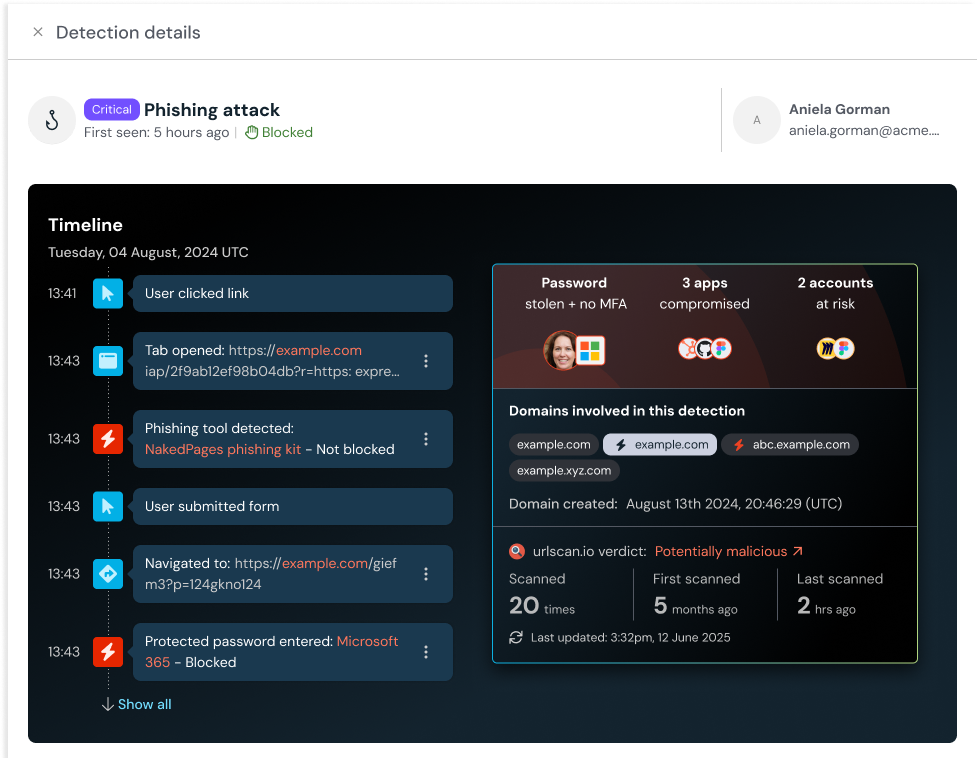
With the visibility provided by this telemetry across Push’s install base, our R&D and Product teams have rapidly iterated all year on our detections to increase coverage and respond quickly to newly identified attack types.
This year, we also released:
Detections for new variants of cloned login pages and AiTM phish kits.
12+ pre-release detections focused on flagging emerging attacker techniques.
7+ first-class SIEM and SOAR integrations, to make it simpler to ingest Push telemetry and operationalize it.
Learn more about Push’s detections features in our blog article.
Detecting and blocking ClickFix-style malicious copy and paste attacks
What happened
ClickFix-style attacks left their mark in 2025, quickly becoming one of the most prevalent attack techniques — with estimates of a 400 percent year-over-year increase, and another report documenting a 517 percent growth in just the last 6 months of the year.
What is ClickFix? This attack technique prompts the user to solve some kind of problem or troubleshooting step in the browser — often presented as a CAPTCHA challenge. The key aspect of the attack is that it tricks users into running malicious commands on their device by copying malicious code from the page clipboard and running it locally. (The copy typically occurs automatically via the page itself, but can also be performed manually by the user.)
These malicious copy and paste attacks are often used to deliver infostealer malware or remote access software, with the attacker’s end goal being stealing session cookies and credentials to facilitate attacks on business apps.
What’s especially challenging about this attack type is that it usually can only be detected after the fact — when a machine is already compromised, or malicious code attempts to execute (if EDR catches it). Even if it is detected, security teams are left flying blind when they try to determine the initial vector for the attack, and which other users might have been targeted.
What we built
Because of our position in the browser, Push is uniquely positioned to detect and block browser-native attacks like ClickFix and other forms of malicious copy and paste techniques. So that’s what we built.
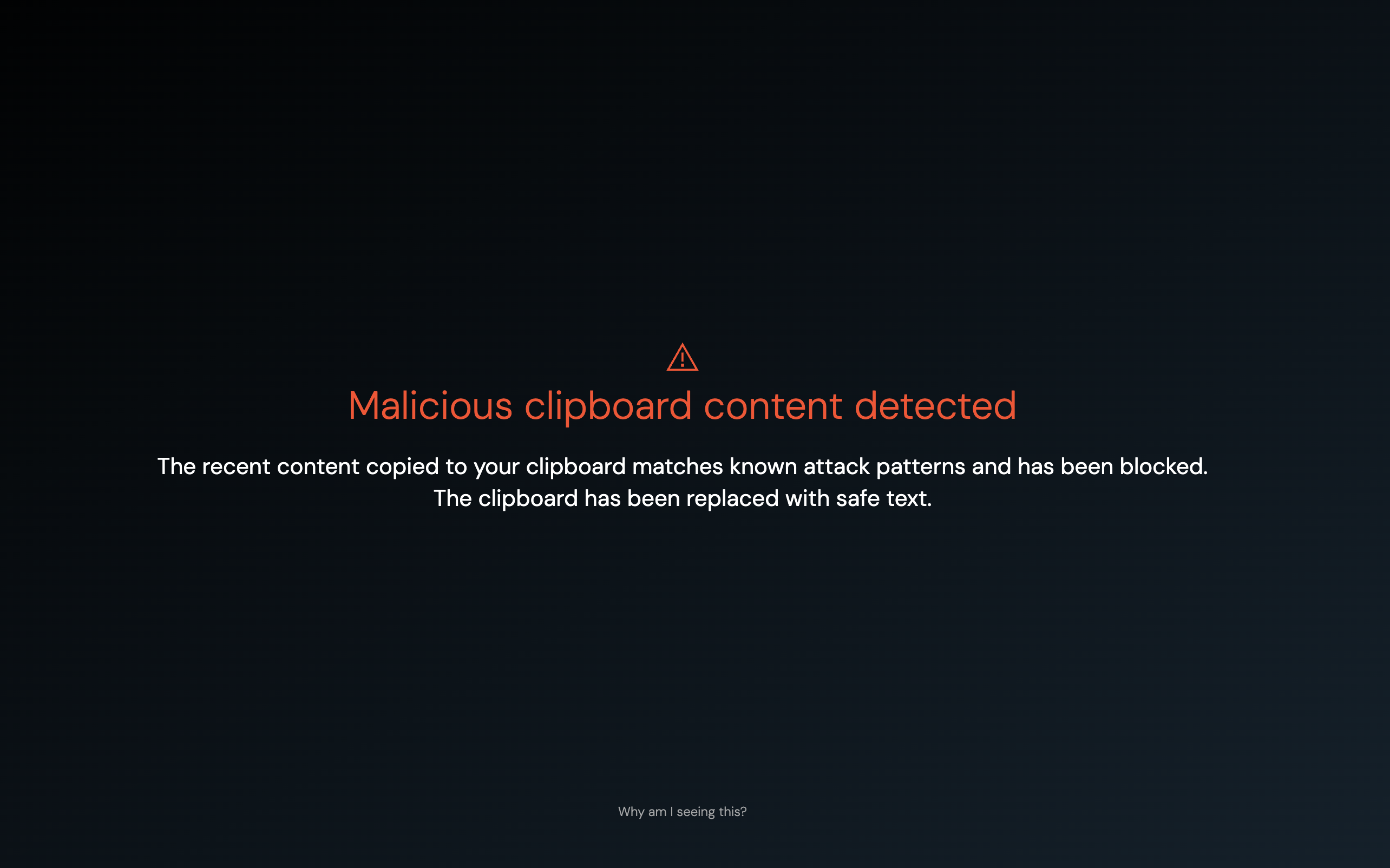
With our Malicious copy and paste detection, you can:
Detect ClickFix-style attacks as soon as they target end-users, regardless of the delivery channel for the lure, or the specifics of the malware type and execution.
Block these attacks before the malicious code is copied to the clipboard.
Safely collect the payload for further investigation by your security team, and replace the clipboard contents with safe text as part of the blocking action.
Capture a detailed timeline of events to see how users were targeted and how the attack unfolded.
Learn more about ClickFix detection in our documentation.
Getting ahead of breaches tied to stolen credentials and ghost logins
What happened
Starting in November 2024 and continuing through July 2025, adversaries linked to the HELLCAT threat group compromised Jira tenants belonging to 10 organizations using stolen credentials.
Business-critical applications like Jira are prime targets for attackers, who in this case dumped valuable data and then held it for ransom (or sold it on criminal marketplaces). Of course, this isn’t just a problem for Jira — data from Push’s initial deployment into customer environments shows that lots of critical apps lack basic controls like strong passwords and MFA.
The evolving threat group known as Scattered Lapsus$ Hunters has also embraced the use of stolen creds, session cookies, and unprotected local account logins — aka ghost logins — to compromise large organizations.
In 2025, Red Hat’s GitLab instance was compromised due to a local account that essentially provided a backdoor to an otherwise secure and SSO-connected account — an attack reminiscent of the 2024 Snowflake breach, which targeted local logins that lacked MFA.
What we built
Push already provided the ability to detect stolen credentials being actively used by employees in your organization with our Stolen credential detection control. This provides an early-warning signal when Push finds a match between credentials for sale on criminal forums with those still being used by your employees, reducing some 99.5% of false positives we usually see with TI feed data.
With Push, you can also identify where employees are logging in with passwords on apps that otherwise should be using SAML, OIDC, or some other federated mechanism — aka the ghost login vulnerability.
This year, we made it easier for security teams to enforce two security fundamentals that help harden accounts and reduce the risk of ATO, even on unmanaged apps:
Strong password enforcement: With this control, you can prompt end-users to fix an insecure password on all your workforce apps, even the ones you don’t centrally manage.
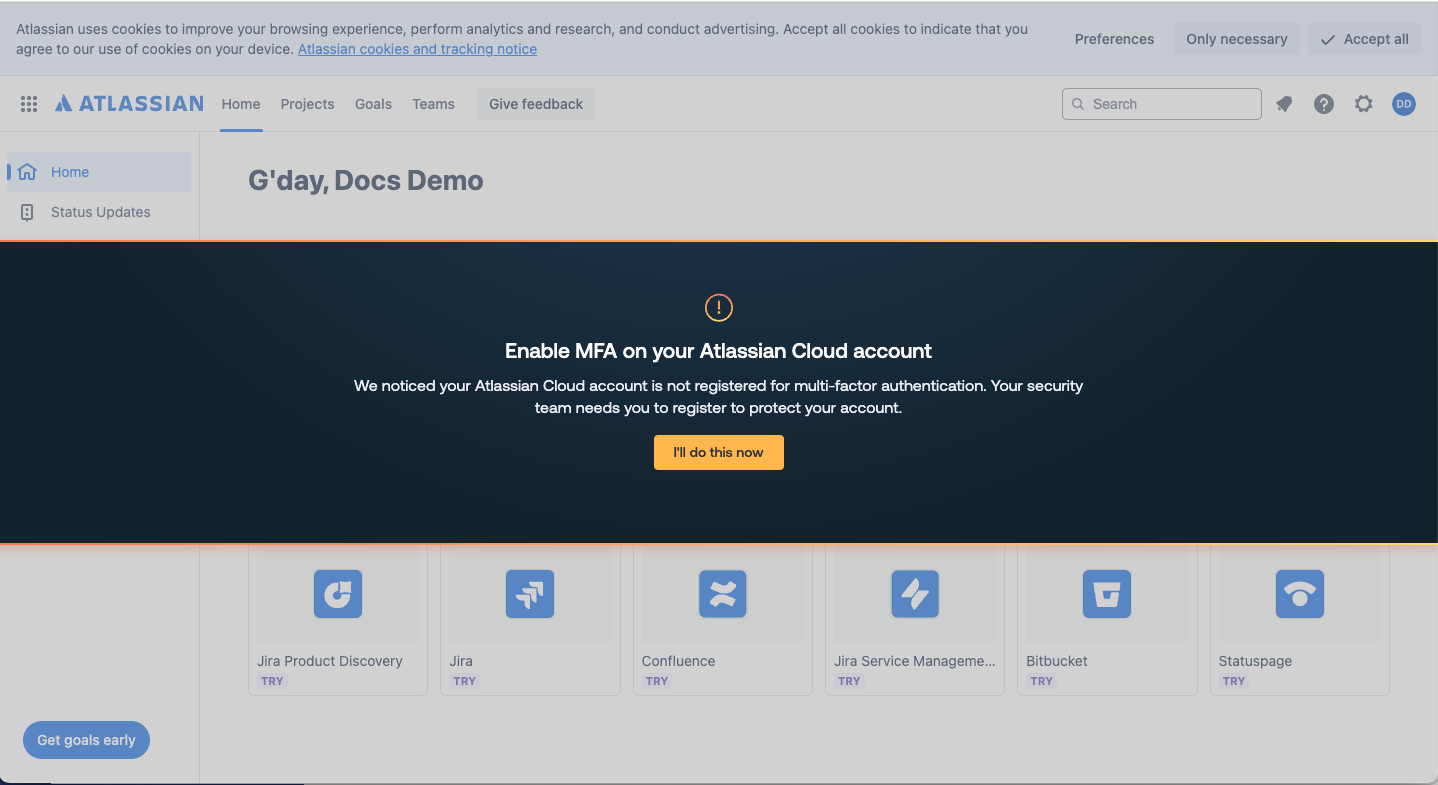
MFA enforcement: With this control, you can prompt end-users to register for MFA where Push detects it’s missing — again, even on unmanaged apps.
Both of these controls use in-browser banners to provide point-in-time guidance to users when they’re most likely to see it and act on it.
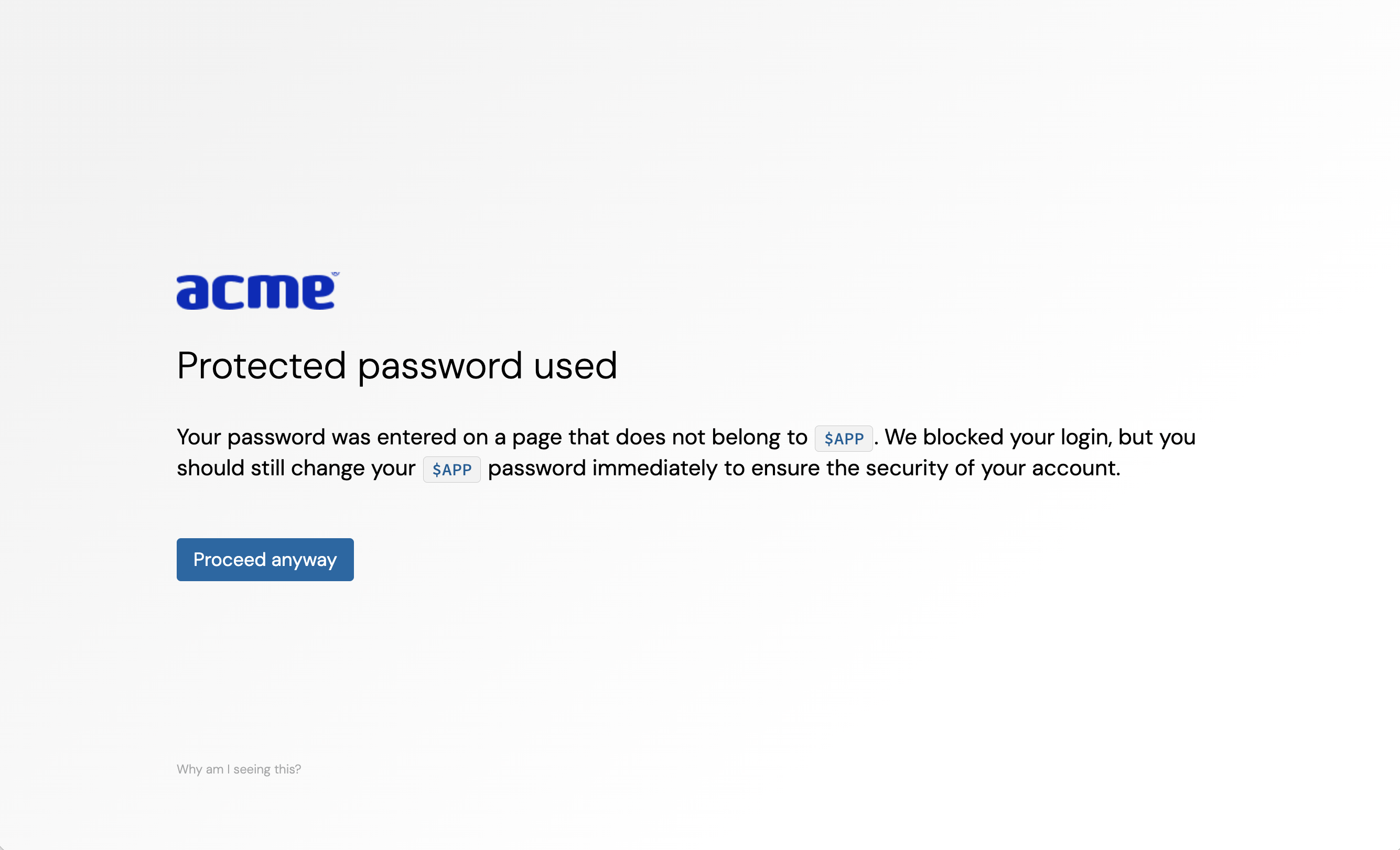
To address the pattern of adversaries moving from targeting hardened core apps such as identity providers to the likes of GitLab, Postman, Jira, and others containing valuable corporate data, we also expanded one of the Push platform’s core security controls called Password protection.
The Password protection control previously could be applied only to IdP passwords, allowing you to essentially “pin” the credential for those systems so that it could never be entered on a phishing page or reused on any other app.
We expanded that control to allow you to protect passwords on any valuable app, preventing account takeover through phished creds and reducing the blast radius of attacks when a compromised account has been reusing passwords on multiple applications.
Push also now gives you visibility into where employees are syncing their corporate browser profile to a personal profile, raising the risk of syncing corporate passwords to unmanaged devices — another vector for credential harvesting if those endpoints become compromised.
And of course, underlying all these features is the foundational visibility of all your apps, accounts, account vulnerabilities, and login methods that Push provides.
Blocking malicious browser extensions
What happened
Getting visibility and control over all the browser extensions used across your workforce has long been a thorny problem for security teams.
The possible solutions haven’t been great, either. Teams could either apply a blunt-force block for most or all extensions, or spend painstaking time trying to understand what was installed, why, and by whom, across all the browsers in the environment.
The urgency of solving this problem increased for many organizations this year after the December 2024 compromise of at least 35 Google Chrome extensions in a campaign targeting browser extension developers. Cyberhaven’s extension was one of these, and the campaign inherited their name.
What we built
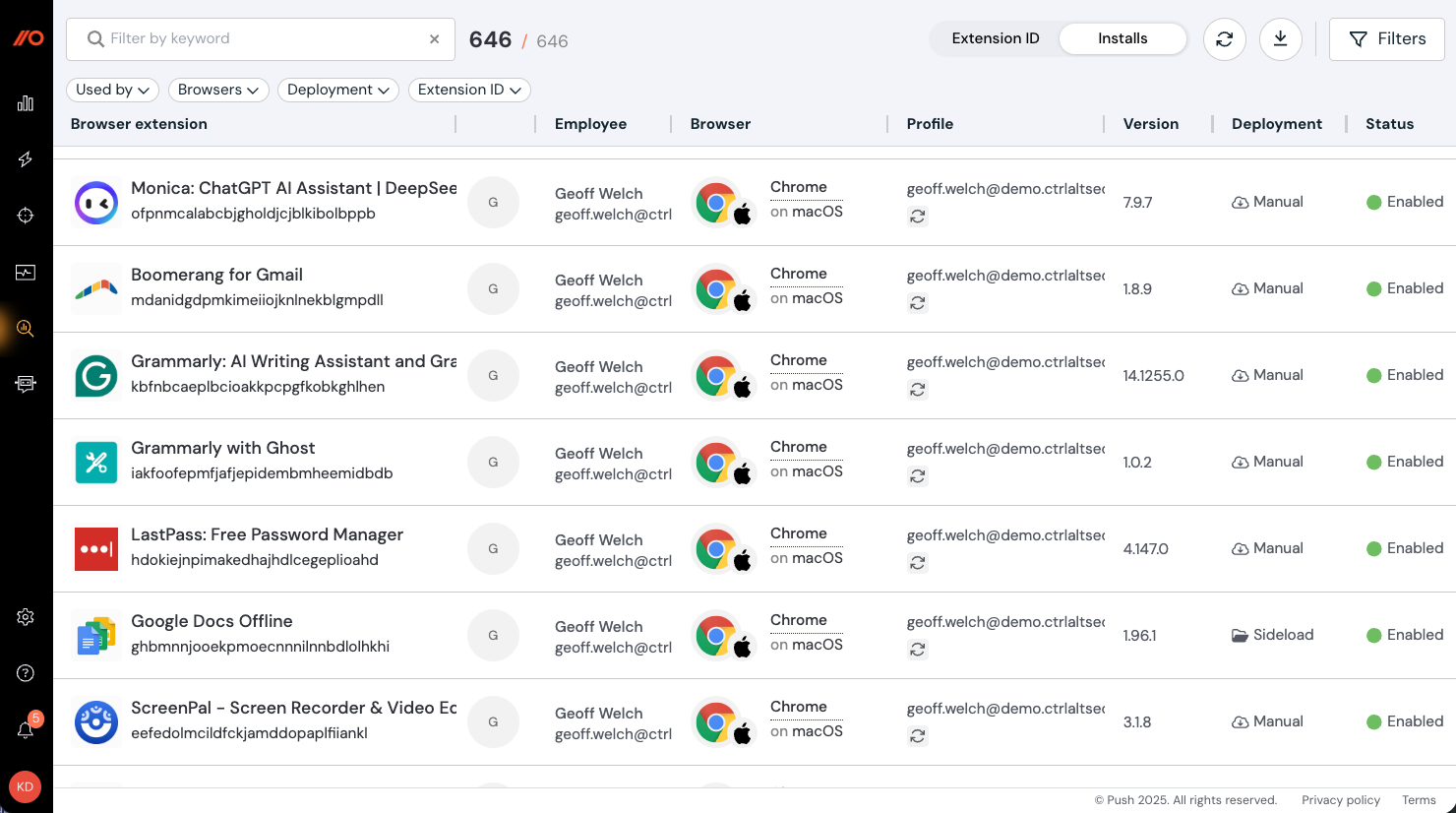
With Push, you can now get visibility across all the browser extensions installed on employee browsers in your environment, and block the ones you don’t want.
You can also:
Review extensions with risky permissions.
Identify extensions with potentially suspicious installation methods, such as sideloaded or manually installed.
Block extensions based on user groups and browser profiles (e.g. profiles logged in with a company domain).
Learn more about extension visibility and management in our documentation.
Adding a layer of protection against help desk scams
What happened
Finally, another big theme in this year’s TTPs was the use of help desk social engineering to compromise organizations.
Attackers like Scattered Spider — now known as part of the evolving cybercriminal group Scattered Lapsus$ Hunters — have targeted organizations including MGM Resorts and Marks & Spencer by convincing help desk staff to help them bypass MFA or reset credentials for accounts they then use to access corporate systems.
What we built
To provide an additional layer of security when verifying employee identities during help desk interactions, Push introduced Employee verification codes.
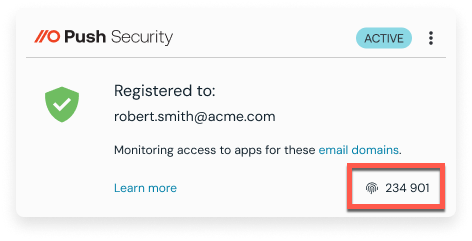
These are a rotating 6-digit verification code accessible via the Push Security extension dropdown. When an employee contacts your help desk, staff can use this code to help verify their identity before performing any sensitive account changes.
Employee verification codes are lightweight, rotate every 24 hours, and don’t require any additional apps or devices.
Learn more about verification codes in our blog article.
Learn more about Push
Push Security’s browser-based security platform provides comprehensive detection and response capabilities against the leading cause of breaches. Push blocks browser-based attacks like AiTM phishing, credential stuffing, malicious browser extensions, ClickFix, and session hijacking.
You don’t need to wait until it all goes wrong — you can also use Push to proactively find and fix vulnerabilities across the apps that your employees use, like ghost logins, SSO coverage gaps, MFA gaps, vulnerable passwords, and more to harden your identity attack surface.
To learn more about Push, check out our latest product overview or book some time with one of our team for a live demo.