Shadow IT security — discover and secure shadow SaaS
Employees adopt SaaS tools faster than security teams can evaluate them. Every self-service signup, personal account login, and OAuth consent grant creates another unmanaged entry point — invisible to your IdP, your CASB, and your SIEM.
- Discover every app employees log into, including shadow SaaS and unsanctioned tools
- See authentication method, MFA status, and password strength for every account
- Enforce access policy across managed and unmanaged devices








Why shadow IT discovery needs to happen in the browser
The average business now has hundreds of SaaS applications in active use, and security teams typically know about fewer than half of them. This shadow SaaS — the unsanctioned applications employees sign up for on their own — sits outside your identity provider, your access policies, and your offboarding workflows.
Network-based discovery tools catch some of this traffic, but they miss direct browser logins, personal account usage on BYOD devices, and OAuth integrations that don't generate distinguishable network signatures. The browser is where employees actually authenticate to these applications, which makes it the only place you can discover all of them.
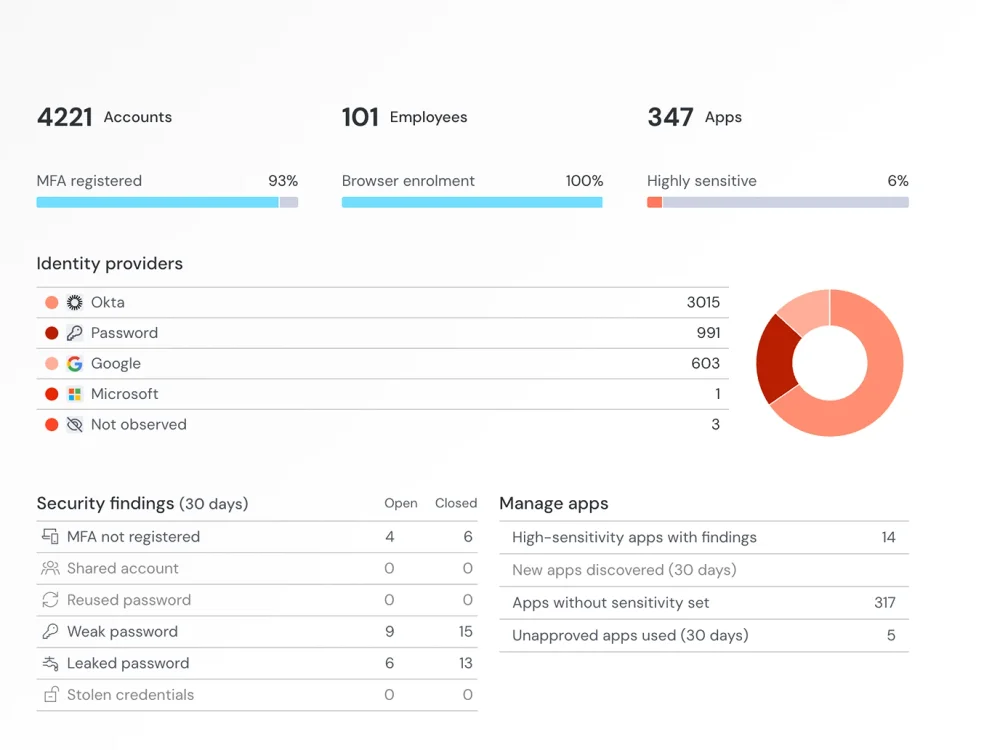
Discover hidden SaaS usage
Push discovers shadow IT from browser events — the actual moment an employee authenticates to an application. This captures every SaaS app in use, regardless of whether it routes through your corporate network, whether the employee is on a managed device, or whether they're using a corporate or personal account. Each discovery includes the authentication method (password, SSO, social login, passkey), MFA status, and password strength — context that network-based discovery can't provide.
Spot risky and insecure SaaS use
Every unmanaged application is a potential attack vector: an account with a reused password, a local login that bypasses SSO policy, an OAuth integration granting persistent access to corporate data. The more applications in use, the larger the identity attack surface.
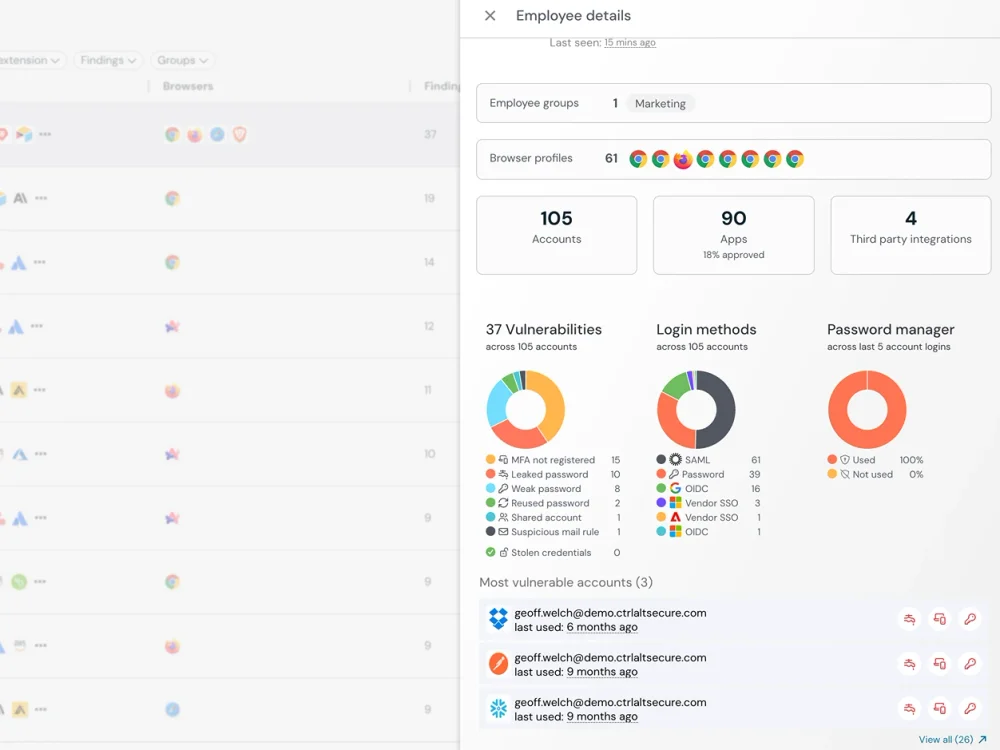
Push gives security teams the visibility to make informed decisions about SaaS sprawl. You see which applications are in active use, how employees are authenticating to them, whether they're using corporate or personal accounts, and what OAuth permissions they've granted. This context lets you distinguish between applications that need to be governed and those that need to be blocked — rather than applying blanket restrictions that push usage underground.
Enforce your policy in real time without disrupting productivity
Blocking applications by category or domain pushes usage to personal devices where you have zero visibility. It frustrates employees who are often using these tools for legitimate work. And it creates an adversarial dynamic between security and the rest of the organization.
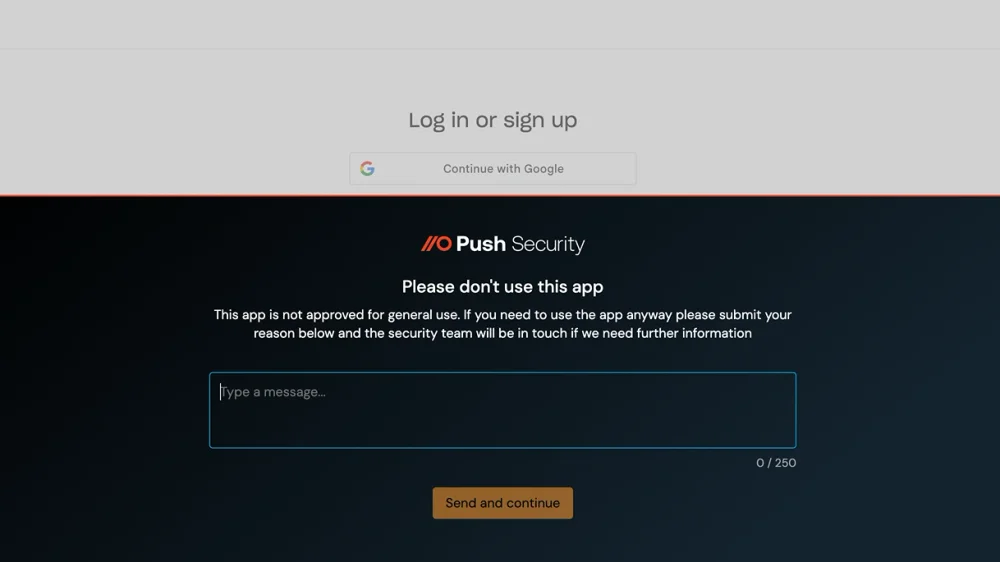
Push takes a different approach. Instead of blocking shadow SaaS and losing visibility, Push discovers every application in use and gives security teams the context to make nuanced policy decisions. Block the highest-risk applications. Allow approved tools with monitoring. Warn users when they attempt to access applications that haven't been evaluated. Prompt users to switch from personal accounts to corporate SSO. The goal is governed access, not gatekeeping — making the sanctioned path easier than the workaround.
See what network-based discovery misses
CASBs discover shadow IT from network traffic — either inline (proxy-based) or via API integration with cloud services. This works for traffic that flows through the corporate network or a managed cloud environment, but it misses direct browser logins on BYOD devices, personal account usage, and OAuth consent flows initiated in the browser.
Push discovers shadow SaaS from the browser session itself — capturing the login event, the authentication method, and the account context at the point of access.
| Dimension | Push Security | CASB (proxy or API-based) |
|---|---|---|
| Discovery method | Yes — Discovers shadow IT from browser login events — captures every app employees authenticate to | No — login events — captures every app employees authenticate to Discovers SaaS from network traffic patterns or API logs — misses direct browser logins and BYOD |
| Authentication context | Yes — Captures login method (password, SSO, social, passkey), MFA status, and password strength at login | No — Sees network traffic metadata — limited or no visibility into how users authenticate |
| BYOD and unmanaged devices | Yes — Works on any device with the browser extension — no network routing or device enrollment required | No — Proxy-based CASB requires traffic routing; API-based CASB only sees managed cloud environments |
| Ghost login detection | Yes — Detects local login paths that bypass SSO on managed applications | No — No visibility into authentication method — can't distinguish SSO from local login |
| OAuth grant visibility | Yes — Captures OAuth consent flows with full context: client ID, scopes, authorization server | Partial — API-based CASB sees OAuth grants post-hoc; proxy-based CASB has limited consent flow visibility |
| Personal vs corporate accounts | Yes — Distinguishes corporate and personal account usage on the same application | No — Limited ability to distinguish account types from network traffic |
| Real-time policy enforcement | Yes — Blocks or warns at the point of browser interaction — context-aware, not domain-level | No — Proxy-based CASB blocks at the network layer — all-or-nothing, no authentication context |

Frequently asked questions
Shadow IT is the use of technology — software, cloud services, devices, or integrations — by employees without the knowledge or approval of IT and security teams. In the SaaS era, shadow IT primarily means employees signing up for cloud applications, connecting OAuth integrations, and using personal accounts for work — all outside the visibility of the organization's security controls.
Push discovers shadow IT from browser login events, catching applications that network-based discovery misses. Every login Push observes includes authentication context — how the user logged in, whether MFA is enabled, and whether they're using a corporate or personal account.
Shadow SaaS is the subset of shadow IT that involves unsanctioned cloud applications — SaaS tools employees sign up for, log into, and connect to corporate data without security or IT approval. It includes self-service signups with personal or corporate email, OAuth integrations that grant AI and productivity apps access to corporate data, and browser extensions that interact with SaaS platforms.
Push discovers shadow SaaS from browser login events, capturing every application employees authenticate to with full context: authentication method, MFA status, account type, and password strength. This works regardless of network path or device management status, catching the shadow SaaS that network-based discovery misses.
SaaS sprawl is the uncontrolled growth of cloud applications across an organization. Each new application introduces potential security risk: another set of credentials, another OAuth integration, another data repository outside central governance. SaaS sprawl also creates operational overhead — redundant tools, overlapping subscriptions, and fragmented data.
Push gives security teams visibility into SaaS sprawl by discovering every application employees authenticate to in the browser. You can track application adoption over time, identify redundant tools, and make data-driven decisions about which applications to sanction, consolidate, or block.
Comprehensive shadow IT discovery is difficult because the usage you most need to find is the usage that bypasses your managed infrastructure. Employees on BYOD devices, personal hotspots, or direct browser logins don't generate the network traffic that proxy-based tools rely on for discovery — and that's exactly where shadow SaaS adoption happens.
Push discovers shadow IT from actual browser login events — the moment an employee authenticates to any application. Every discovery includes full context: which app, which user, what authentication method, whether MFA is enabled, and whether they're using a corporate or personal account. This works regardless of network path, device type, or whether the employee is on a managed or personal device.
CASBs discover SaaS applications from network traffic (proxy-based) or cloud API logs (API-based). They're effective for traffic that flows through managed network infrastructure, but they miss direct browser logins, BYOD usage, personal accounts, and OAuth consent flows.
Push discovers SaaS from the browser session — capturing the login event and authentication context at the point of access. For shadow IT specifically, browser-based discovery has higher fidelity because it captures what network discovery can't: the authentication method, whether it's SSO or local login, and whether MFA is enabled. Push complements CASB — CASB provides inline DLP and API-level controls for sanctioned apps; Push provides comprehensive discovery and authentication monitoring across all apps.
Employees create shadow accounts by signing up for SaaS applications using personal email addresses or non-corporate identities — outside the organization's identity provider. These accounts bypass SSO, aren't subject to MFA policies, don't appear in deprovisioning workflows when employees leave, and their credentials aren't monitored for breach exposure.
Push discovers shadow accounts from browser login events. When an employee authenticates to a SaaS application using a personal email, Push captures it — the application, the identity, the authentication method — and surfaces it for governance.
Network proxying has practical limits for shadow IT discovery — organizations with significant BYOD, remote work, or contractor populations can't route all traffic through a corporate proxy, and employees increasingly access shadow SaaS through paths that bypass network-level inspection entirely. Typical proxy visibility might tell you if someone accessed a page, but not whether they logged in, how, or what they did on the page to interact with the app.
Push deploys as a browser extension and discovers every application employees authenticate to — regardless of network path, device management status, or proxy configuration. Browser-based discovery captures the login event directly, so it works on managed and unmanaged devices without requiring traffic routing infrastructure. Push sees both network and client-side activity in the browser to build a complete picture of the user interaction.
Network-based tools only see SaaS usage that flows through your corporate network or proxy. Unmanaged devices — BYOD laptops, contractor machines, personal phones — bypass this entirely, creating a blind spot that grows with every remote worker and contractor you onboard.
Push deploys as a browser extension and can be installed on unmanaged devices without MDM, providing consistent SaaS discovery across your entire user population. Every login is captured with the same authentication context regardless of device management status.
When employees use personal accounts for work SaaS apps, those accounts sit outside your identity provider, aren't subject to SSO or MFA policies, don't appear in offboarding workflows, and their credentials aren't monitored for breach exposure. If the employee leaves, those accounts persist with whatever data they contain — and if those personal credentials appear in a breach, you have no way to force a password reset.
Push discovers personal account usage by observing authentication behavior in the browser and distinguishing corporate from personal identities. Security teams can then enforce policy — prompting users to switch to corporate SSO or blocking personal account logins on sensitive applications.
lanket blocking drives usage to personal devices where you have zero visibility. The more effective approach is governed access — making the sanctioned path easier than the workaround, so employees choose the governed channel because it's less friction, not more.
Push supports this model by giving security teams real-time visibility into application adoption and the ability to enforce policy at the point of access — blocking the highest-risk applications, warning users when they access unevaluated apps, and monitoring sanctioned tools — rather than applying blanket domain-level restrictions.
Latest resources


